



![[PRO Tips] Gold’s Bullish Revival: Seasonal Trends and Key Levels to Watch](https://xinker.org/uploads/images/202412/image_430x256_67724cc6ad0cd.webp)
![[PRO Tips] Gold Market Under Short-Term Pressure, Safe-Haven Demand and Central Bank Buying Support Long-Term Upside Potential](https://xinker.org/uploads/images/202412/image_430x256_676ffb4685287.webp)
![[PRO Tips] Analysis of 9 key points of differentiation strategy! Master differentiation to create a brand advantage that is unique in the world!](https://firebasestorage.googleapis.com/v0/b/xinker-tips.appspot.com/o/article_thumbnails%2Fscaled_differentiation%20strategy.png.png?alt=media&token=a1bfc3d2-e85a-4db7-8a6d-01c7274f8940)
![[PRO Tips] Will REITs regain growth momentum in 2024? 3 REITs ETFs you must know if you want to invest in real estate.](https://firebasestorage.googleapis.com/v0/b/xinker-tips.appspot.com/o/article_thumbnails%2Fscaled_REITs1.png.png?alt=media&token=8af4eb93-33ff-466f-8039-b6555fad52b4)
![[PRO Tips] Complete tutorial on how to make money in Adobe Stock!](https://firebasestorage.googleapis.com/v0/b/xinker-tips.appspot.com/o/article_thumbnails%2Fscaled_tut-adobe1.png.png?alt=media&token=0b2c8cf2-22bd-4142-883e-140ed1cbaf02)
![[Passive Income] Unlock the secret of passive income: 3 steps to apply for Google AdSense](https://xinker.org/uploads/images/202410/image_430x256_6717a4fb3052b.webp)
![[Passive Income] Earn over $200 a day with AI-generated articles!](https://firebasestorage.googleapis.com/v0/b/xinker-tips.appspot.com/o/article_thumbnails%2Fscaled_article1.png.png?alt=media&token=f61bf35b-8553-4719-826d-7360024adc70)
![[Passive Income] Earn over 20 USD per download with AI-generated images!](https://firebasestorage.googleapis.com/v0/b/xinker-tips.appspot.com/o/article_thumbnails%2Fscaled_adobe2.png.png?alt=media&token=3e20e76a-a907-45af-80aa-bf9b3600301f)
![[Passive Income] Earn 10 USD per new download by sharing CapCut!](https://firebasestorage.googleapis.com/v0/b/xinker-tips.appspot.com/o/article_thumbnails%2Fscaled_capcut2.png.png?alt=media&token=a04dec40-1fac-4857-86f2-19a8be02d38e)
![[Passive Income] Use your WiFi to create passive income in 5 minutes, and you can earn 4-6 U per day!](https://firebasestorage.googleapis.com/v0/b/xinker-tips.appspot.com/o/article_thumbnails%2Fscaled_Grassio.webp.png?alt=media&token=7659a95e-0e47-4f27-a17d-c942ac3cf7f4)


![[Business Talk] The Unique Theme of XINKER's Song: Beef Wellington and Business Mastery](https://xinker.org/uploads/images/202410/image_430x256_671afc155f47f.webp)
![[Business Talk] Chagee: Opening 3,500 stores in 6 years](https://xinker.org/uploads/images/202410/image_430x256_671afce80c5f9.webp)


Wallpaper Engine 2.8 - Dynamic Model Generation & Text Rendering Improvements
While Wallpaper Engine 2.8 was primarily planned as a maintenance release with various bug fixes and improvements under the hood, we also found the time to add some cool new features which you should soon start seeing on new wallpapers.Switch to 64-bit We have been performing a lot of background maintenance recently to improve performance, fix issues and overall future-proof the app. While some Wallpaper Engine processes were already available in 64-bit, we are now largely moving to 64-bit executables. Because of this, we have renamed the user interface process from ui32.exe to wallpaperui.exe. If you run into any issues with updating the app, be sure to exclude the wallpaper_engine directory and specifically wallpaperui.exe from any antivirus app or firewall.New FeaturesDynamic Models The first new feature we are introducing is dynamic model generation as part of Wallpaper Engine's SceneScript language. This allows wallpaper creators to generate custom 2D and 3D shapes and models entirely from code. Up until now, you had to import pre-made 3D models, but with this update, wallpapers can draw and animate geometry completely on the fly. For everyday users, this means you can look forward to wildly new types of dynamic, interactive and audio-reactive wallpapers hitting the Workshop.Generate 3D models via SceneScript code, including full support for advanced materials with lighting.3D models can also be altered dynamically as shown in this 3D audio bars example.As shown in the examples above, you now have the ability to create not just very basic models but even procedural and interactive geometry. If you are interested in learning more about this functionality, be sure to check out our designer documentation on the new SceneScript-based dynamic model feature:Click here to learn more.Text Rendering ImprovementsText layers have received some major new features. You can now enable smooth font scaling to keep your text perfectly crisp at any size. We have also added a bunch of new styling options, including blur, drop shadows, letter spacing, and the highly requested font outline support to really make your text stand out. All of these properties can also be animated on the fly:Because font files are notoriously complex, the new rendering techniques might have occasional quirks with specific custom fonts, but the new system, msdf, is optional and can either be enabled manually on a text layer or by using any of the new styling features.Video Improvements: True HDR Video Support & More We have also introduced a new video framework option. Behind the scenes, this switches video rendering to the custom video renderer we already use for video textures. On top of that, we have also added true HDR support to our renderer. This results in a much improved video rendering system which supports HDR videos along with the ability to flip videos and apply image filters directly to them.While we are very confident in the new system, we did not want to risk introducing any stability issues for existing setups, which is why the new framework remains disabled by default for existing users for the time being. However, it will be enabled by default for new installations. If you want to try it out now, head over to the "General" tab in the Wallpaper Engine settings and change the "Video framework" option to "Scene DX11 (HDR Support)".Additions / ChangesGeneral Changes & UpdatesThe user interface is now a 64-bit application and the executable has been renamed to wallpaperui.exe.Added a new video framework option with a DirectX 11 video backend based on the Scene video texture system. This supports true HDR videos, flip functionality, and image filters. It is disabled for existing users for now, but you can opt in by selecting the new "Scene DX11" video framework option in the General tab of the settings.The Android app now requires Android 10 (up from Android 8.1) because of new hard requirements enforced by third-party libraries updates.Editor & SceneScriptAdded a new SceneScript-based dynamic model system: Added createModelData and destroyModelData SceneScript functions to create layers with custom geometry, and added the IModelData interface.Added new text layer features: Text outlines, drop shadows, blur, letter spacing, effect padding.Added directories to the asset window and the ability to create custom materials (needed for dynamic models).Added a "Select/Deselect All" option to the Clean Project modal.Added more options for puppet warp animation smoothing.Added support for numbers in min and max for all SceneScript vector classes.Added various generic linear algebra-related functions to JavaScript vector (Vec) and matrix (Mat) classes in alignment with internal engine math.Inherited the interpolation flag for user textures.Engine Optimizations & Technical ChangesImproved the overall performance of skeletal animations.Made all model data and GPU buffers shared to improve efficiency.Optimized V8 engine integration to improve sc
While Wallpaper Engine 2.8 was primarily planned as a maintenance release with various bug fixes and improvements under the hood, we also found the time to add some cool new features which you should soon start seeing on new wallpapers.
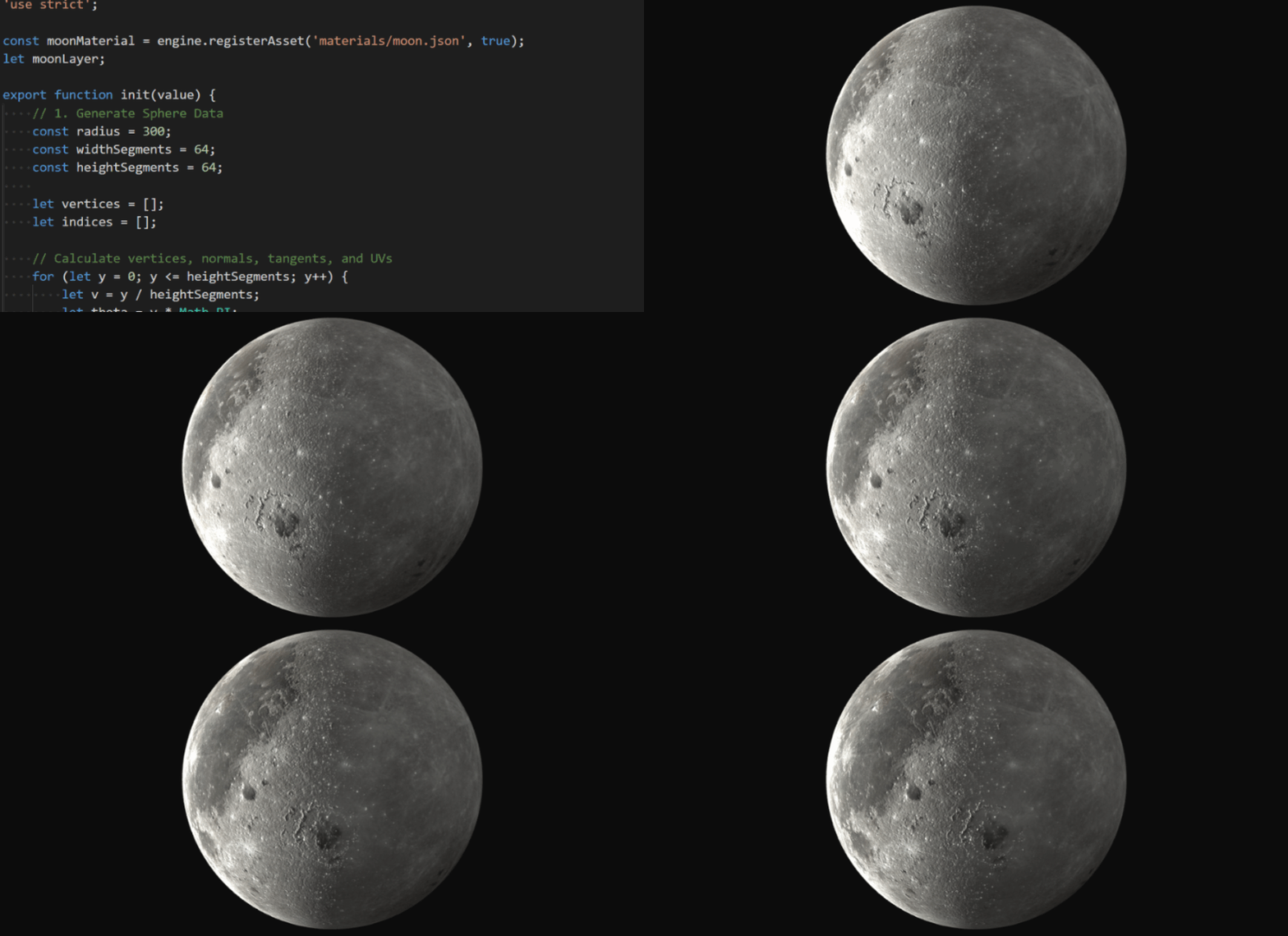 Generate 3D models via SceneScript code, including full support for advanced materials with lighting.
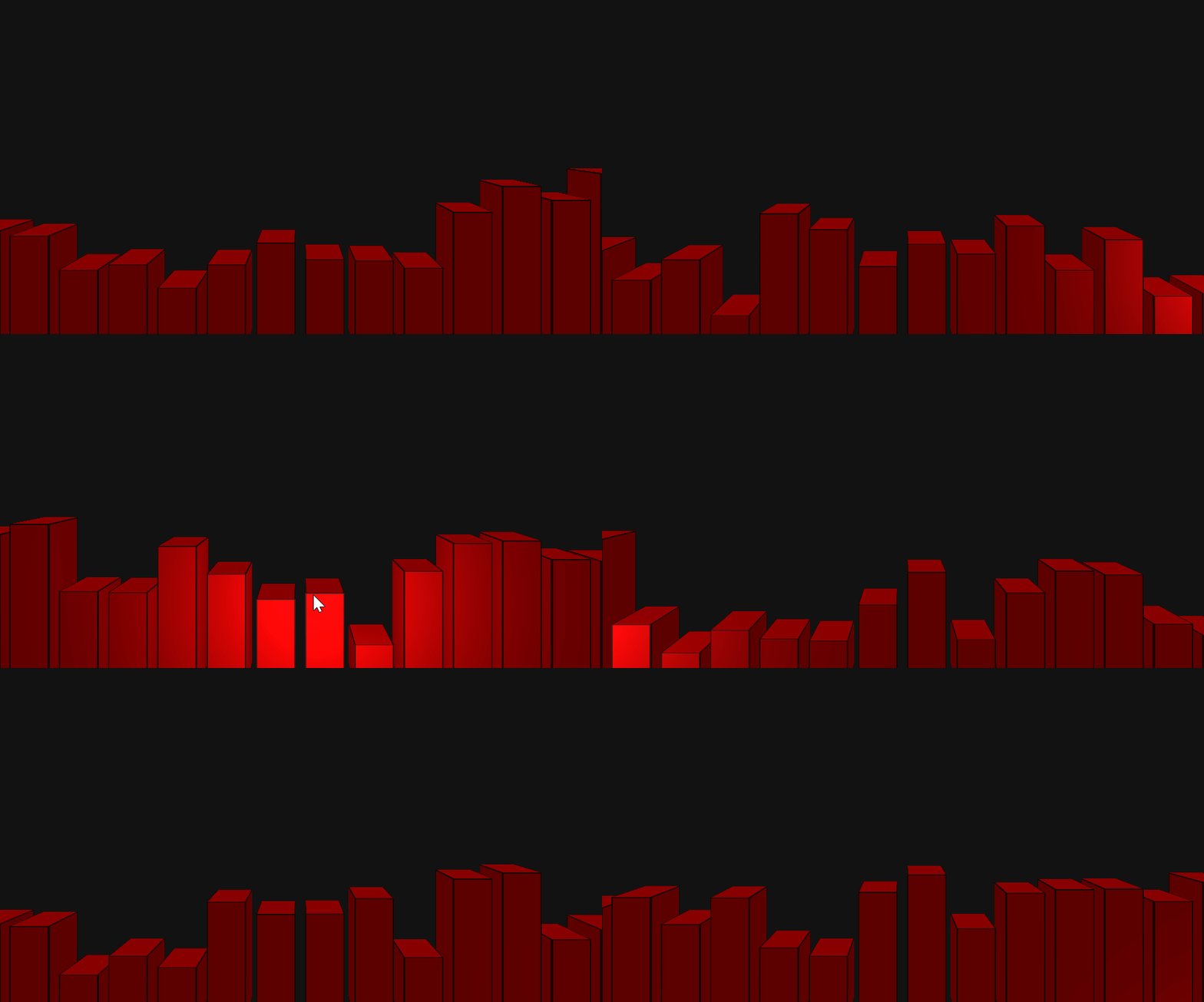 3D models can also be altered dynamically as shown in this 3D audio bars example.
As shown in the examples above, you now have the ability to create not just very basic models but even procedural and interactive geometry. If you are interested in learning more about this functionality, be sure to check out our designer documentation on the new SceneScript-based dynamic model feature:

Because font files are notoriously complex, the new rendering techniques might have occasional quirks with specific custom fonts, but the new system, msdf, is optional and can either be enabled manually on a text layer or by using any of the new styling features.
While we are very confident in the new system, we did not want to risk introducing any stability issues for existing setups, which is why the new framework remains disabled by default for existing users for the time being. However, it will be enabled by default for new installations. If you want to try it out now, head over to the "General" tab in the Wallpaper Engine settings and change the "Video framework" option to "Scene DX11 (HDR Support)".
If you have installed the APK file directly, you can grab the latest APK on our website right now:
Since Android 10 was released in 2019 and runs on many devices which were first released in 2017, this really only impacts devices that are roughly 10 years or older. However, the outdated Wallpaper Engine 2.7 APK remains available for older devices and can be downloaded directly from the following link:
[url=
https://www.wallpaperengine.io/android/apk/history/wallpaper-engine-2.7.4.apk]Download the OUTDATED version 2.7 of Wallpaper Engine for Android[/url]
Switch to 64-bit
We have been performing a lot of background maintenance recently to improve performance, fix issues and overall future-proof the app. While some Wallpaper Engine processes were already available in 64-bit, we are now largely moving to 64-bit executables. Because of this, we have renamed the user interface process from ui32.exe to wallpaperui.exe. If you run into any issues with updating the app, be sure to exclude the wallpaper_engine directory and specifically wallpaperui.exe from any antivirus app or firewall.New Features
Dynamic Models
The first new feature we are introducing is dynamic model generation as part of Wallpaper Engine's SceneScript language. This allows wallpaper creators to generate custom 2D and 3D shapes and models entirely from code. Up until now, you had to import pre-made 3D models, but with this update, wallpapers can draw and animate geometry completely on the fly. For everyday users, this means you can look forward to wildly new types of dynamic, interactive and audio-reactive wallpapers hitting the Workshop.Generate 3D models via SceneScript code, including full support for advanced materials with lighting.3D models can also be altered dynamically as shown in this 3D audio bars example.As shown in the examples above, you now have the ability to create not just very basic models but even procedural and interactive geometry. If you are interested in learning more about this functionality, be sure to check out our designer documentation on the new SceneScript-based dynamic model feature:
Text Rendering Improvements
Text layers have received some major new features. You can now enable smooth font scaling to keep your text perfectly crisp at any size. We have also added a bunch of new styling options, including blur, drop shadows, letter spacing, and the highly requested font outline support to really make your text stand out. All of these properties can also be animated on the fly:Because font files are notoriously complex, the new rendering techniques might have occasional quirks with specific custom fonts, but the new system, msdf, is optional and can either be enabled manually on a text layer or by using any of the new styling features.
Video Improvements: True HDR Video Support & More
We have also introduced a new video framework option. Behind the scenes, this switches video rendering to the custom video renderer we already use for video textures. On top of that, we have also added true HDR support to our renderer. This results in a much improved video rendering system which supports HDR videos along with the ability to flip videos and apply image filters directly to them.While we are very confident in the new system, we did not want to risk introducing any stability issues for existing setups, which is why the new framework remains disabled by default for existing users for the time being. However, it will be enabled by default for new installations. If you want to try it out now, head over to the "General" tab in the Wallpaper Engine settings and change the "Video framework" option to "Scene DX11 (HDR Support)".
Additions / Changes
General Changes & Updates
- The user interface is now a 64-bit application and the executable has been renamed to wallpaperui.exe.
- Added a new video framework option with a DirectX 11 video backend based on the Scene video texture system. This supports true HDR videos, flip functionality, and image filters. It is disabled for existing users for now, but you can opt in by selecting the new "Scene DX11" video framework option in the General tab of the settings.
- The Android app now requires Android 10 (up from Android 8.1) because of new hard requirements enforced by third-party libraries updates.
Editor & SceneScript
- Added a new SceneScript-based dynamic model system: Added createModelData and destroyModelData SceneScript functions to create layers with custom geometry, and added the IModelData interface.
- Added new text layer features: Text outlines, drop shadows, blur, letter spacing, effect padding.
- Added directories to the asset window and the ability to create custom materials (needed for dynamic models).
- Added a "Select/Deselect All" option to the Clean Project modal.
- Added more options for puppet warp animation smoothing.
- Added support for numbers in min and max for all SceneScript vector classes.
- Added various generic linear algebra-related functions to JavaScript vector (Vec) and matrix (Mat) classes in alignment with internal engine math.
- Inherited the interpolation flag for user textures.
Engine Optimizations & Technical Changes
- Improved the overall performance of skeletal animations.
- Made all model data and GPU buffers shared to improve efficiency.
- Optimized V8 engine integration to improve script performance.
- Overhauled the shader precompiler to run faster and handle certain complex directive setups more accurately.
- Optimized the HLSL translator.
- Added a precache option for the registerAsset function.
- Replaced the DevTools port with built-in DevTools, as the old custom remote debugging has stopped working due to forced changes in CEF.
- Updated various third-party libraries to address bugs, improve parsing performance, and boost overall app stability.
Bug Fixes
- Fixed YouTube previews not working.
- Fixed a media engine deadlock during device loss (such as graphics driver crashes or updates).
- Fixed custom textures on solid placeholders not importing correctly from Steam Workshop assets.
- Fixed the reflection map not working in Chroma, Vegetation, and Fur shaders.
- Fixed the Fur shader occlusion factor.
- Fixed the asynchronous texture loader not being able to handle 3D textures properly.
- Fixed the behavior of REMAP_VALUE_OPTION_SCALAR_POSITION_BETWEEN_TWO_CONTROL_POINTS in the particle system.
Wallpaper Engine - Android Update
The Android update is being processed by all app stores. Please note that mobile app stores tend to release updates with a significant delay, so it might take a few days for the update to be accepted and finally reach you.If you have installed the APK file directly, you can grab the latest APK on our website right now:
Retiring Support for Android 8.1 and 9.0
The Wallpaper Engine Android companion app now requires Android 10 or higher. There was unfortunately no way around this, since this requirement comes from third-party libraries which we require for the app to function on a basic level.Since Android 10 was released in 2019 and runs on many devices which were first released in 2017, this really only impacts devices that are roughly 10 years or older. However, the outdated Wallpaper Engine 2.7 APK remains available for older devices and can be downloaded directly from the following link:
[url=
https://www.wallpaperengine.io/android/apk/history/wallpaper-engine-2.7.4.apk]Download the OUTDATED version 2.7 of Wallpaper Engine for Android[/url]
What's Your Reaction?








XINKER - Business and Income Tips
Explore XINKER, the ultimate platform for mastering business strategies, discovering passive income opportunities, and learning success principles. Join a community of thinkers dedicated to achieving financial freedom and entrepreneurial excellence.



![[Business Talk] Chagee: Opening 3,500 stores in 6 years](https://xinker.org/uploads/images/202410/image_140x98_671afce94bf91.webp)






