



![[PRO Tips] Gold’s Bullish Revival: Seasonal Trends and Key Levels to Watch](https://xinker.org/uploads/images/202412/image_430x256_67724cc6ad0cd.webp)
![[PRO Tips] Gold Market Under Short-Term Pressure, Safe-Haven Demand and Central Bank Buying Support Long-Term Upside Potential](https://xinker.org/uploads/images/202412/image_430x256_676ffb4685287.webp)
![[PRO Tips] Analysis of 9 key points of differentiation strategy! Master differentiation to create a brand advantage that is unique in the world!](https://firebasestorage.googleapis.com/v0/b/xinker-tips.appspot.com/o/article_thumbnails%2Fscaled_differentiation%20strategy.png.png?alt=media&token=a1bfc3d2-e85a-4db7-8a6d-01c7274f8940)
![[PRO Tips] Will REITs regain growth momentum in 2024? 3 REITs ETFs you must know if you want to invest in real estate.](https://firebasestorage.googleapis.com/v0/b/xinker-tips.appspot.com/o/article_thumbnails%2Fscaled_REITs1.png.png?alt=media&token=8af4eb93-33ff-466f-8039-b6555fad52b4)
![[PRO Tips] Complete tutorial on how to make money in Adobe Stock!](https://firebasestorage.googleapis.com/v0/b/xinker-tips.appspot.com/o/article_thumbnails%2Fscaled_tut-adobe1.png.png?alt=media&token=0b2c8cf2-22bd-4142-883e-140ed1cbaf02)
![[Passive Income] Unlock the secret of passive income: 3 steps to apply for Google AdSense](https://xinker.org/uploads/images/202410/image_430x256_6717a4fb3052b.webp)
![[Passive Income] Earn over $200 a day with AI-generated articles!](https://firebasestorage.googleapis.com/v0/b/xinker-tips.appspot.com/o/article_thumbnails%2Fscaled_article1.png.png?alt=media&token=f61bf35b-8553-4719-826d-7360024adc70)
![[Passive Income] Earn over 20 USD per download with AI-generated images!](https://firebasestorage.googleapis.com/v0/b/xinker-tips.appspot.com/o/article_thumbnails%2Fscaled_adobe2.png.png?alt=media&token=3e20e76a-a907-45af-80aa-bf9b3600301f)
![[Passive Income] Earn 10 USD per new download by sharing CapCut!](https://firebasestorage.googleapis.com/v0/b/xinker-tips.appspot.com/o/article_thumbnails%2Fscaled_capcut2.png.png?alt=media&token=a04dec40-1fac-4857-86f2-19a8be02d38e)
![[Passive Income] Use your WiFi to create passive income in 5 minutes, and you can earn 4-6 U per day!](https://firebasestorage.googleapis.com/v0/b/xinker-tips.appspot.com/o/article_thumbnails%2Fscaled_Grassio.webp.png?alt=media&token=7659a95e-0e47-4f27-a17d-c942ac3cf7f4)


![[Business Talk] The Unique Theme of XINKER's Song: Beef Wellington and Business Mastery](https://xinker.org/uploads/images/202410/image_430x256_671afc155f47f.webp)
![[Business Talk] Chagee: Opening 3,500 stores in 6 years](https://xinker.org/uploads/images/202410/image_430x256_671afce80c5f9.webp)


Steam Market Reopening & Hotfix [Ver 1.00.21]
Hello,This is the development team.We would like to share today's update details.With today's update, the Steam Market has reopened, and a hotfix has been applied to stabilize the Market and resolve major bugs.Immediately after the Steam Market reopens, Market server traffic may surge all at once. Please understand that a queue of up to 1 hour may occur right after the update.\[Steam Market - Reopening]The Steam Market for TBH: Task Bar Hero is available again.■ Market Usage Guide1. The number of items you can list on the Market is limited as follows: > 4 listing slots are provided. > The cooldown to list a new item is 8 hours per slot. (Once you list an item on the Trade Ship, a cooldown begins. After the cooldown has started, the item listing cannot be canceled.)2. Depending on Steam server processing time, the listing and sale buttons may not be activated on some accounts for about 30 minutes to 2 hours after the Market opens.3. For more stable Market operation, items of the top 3 grades (Cosmic, Divine, Celestial) are restricted from listing for the time being. (*Soulstones can still be listed.)※ After monitoring market conditions and stability—such as trading volume—following the Market's reopening, these grades will also be made available for listing. We will announce the specific schedule through a separate notice.\[Bug Fixes]- Fixed an issue where the Trade Ship window could not be moved even when dragging the menu.- Fixed an issue where the result level range setting was not updated when changing the synthesis type in the Cube > Synthesis menu.- Fixed an issue where the mail list disappeared and became invisible when refreshing the Mailbox.- Fixed an issue where chest names in the Mailbox were not displayed correctly.- Fixed an issue in Cube > Offering where Soulstones of a grade lower than the Coin appeared.- Fixed an issue so that Coins no longer appear as a result item in Offering.- Fixed an issue where the Skill Level +1 effect on equipment options was not applied to the actual stat increase.- Fixed an issue where, when using the Rune menu while the Stash menu was open, it interacted with the Stash slots behind it.\[Other]- Added usage guidance text within the Mailbox menu.\[How to Force an Update]- For those who do not see the update button, here is how to force an update.Open your Steam Library.Right-click TBH: Taskbar Hero.Select Properties.Open the Installed Files tab.Click Verify integrity of game files.Thank you to everyone who waited for the Market's reopening.Going forward, we will continue to closely monitor the trading environment and game data based on your feedback, and keep improving so that we can provide a more stable and fair gaming experience.Thank you. Development Team
![Steam Market Reopening & Hotfix [Ver 1.00.21]](https://clan.akamai.steamstatic.com/images/45637239/6c4ae96d72acc67f9251883e8f04924ce65a4d2a.png?#)
Hello,
This is the
We would like to share today's update details.
With today's update, the Steam Market has reopened, and a hotfix has been applied to stabilize the Market and resolve major bugs.
Immediately after the Steam Market reopens, Market server traffic may surge all at once. Please understand that a queue of up to 1 hour may occur right after the update.
The Steam Market for TBH: Task Bar Hero is available again.
■ Market Usage Guide
1. The number of items you can list on the Market is limited as follows:
> 4 listing slots are provided.
> The cooldown to list a new item is 8 hours per slot.
(Once you list an item on the Trade Ship, a cooldown begins. After the cooldown has started, the item listing cannot be canceled.)
2. Depending on Steam server processing time, the listing and sale buttons may not be activated on some accounts for about 30 minutes to 2 hours after the Market opens.
3. For more stable Market operation, items of the top 3 grades (Cosmic, Divine, Celestial) are restricted from listing for the time being. (*Soulstones can still be listed.)
※ After monitoring market conditions and stability—such as trading volume—following the Market's reopening, these grades will also be made available for listing. We will announce the specific schedule through a separate notice.
- Fixed an issue where the Trade Ship window could not be moved even when dragging the menu.
- Fixed an issue where the result level range setting was not updated when changing the synthesis type in the Cube > Synthesis menu.
- Fixed an issue where the mail list disappeared and became invisible when refreshing the Mailbox.
- Fixed an issue where chest names in the Mailbox were not displayed correctly.
- Fixed an issue in Cube > Offering where Soulstones of a grade lower than the Coin appeared.
- Fixed an issue so that Coins no longer appear as a result item in Offering.
- Fixed an issue where the Skill Level +1 effect on equipment options was not applied to the actual stat increase.
- Fixed an issue where, when using the Rune menu while the Stash menu was open, it interacted with the Stash slots behind it.
- Added usage guidance text within the Mailbox menu.
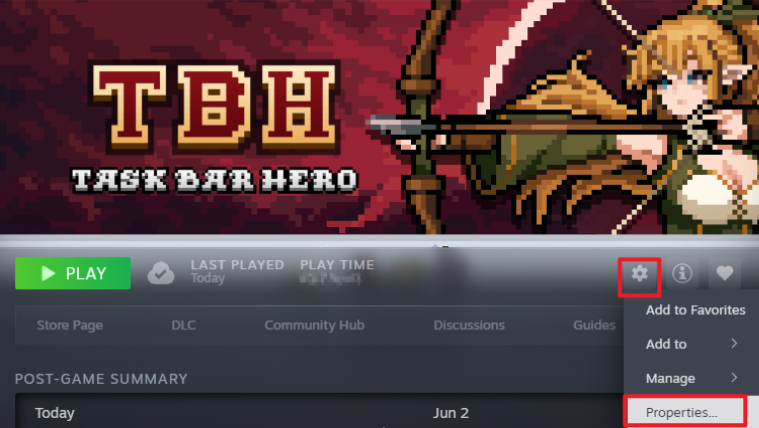
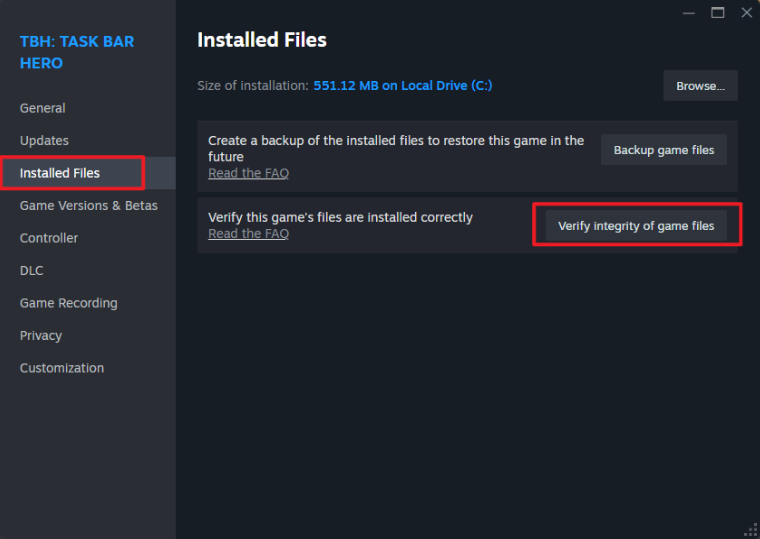
- For those who do not see the update button, here is how to force an update.
Open your Steam Library.
Right-click TBH: Taskbar Hero.
Select Properties.
Open the Installed Files tab.
Click Verify integrity of game files.
Thank you to everyone who waited for the Market's reopening.
Going forward, we will continue to closely monitor the trading environment and game data based on your feedback, and keep improving so that we can provide a more stable and fair gaming experience.
Thank you.
What's Your Reaction?









![[Business Talk] Chagee: Opening 3,500 stores in 6 years](https://xinker.org/uploads/images/202410/image_140x98_671afce94bf91.webp)






