




![[PRO Tips] Gold’s Bullish Revival: Seasonal Trends and Key Levels to Watch](https://xinker.org/uploads/images/202412/image_430x256_67724cc6ad0cd.webp)
![[PRO Tips] Gold Market Under Short-Term Pressure, Safe-Haven Demand and Central Bank Buying Support Long-Term Upside Potential](https://xinker.org/uploads/images/202412/image_430x256_676ffb4685287.webp)
![[PRO Tips] Analysis of 9 key points of differentiation strategy! Master differentiation to create a brand advantage that is unique in the world!](https://firebasestorage.googleapis.com/v0/b/xinker-tips.appspot.com/o/article_thumbnails%2Fscaled_differentiation%20strategy.png.png?alt=media&token=a1bfc3d2-e85a-4db7-8a6d-01c7274f8940)
![[PRO Tips] Will REITs regain growth momentum in 2024? 3 REITs ETFs you must know if you want to invest in real estate.](https://firebasestorage.googleapis.com/v0/b/xinker-tips.appspot.com/o/article_thumbnails%2Fscaled_REITs1.png.png?alt=media&token=8af4eb93-33ff-466f-8039-b6555fad52b4)
![[PRO Tips] Complete tutorial on how to make money in Adobe Stock!](https://firebasestorage.googleapis.com/v0/b/xinker-tips.appspot.com/o/article_thumbnails%2Fscaled_tut-adobe1.png.png?alt=media&token=0b2c8cf2-22bd-4142-883e-140ed1cbaf02)
![[Passive Income] Unlock the secret of passive income: 3 steps to apply for Google AdSense](https://xinker.org/uploads/images/202410/image_430x256_6717a4fb3052b.webp)
![[Passive Income] Earn over $200 a day with AI-generated articles!](https://firebasestorage.googleapis.com/v0/b/xinker-tips.appspot.com/o/article_thumbnails%2Fscaled_article1.png.png?alt=media&token=f61bf35b-8553-4719-826d-7360024adc70)
![[Passive Income] Earn over 20 USD per download with AI-generated images!](https://firebasestorage.googleapis.com/v0/b/xinker-tips.appspot.com/o/article_thumbnails%2Fscaled_adobe2.png.png?alt=media&token=3e20e76a-a907-45af-80aa-bf9b3600301f)
![[Passive Income] Earn 10 USD per new download by sharing CapCut!](https://firebasestorage.googleapis.com/v0/b/xinker-tips.appspot.com/o/article_thumbnails%2Fscaled_capcut2.png.png?alt=media&token=a04dec40-1fac-4857-86f2-19a8be02d38e)
![[Passive Income] Use your WiFi to create passive income in 5 minutes, and you can earn 4-6 U per day!](https://firebasestorage.googleapis.com/v0/b/xinker-tips.appspot.com/o/article_thumbnails%2Fscaled_Grassio.webp.png?alt=media&token=7659a95e-0e47-4f27-a17d-c942ac3cf7f4)


![[Business Talk] The Unique Theme of XINKER's Song: Beef Wellington and Business Mastery](https://xinker.org/uploads/images/202410/image_430x256_671afc155f47f.webp)
![[Business Talk] Chagee: Opening 3,500 stores in 6 years](https://xinker.org/uploads/images/202410/image_430x256_671afce80c5f9.webp)


Mod Update Warships of the Pacific
Generals!For the release of the Warships of the Pacific, we’ve made some updates to the model selector in the equipment and division designers in the free patch. These changes required some minor breaking changes related to the camera settings for the 3d model views. Hence, you’ll need to do some minor updates if you have overridden these camera settings in your mod. We hope that this guide will help you to make any required updates to your mods.Whom will this affect?Only relevant for mods that modify any of these camera settings files of the designers (game version 1.17.4), found in hoi4/game/gfx/3dviewenv/: equipment_editor_small_portrait.txt equipment_editor.txt plane_designer_3d_preview.txt tank_designer_3d_preview.txt template_editor.txt template_small_portrait.txtWhat if I don’t do anything?Then the game will use the camera settings from native 1.17.5.0 rather than those in your mod.How do I update?You will need to add your 3d model view camera settings to the new files in order to keep your mods 3d model view camera settings. The new files are located in hoi4/game/gfx/3dviewenv/ and are named as follows: division_designer_model.txt division_designer_model_preview.txt division_designer_model_list.txt plane_designer_model.txt plane_designer_model_preview.txt plane_designer_model_list.txt ship_designer_model.txt ship_designer_model_preview.txt ship_designer_model_list.txt tank_designer_model.txt tank_designer_model_preview.txt tank_designer_model_list.txtThe first part of the filename corresponds to which designer the camera setting will be used for and the last part of the filename correspondsto which view of that designer the setting will be used for.The plane designer in the image illustrates the three different 3d model view settings:model : the big view inside the model selector - shown in redmodel_preview : the preview on which a player clicks to open up the model selector - shown in orangemodel_list : the thumbnails in the model list inside the model selector - shown in yellow

Generals!
For the release of the Warships of the Pacific, we’ve made some updates to the model selector in the equipment and division designers in the free patch. These changes required some minor breaking changes related to the camera settings for the 3d model views. Hence, you’ll need to do some minor updates if you have overridden these camera settings in your mod. We hope that this guide will help you to make any required updates to your mods.
The first part of the filename corresponds to which designer the camera setting will be used for and the last part of the filename corresponds
to which view of that designer the setting will be used for.
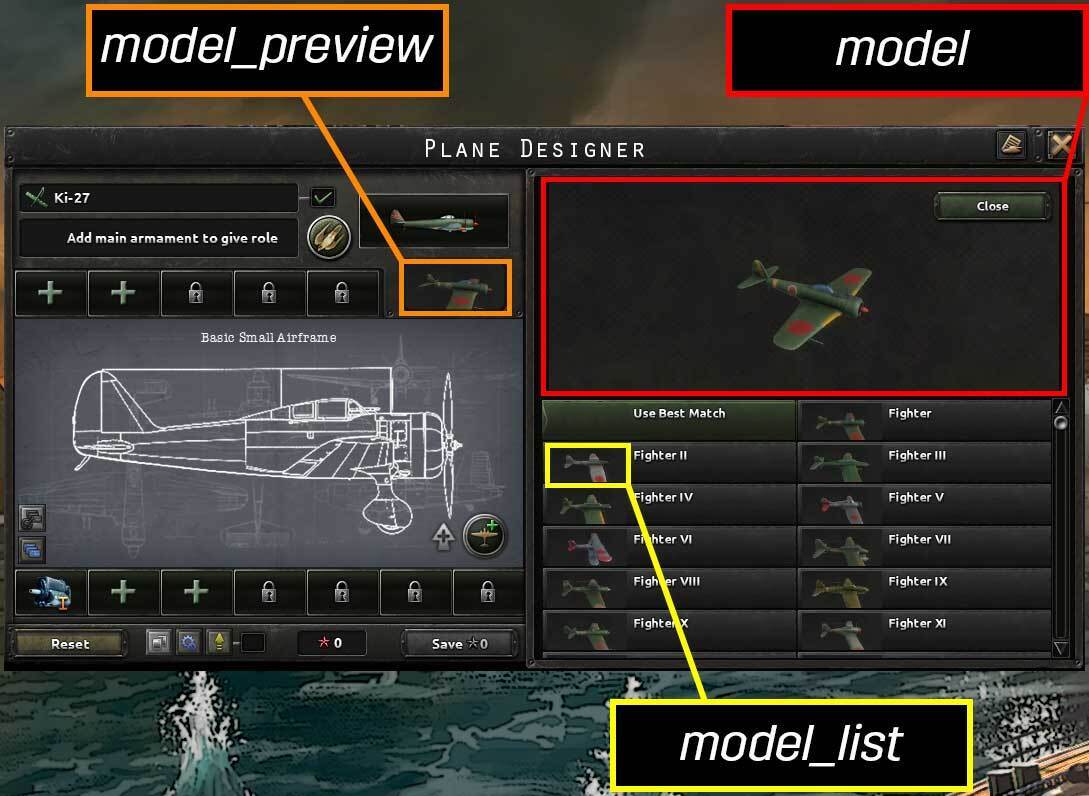
The plane designer in the image illustrates the three different 3d model view settings:
model : the big view inside the model selector - shown in red
model_preview : the preview on which a player clicks to open up the model selector - shown in orange
model_list : the thumbnails in the model list inside the model selector - shown in yellow
For the release of the Warships of the Pacific, we’ve made some updates to the model selector in the equipment and division designers in the free patch. These changes required some minor breaking changes related to the camera settings for the 3d model views. Hence, you’ll need to do some minor updates if you have overridden these camera settings in your mod. We hope that this guide will help you to make any required updates to your mods.
Whom will this affect?
Only relevant for mods that modify any of these camera settings files of the designers (game version 1.17.4), found in hoi4/game/gfx/3dviewenv/:- equipment_editor_small_portrait.txt
- equipment_editor.txt
- plane_designer_3d_preview.txt
- tank_designer_3d_preview.txt
- template_editor.txt
- template_small_portrait.txt
What if I don’t do anything?
Then the game will use the camera settings from native 1.17.5.0 rather than those in your mod.How do I update?
You will need to add your 3d model view camera settings to the new files in order to keep your mods 3d model view camera settings. The new files are located in hoi4/game/gfx/3dviewenv/ and are named as follows:- division_designer_model.txt
- division_designer_model_preview.txt
- division_designer_model_list.txt
- plane_designer_model.txt
- plane_designer_model_preview.txt
- plane_designer_model_list.txt
- ship_designer_model.txt
- ship_designer_model_preview.txt
- ship_designer_model_list.txt
- tank_designer_model.txt
- tank_designer_model_preview.txt
- tank_designer_model_list.txt
The first part of the filename corresponds to which designer the camera setting will be used for and the last part of the filename corresponds
to which view of that designer the setting will be used for.
The plane designer in the image illustrates the three different 3d model view settings:
model : the big view inside the model selector - shown in red
model_preview : the preview on which a player clicks to open up the model selector - shown in orange
model_list : the thumbnails in the model list inside the model selector - shown in yellow
What's Your Reaction?








XINKER - Business and Income Tips
Explore XINKER, the ultimate platform for mastering business strategies, discovering passive income opportunities, and learning success principles. Join a community of thinkers dedicated to achieving financial freedom and entrepreneurial excellence.

![Universal Tower Defense X Tier List [????☠️UPD 3]](https://www.destructoid.com/wp-content/uploads/2026/05/universal-tower-defense-x-tier-list-and-guide.jpg)