



![[PRO Tips] Gold’s Bullish Revival: Seasonal Trends and Key Levels to Watch](https://xinker.org/uploads/images/202412/image_430x256_67724cc6ad0cd.webp)
![[PRO Tips] Gold Market Under Short-Term Pressure, Safe-Haven Demand and Central Bank Buying Support Long-Term Upside Potential](https://xinker.org/uploads/images/202412/image_430x256_676ffb4685287.webp)
![[PRO Tips] Analysis of 9 key points of differentiation strategy! Master differentiation to create a brand advantage that is unique in the world!](https://firebasestorage.googleapis.com/v0/b/xinker-tips.appspot.com/o/article_thumbnails%2Fscaled_differentiation%20strategy.png.png?alt=media&token=a1bfc3d2-e85a-4db7-8a6d-01c7274f8940)
![[PRO Tips] Will REITs regain growth momentum in 2024? 3 REITs ETFs you must know if you want to invest in real estate.](https://firebasestorage.googleapis.com/v0/b/xinker-tips.appspot.com/o/article_thumbnails%2Fscaled_REITs1.png.png?alt=media&token=8af4eb93-33ff-466f-8039-b6555fad52b4)
![[PRO Tips] Complete tutorial on how to make money in Adobe Stock!](https://firebasestorage.googleapis.com/v0/b/xinker-tips.appspot.com/o/article_thumbnails%2Fscaled_tut-adobe1.png.png?alt=media&token=0b2c8cf2-22bd-4142-883e-140ed1cbaf02)
![[Passive Income] Unlock the secret of passive income: 3 steps to apply for Google AdSense](https://xinker.org/uploads/images/202410/image_430x256_6717a4fb3052b.webp)
![[Passive Income] Earn over $200 a day with AI-generated articles!](https://firebasestorage.googleapis.com/v0/b/xinker-tips.appspot.com/o/article_thumbnails%2Fscaled_article1.png.png?alt=media&token=f61bf35b-8553-4719-826d-7360024adc70)
![[Passive Income] Earn over 20 USD per download with AI-generated images!](https://firebasestorage.googleapis.com/v0/b/xinker-tips.appspot.com/o/article_thumbnails%2Fscaled_adobe2.png.png?alt=media&token=3e20e76a-a907-45af-80aa-bf9b3600301f)
![[Passive Income] Earn 10 USD per new download by sharing CapCut!](https://firebasestorage.googleapis.com/v0/b/xinker-tips.appspot.com/o/article_thumbnails%2Fscaled_capcut2.png.png?alt=media&token=a04dec40-1fac-4857-86f2-19a8be02d38e)
![[Passive Income] Use your WiFi to create passive income in 5 minutes, and you can earn 4-6 U per day!](https://firebasestorage.googleapis.com/v0/b/xinker-tips.appspot.com/o/article_thumbnails%2Fscaled_Grassio.webp.png?alt=media&token=7659a95e-0e47-4f27-a17d-c942ac3cf7f4)


![[Business Talk] The Unique Theme of XINKER's Song: Beef Wellington and Business Mastery](https://xinker.org/uploads/images/202410/image_430x256_671afc155f47f.webp)
![[Business Talk] Chagee: Opening 3,500 stores in 6 years](https://xinker.org/uploads/images/202410/image_430x256_671afce80c5f9.webp)


City Corner #4 - A Peek into Performance
Greetings, Mayors!In this City Corner, we will be diving deep into the technicalities of Cities: Skylines II, and more specifically, the performance of it all. We sat down with our technical director and lead programmer, who went into detail about the performance in general. In addition, we take a look at the two types of performance issues our team has looked into. We also talked about our plans for the future, and what they might look like when it comes to fixing the issues in performance, and a sneak peek at a new tool that we’re planning on adding in the next patch!With that being said, buckle up, let’s get right into it!What Is Performance? So, what does the term performance entail? In short, Cities: Skylines II has been made in a way that maximizes the utilization of multicore CPUs. This means that the base tech is in a good spot, but there are still a lot of things that we can do to improve it. A city builder like this is uniquely challenging; you can zoom in very close to look at your citizens in detail and then zoom out quickly to admire your whole city in one view. These different points of view can make things difficult when thinking about performance. In addition, the world is dynamic and constantly changing, which means that nothing can be precomputed ahead of time or baked in to help solve performance issues. Although there are many things that still require more investigation regarding performance, we see these challenges as intriguing and want to face them head-on, which is also the reason why we chose game development as our career path to begin with. We have also been collaborating with Unity to help pinpoint specific performance issues and help finding solutions to them. Now, let’s look at some of the things that are currently affecting performance, and what possibilities there are for fixing them. Rendering Performance (GPU)It might sound obvious that we have determined that the biggest impact on rendering performance is the number of triangles that need to be rendered, but there is more to it. Take the citizens’ teeth, as an example; the teeth of every visible citizen in your city used to be rendered, no matter the distance. Luckily, since the game is not about dentistry, the rendering of the teeth was fixed long ago, but there are still a lot of places that could use performance improvements.The easiest way we can start improving the rendering performance is by adding more and better Level of Detail (LOD) models. LODs are simplified versions of models that are swapped in when objects are far from the camera, since you don't need the same level of detail for a building on the horizon as one right in front of you. The simplified assets reduce the number of triangles the GPU has to process, and it also indirectly benefits shadow rendering performance, since shadows are drawn using the same geometry.Water simulation also runs on the GPU because it involves the same kind of massively parallel math that GPUs are built for to calculate how water flows, builds up pressure, and interacts with the terrain. The water system is one of the heavier parts of the rendering pipeline; the problem becomes especially pronounced on lower-end hardware, where it uses so many GPU resources that it prevents other rendering work from running alongside it. We're now investigating ways to improve the water simulation, particularly on less powerful hardware, so it plays nicely with the rest of the rendering pipeline.Terrain rendering is another area we’re currently looking into. Right now, the terrain system generates geometry for parts that are not visible to the camera. In some cases, around 65% of the terrain geometry we submit ends up being culled (removed) because it’s outside of the view. By adding smarter visibility checks earlier in the process, we can avoid sending unnecessary geometry to the GPU in the first place. Our profiling shows that between 40% - 60% of the triangles we send to the GPU end up being discarded because they are too small to show up on screen, which is a lot of wasted work. Better LODs would catch these cases earlier and swap in simpler geometry before the GPU ever has to deal with them.The different LOD levels of the Iceflake ArenaSimulation Performance (CPU)The simulation performance is a tougher cookie compared to the rendering performance, since the issues are emphasized only after your city has passed a certain point. Usually, these issues are heavily related to the population growth, as well as the pathfinding of your citizens. That is why the easiest way to approach the simulation performance issues is to look at the pathfinding requests and how often they are made within the game. For example, instead of walking 30 kilometers just to go to a store, which requires pathfinding to search through the entire city, could the citizens perhaps find a smarter way to purchase their groceries?These kinds of small gameplay changes are definitely a possibility, but they still take a long

Greetings, Mayors!
In this City Corner, we will be diving deep into the technicalities of Cities: Skylines II, and more specifically, the performance of it all. We sat down with our technical director and lead programmer, who went into detail about the performance in general. In addition, we take a look at the two types of performance issues our team has looked into. We also talked about our plans for the future, and what they might look like when it comes to fixing the issues in performance, and a sneak peek at a new tool that we’re planning on adding in the next patch!
With that being said, buckle up, let’s get right into it!
So, what does the term performance entail? In short, Cities: Skylines II has been made in a way that maximizes the utilization of multicore CPUs. This means that the base tech is in a good spot, but there are still a lot of things that we can do to improve it. A city builder like this is uniquely challenging; you can zoom in very close to look at your citizens in detail and then zoom out quickly to admire your whole city in one view. These different points of view can make things difficult when thinking about performance. In addition, the world is dynamic and constantly changing, which means that nothing can be precomputed ahead of time or baked in to help solve performance issues.
Although there are many things that still require more investigation regarding performance, we see these challenges as intriguing and want to face them head-on, which is also the reason why we chose game development as our career path to begin with. We have also been collaborating with Unity to help pinpoint specific performance issues and help finding solutions to them. Now, let’s look at some of the things that are currently affecting performance, and what possibilities there are for fixing them.
It might sound obvious that we have determined that the biggest impact on rendering performance is the number of triangles that need to be rendered, but there is more to it. Take the citizens’ teeth, as an example; the teeth of every visible citizen in your city used to be rendered, no matter the distance. Luckily, since the game is not about dentistry, the rendering of the teeth was fixed long ago, but there are still a lot of places that could use performance improvements.
The easiest way we can start improving the rendering performance is by adding more and better Level of Detail (LOD) models. LODs are simplified versions of models that are swapped in when objects are far from the camera, since you don't need the same level of detail for a building on the horizon as one right in front of you. The simplified assets reduce the number of triangles the GPU has to process, and it also indirectly benefits shadow rendering performance, since shadows are drawn using the same geometry.
Water simulation also runs on the GPU because it involves the same kind of massively parallel math that GPUs are built for to calculate how water flows, builds up pressure, and interacts with the terrain. The water system is one of the heavier parts of the rendering pipeline; the problem becomes especially pronounced on lower-end hardware, where it uses so many GPU resources that it prevents other rendering work from running alongside it. We're now investigating ways to improve the water simulation, particularly on less powerful hardware, so it plays nicely with the rest of the rendering pipeline.
Terrain rendering is another area we’re currently looking into. Right now, the terrain system generates geometry for parts that are not visible to the camera. In some cases, around 65% of the terrain geometry we submit ends up being culled (removed) because it’s outside of the view. By adding smarter visibility checks earlier in the process, we can avoid sending unnecessary geometry to the GPU in the first place. Our profiling shows that between 40% - 60% of the triangles we send to the GPU end up being discarded because they are too small to show up on screen, which is a lot of wasted work. Better LODs would catch these cases earlier and swap in simpler geometry before the GPU ever has to deal with them.
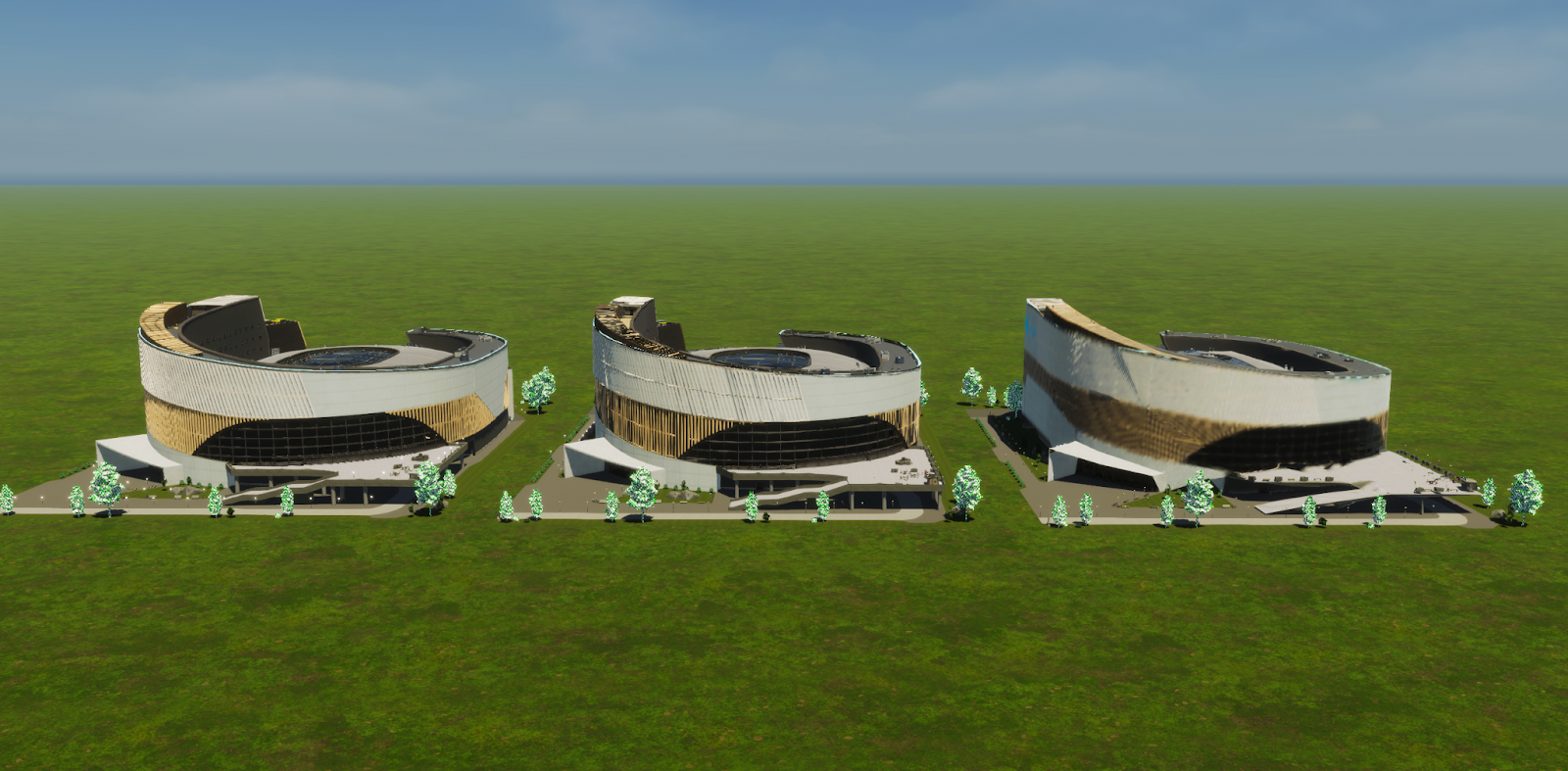
The different LOD levels of the Iceflake Arena
The simulation performance is a tougher cookie compared to the rendering performance, since the issues are emphasized only after your city has passed a certain point. Usually, these issues are heavily related to the population growth, as well as the pathfinding of your citizens. That is why the easiest way to approach the simulation performance issues is to look at the pathfinding requests and how often they are made within the game. For example, instead of walking 30 kilometers just to go to a store, which requires pathfinding to search through the entire city, could the citizens perhaps find a smarter way to purchase their groceries?
These kinds of small gameplay changes are definitely a possibility, but they still take a long time to fix due to the fact that they affect the rest of the simulation as well. However, we are looking into all kinds of possibilities, like reducing the number of pedestrians to better reflect the size of your city, which would help the simulation performance, especially in larger cities.
Issues in the game can also cause bigger performance problems. Some of these we have already fixed, like the citizens or criminals getting stuck in certain buildings, which caused excessive pathfinding, or the large amount of bicycles, which also caused further stress on the pathfinding system. However, there are still similar problems to be found to improve the performance further.
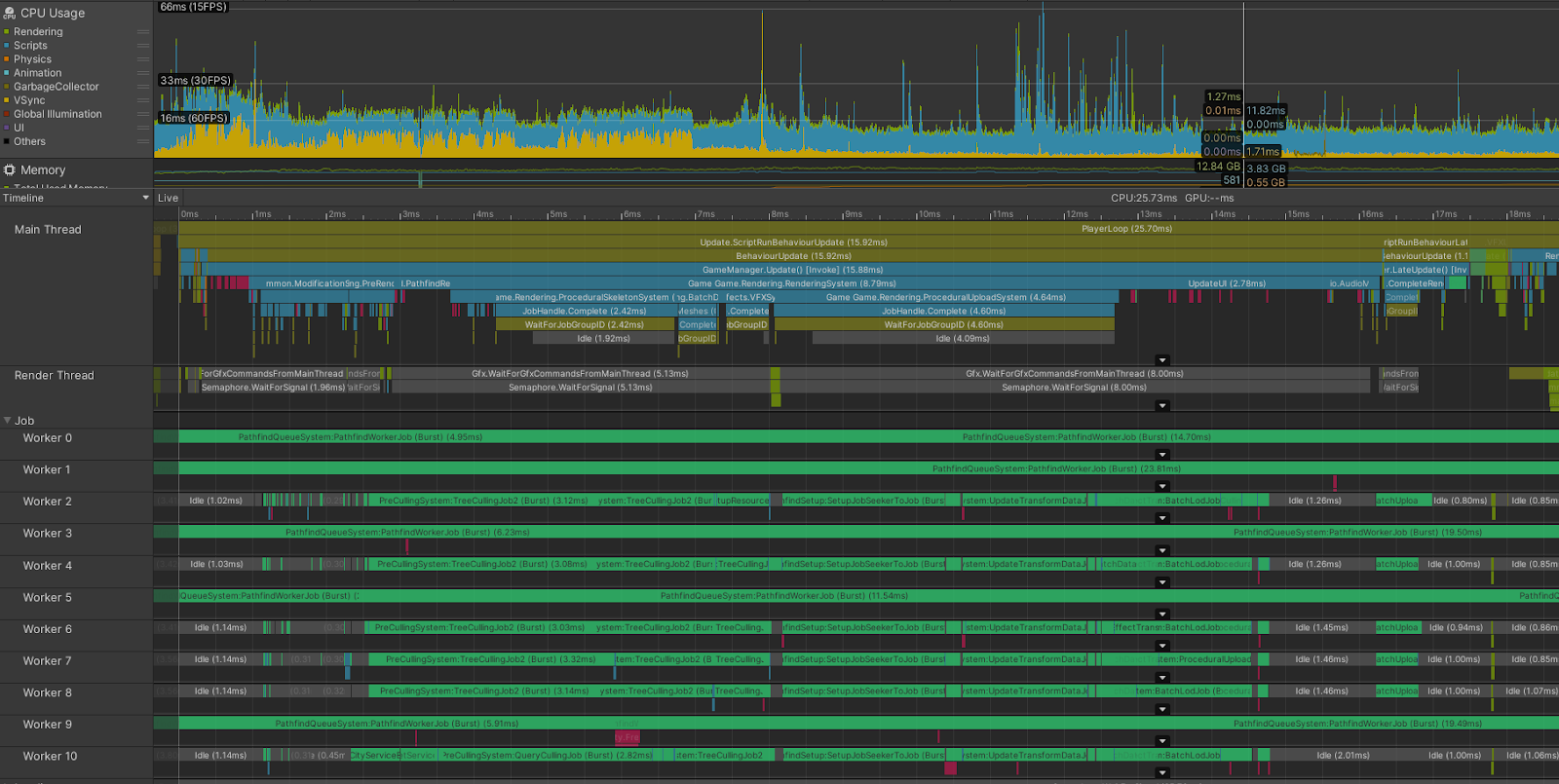
Unity Profiler is used to track the Pathfinding performance bottlenecks. In this case, many of the CPU threads are busy with pathfinding and related calculations.
In our previous updates, we have applied some simple fixes related to performance. For example, lowering shadow resolution on lower hardware settings, automatically matching the graphics quality setting based on the used hardware, and disabling some of the most taxing effects, like SSGI, on lower-end hardware.
While the performance issues still need more investigation, optimization, and trying out different solutions, we do have a rough idea of what we should prioritize when it comes to improving the performance. We are currently prioritizing the LODs and the algorithms that affect the rendering, which will improve the performance on the GPU side and can immediately be seen even in your smallest cities. We are also looking into the limitations of different CPUs and graphics cards.
We have prepared a benchmark tool, which allows you to check your performance between patches and how the updates affect the performance on your computer. This also allows us to gather data on which areas and on what kind of hardware we need to put more focus on. This will be included in the next patch, which, if all goes well, is planned to be released at the end of this month.
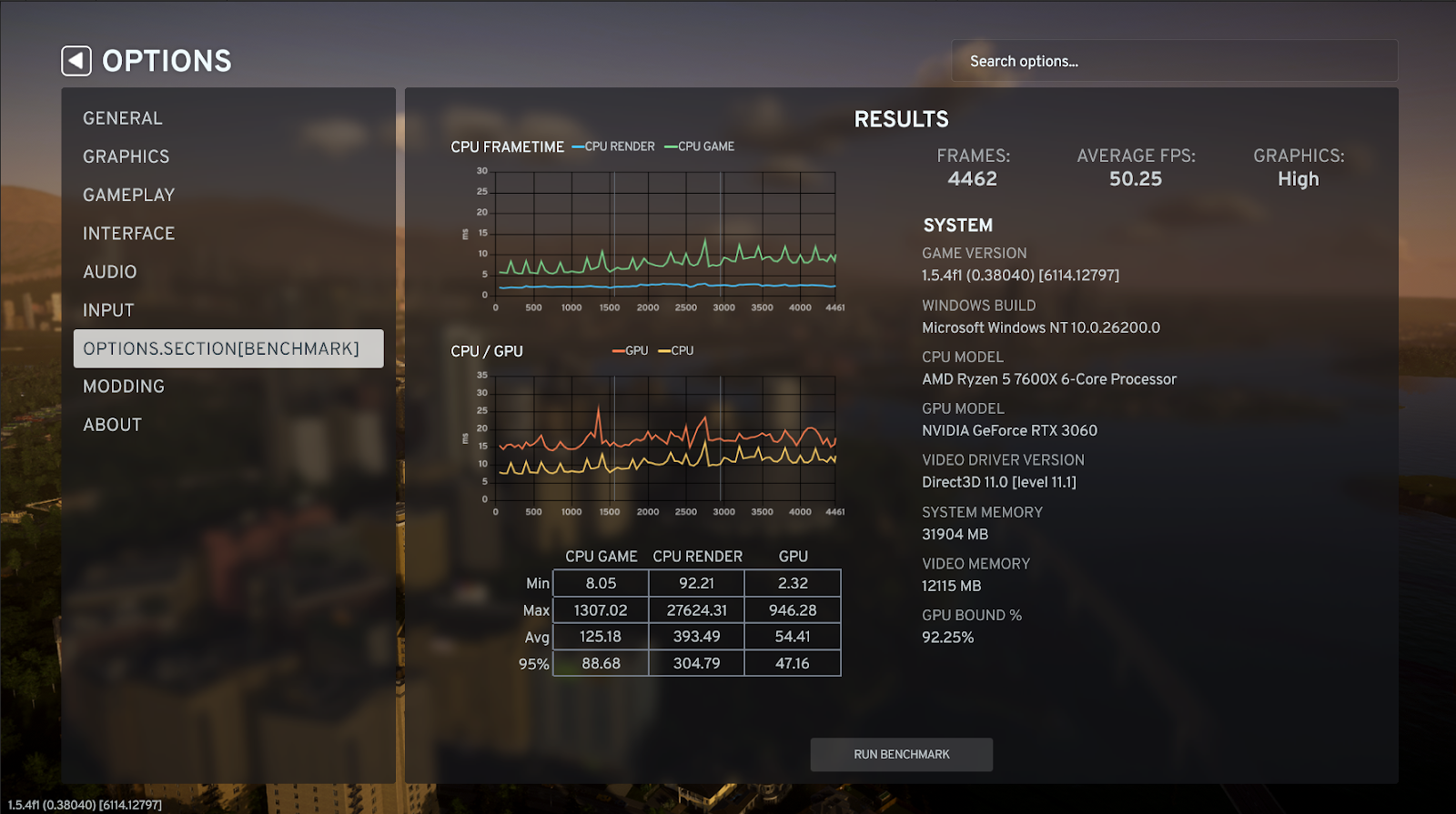
An early iteration of the benchmark tool.
Thank you for reading, and as always, we will keep you updated on the progress as we make changes towards better performance. Until next time!
What's Your Reaction?