

![[PRO Tips] Gold’s Bullish Revival: Seasonal Trends and Key Levels to Watch](https://xinker.org/uploads/images/202412/image_430x256_67724cc6ad0cd.webp)
![[PRO Tips] Gold Market Under Short-Term Pressure, Safe-Haven Demand and Central Bank Buying Support Long-Term Upside Potential](https://xinker.org/uploads/images/202412/image_430x256_676ffb4685287.webp)
![[PRO Tips] Analysis of 9 key points of differentiation strategy! Master differentiation to create a brand advantage that is unique in the world!](https://firebasestorage.googleapis.com/v0/b/xinker-tips.appspot.com/o/article_thumbnails%2Fscaled_differentiation%20strategy.png.png?alt=media&token=a1bfc3d2-e85a-4db7-8a6d-01c7274f8940)
![[PRO Tips] Will REITs regain growth momentum in 2024? 3 REITs ETFs you must know if you want to invest in real estate.](https://firebasestorage.googleapis.com/v0/b/xinker-tips.appspot.com/o/article_thumbnails%2Fscaled_REITs1.png.png?alt=media&token=8af4eb93-33ff-466f-8039-b6555fad52b4)
![[PRO Tips] Complete tutorial on how to make money in Adobe Stock!](https://firebasestorage.googleapis.com/v0/b/xinker-tips.appspot.com/o/article_thumbnails%2Fscaled_tut-adobe1.png.png?alt=media&token=0b2c8cf2-22bd-4142-883e-140ed1cbaf02)
![[Passive Income] Unlock the secret of passive income: 3 steps to apply for Google AdSense](https://xinker.org/uploads/images/202410/image_430x256_6717a4fb3052b.webp)
![[Passive Income] Earn over $200 a day with AI-generated articles!](https://firebasestorage.googleapis.com/v0/b/xinker-tips.appspot.com/o/article_thumbnails%2Fscaled_article1.png.png?alt=media&token=f61bf35b-8553-4719-826d-7360024adc70)
![[Passive Income] Earn over 20 USD per download with AI-generated images!](https://firebasestorage.googleapis.com/v0/b/xinker-tips.appspot.com/o/article_thumbnails%2Fscaled_adobe2.png.png?alt=media&token=3e20e76a-a907-45af-80aa-bf9b3600301f)
![[Passive Income] Earn 10 USD per new download by sharing CapCut!](https://firebasestorage.googleapis.com/v0/b/xinker-tips.appspot.com/o/article_thumbnails%2Fscaled_capcut2.png.png?alt=media&token=a04dec40-1fac-4857-86f2-19a8be02d38e)
![[Passive Income] Use your WiFi to create passive income in 5 minutes, and you can earn 4-6 U per day!](https://firebasestorage.googleapis.com/v0/b/xinker-tips.appspot.com/o/article_thumbnails%2Fscaled_Grassio.webp.png?alt=media&token=7659a95e-0e47-4f27-a17d-c942ac3cf7f4)


![[Business Talk] The Unique Theme of XINKER's Song: Beef Wellington and Business Mastery](https://xinker.org/uploads/images/202410/image_430x256_671afc155f47f.webp)
![[Business Talk] Chagee: Opening 3,500 stores in 6 years](https://xinker.org/uploads/images/202410/image_430x256_671afce80c5f9.webp)


Thunder at our Gates: Army HQs & Special Forces
If I were extremely funny, I’d start this off by typing something like “G’day mates”, but a simple “hello gamers” will have to suffice this time. Welcome to this dev diary, where I’ll take you through the new bigger feature coming with the next expansion, Thunder at our Gates. This will be quite a long one, so I suggest you get comfortable. I will use this as an opportunity to take you through a bit of the design process and the thoughts that have gone into it.Army HQ'sChapter 1: Dangerously ShippableArmy HQs began with a prototype looking at the simple concept of placing generals on the map. At the time, all we had was the ability to assign a general to an existing division inside an army, and their portrait would be attached to it. This would emanate a radius, and the idea was to fill this with various effects.At the time, my most eminent colleague Zwirbaum noted it as “Dangerously shippable”, and it certainly is an enticing thought. From the perspective of a designer, a strong prototype or visual mockup is a good starting point for further ideation. We used this together with initial design documentation to produce further prototypes. Initially, we considered it as a way to consolidate the general abilities and skill bonuses, and give the player a way to sort of direct the intention of their use, along with making the effects more visible on the game map. Simply put, we’d enable abilities for units inside the commanders radius, along with buffing stats inside there. Additionally, we wanted generals to be capturable if their assigned division was encircled and destroyed. Inside the circle, abilities active, buffs apply; outside, nothing!For the record: I am simplifying the total contents of it. What you’re getting now is an old plan of the idea of how players engage with it.But it would lead to some odd cases. In playtesting you’d see players or AI kind of carve a path using deployed commanders, but run into a halt when they met an opposing commander on the other side. Additionally, there were concerns about funneling players into a behaviour of microing all their units to fit inside the command radius. In fact, anything based on proximity would kind of force this behaviour. There were a lot of ways to get kinda messy with it.The one thing I disliked the most however, was the fact that you’d have this big thing basically begging players to get their generals encircled. I don’t know about you, but when I see that big empty space behind the general on the front I just see the wasted opportunities. Clearly, the generals yearn to be encircled.Somehow the ideal case scenario. What.Additionally, in the context of our game, and in the context of a lot of real life scenarios, leadership is not propagated in an equidistant circle from the leader, even when they have good radios. Why would you try to call divisions in your backline that aren’t even there?No; Orders, chain of command, and leadership tends to propagate down the ranks instead, like so:You can probably see where this is goingBasing things on distance in a game that both regards distance with an absolute length setting in kilometers as well as a more abstract one in “tiles” always gets a bit tricky. More on that soon.Chapter 2: Hearts of Iron III Is Good, ActuallyA fairly resounding point of discussion back in the Dev Corner was comparisons to the OOB system made for HoI3, from both negative and positive perspectives. It has been enjoyed for its depth, but has also been considered a micro nightmare, and I’ve also seen people call it a “game in and of itself”. All considerations aside, there’s an interesting case to be made for its tendency to leave a large amount of dashed lines and arrows around. So we wanted to try that out, for feelings sake. Working with lines like that being the visual part certainly avoids the feeling of missed space and opportunity. Additionally, the bonuses now apply to units of the same Order, rather than just being in the same Army outright. In order to give benefits to units in terms of ability usage and planning bonus, players would have to attach the general to the same order. All that said, just adding a bunch of lines and calling it a day is sadly not enough to build a readable, and hopefully usable, feature on.HmmmmYes, quite.You are seeing some of the more extreme examples of experimenting with this feature. This is the fun stuff.Chapter 3: What is a Feature? A Miserable Little Pile of ConsiderationsFeatures ultimately need to provide something for the player to play with. Plopping a general on the map is a nice visual treat but doesn’t do very much for the player. Attaching generals to orders at least gives the players a consideration of where to prioritse the placement. If you put up multiple frontline orders, which one gets the benefits? Up until now generals were simply assigned to existing divisions in the army. There are benefits to this, in my opinion. It solves a bunch of edge cases in advance, like not having
If I were extremely funny, I’d start this off by typing something like “G’day mates”, but a simple “hello gamers” will have to suffice this time. Welcome to this dev diary, where I’ll take you through the new bigger feature coming with the next expansion, Thunder at our Gates. This will be quite a long one, so I suggest you get comfortable. I will use this as an opportunity to take you through a bit of the design process and the thoughts that have gone into it.
Army HQs began with a prototype looking at the simple concept of placing generals on the map. At the time, all we had was the ability to assign a general to an existing division inside an army, and their portrait would be attached to it. This would emanate a radius, and the idea was to fill this with various effects.
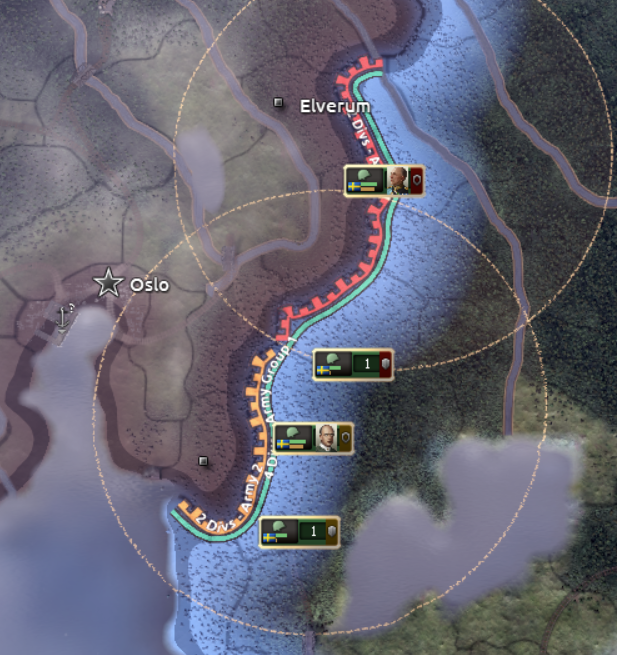
At the time, my most eminent colleague Zwirbaum noted it as “Dangerously shippable”, and it certainly is an enticing thought. From the perspective of a designer, a strong prototype or visual mockup is a good starting point for further ideation. We used this together with initial design documentation to produce further prototypes. Initially, we considered it as a way to consolidate the general abilities and skill bonuses, and give the player a way to sort of direct the intention of their use, along with making the effects more visible on the game map. Simply put, we’d enable abilities for units inside the commanders radius, along with buffing stats inside there. Additionally, we wanted generals to be capturable if their assigned division was encircled and destroyed.
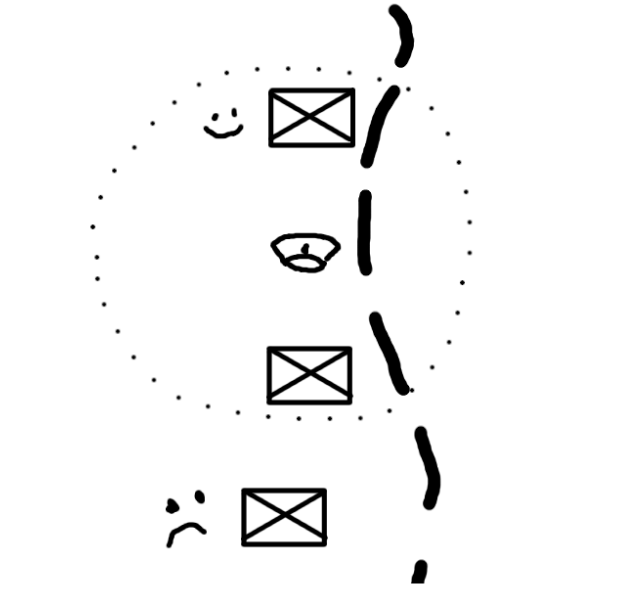
Inside the circle, abilities active, buffs apply; outside, nothing!
For the record: I am simplifying the total contents of it. What you’re getting now is an old plan of the idea of how players engage with it.
But it would lead to some odd cases. In playtesting you’d see players or AI kind of carve a path using deployed commanders, but run into a halt when they met an opposing commander on the other side. Additionally, there were concerns about funneling players into a behaviour of microing all their units to fit inside the command radius. In fact, anything based on proximity would kind of force this behaviour. There were a lot of ways to get kinda messy with it.
The one thing I disliked the most however, was the fact that you’d have this big thing basically begging players to get their generals encircled. I don’t know about you, but when I see that big empty space behind the general on the front I just see the wasted opportunities. Clearly, the generals yearn to be encircled.
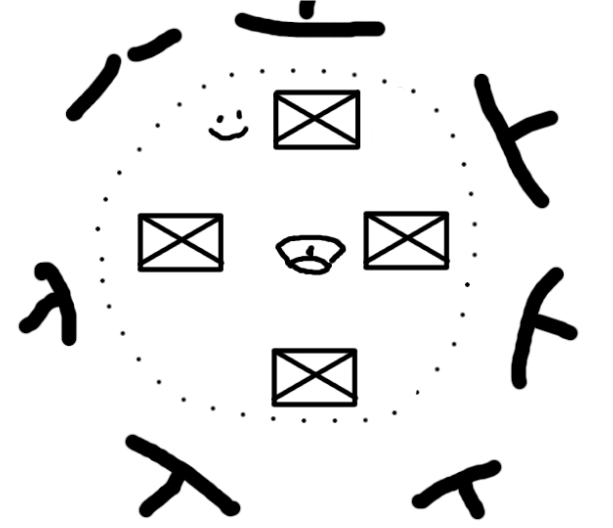
Somehow the ideal case scenario. What.
Additionally, in the context of our game, and in the context of a lot of real life scenarios, leadership is not propagated in an equidistant circle from the leader, even when they have good radios. Why would you try to call divisions in your backline that aren’t even there?
No; Orders, chain of command, and leadership tends to propagate down the ranks instead, like so:
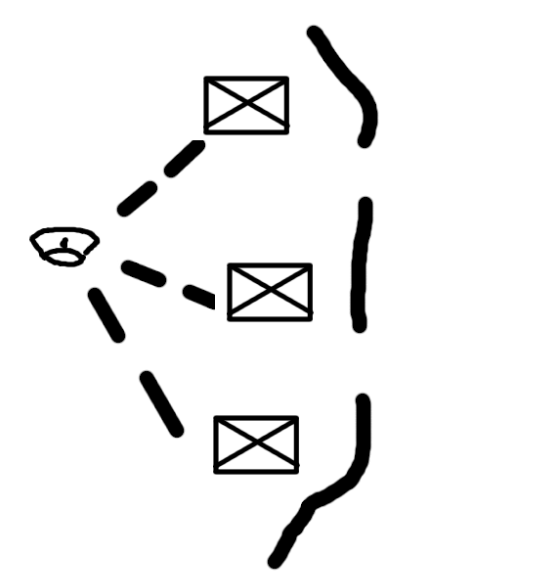
You can probably see where this is going
Basing things on distance in a game that both regards distance with an absolute length setting in kilometers as well as a more abstract one in “tiles” always gets a bit tricky. More on that soon.
A fairly resounding point of discussion back in the Dev Corner was comparisons to the OOB system made for HoI3, from both negative and positive perspectives. It has been enjoyed for its depth, but has also been considered a micro nightmare, and I’ve also seen people call it a “game in and of itself”. All considerations aside, there’s an interesting case to be made for its tendency to leave a large amount of dashed lines and arrows around. So we wanted to try that out, for feelings sake.
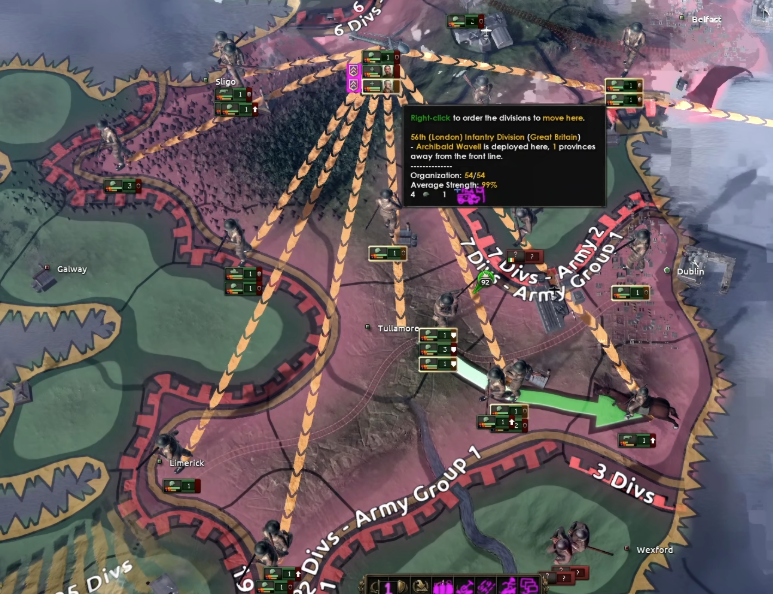
Working with lines like that being the visual part certainly avoids the feeling of missed space and opportunity. Additionally, the bonuses now apply to units of the same Order, rather than just being in the same Army outright. In order to give benefits to units in terms of ability usage and planning bonus, players would have to attach the general to the same order. All that said, just adding a bunch of lines and calling it a day is sadly not enough to build a readable, and hopefully usable, feature on.
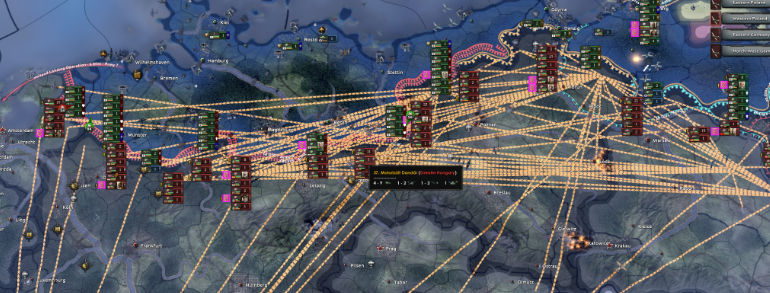
Hmmmm
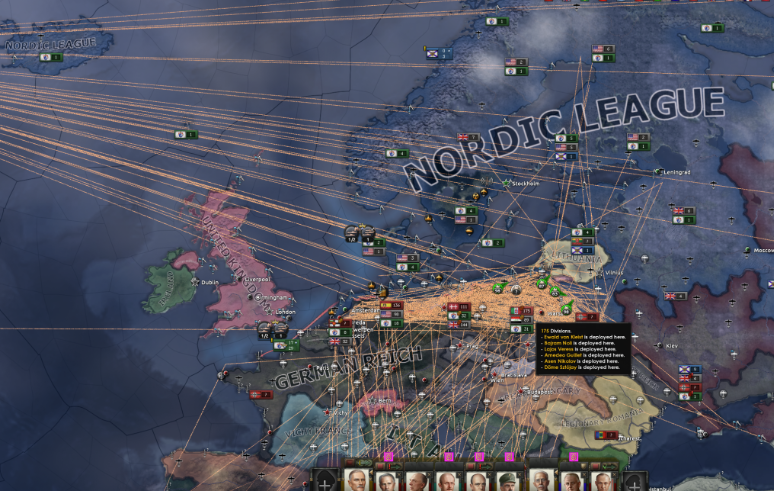
Yes, quite.
You are seeing some of the more extreme examples of experimenting with this feature. This is the fun stuff.
Features ultimately need to provide something for the player to play with. Plopping a general on the map is a nice visual treat but doesn’t do very much for the player. Attaching generals to orders at least gives the players a consideration of where to prioritse the placement. If you put up multiple frontline orders, which one gets the benefits?
Up until now generals were simply assigned to existing divisions in the army. There are benefits to this, in my opinion. It solves a bunch of edge cases in advance, like not having to worry about being able to procure additional equipment in order to build specific HQ divisions, not having to worry about specific limitations on what an HQ division/company should look like, etc.
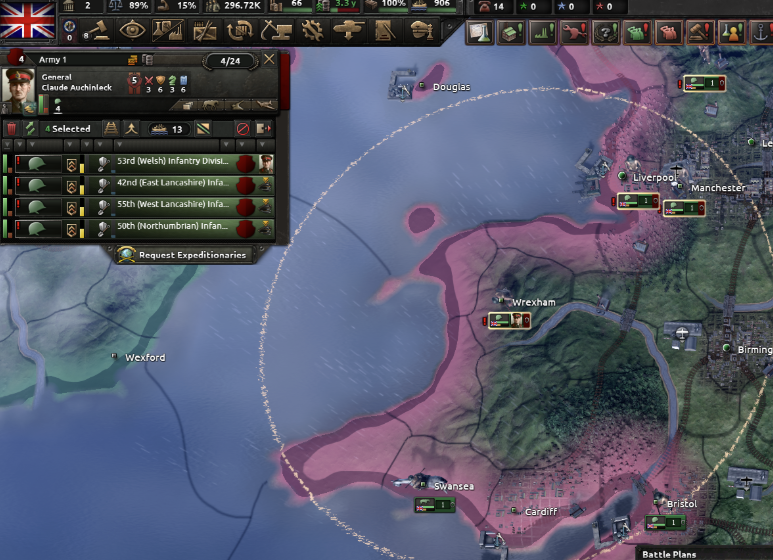
A division with an assigned general from the old Dev Diary
But like any consideration, it carries baggage too. It means you get less customisation in terms of being able to create your own dedicated HQ unit. It makes it harder to encourage a flow where players can create units they want to deploy their general to, and it also removes a bit of the uniqueness of having a dedicated HQ template. Anyways, that’s enough of history. Hope you enjoyed getting a glimpse into the process of how this was done.
Thanks to feedback from both internal sources and the community, it was possible to set the goals we wanted to achieve. We want to introduce HQ’s on the army level in the game, and they should:
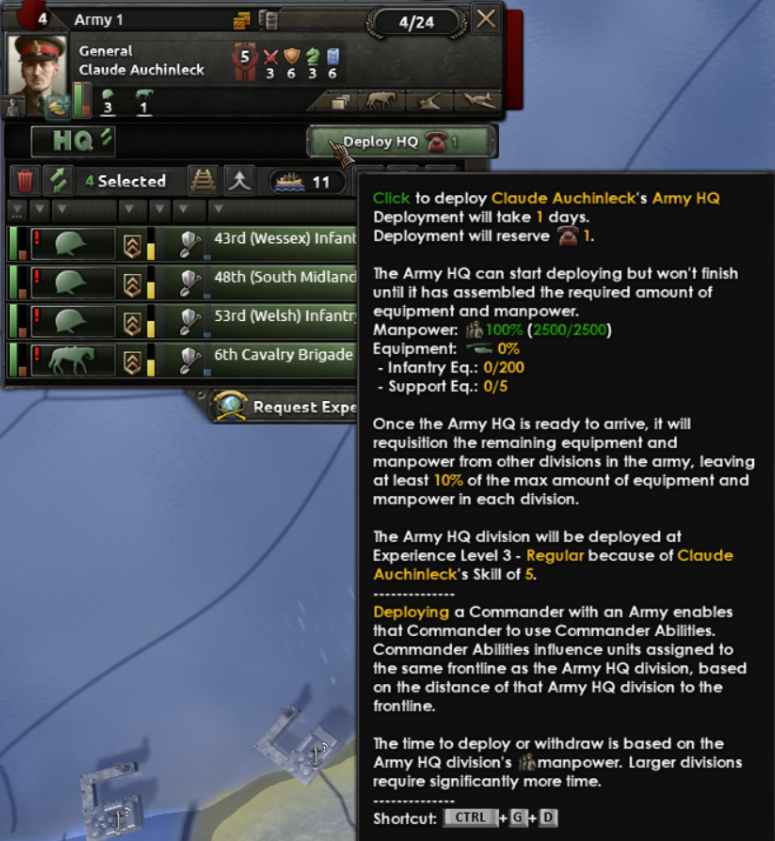
Deploying allocates a certain amount of Command Power until the deployment is over. Additionally, it costs the indicated equipment to fully deploy the HQ. Note that HQ units cannot be trained like other units, only deployed this way.
Why deploy? We’ve moved around some benefits depending on if the HQ is deployed or not. Deploying and assigning the HQ to a specific order will improve its planning bonus, which is otherwise capped at 80% of the max. Additionally, deploying enables the use of abilities across the army. Finally, deploying and assigning confers the specific HQ unit bonuses towards units assigned to the same order as it.
In another dev diary, we’re talking about the division designer rework. Army HQs are also a part of this, and get their own version of the division designer.
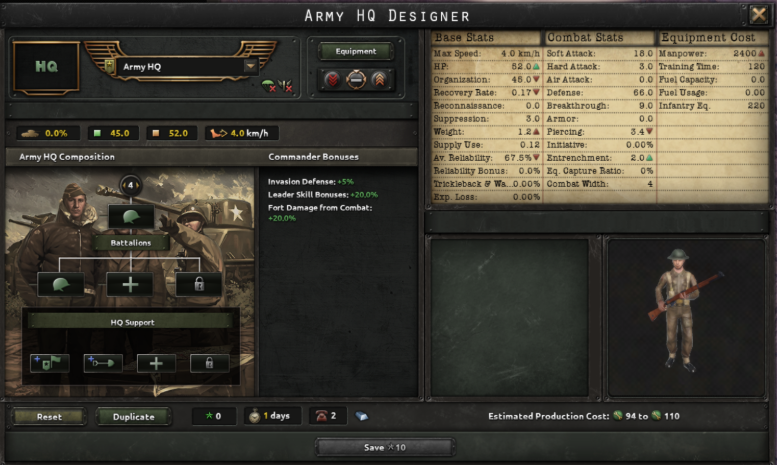
Army HQs don't count towards total division count in an army (but they do count towards volunteer limits, mind, to prevent exploits), so when designing HQ units we want to focus on different things. The CP cost of deployment, as well as the time it takes to deploy them increases with the size of the HQ division; but of course, if it’s bigger it will both be stronger in case it gets caught up in combat, and it can provide more bonuses to its assigned army. But we don’t want it to be put in the rest of the division templates and have it mixed up, at which point it would just be another template. Which it is.

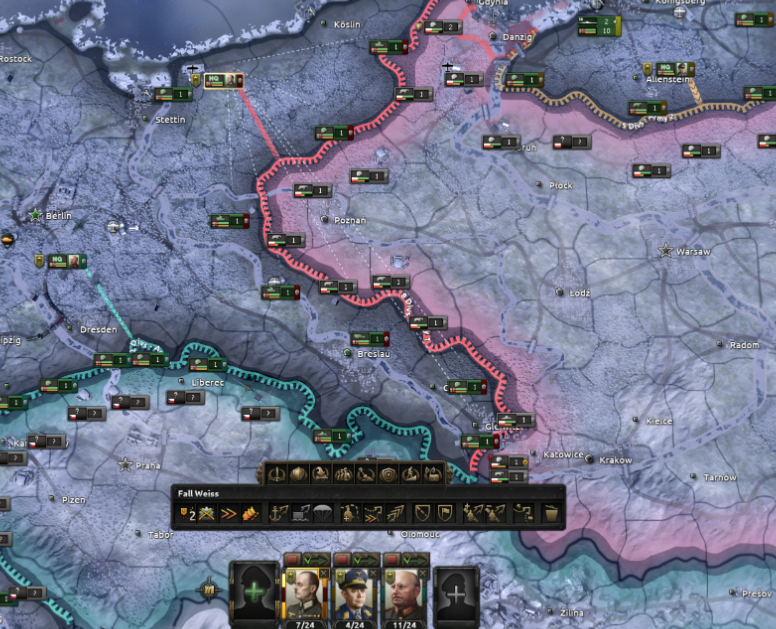
If you assign an HQ to an order, it’s signified by a line drawn to the order. The line grows thinner the further away the general is moved, signifying that the bonuses are weakened. Additionally, when a general is selected, faint lines indicate what other divisions are assigned to the same order (thus showing which divisions will get the increased benefits).
As I mentioned, we wanted to not overdo microing when assigning generals to armies.
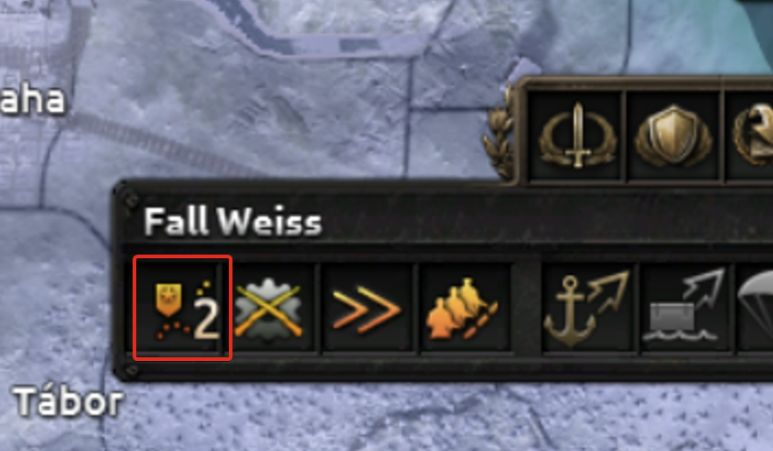
A new indicator allows you to set the proximity to the frontline for the army HQ. When enabled, the HQ unit tries to stay a certain amount of provinces behind the frontline. It follows it automatically upon advancing, or retreating, if need be. You can also set it to be free if you want to micro its movements in detail. Right now, you get scaling benefits to ability and general modifier output when moving it closer to the frontline, along with the aforementioned planning bonus increase.
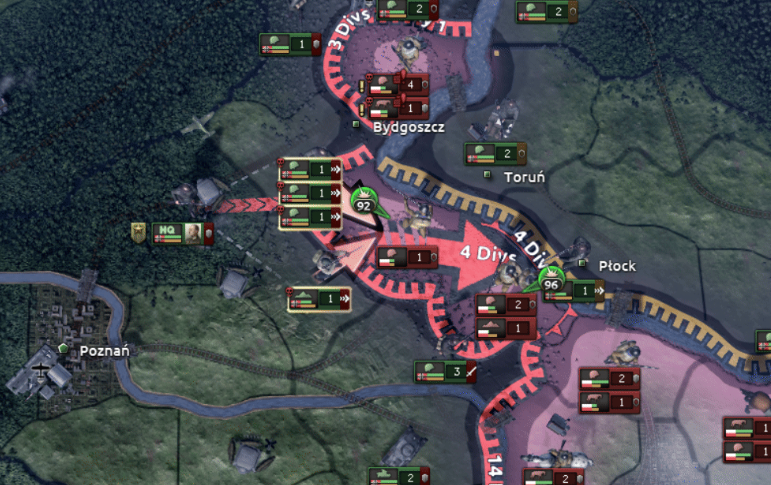
Just wait for it. The little guy moves eventually.
This goes quite a long way in not forcing you to keep a close eye on the general. Another option is to not deploy them or assign them to an order at all. This still leaves you with some of the benefits, but far from all of them.
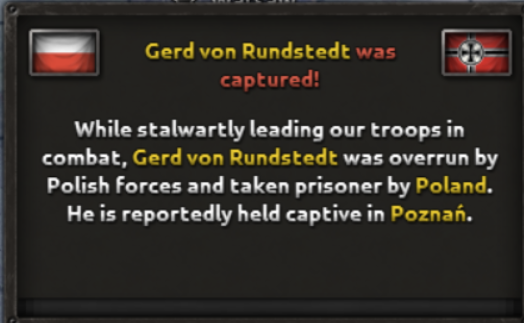
What about capturing generals? This is still a thing, but it does not carry an extreme emphasis. Getting generals captured does mean losing the effects of that general, but there are ways to get them back; either through performing a land raid or a spy operation. When a general is captured, they get moved to a VP or supply hub belonging to the country that captured them. If this ends up close to your current borders, you might be able to simply reoccupy that space to free them.
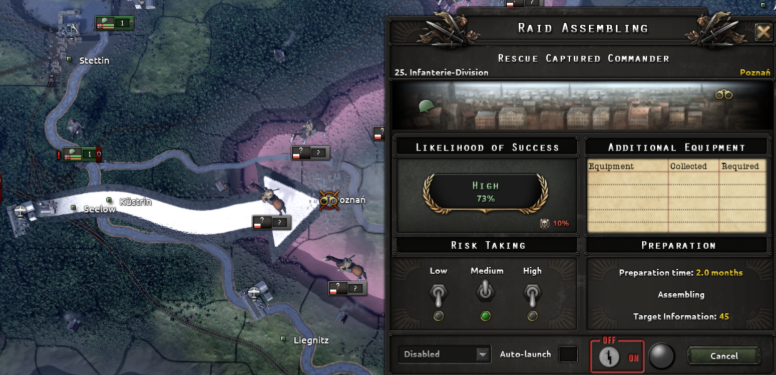
This is what the raid options look like. Usually works best if you own a supply hub near where your general is captured!
Thank you if you’ve read this far! It’s been quite a ride getting this feature to a state where it’s both workable, engaging, and not forcing a full commitment from new or old players. We hope that you enjoy it in whatever way you choose to play with it.
Sitting on the Operations track and unlocked with Thunder at Our Gates, Dispersed Operations confronts a problem that defined the second half of the war for so many armies: how do you keep fighting when the sky no longer belongs to you?
Inspired by the doctrinal changes that armies, especially the 1944 Wehrmacht and at various points the Red Army, this doctrine focuses on reducing the effect of the enemy’s air support.
Mechanically, the doctrine grants immediate gains: the bonus enemy armies draw from air superiority over you drops by 10%, and your land reinforce rate improves by 5%. The milestones deepen these benefits and reward you for adopting dedicated logistics companies.
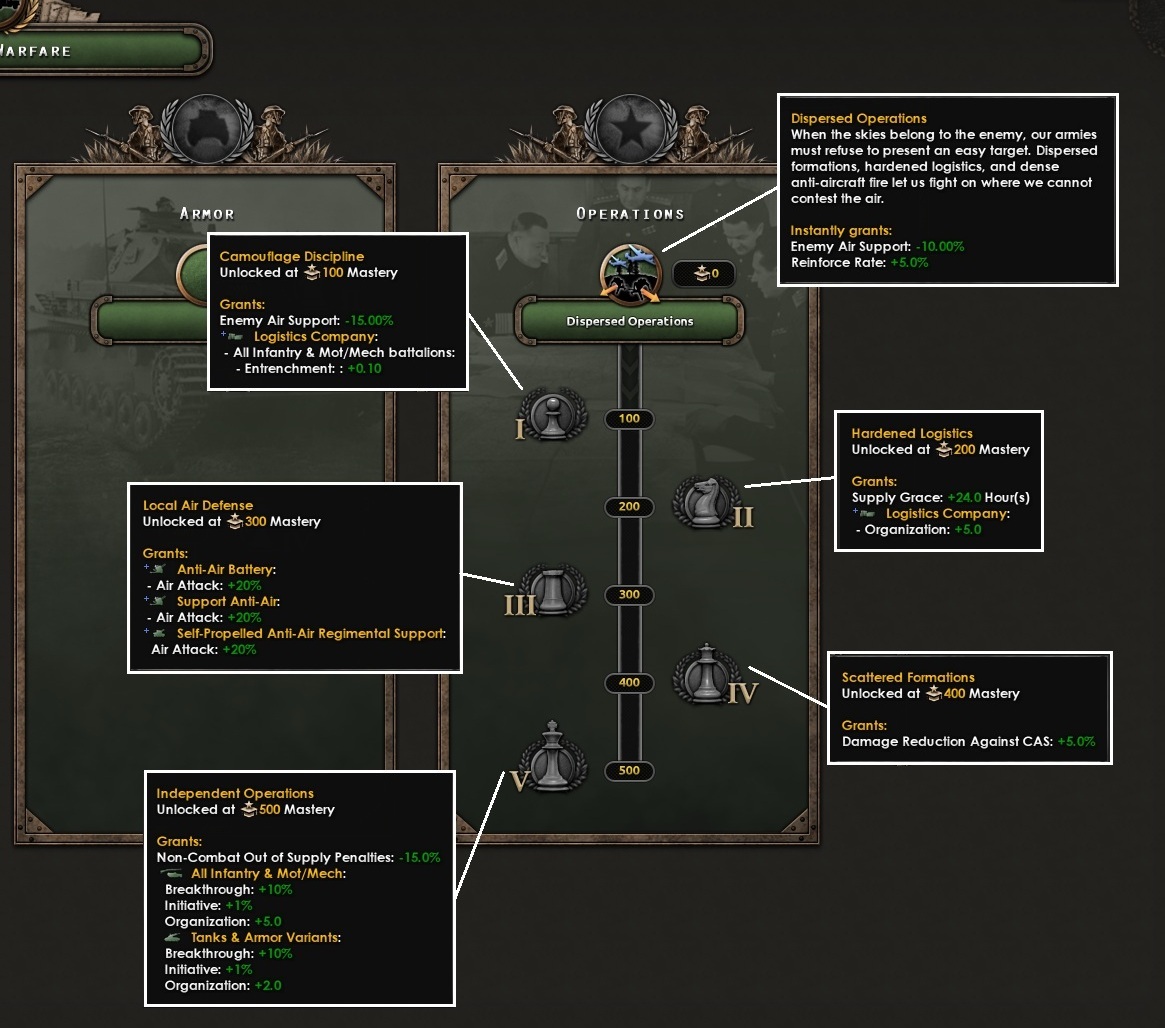
Camouflage Discipline: The bonus enemy armies draw from air superiority over you drops by a further 15%, and logistics companies grant +0.1 entrenchment per infantry battalion.
Hardened Logistics: Logistics companies gain +5 organisation, and all divisions receive 24 hours of no-supply grace before out-of-supply penalties apply.
Local Air Defense: +20% air attack on all anti-air, towed and self-propelled alike.
Scattered Formations: +5% Enemy CAS damage reduction
Independent Operations: +1% initiative and +10% breakthrough across infantry and armor, +5 organisation for infantry and +2 for armor, and a −15% to the out-of-supply penalty.
This is a strong defensive operational doctrine, rewarding players who invest in logistics support and anti-air to keep their forces resilient.
Hello, I’m Zwirbaum, Game Designer for Hearts of Iron, and here I will be taking over this dev diary from my dear colleague Jaboth - to talk about the Special Forces Doctrines. Unfortunately this time around, I will not be writing anything in a clever, interesting, funny or nice way, but rather be somewhat of a provider of a dry delivery of the information. Sorry about that!
SF Doctrines are getting a makeover, and are translated from the old ‘buy with XP’ system, into the new Mastery-based system, that we have introduced in the patch 1.17 with the release of No Compromise, No Surrender. To make things clear, Special Forces Doctrines is an update to the already existing system from Arms Against Tyranny, and NOT a new Thunder at Our Gates feature.
Special Forces Doctrines arrived with the Arms Against Tyranny Expansion, and when translating them into a new system we decided to try to keep as much as possible of their original intent. It is mainly unlocked by ownership of Arms Against Tyranny* - giving access to any Sub Doctrines related to the original Special Forces, Mountaineers, Marines and Paratroopers. If you own just No Compromise, No Surrender, you will be able to select Rangers Sub Doctrines. And of course if you own both of those Expansions, you will have the full lineup of all Sub Doctrines.
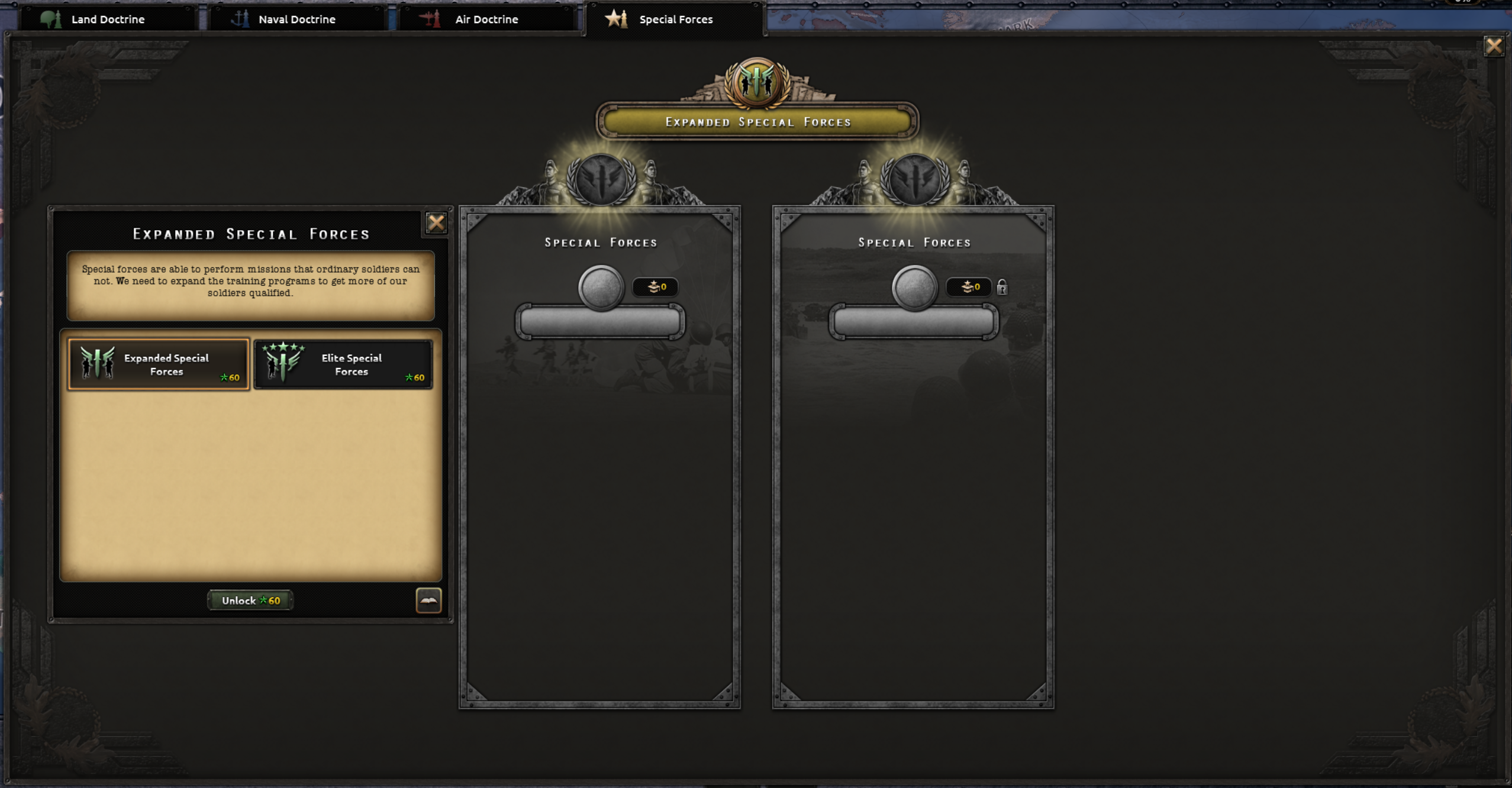
There are two ‘Grand Special Forces Doctrines’ - to choose from, one which is mostly focused about expanding the limit of the number of Special Forces, while the other one is more focused about their quality and capabilities. Those that remember Waking the Tiger, will find that those two Grand Doctrines are loosely inspired by the Special Forces Technologies added with WtT, thus merging old, with newer things, and moving them to the brand new system.
Special Forces Doctrines as opposed to the rest of the doctrines, will have two tracks that can pick from the same pool of the Sub Doctrines. This is similar to how the system currently operates where you can have one branch of the Special Forces picked, and the second branch is unlocked either by the country content, or for other countries by enacting a decision.
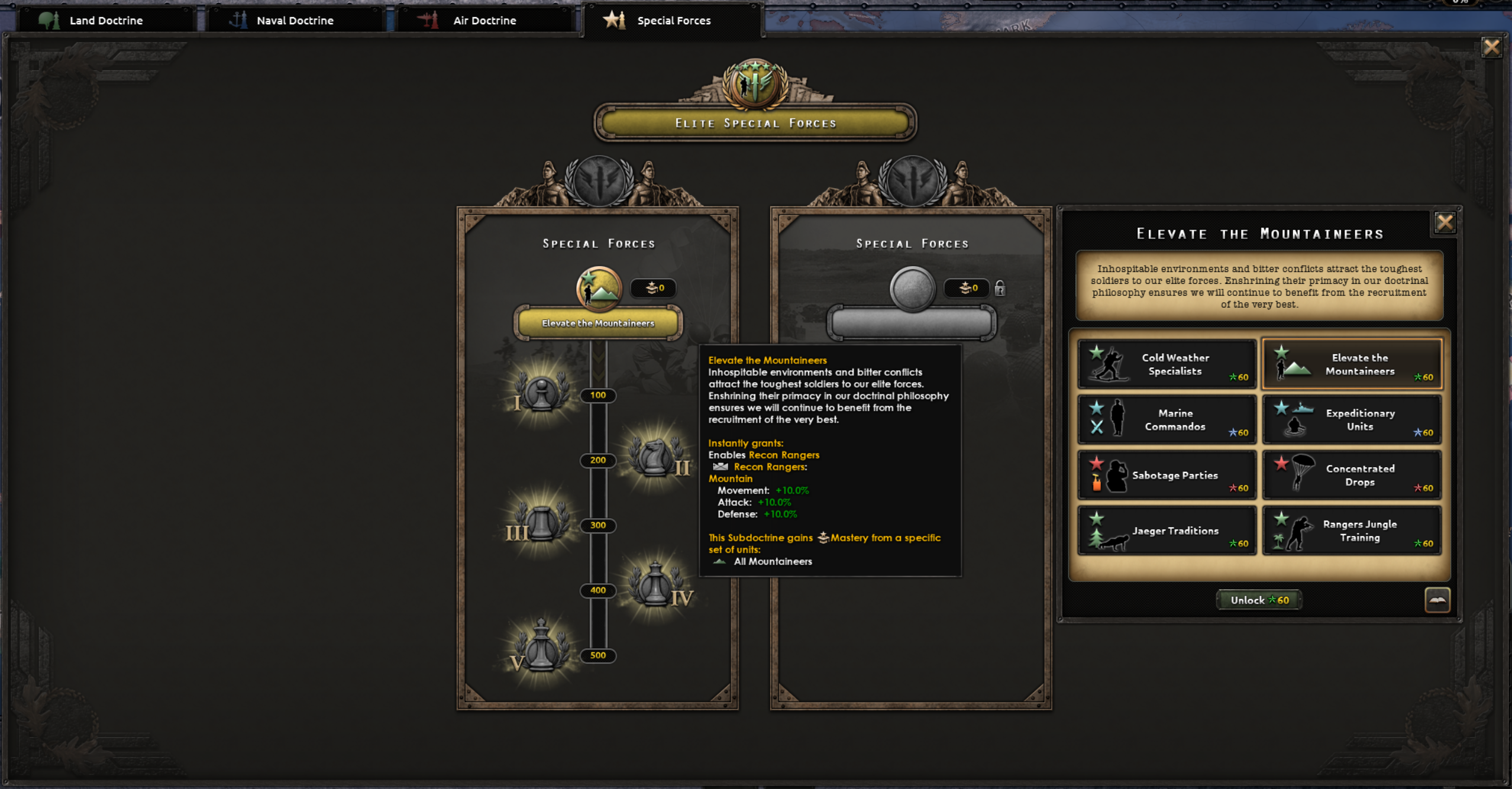
After selecting the Special Forces ‘Grand Doctrines’, you will be able to select one of two, six or eight Subdoctrines (depending on which expansions you own) into two Tracks. Each Special Forces branch is represented by two Sub Doctrines, like Mountaineers have Cold Weather Specialists and Elevate the Mountaineers.
Each Special Forces Branch will have two Sub Doctrine choices associated with that branch, and those choices are mutually exclusive, which means that for example you can pick only one ‘Mountaineer’ related Sub Doctrine, just like right now you can’t select all ‘doctrine techs’ from the same Special Forces Branch.
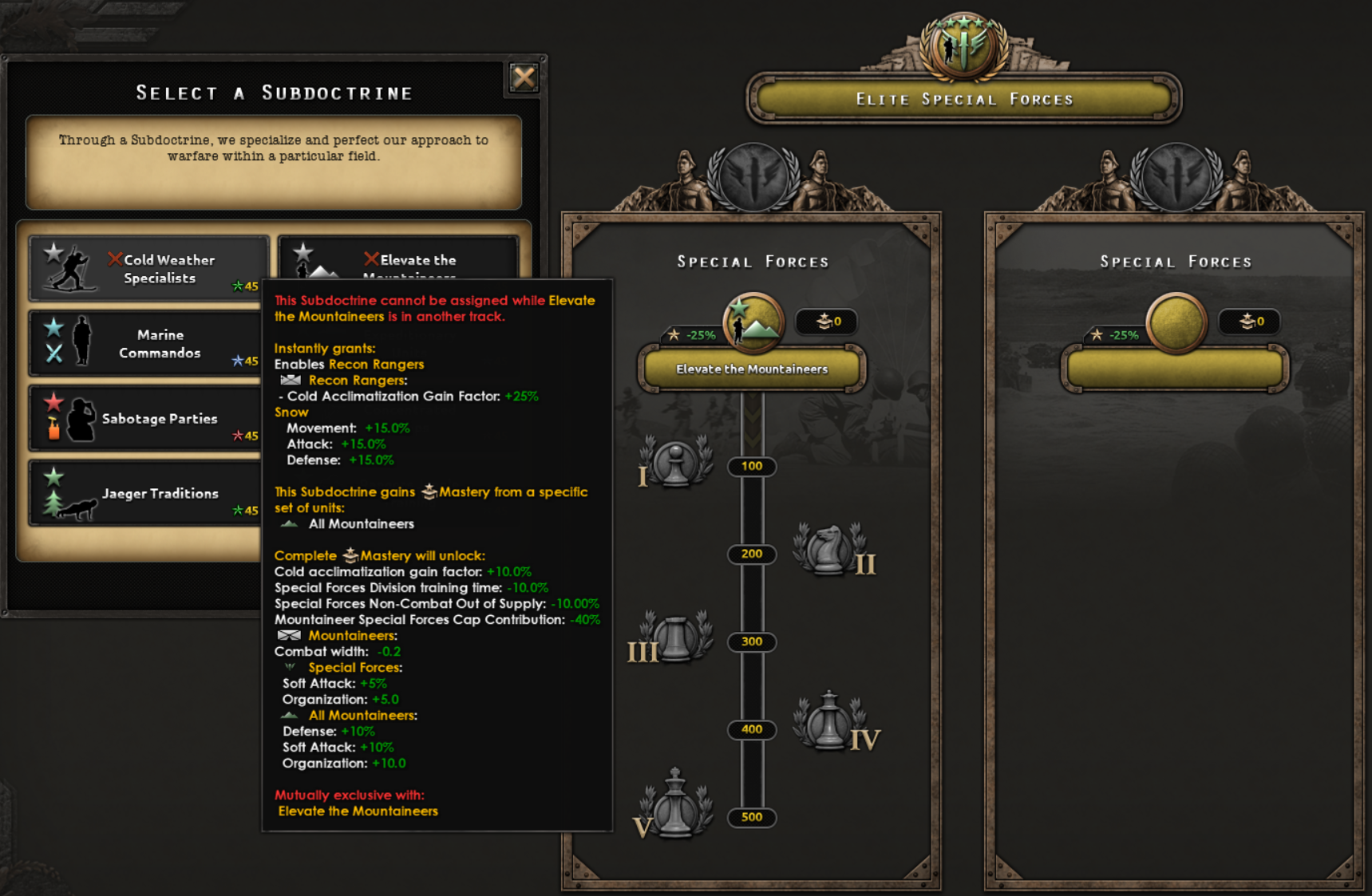
Example of mutually exclusive Sub Doctrines. When we added the doctrine system in No Compromise, No Surrender, things like mutually exclusive choices were not directly available, but now we have expanded Doctrines with a new set of things that can be done, which I am fairly sure modders will love to sink their teeth in.
The second Track/Slot is locked at the start of the game and is unlocked in the same way as the unlocking of the Special Forces branches worked previously. So, now that I mentioned country content…
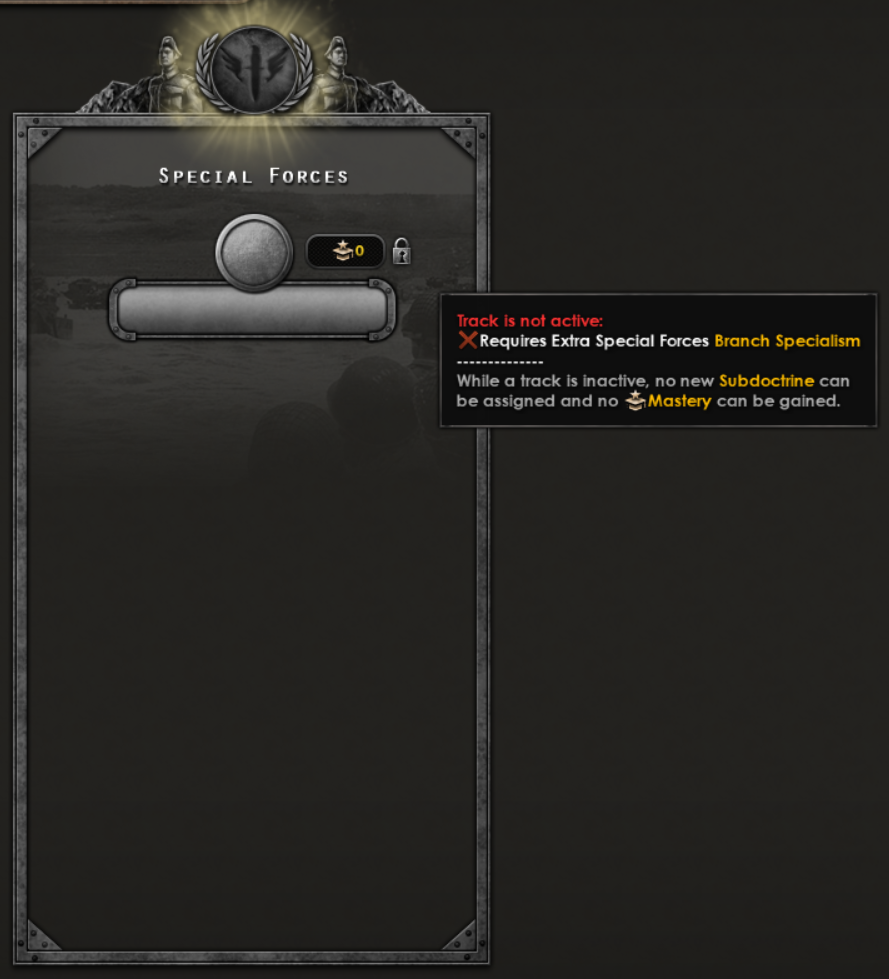
Special Forces Doctrine track that needs to be activated.Pick the proper National Focus or enact a decision to further specialize and increase effectiveness of your second Special Forces branches.
Country content, like National Foci, that previously were targeting Old Special Forces Doctrines have been adapted into the new system where they will provide boni that are more appropriate for the new system like this German focus for the Fallschirmjäger.
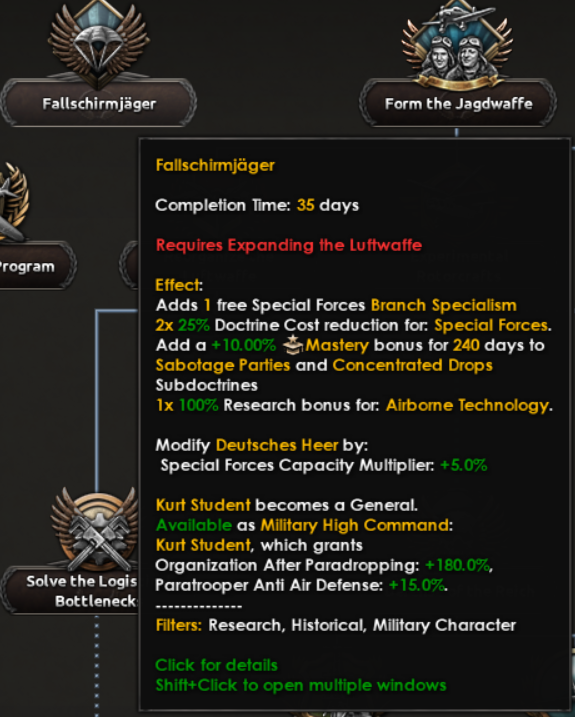
Look at that subtle off-white coloring. The tasteful thickness of it. Oh, my God.
Those that own No Compromise, No Surrender, and will be using the Faction feature will notice that we have added Special Forces doctrine sharing in the Faction Military Operations Tab. For those who use more clandestine features of the La Résistance, Intel Ledger has been updated to include the Special Forces Doctrine tab there as well, so you will be able to get the information about what Special Forces your opponents may have invested more heavily into.
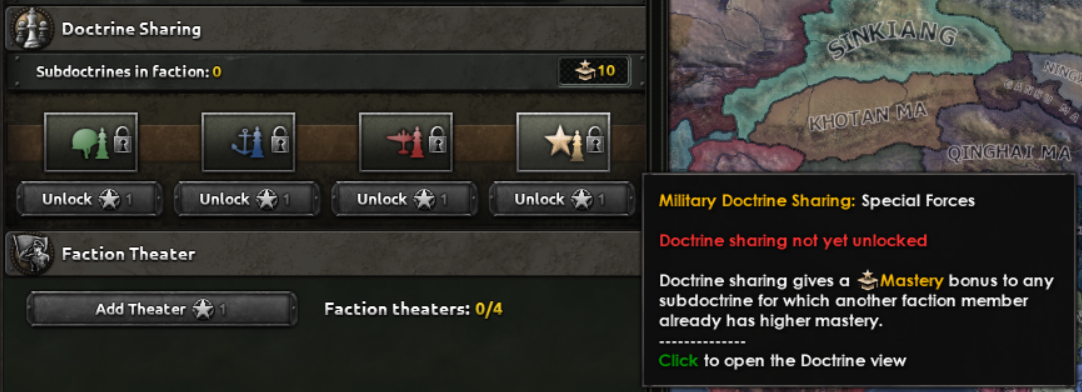
Updated Faction Military Window. You too now can spread the hard earned knowledge of Special Forces, or benefit from the hard labour of others.
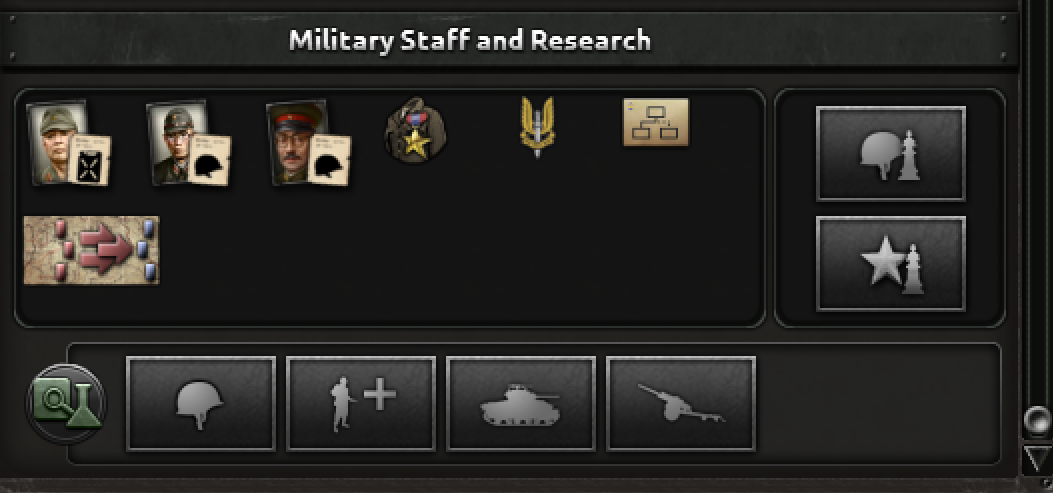
And here it is, the new button that will allow you to peek into your (potential) opponents Special Forces Doctrine.
And that’s pretty much all from me when it comes to this ‘update’. If you have any questions, I’ll try to keep my eyes open and answer any of them coming this way. Otherwise, thanks for reading, take care, and until next time, farewell.
/Zwirbaum
Army HQ's
Chapter 1: Dangerously Shippable
Army HQs began with a prototype looking at the simple concept of placing generals on the map. At the time, all we had was the ability to assign a general to an existing division inside an army, and their portrait would be attached to it. This would emanate a radius, and the idea was to fill this with various effects.
At the time, my most eminent colleague Zwirbaum noted it as “Dangerously shippable”, and it certainly is an enticing thought. From the perspective of a designer, a strong prototype or visual mockup is a good starting point for further ideation. We used this together with initial design documentation to produce further prototypes. Initially, we considered it as a way to consolidate the general abilities and skill bonuses, and give the player a way to sort of direct the intention of their use, along with making the effects more visible on the game map. Simply put, we’d enable abilities for units inside the commanders radius, along with buffing stats inside there. Additionally, we wanted generals to be capturable if their assigned division was encircled and destroyed.
Inside the circle, abilities active, buffs apply; outside, nothing!
For the record: I am simplifying the total contents of it. What you’re getting now is an old plan of the idea of how players engage with it.
But it would lead to some odd cases. In playtesting you’d see players or AI kind of carve a path using deployed commanders, but run into a halt when they met an opposing commander on the other side. Additionally, there were concerns about funneling players into a behaviour of microing all their units to fit inside the command radius. In fact, anything based on proximity would kind of force this behaviour. There were a lot of ways to get kinda messy with it.
The one thing I disliked the most however, was the fact that you’d have this big thing basically begging players to get their generals encircled. I don’t know about you, but when I see that big empty space behind the general on the front I just see the wasted opportunities. Clearly, the generals yearn to be encircled.
Somehow the ideal case scenario. What.
Additionally, in the context of our game, and in the context of a lot of real life scenarios, leadership is not propagated in an equidistant circle from the leader, even when they have good radios. Why would you try to call divisions in your backline that aren’t even there?
No; Orders, chain of command, and leadership tends to propagate down the ranks instead, like so:
You can probably see where this is going
Basing things on distance in a game that both regards distance with an absolute length setting in kilometers as well as a more abstract one in “tiles” always gets a bit tricky. More on that soon.
Chapter 2: Hearts of Iron III Is Good, Actually
A fairly resounding point of discussion back in the Dev Corner was comparisons to the OOB system made for HoI3, from both negative and positive perspectives. It has been enjoyed for its depth, but has also been considered a micro nightmare, and I’ve also seen people call it a “game in and of itself”. All considerations aside, there’s an interesting case to be made for its tendency to leave a large amount of dashed lines and arrows around. So we wanted to try that out, for feelings sake.
Working with lines like that being the visual part certainly avoids the feeling of missed space and opportunity. Additionally, the bonuses now apply to units of the same Order, rather than just being in the same Army outright. In order to give benefits to units in terms of ability usage and planning bonus, players would have to attach the general to the same order. All that said, just adding a bunch of lines and calling it a day is sadly not enough to build a readable, and hopefully usable, feature on.
Hmmmm
Yes, quite.
You are seeing some of the more extreme examples of experimenting with this feature. This is the fun stuff.
Chapter 3: What is a Feature? A Miserable Little Pile of Considerations
Features ultimately need to provide something for the player to play with. Plopping a general on the map is a nice visual treat but doesn’t do very much for the player. Attaching generals to orders at least gives the players a consideration of where to prioritse the placement. If you put up multiple frontline orders, which one gets the benefits?
Up until now generals were simply assigned to existing divisions in the army. There are benefits to this, in my opinion. It solves a bunch of edge cases in advance, like not having to worry about being able to procure additional equipment in order to build specific HQ divisions, not having to worry about specific limitations on what an HQ division/company should look like, etc.
A division with an assigned general from the old Dev Diary
But like any consideration, it carries baggage too. It means you get less customisation in terms of being able to create your own dedicated HQ unit. It makes it harder to encourage a flow where players can create units they want to deploy their general to, and it also removes a bit of the uniqueness of having a dedicated HQ template. Anyways, that’s enough of history. Hope you enjoyed getting a glimpse into the process of how this was done.
Chapter 4: Final Results
Thanks to feedback from both internal sources and the community, it was possible to set the goals we wanted to achieve. We want to introduce HQ’s on the army level in the game, and they should:
- Give the players reason to use generals as a resource in terms of prioritising certain frontlines and theatres over others
- Allow for customisation that can allow them to make their armies better suited for the conditions they will be facing
- Provide an additional layer of consideration when it comes to the use of abilities and planning
- Let the player build dedicated HQ division/company templates, where they can build for a certain set of bonuses
- Deploy generals onto the map with said HQ templates, which allocates an amount of Command Power
- Allow them to set a preferred distance to the frontline, that the division will automatically adhere to
- Still allow for manual control if needed
- Provide HQ-derived bonuses when the general is deployed, and increase said bonuses when they attach to
Deploying allocates a certain amount of Command Power until the deployment is over. Additionally, it costs the indicated equipment to fully deploy the HQ. Note that HQ units cannot be trained like other units, only deployed this way.
Why deploy? We’ve moved around some benefits depending on if the HQ is deployed or not. Deploying and assigning the HQ to a specific order will improve its planning bonus, which is otherwise capped at 80% of the max. Additionally, deploying enables the use of abilities across the army. Finally, deploying and assigning confers the specific HQ unit bonuses towards units assigned to the same order as it.
HQ Units
In another dev diary, we’re talking about the division designer rework. Army HQs are also a part of this, and get their own version of the division designer.
Army HQs don't count towards total division count in an army (but they do count towards volunteer limits, mind, to prevent exploits), so when designing HQ units we want to focus on different things. The CP cost of deployment, as well as the time it takes to deploy them increases with the size of the HQ division; but of course, if it’s bigger it will both be stronger in case it gets caught up in combat, and it can provide more bonuses to its assigned army. But we don’t want it to be put in the rest of the division templates and have it mixed up, at which point it would just be another template. Which it is.
If you assign an HQ to an order, it’s signified by a line drawn to the order. The line grows thinner the further away the general is moved, signifying that the bonuses are weakened. Additionally, when a general is selected, faint lines indicate what other divisions are assigned to the same order (thus showing which divisions will get the increased benefits).
As I mentioned, we wanted to not overdo microing when assigning generals to armies.
A new indicator allows you to set the proximity to the frontline for the army HQ. When enabled, the HQ unit tries to stay a certain amount of provinces behind the frontline. It follows it automatically upon advancing, or retreating, if need be. You can also set it to be free if you want to micro its movements in detail. Right now, you get scaling benefits to ability and general modifier output when moving it closer to the frontline, along with the aforementioned planning bonus increase.
Just wait for it. The little guy moves eventually.
This goes quite a long way in not forcing you to keep a close eye on the general. Another option is to not deploy them or assign them to an order at all. This still leaves you with some of the benefits, but far from all of them.
Capturing Generals
What about capturing generals? This is still a thing, but it does not carry an extreme emphasis. Getting generals captured does mean losing the effects of that general, but there are ways to get them back; either through performing a land raid or a spy operation. When a general is captured, they get moved to a VP or supply hub belonging to the country that captured them. If this ends up close to your current borders, you might be able to simply reoccupy that space to free them.
This is what the raid options look like. Usually works best if you own a supply hub near where your general is captured!
Wrap-up
Thank you if you’ve read this far! It’s been quite a ride getting this feature to a state where it’s both workable, engaging, and not forcing a full commitment from new or old players. We hope that you enjoy it in whatever way you choose to play with it.
New Sub Doctrine: Dispersed Operations
Sitting on the Operations track and unlocked with Thunder at Our Gates, Dispersed Operations confronts a problem that defined the second half of the war for so many armies: how do you keep fighting when the sky no longer belongs to you?
Inspired by the doctrinal changes that armies, especially the 1944 Wehrmacht and at various points the Red Army, this doctrine focuses on reducing the effect of the enemy’s air support.
Mechanically, the doctrine grants immediate gains: the bonus enemy armies draw from air superiority over you drops by 10%, and your land reinforce rate improves by 5%. The milestones deepen these benefits and reward you for adopting dedicated logistics companies.
Camouflage Discipline: The bonus enemy armies draw from air superiority over you drops by a further 15%, and logistics companies grant +0.1 entrenchment per infantry battalion.
Hardened Logistics: Logistics companies gain +5 organisation, and all divisions receive 24 hours of no-supply grace before out-of-supply penalties apply.
Local Air Defense: +20% air attack on all anti-air, towed and self-propelled alike.
Scattered Formations: +5% Enemy CAS damage reduction
Independent Operations: +1% initiative and +10% breakthrough across infantry and armor, +5 organisation for infantry and +2 for armor, and a −15% to the out-of-supply penalty.
This is a strong defensive operational doctrine, rewarding players who invest in logistics support and anti-air to keep their forces resilient.
Special Forces
Hello, I’m Zwirbaum, Game Designer for Hearts of Iron, and here I will be taking over this dev diary from my dear colleague Jaboth - to talk about the Special Forces Doctrines. Unfortunately this time around, I will not be writing anything in a clever, interesting, funny or nice way, but rather be somewhat of a provider of a dry delivery of the information. Sorry about that!
SF Doctrines are getting a makeover, and are translated from the old ‘buy with XP’ system, into the new Mastery-based system, that we have introduced in the patch 1.17 with the release of No Compromise, No Surrender. To make things clear, Special Forces Doctrines is an update to the already existing system from Arms Against Tyranny, and NOT a new Thunder at Our Gates feature.
Special Forces Doctrines arrived with the Arms Against Tyranny Expansion, and when translating them into a new system we decided to try to keep as much as possible of their original intent. It is mainly unlocked by ownership of Arms Against Tyranny* - giving access to any Sub Doctrines related to the original Special Forces, Mountaineers, Marines and Paratroopers. If you own just No Compromise, No Surrender, you will be able to select Rangers Sub Doctrines. And of course if you own both of those Expansions, you will have the full lineup of all Sub Doctrines.
There are two ‘Grand Special Forces Doctrines’ - to choose from, one which is mostly focused about expanding the limit of the number of Special Forces, while the other one is more focused about their quality and capabilities. Those that remember Waking the Tiger, will find that those two Grand Doctrines are loosely inspired by the Special Forces Technologies added with WtT, thus merging old, with newer things, and moving them to the brand new system.
Special Forces Doctrines as opposed to the rest of the doctrines, will have two tracks that can pick from the same pool of the Sub Doctrines. This is similar to how the system currently operates where you can have one branch of the Special Forces picked, and the second branch is unlocked either by the country content, or for other countries by enacting a decision.
After selecting the Special Forces ‘Grand Doctrines’, you will be able to select one of two, six or eight Subdoctrines (depending on which expansions you own) into two Tracks. Each Special Forces branch is represented by two Sub Doctrines, like Mountaineers have Cold Weather Specialists and Elevate the Mountaineers.
Each Special Forces Branch will have two Sub Doctrine choices associated with that branch, and those choices are mutually exclusive, which means that for example you can pick only one ‘Mountaineer’ related Sub Doctrine, just like right now you can’t select all ‘doctrine techs’ from the same Special Forces Branch.
Example of mutually exclusive Sub Doctrines. When we added the doctrine system in No Compromise, No Surrender, things like mutually exclusive choices were not directly available, but now we have expanded Doctrines with a new set of things that can be done, which I am fairly sure modders will love to sink their teeth in.
The second Track/Slot is locked at the start of the game and is unlocked in the same way as the unlocking of the Special Forces branches worked previously. So, now that I mentioned country content…
Special Forces Doctrine track that needs to be activated.Pick the proper National Focus or enact a decision to further specialize and increase effectiveness of your second Special Forces branches.
Country content, like National Foci, that previously were targeting Old Special Forces Doctrines have been adapted into the new system where they will provide boni that are more appropriate for the new system like this German focus for the Fallschirmjäger.
Look at that subtle off-white coloring. The tasteful thickness of it. Oh, my God.
Those that own No Compromise, No Surrender, and will be using the Faction feature will notice that we have added Special Forces doctrine sharing in the Faction Military Operations Tab. For those who use more clandestine features of the La Résistance, Intel Ledger has been updated to include the Special Forces Doctrine tab there as well, so you will be able to get the information about what Special Forces your opponents may have invested more heavily into.
Updated Faction Military Window. You too now can spread the hard earned knowledge of Special Forces, or benefit from the hard labour of others.
And here it is, the new button that will allow you to peek into your (potential) opponents Special Forces Doctrine.
And that’s pretty much all from me when it comes to this ‘update’. If you have any questions, I’ll try to keep my eyes open and answer any of them coming this way. Otherwise, thanks for reading, take care, and until next time, farewell.
/Zwirbaum
What's Your Reaction?








XINKER - Business and Income Tips
Explore XINKER, the ultimate platform for mastering business strategies, discovering passive income opportunities, and learning success principles. Join a community of thinkers dedicated to achieving financial freedom and entrepreneurial excellence.


![[Business Talk] Chagee: Opening 3,500 stores in 6 years](https://xinker.org/uploads/images/202410/image_140x98_671afce94bf91.webp)






