


![[PRO Tips] Gold’s Bullish Revival: Seasonal Trends and Key Levels to Watch](https://xinker.org/uploads/images/202412/image_430x256_67724cc6ad0cd.webp)
![[PRO Tips] Gold Market Under Short-Term Pressure, Safe-Haven Demand and Central Bank Buying Support Long-Term Upside Potential](https://xinker.org/uploads/images/202412/image_430x256_676ffb4685287.webp)
![[PRO Tips] Analysis of 9 key points of differentiation strategy! Master differentiation to create a brand advantage that is unique in the world!](https://firebasestorage.googleapis.com/v0/b/xinker-tips.appspot.com/o/article_thumbnails%2Fscaled_differentiation%20strategy.png.png?alt=media&token=a1bfc3d2-e85a-4db7-8a6d-01c7274f8940)
![[PRO Tips] Will REITs regain growth momentum in 2024? 3 REITs ETFs you must know if you want to invest in real estate.](https://firebasestorage.googleapis.com/v0/b/xinker-tips.appspot.com/o/article_thumbnails%2Fscaled_REITs1.png.png?alt=media&token=8af4eb93-33ff-466f-8039-b6555fad52b4)
![[PRO Tips] Complete tutorial on how to make money in Adobe Stock!](https://firebasestorage.googleapis.com/v0/b/xinker-tips.appspot.com/o/article_thumbnails%2Fscaled_tut-adobe1.png.png?alt=media&token=0b2c8cf2-22bd-4142-883e-140ed1cbaf02)
![[Passive Income] Unlock the secret of passive income: 3 steps to apply for Google AdSense](https://xinker.org/uploads/images/202410/image_430x256_6717a4fb3052b.webp)
![[Passive Income] Earn over $200 a day with AI-generated articles!](https://firebasestorage.googleapis.com/v0/b/xinker-tips.appspot.com/o/article_thumbnails%2Fscaled_article1.png.png?alt=media&token=f61bf35b-8553-4719-826d-7360024adc70)
![[Passive Income] Earn over 20 USD per download with AI-generated images!](https://firebasestorage.googleapis.com/v0/b/xinker-tips.appspot.com/o/article_thumbnails%2Fscaled_adobe2.png.png?alt=media&token=3e20e76a-a907-45af-80aa-bf9b3600301f)
![[Passive Income] Earn 10 USD per new download by sharing CapCut!](https://firebasestorage.googleapis.com/v0/b/xinker-tips.appspot.com/o/article_thumbnails%2Fscaled_capcut2.png.png?alt=media&token=a04dec40-1fac-4857-86f2-19a8be02d38e)
![[Passive Income] Use your WiFi to create passive income in 5 minutes, and you can earn 4-6 U per day!](https://firebasestorage.googleapis.com/v0/b/xinker-tips.appspot.com/o/article_thumbnails%2Fscaled_Grassio.webp.png?alt=media&token=7659a95e-0e47-4f27-a17d-c942ac3cf7f4)


![[Business Talk] The Unique Theme of XINKER's Song: Beef Wellington and Business Mastery](https://xinker.org/uploads/images/202410/image_430x256_671afc155f47f.webp)
![[Business Talk] Chagee: Opening 3,500 stores in 6 years](https://xinker.org/uploads/images/202410/image_430x256_671afce80c5f9.webp)


Notice Regarding Party Join Method
Greetings, Star Guardians.We would like to inform you of an issue where a \[Unstable Network] pop-up may appear when attempting to join a party, which may prevent you from joining.▶ Go to the Version 1.0 Known Issues NoticeTo assist with this, we would like to share a temporary method that allows you to join and use party features.Please refer to the details below for more information.✦ How to Join a Party1. Accept a party invitation sent by another Star Guardian, or attempt to join an already created party.2. After accepting the invitation, if the following pop-up appears, select \[Reconnect].- This pop-up is not caused by an actual network issue, but a temporary error. Selecting \[Reconnect] will allow you to proceed normally.* If the pop-up does not appear, please try accepting the party invitation or joining the party again.3. After selecting \[Reconnect] and confirming your connection, accept the party invitation again from the Star Guardian you intended to join.Please refer to the above method when attempting to join a party.We are currently reviewing this issue and will work to resolve it as soon as possible.We kindly ask for your understanding regarding any inconvenience caused, and we will do our best to provide a stable service.Thank you.
Greetings, Star Guardians.
We would like to inform you of an issue where a \[Unstable Network] pop-up may appear when attempting to join a party, which may prevent you from joining.
▶ Go to the Version 1.0 Known Issues Notice
To assist with this, we would like to share a temporary method that allows you to join and use party features.
Please refer to the details below for more information.
✦ How to Join a Party
1. Accept a party invitation sent by another Star Guardian, or attempt to join an already created party.
2. After accepting the invitation, if the following pop-up appears, select \[Reconnect].
- This pop-up is not caused by an actual network issue, but a temporary error. Selecting \[Reconnect] will allow you to proceed normally.
* If the pop-up does not appear, please try accepting the party invitation or joining the party again.
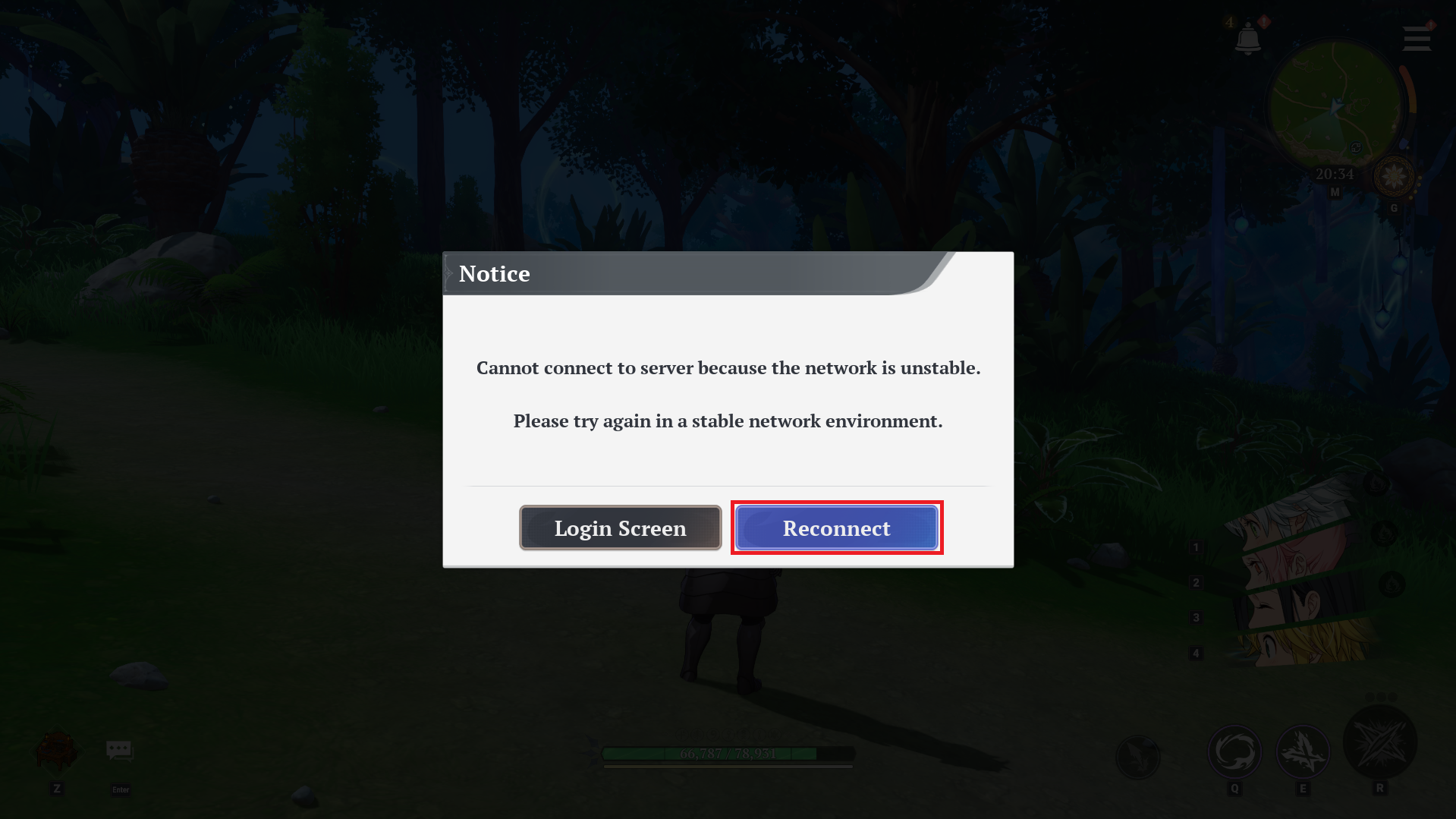
3. After selecting \[Reconnect] and confirming your connection, accept the party invitation again from the Star Guardian you intended to join.
Please refer to the above method when attempting to join a party.
We are currently reviewing this issue and will work to resolve it as soon as possible.
We kindly ask for your understanding regarding any inconvenience caused, and we will do our best to provide a stable service.
Thank you.
What's Your Reaction?