


![[PRO Tips] Gold’s Bullish Revival: Seasonal Trends and Key Levels to Watch](https://xinker.org/uploads/images/202412/image_430x256_67724cc6ad0cd.webp)
![[PRO Tips] Gold Market Under Short-Term Pressure, Safe-Haven Demand and Central Bank Buying Support Long-Term Upside Potential](https://xinker.org/uploads/images/202412/image_430x256_676ffb4685287.webp)
![[PRO Tips] Analysis of 9 key points of differentiation strategy! Master differentiation to create a brand advantage that is unique in the world!](https://firebasestorage.googleapis.com/v0/b/xinker-tips.appspot.com/o/article_thumbnails%2Fscaled_differentiation%20strategy.png.png?alt=media&token=a1bfc3d2-e85a-4db7-8a6d-01c7274f8940)
![[PRO Tips] Will REITs regain growth momentum in 2024? 3 REITs ETFs you must know if you want to invest in real estate.](https://firebasestorage.googleapis.com/v0/b/xinker-tips.appspot.com/o/article_thumbnails%2Fscaled_REITs1.png.png?alt=media&token=8af4eb93-33ff-466f-8039-b6555fad52b4)
![[PRO Tips] Complete tutorial on how to make money in Adobe Stock!](https://firebasestorage.googleapis.com/v0/b/xinker-tips.appspot.com/o/article_thumbnails%2Fscaled_tut-adobe1.png.png?alt=media&token=0b2c8cf2-22bd-4142-883e-140ed1cbaf02)
![[Passive Income] Unlock the secret of passive income: 3 steps to apply for Google AdSense](https://xinker.org/uploads/images/202410/image_430x256_6717a4fb3052b.webp)
![[Passive Income] Earn over $200 a day with AI-generated articles!](https://firebasestorage.googleapis.com/v0/b/xinker-tips.appspot.com/o/article_thumbnails%2Fscaled_article1.png.png?alt=media&token=f61bf35b-8553-4719-826d-7360024adc70)
![[Passive Income] Earn over 20 USD per download with AI-generated images!](https://firebasestorage.googleapis.com/v0/b/xinker-tips.appspot.com/o/article_thumbnails%2Fscaled_adobe2.png.png?alt=media&token=3e20e76a-a907-45af-80aa-bf9b3600301f)
![[Passive Income] Earn 10 USD per new download by sharing CapCut!](https://firebasestorage.googleapis.com/v0/b/xinker-tips.appspot.com/o/article_thumbnails%2Fscaled_capcut2.png.png?alt=media&token=a04dec40-1fac-4857-86f2-19a8be02d38e)
![[Passive Income] Use your WiFi to create passive income in 5 minutes, and you can earn 4-6 U per day!](https://firebasestorage.googleapis.com/v0/b/xinker-tips.appspot.com/o/article_thumbnails%2Fscaled_Grassio.webp.png?alt=media&token=7659a95e-0e47-4f27-a17d-c942ac3cf7f4)


![[Business Talk] The Unique Theme of XINKER's Song: Beef Wellington and Business Mastery](https://xinker.org/uploads/images/202410/image_430x256_671afc155f47f.webp)
![[Business Talk] Chagee: Opening 3,500 stores in 6 years](https://xinker.org/uploads/images/202410/image_430x256_671afce80c5f9.webp)


Lumina Awakens!
Today's Major Version update is scheduled to deploy at approximately [color=#66ccff]2:00 PM Pacific[/color], bringing a new wave of post-Genesis launch fixes alongside the arrival of Dragontopia's newest tameable dragon.The shadow meets its light. [color=#66ccff]Lumina awakens in Dragontopia[/color]! Taking flight as Umbra's radiant counterpart and bringing a brilliant new force to the skies! With celestial power at her command and a bond that burns brightest beside her shadowed kin, Lumina adds a new layer of speed, strategy, and spectacle to the battle above the clouds!The full patch notes are available below, covering gameplay fixes, stability improvements, bug fixes, and post-launch adjustments following the release of Genesis Ascended Part 1 and ARK: Tides of Fortune.Download in full resolutionAvailable now on Steam!Major version of Servers and ClientsDLC: Dragontopia Day One Content Update[color=#ecf0f1]New Tameable Dragon[/color]LuminaThe shadow meets its light. Lumina awakens in Dragontopia.Umbra / Dragontopia FixesFixed several issues on Umbra's DragonhornFixed cases where Umbra's AI struggled to hit its targetFixed an issue that caused Umbra to use abilities when using the Spyglass/Tek Binoculars while mountedFixed several Gamepad issues with UmbraFixed Umbra's Gamepad Sprint control on the HUDFixed Umbra appearing too low when displayed in a Display CaseFixed Deep Diver milestone not progressing with UmbraFixed mindwipe not refunding Dragon Skill Points investedFixed Tracked Dragontopia Milestones all disappearing after completing one of themGeneral FixesFixed inability to craft Cryopods/Cryofridges in Genesis Mission TerminalsFixed creatures getting stuck in Cryopods after starting the Gauntlet missionsFixed rain on the Genesis Ocean biome not refilling water stat or containersFixed an issue that could sometimes cause foliage interaction not to work correctly on GenesisFixed inaccuracies of player location on the Genesis MapFixed an issue on Xbox where audio could be lostFixed an entitlement issue with paid CosmeticsFixed some missing Mission icons in the Mission UIAdjusted various Genesis Outpost mission textFixed issues with HLNA's Ocean Teleports: NE, N, E, W teleporting to the same islandFixed some localization issues with HLNA's reactionsAdded some missing HLNA sound cuesAdjusted some of Tides of Fortune's Skill descriptions to be clearerAdjusted scatter limits on dreadlocks hairstyle to make dye colors truer on dark hairIncreased Hand Cannon's damage by 300%Fixed Hand Cannon having no water interaction when hitting a water surfaceAdjusted Grapeshot ammo crafting requirements to be more reasonableFixed Corrosive Ship Cannonball not having an icon/name/descriptionImproved Bounty Board's map-specific creature whitelisting/blacklistingFixed Treasure Map Bottles being lumped with generic loot crates when using the Treasure Hunter skillPrevented Bio-Grinder from working on mission creaturesPrevented Wisp of Industry skill being activated while seatedFixed not being able to equip the Shovel when owning Tides of FortuneAdded the Tek Bunker to the Tek Replicator's inventoryMegachelon Shell can now be grinded for ChitinFixed Astrocetus not force-landing when flying above the Lost King's city in Lost ColonyPalaeoctopusImproved Palaeoctopus attacks on low-performing serversIncreased melee swing radius on Palaeoctopus swipe attacksFixed an issue where Palaeoctopus would have weird targeting after being unclaimedBloodstalkerFixed Bloodstalker not being cloneableFixed issue where Bloodstalker would correct its climbing location due to the climbing location being stuck inside terrainAdjusted Gamepad controls for Bloodstalker's Submerge ability from LB + L3 → LB + RTMore comfortable control to press, and no longer toggles voice as it did in ASE.TidepupFixed Tidepup not retaining XP once evolvingFixed missing "Ready To Evolve" VFX on Tidepup if it was activated on your shoulder in first-person viewFixed shoulder-mounted dino HUD elements overlapping with shoulder-mounted TidepupGenesis untameable ocean dino spawners will now not spawn close to shores or in playable underwater areasUntameable wild creatures are now named "Feral" instead of "Wild" on their floating nameFixed enemies sometimes spawning clipping the mesh during The Final Test BossHover SkiffFixed Hover Skiff's ramp having no damage overlayFixed Hover Skiff damage overlay not displaying correctlyFixed being unable to build on Hover Skiff sometimesFixed Hoverskiff not having a destructible mesh when destroyedFixed Ammo Box looking filled visually in some languagesFixed Hammock Skin being automatically awarded on Tides of Fortune ownershipFixed an issue with orbit cam rotation when tapping on the Aquarium structureRevised settings for Aquarium SFXSkill Tree Menu hotbar highlight will now appear in the appropriate color for that Skill Tree when dragging an active skillFixed issues where Lost Colony Activatable skills would cause ghost items to fill
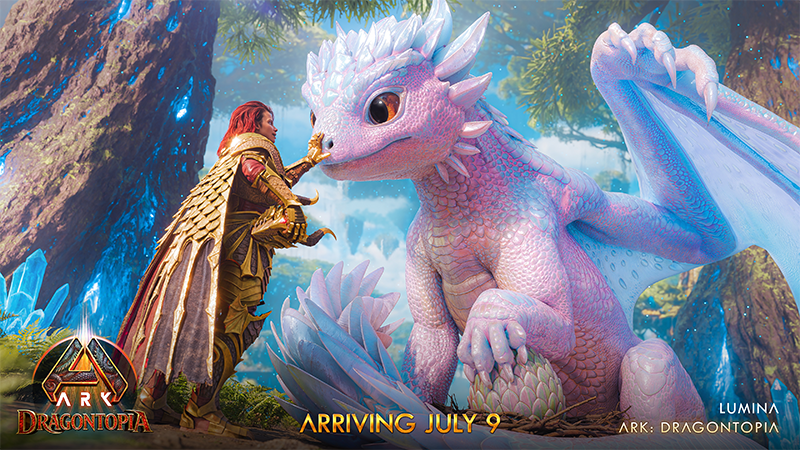

Today's Major Version update is scheduled to deploy at approximately [color=#66ccff]2:00 PM Pacific[/color], bringing a new wave of post-Genesis launch fixes alongside the arrival of Dragontopia's newest tameable dragon.
The shadow meets its light. [color=#66ccff]Lumina awakens in Dragontopia[/color]! Taking flight as Umbra's radiant counterpart and bringing a brilliant new force to the skies! With celestial power at her command and a bond that burns brightest beside her shadowed kin, Lumina adds a new layer of speed, strategy, and spectacle to the battle above the clouds!
The full patch notes are available below, covering gameplay fixes, stability improvements, bug fixes, and post-launch adjustments following the release of Genesis Ascended Part 1 and ARK: Tides of Fortune.
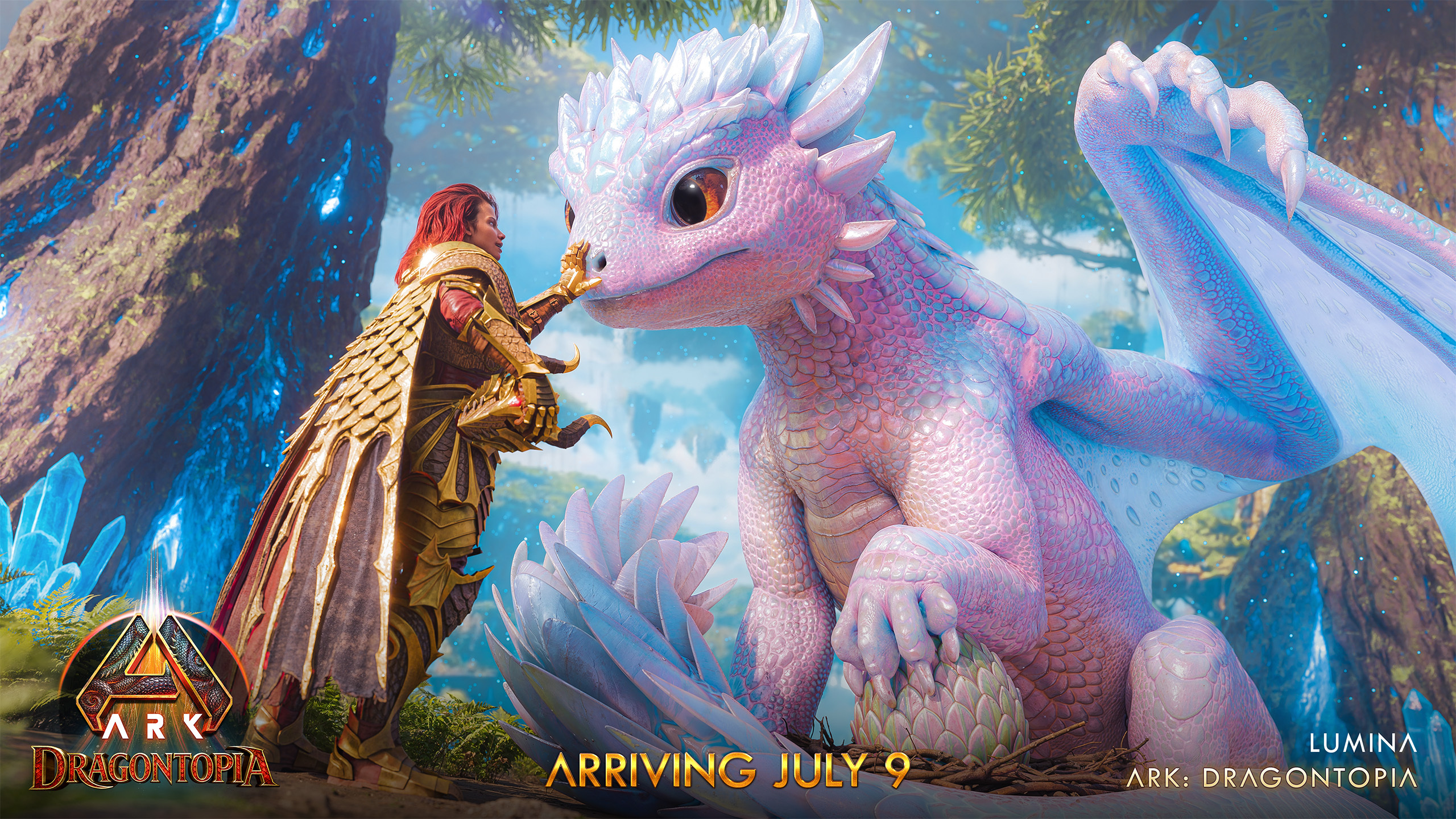
Download in full resolution
Available now on Steam!


Major version of Servers and Clients
DLC: Dragontopia Day One Content Update
- [color=#ecf0f1]New Tameable Dragon[/color]
- Lumina
- The shadow meets its light. Lumina awakens in Dragontopia.
- Lumina
- Umbra / Dragontopia Fixes
- Fixed several issues on Umbra's Dragonhorn
- Fixed cases where Umbra's AI struggled to hit its target
- Fixed an issue that caused Umbra to use abilities when using the Spyglass/Tek Binoculars while mounted
- Fixed several Gamepad issues with Umbra
- Fixed Umbra's Gamepad Sprint control on the HUD
- Fixed Umbra appearing too low when displayed in a Display Case
- Fixed Deep Diver milestone not progressing with Umbra
- Fixed mindwipe not refunding Dragon Skill Points invested
- Fixed Tracked Dragontopia Milestones all disappearing after completing one of them
- Fixed several issues on Umbra's Dragonhorn
General Fixes
- Fixed inability to craft Cryopods/Cryofridges in Genesis Mission Terminals
- Fixed creatures getting stuck in Cryopods after starting the Gauntlet missions
- Fixed rain on the Genesis Ocean biome not refilling water stat or containers
- Fixed an issue that could sometimes cause foliage interaction not to work correctly on Genesis
- Fixed inaccuracies of player location on the Genesis Map
- Fixed an issue on Xbox where audio could be lost
- Fixed an entitlement issue with paid Cosmetics
- Fixed some missing Mission icons in the Mission UI
- Adjusted various Genesis Outpost mission text
- Fixed issues with HLNA's Ocean Teleports: NE, N, E, W teleporting to the same island
- Fixed some localization issues with HLNA's reactions
- Added some missing HLNA sound cues
- Adjusted some of Tides of Fortune's Skill descriptions to be clearer
- Adjusted scatter limits on dreadlocks hairstyle to make dye colors truer on dark hair
- Increased Hand Cannon's damage by 300%
- Fixed Hand Cannon having no water interaction when hitting a water surface
- Adjusted Grapeshot ammo crafting requirements to be more reasonable
- Fixed Corrosive Ship Cannonball not having an icon/name/description
- Improved Bounty Board's map-specific creature whitelisting/blacklisting
- Fixed Treasure Map Bottles being lumped with generic loot crates when using the Treasure Hunter skill
- Prevented Bio-Grinder from working on mission creatures
- Prevented Wisp of Industry skill being activated while seated
- Fixed not being able to equip the Shovel when owning Tides of Fortune
- Added the Tek Bunker to the Tek Replicator's inventory
- Megachelon Shell can now be grinded for Chitin
- Fixed Astrocetus not force-landing when flying above the Lost King's city in Lost Colony
- Palaeoctopus
- Improved Palaeoctopus attacks on low-performing servers
- Increased melee swing radius on Palaeoctopus swipe attacks
- Fixed an issue where Palaeoctopus would have weird targeting after being unclaimed
- Improved Palaeoctopus attacks on low-performing servers
- Bloodstalker
- Fixed Bloodstalker not being cloneable
- Fixed issue where Bloodstalker would correct its climbing location due to the climbing location being stuck inside terrain
- Adjusted Gamepad controls for Bloodstalker's Submerge ability from LB + L3 → LB + RT
- More comfortable control to press, and no longer toggles voice as it did in ASE.
- Fixed Bloodstalker not being cloneable
- Tidepup
- Fixed Tidepup not retaining XP once evolving
- Fixed missing "Ready To Evolve" VFX on Tidepup if it was activated on your shoulder in first-person view
- Fixed shoulder-mounted dino HUD elements overlapping with shoulder-mounted Tidepup
- Fixed Tidepup not retaining XP once evolving
- Genesis untameable ocean dino spawners will now not spawn close to shores or in playable underwater areas
- Untameable wild creatures are now named "Feral" instead of "Wild" on their floating name
- Fixed enemies sometimes spawning clipping the mesh during The Final Test Boss
- Hover Skiff
- Fixed Hover Skiff's ramp having no damage overlay
- Fixed Hover Skiff damage overlay not displaying correctly
- Fixed being unable to build on Hover Skiff sometimes
- Fixed Hoverskiff not having a destructible mesh when destroyed
- Fixed Hover Skiff's ramp having no damage overlay
- Fixed Ammo Box looking filled visually in some languages
- Fixed Hammock Skin being automatically awarded on Tides of Fortune ownership
- Fixed an issue with orbit cam rotation when tapping on the Aquarium structure
- Revised settings for Aquarium SFX
- Skill Tree Menu hotbar highlight will now appear in the appropriate color for that Skill Tree when dragging an active skill
- Fixed issues where Lost Colony Activatable skills would cause ghost items to fill the player inventory
- Fixed several exploits
- Fixed several crashes
Ship Fixes
- Optimized & improved ship physics
- Improved ship buoyancy
- Reduced Sloop's max speed and steering forced by approximately 10%
- Fixed Shipyard not correctly checking for obstruction when placing
- Fixed an issue that could cause a docked ship to be destroyed too easily from the Shipyard
- Fixed an issue with the Shipyard where ships could teleport to previous dock teleport location when launching
- Fixed custom keybindings preventing Ship functionality
- Fixed Steam gamepad controls not working with custom KBM keybindings
- Fixed Ship Skill: Smokescreen not working against Outpost NPC Pirate Ships
- Fixed NPC Pirate Ship's inventory being accessible
- Fixed an issue that caused newly crafted ships to not auto-collect floating cargo
- Fixed ships crafted at Shipyard anchored visually and don't unanchor after moving on Singleplayer
- Fixed desync that could occur while piloting a ship
- Fixed a rare issue that caused structures to appear invisible on ships
- Fixed an issue that could prevent snapping structures on top of each other on a ship
- Fixed damage overlay not displaying on the ship's decks correctly
- Fixed an issue that could cause the ship's steering wheel to take damage
- Fixed inability to use Soap on ships
- Fixed a location near the ladder of ships that could cause you to control the cannons instead of using the ladder
- Fixed various Vacuum Compartment incorrect snapping logic
- Fixed water post-process not being removed when entering a Vacuum compartment placed in the Genesis Ocean biome
- Fixed a jitter that would happen when a player observed a character with armor on an anchored or docked ship
- Fixed Ships Ladder Cover not being destroyed when ships go out of replication range
- Fixed other tribes being able to steal Outpost mission loot with ships on PVE
- Players can now fire the cannons while in first-person view on the ship wheel, for a more immersive experience
- Repair resources required are now displayed on the Shipyard's repair MUW option
- The cannon selection pulse has been disabled; the glow indicating selected cannons on ships is now static.
- Fixed combat music during ship combat not advancing sometimes
- Removed Vehicle HUD tooltip from ships
- Raised Brigantine structure limit to 200
- Raised Sloop structure limit to 75

Alongside today's Major Version update and Lumina's arrival, we also want to share an update on character restoration following the recent Official Network rollback.
Since the rollback, the team has been manually restoring impacted characters, and approximately 20% of reported characters have already been restored through that process.
Alongside that work, we've also been improving the restoration pipeline itself so the remaining impacted characters can be handled more quickly and at a much larger scale and fortunately had a breakthrough. We are now successfully able to systematically identify lost characters reported through our form and programmatically restore them in game. This significantly eliminates the amount of time a single restoration would take, and also lays the groundwork for this process to become automated in the future.
With these improvements, we now expect to have 95% of impacted characters restored by the end of the day, with the remaining complex cases which require manual investigation to be restored by the end of the weekend. We know this has been a frustrating situation for players who have been waiting to get back to their characters, and we appreciate everyone's patience.
If you believe you are still missing a character and have not yet submitted a report, please use the character restoration form here.
Before submitting the form, please check your other servers and the cloud to make sure the character is not already available elsewhere. Once you open the form, follow the steps provided and make sure the information is accurate before submitting.
Please include the following details:
- EOS ID
To find this, enter Single Player, open the console, and type [color=#2ecc71]whoami[/color]. This should display a long string of numbers and letters beginning with [color=#2ecc71]000[/color] (three zeros). - Account name
- Implant number, if available
This is helpful, but restoration can still be completed without it. - Official Network cluster
For example: PvE, PvP, Small Tribes, Console Small Tribes, or another Official cluster.
After your form has been submitted, there is nothing else you need to do while restoration is processed. Once restored, your character will appear in the cloud, so you can check there periodically.
While waiting for restoration, you may continue playing on other characters, but please avoid the following actions:
- Do not transfer other characters through the cloud.
- Do not transfer items through the cloud.
- Do not upload or download items through the cloud.
- Do not upload or download tames through the cloud.
- Do not play Club ARK.
Today's update also includes a range of fixes across gameplay systems, bugs and stability, with more post-launch improvements already in progress. We'll continue monitoring the live environment closely, working through your valuable player reports, and releasing follow-up patches as we move through the launch period.
What's Your Reaction?








XINKER - Business and Income Tips
Explore XINKER, the ultimate platform for mastering business strategies, discovering passive income opportunities, and learning success principles. Join a community of thinkers dedicated to achieving financial freedom and entrepreneurial excellence.

![[Business Talk] Chagee: Opening 3,500 stores in 6 years](https://xinker.org/uploads/images/202410/image_140x98_671afce94bf91.webp)






