
![[PRO Tips] Gold’s Bullish Revival: Seasonal Trends and Key Levels to Watch](https://xinker.org/uploads/images/202412/image_430x256_67724cc6ad0cd.webp)
![[PRO Tips] Gold Market Under Short-Term Pressure, Safe-Haven Demand and Central Bank Buying Support Long-Term Upside Potential](https://xinker.org/uploads/images/202412/image_430x256_676ffb4685287.webp)
![[PRO Tips] Analysis of 9 key points of differentiation strategy! Master differentiation to create a brand advantage that is unique in the world!](https://firebasestorage.googleapis.com/v0/b/xinker-tips.appspot.com/o/article_thumbnails%2Fscaled_differentiation%20strategy.png.png?alt=media&token=a1bfc3d2-e85a-4db7-8a6d-01c7274f8940)
![[PRO Tips] Will REITs regain growth momentum in 2024? 3 REITs ETFs you must know if you want to invest in real estate.](https://firebasestorage.googleapis.com/v0/b/xinker-tips.appspot.com/o/article_thumbnails%2Fscaled_REITs1.png.png?alt=media&token=8af4eb93-33ff-466f-8039-b6555fad52b4)
![[PRO Tips] Complete tutorial on how to make money in Adobe Stock!](https://firebasestorage.googleapis.com/v0/b/xinker-tips.appspot.com/o/article_thumbnails%2Fscaled_tut-adobe1.png.png?alt=media&token=0b2c8cf2-22bd-4142-883e-140ed1cbaf02)
![[Passive Income] Unlock the secret of passive income: 3 steps to apply for Google AdSense](https://xinker.org/uploads/images/202410/image_430x256_6717a4fb3052b.webp)
![[Passive Income] Earn over $200 a day with AI-generated articles!](https://firebasestorage.googleapis.com/v0/b/xinker-tips.appspot.com/o/article_thumbnails%2Fscaled_article1.png.png?alt=media&token=f61bf35b-8553-4719-826d-7360024adc70)
![[Passive Income] Earn over 20 USD per download with AI-generated images!](https://firebasestorage.googleapis.com/v0/b/xinker-tips.appspot.com/o/article_thumbnails%2Fscaled_adobe2.png.png?alt=media&token=3e20e76a-a907-45af-80aa-bf9b3600301f)
![[Passive Income] Earn 10 USD per new download by sharing CapCut!](https://firebasestorage.googleapis.com/v0/b/xinker-tips.appspot.com/o/article_thumbnails%2Fscaled_capcut2.png.png?alt=media&token=a04dec40-1fac-4857-86f2-19a8be02d38e)
![[Passive Income] Use your WiFi to create passive income in 5 minutes, and you can earn 4-6 U per day!](https://firebasestorage.googleapis.com/v0/b/xinker-tips.appspot.com/o/article_thumbnails%2Fscaled_Grassio.webp.png?alt=media&token=7659a95e-0e47-4f27-a17d-c942ac3cf7f4)


![[Business Talk] The Unique Theme of XINKER's Song: Beef Wellington and Business Mastery](https://xinker.org/uploads/images/202410/image_430x256_671afc155f47f.webp)
![[Business Talk] Chagee: Opening 3,500 stores in 6 years](https://xinker.org/uploads/images/202410/image_430x256_671afce80c5f9.webp)


Loverwatch
LoverwatchLoverwatch is back from 2/13-3/1 to engage on and beyond the battlefield, bringing some light, heartfelt fun for Valentine’s Day. Play through the web event on desktop or mobile, spend time with iconic Heroes, uncover inside jokes and easter eggs, and earn sweet returning rewards along the way. This year, Loverwatch is more accessible than ever, with improved mobile support and new language options so more players can find join the fun. And of course, you can discover your love of geometry with Hanzo. Love is back in the air, and it never dies! Valentine's Day Bundles Loverwatch.gg Relaunch: Known Issues Q&AWe're excited to announce the relaunch of Loverwatch.gg — bringing meaningful improvements to the overall experience, including better mobile support. Loverwatch.gg is a browser-based experience built primarily for desktop PC & Mac desktops. While we've made solid strides in mobile compatibility, performance on phones and tablets still depends heavily on the device, browser, and available resources. Here's a compilation of clear info for the most common questions and fixes.Q: What are the minimum specs to run Loverwatch.gg on a mobile browser?A: Given the specific mobile-browser limitations per device we recommend the following specs for a playable experience:- Android 10+ or iOS 26+- At least 6GB RAM- Latest Chrome or Safari (strong WebGL support)- Qualcomm Snapdragon 8 Gen 1+ or Apple A15+ ProcessorDevices below these specs may experience longer load times or occasional stuttering.Q: Should I play in Landscape or Portrait Mode?A: Play in Landscape (horizontal) mode for the best results. The game’s layout, artwork, and interactive elements are optimized for wider screens. Portrait Mode can hide parts of the UI or make navigation less intuitive.Q: Why am I getting a blank screen, restarts, glitches, or strange behavior on mobile?A: These issues usually come from limited device memory or browser overload. Try this quick fix sequence:Close all other apps and browser tabs to free RAM.Clear your browser cache (Settings > Privacy > Clear browsing data → focus on cached images/files).Restart the browser and reload loverwatch.ggincognito/private mode can help avoid extension conflicts.Most players see these problems disappear after freeing memory. For the smoothest, most reliable experience we designed, a PC or M remains the gold standard.Thanks for joining us on the relaunch! We’ve tuned things up so more players can engage on and beyond the battlefield. Loverwatch is in the air and we’re taking a deep breath.
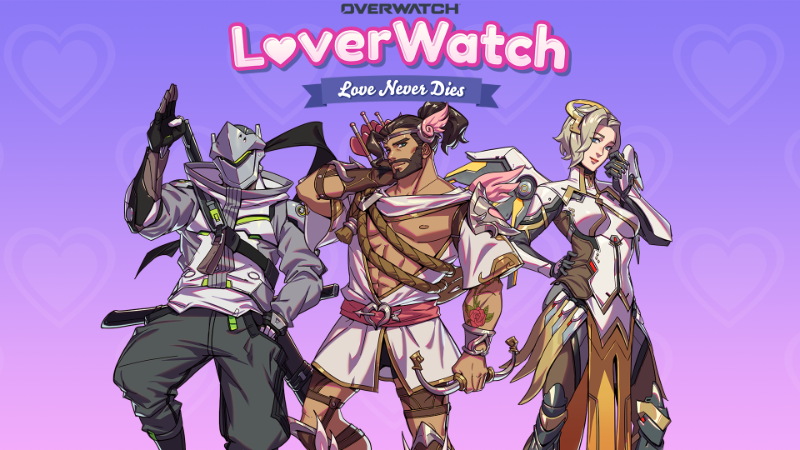

Loverwatch is back from 2/13-3/1 to engage on and beyond the battlefield, bringing some light, heartfelt fun for Valentine’s Day. Play through the web event on desktop or mobile, spend time with iconic Heroes, uncover inside jokes and easter eggs, and earn sweet returning rewards along the way. This year, Loverwatch is more accessible than ever, with improved mobile support and new language options so more players can find join the fun. And of course, you can discover your love of geometry with Hanzo. Love is back in the air, and it never dies!


We're excited to announce the relaunch of Loverwatch.gg — bringing meaningful improvements to the overall experience, including better mobile support. Loverwatch.gg is a browser-based experience built primarily for desktop PC & Mac desktops. While we've made solid strides in mobile compatibility, performance on phones and tablets still depends heavily on the device, browser, and available resources. Here's a compilation of clear info for the most common questions and fixes.
Q: What are the minimum specs to run Loverwatch.gg on a mobile browser?
A: Given the specific mobile-browser limitations per device we recommend the following specs for a playable experience:
- Android 10+ or iOS 26+
- At least 6GB RAM
- Latest Chrome or Safari (strong WebGL support)
- Qualcomm Snapdragon 8 Gen 1+ or Apple A15+ Processor
Devices below these specs may experience longer load times or occasional stuttering.
Q: Should I play in Landscape or Portrait Mode?
A: Play in Landscape (horizontal) mode for the best results. The game’s layout, artwork, and interactive elements are optimized for wider screens. Portrait Mode can hide parts of the UI or make navigation less intuitive.
Q: Why am I getting a blank screen, restarts, glitches, or strange behavior on mobile?
A: These issues usually come from limited device memory or browser overload. Try this quick fix sequence:
Close all other apps and browser tabs to free RAM.
Clear your browser cache (Settings > Privacy > Clear browsing data → focus on cached images/files).
Restart the browser and reload loverwatch.gg
incognito/private mode can help avoid extension conflicts.
Most players see these problems disappear after freeing memory. For the smoothest, most reliable experience we designed, a PC or M remains the gold standard.
Thanks for joining us on the relaunch! We’ve tuned things up so more players can engage on and beyond the battlefield. Loverwatch is in the air and we’re taking a deep breath.
What's Your Reaction?