





![[PRO Tips] Gold’s Bullish Revival: Seasonal Trends and Key Levels to Watch](https://xinker.org/uploads/images/202412/image_430x256_67724cc6ad0cd.webp)
![[PRO Tips] Gold Market Under Short-Term Pressure, Safe-Haven Demand and Central Bank Buying Support Long-Term Upside Potential](https://xinker.org/uploads/images/202412/image_430x256_676ffb4685287.webp)
![[PRO Tips] Analysis of 9 key points of differentiation strategy! Master differentiation to create a brand advantage that is unique in the world!](https://firebasestorage.googleapis.com/v0/b/xinker-tips.appspot.com/o/article_thumbnails%2Fscaled_differentiation%20strategy.png.png?alt=media&token=a1bfc3d2-e85a-4db7-8a6d-01c7274f8940)
![[PRO Tips] Will REITs regain growth momentum in 2024? 3 REITs ETFs you must know if you want to invest in real estate.](https://firebasestorage.googleapis.com/v0/b/xinker-tips.appspot.com/o/article_thumbnails%2Fscaled_REITs1.png.png?alt=media&token=8af4eb93-33ff-466f-8039-b6555fad52b4)
![[PRO Tips] Complete tutorial on how to make money in Adobe Stock!](https://firebasestorage.googleapis.com/v0/b/xinker-tips.appspot.com/o/article_thumbnails%2Fscaled_tut-adobe1.png.png?alt=media&token=0b2c8cf2-22bd-4142-883e-140ed1cbaf02)
![[Passive Income] Unlock the secret of passive income: 3 steps to apply for Google AdSense](https://xinker.org/uploads/images/202410/image_430x256_6717a4fb3052b.webp)
![[Passive Income] Earn over $200 a day with AI-generated articles!](https://firebasestorage.googleapis.com/v0/b/xinker-tips.appspot.com/o/article_thumbnails%2Fscaled_article1.png.png?alt=media&token=f61bf35b-8553-4719-826d-7360024adc70)
![[Passive Income] Earn over 20 USD per download with AI-generated images!](https://firebasestorage.googleapis.com/v0/b/xinker-tips.appspot.com/o/article_thumbnails%2Fscaled_adobe2.png.png?alt=media&token=3e20e76a-a907-45af-80aa-bf9b3600301f)
![[Passive Income] Earn 10 USD per new download by sharing CapCut!](https://firebasestorage.googleapis.com/v0/b/xinker-tips.appspot.com/o/article_thumbnails%2Fscaled_capcut2.png.png?alt=media&token=a04dec40-1fac-4857-86f2-19a8be02d38e)
![[Passive Income] Use your WiFi to create passive income in 5 minutes, and you can earn 4-6 U per day!](https://firebasestorage.googleapis.com/v0/b/xinker-tips.appspot.com/o/article_thumbnails%2Fscaled_Grassio.webp.png?alt=media&token=7659a95e-0e47-4f27-a17d-c942ac3cf7f4)


![[Business Talk] The Unique Theme of XINKER's Song: Beef Wellington and Business Mastery](https://xinker.org/uploads/images/202410/image_430x256_671afc155f47f.webp)
![[Business Talk] Chagee: Opening 3,500 stores in 6 years](https://xinker.org/uploads/images/202410/image_430x256_671afce80c5f9.webp)


How to use the watch in Phasmophobia
Phasmophobia's player character update completely reworked just about everything about the player character model. It also introduced a new item, the player watch, which can actually be interacted with and used during investigations. Unlike all other items, this one is attached to your avatar, so figuring out what it actually does and how to make use of it can be rather tricky. It's an extremely useful item you shouldn't overlook, though, so here's how to use the watch in Phasmophobia.Table of contentsWhat does the watch do in Phasmophobia?How to view your watch in PhasmophobiaHow to equip the watch in PhasmophobiaWhat does the watch do in Phasmophobia? Screenshot by Destructoid The watch is a multifunctional tool with a few different helpful uses in Phasmophobia. It monitors your sanity, keeps track of elapsed time, and lets you know when the microphone is in use, offering a few different useful functions you'll want to rely on during investigations. The circle around the outside of the watch tracks your sanity. This is the only tool you can consistently use to monitor this stat from outside of the truck. The timer in the middle of the watch keeps track of how long you've been in the contract. You can keep an eye on it once you head inside to track when the setup time has ended. The microphone icon near the bottom of the watch lets you know when your microphone is being picked up. When active, the icon changes from transparent grey to solid white. How to view your watch in Phasmophobia There are two ways to view and use your watch in Phasmophobia, depending on whether or not you're holding something in your left hand. You can check out your watch by either opening the Journal or holding down the use button. The first, and generally easiest method, is simply to open your Journal. Your left hand will usually be holding something, typically your Flashlight, so opening your Journal is the most effective way to quickly get a glimpse at it. Whenever you open your journal, both your hands hold it, allowing you to see the watch strapped to your left wrist. The second method, which only works when your left hand is empty, is to hold down the use button. This button varies by platform and can be freely adjusted, so if you aren't sure what it is for you, open your Journal, select Options, switch over to the Controls page, and scroll down to find the Hold Use text. Whatever button is listed next to it is what you need to press and hold to view your watch while playing. You can also adjust the assigned button from this page if you don't like what it defaults to. Screenshot by Destructoid How to equip the watch in Phasmophobia The watch is always equipped on everyone by default, so you don't need to do anything to put it on. There's also no way to remove it, so you'll always have this tool at your disposal in every contract you tackle. Now that you know how this useful tool works, you're ready to take on some of the tougher tasks you can tackle in Phasmophobia. If you're not sure what to try, consider working on the weekly challenge, capturing unique evidence, identifying a Dayan, and getting all hidden achievements. The post How to use the watch in Phasmophobia appeared first on Destructoid.
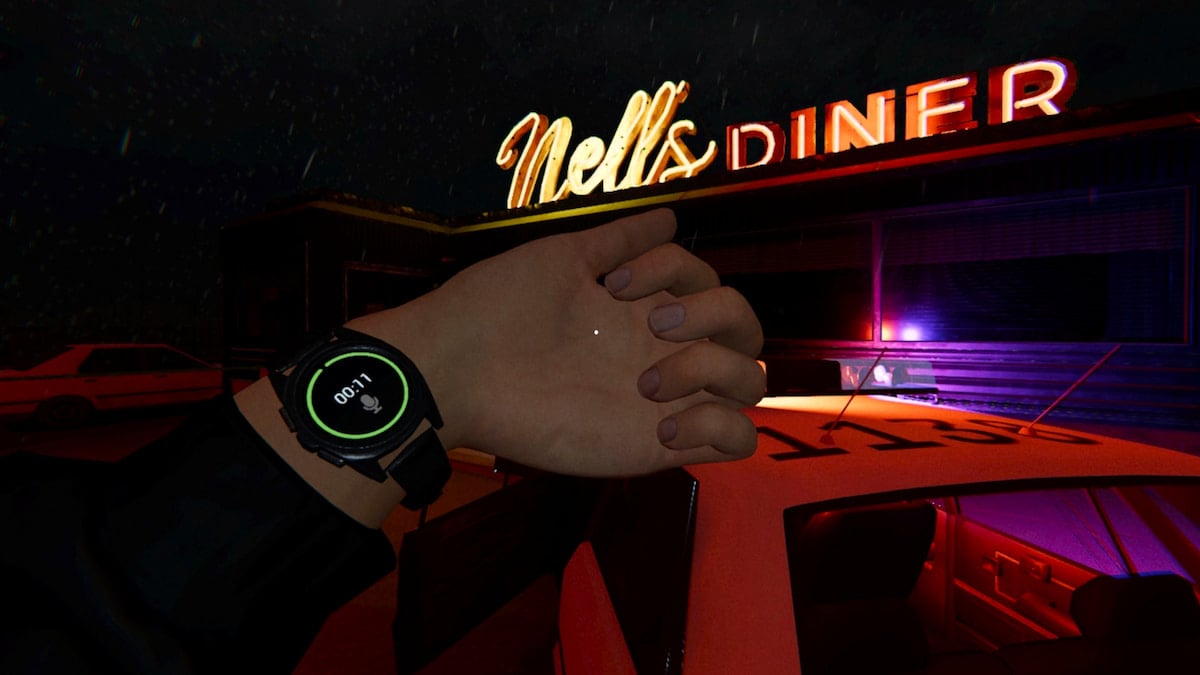
Phasmophobia's player character update completely reworked just about everything about the player character model. It also introduced a new item, the player watch, which can actually be interacted with and used during investigations.
Unlike all other items, this one is attached to your avatar, so figuring out what it actually does and how to make use of it can be rather tricky. It's an extremely useful item you shouldn't overlook, though, so here's how to use the watch in Phasmophobia.
Table of contents
- What does the watch do in Phasmophobia?
- How to view your watch in Phasmophobia
- How to equip the watch in Phasmophobia
What does the watch do in Phasmophobia?
 Screenshot by Destructoid The watch is a multifunctional tool with a few different helpful uses in Phasmophobia. It monitors your sanity, keeps track of elapsed time, and lets you know when the microphone is in use, offering a few different useful functions you'll want to rely on during investigations.
 - The circle around the outside of the watch tracks your sanity. This is the only tool you can consistently use to monitor this stat from outside of the truck.
- The timer in the middle of the watch keeps track of how long you've been in the contract. You can keep an eye on it once you head inside to track when the setup time has ended.
- The microphone icon near the bottom of the watch lets you know when your microphone is being picked up. When active, the icon changes from transparent grey to solid white.
How to view your watch in Phasmophobia
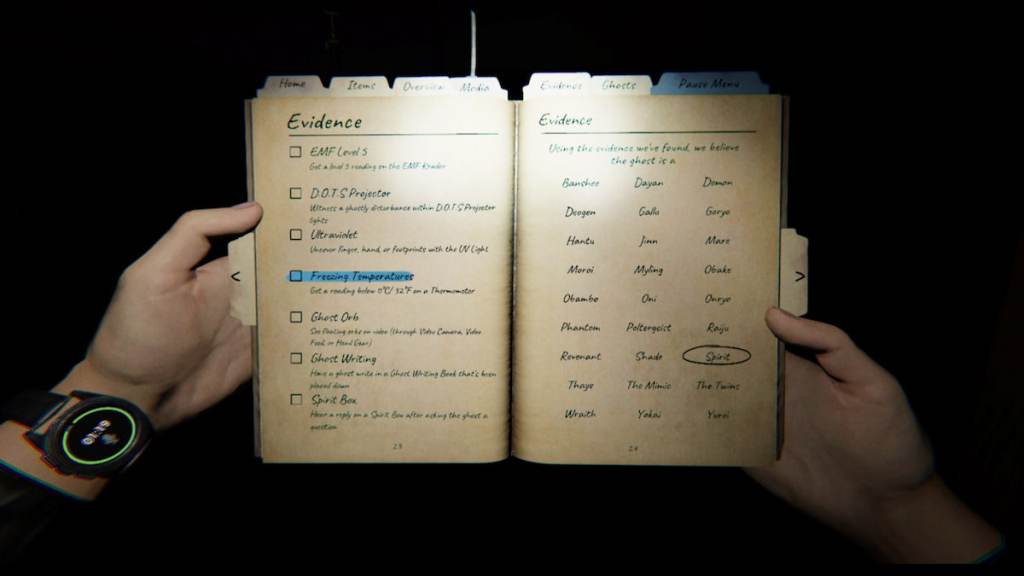
There are two ways to view and use your watch in Phasmophobia, depending on whether or not you're holding something in your left hand. You can check out your watch by either opening the Journal or holding down the use button. - The first, and generally easiest method, is simply to open your Journal. Your left hand will usually be holding something, typically your Flashlight, so opening your Journal is the most effective way to quickly get a glimpse at it. Whenever you open your journal, both your hands hold it, allowing you to see the watch strapped to your left wrist.
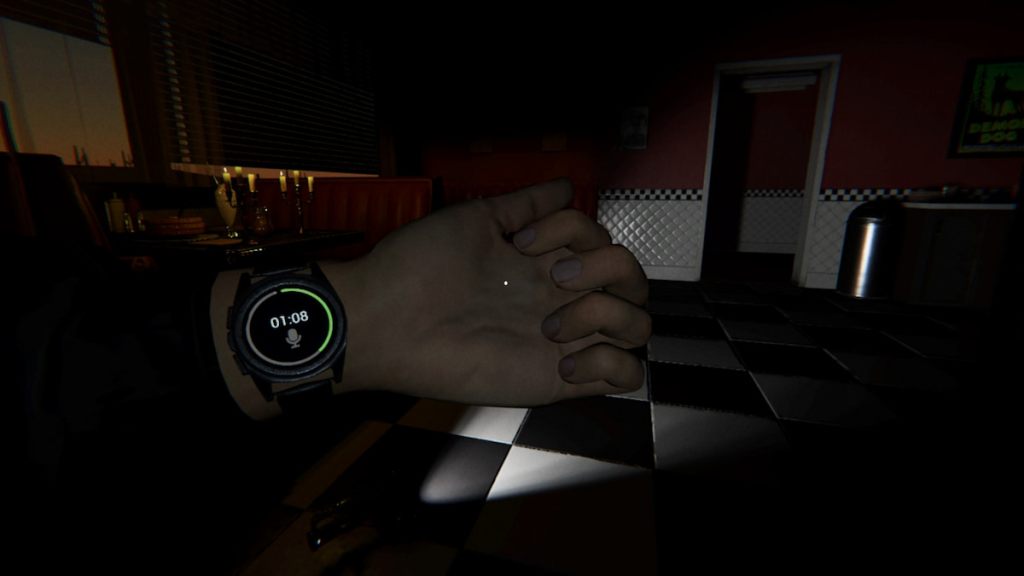
- The second method, which only works when your left hand is empty, is to hold down the use button. This button varies by platform and can be freely adjusted, so if you aren't sure what it is for you, open your Journal, select Options, switch over to the Controls page, and scroll down to find the Hold Use text. Whatever button is listed next to it is what you need to press and hold to view your watch while playing. You can also adjust the assigned button from this page if you don't like what it defaults to.
 Screenshot by Destructoid
 How to equip the watch in Phasmophobia
The watch is always equipped on everyone by default, so you don't need to do anything to put it on. There's also no way to remove it, so you'll always have this tool at your disposal in every contract you tackle. Now that you know how this useful tool works, you're ready to take on some of the tougher tasks you can tackle in Phasmophobia. If you're not sure what to try, consider working on the weekly challenge, capturing unique evidence, identifying a Dayan, and getting all hidden achievements.
The post How to use the watch in Phasmophobia appeared first on Destructoid.
What's Your Reaction?








XINKER - Business and Income Tips
Explore XINKER, the ultimate platform for mastering business strategies, discovering passive income opportunities, and learning success principles. Join a community of thinkers dedicated to achieving financial freedom and entrepreneurial excellence.


![[Business Talk] Chagee: Opening 3,500 stores in 6 years](https://xinker.org/uploads/images/202410/image_140x98_671afce94bf91.webp)






