


![[PRO Tips] Gold’s Bullish Revival: Seasonal Trends and Key Levels to Watch](https://xinker.org/uploads/images/202412/image_430x256_67724cc6ad0cd.webp)
![[PRO Tips] Gold Market Under Short-Term Pressure, Safe-Haven Demand and Central Bank Buying Support Long-Term Upside Potential](https://xinker.org/uploads/images/202412/image_430x256_676ffb4685287.webp)
![[PRO Tips] Analysis of 9 key points of differentiation strategy! Master differentiation to create a brand advantage that is unique in the world!](https://firebasestorage.googleapis.com/v0/b/xinker-tips.appspot.com/o/article_thumbnails%2Fscaled_differentiation%20strategy.png.png?alt=media&token=a1bfc3d2-e85a-4db7-8a6d-01c7274f8940)
![[PRO Tips] Will REITs regain growth momentum in 2024? 3 REITs ETFs you must know if you want to invest in real estate.](https://firebasestorage.googleapis.com/v0/b/xinker-tips.appspot.com/o/article_thumbnails%2Fscaled_REITs1.png.png?alt=media&token=8af4eb93-33ff-466f-8039-b6555fad52b4)
![[PRO Tips] Complete tutorial on how to make money in Adobe Stock!](https://firebasestorage.googleapis.com/v0/b/xinker-tips.appspot.com/o/article_thumbnails%2Fscaled_tut-adobe1.png.png?alt=media&token=0b2c8cf2-22bd-4142-883e-140ed1cbaf02)
![[Passive Income] Unlock the secret of passive income: 3 steps to apply for Google AdSense](https://xinker.org/uploads/images/202410/image_430x256_6717a4fb3052b.webp)
![[Passive Income] Earn over $200 a day with AI-generated articles!](https://firebasestorage.googleapis.com/v0/b/xinker-tips.appspot.com/o/article_thumbnails%2Fscaled_article1.png.png?alt=media&token=f61bf35b-8553-4719-826d-7360024adc70)
![[Passive Income] Earn over 20 USD per download with AI-generated images!](https://firebasestorage.googleapis.com/v0/b/xinker-tips.appspot.com/o/article_thumbnails%2Fscaled_adobe2.png.png?alt=media&token=3e20e76a-a907-45af-80aa-bf9b3600301f)
![[Passive Income] Earn 10 USD per new download by sharing CapCut!](https://firebasestorage.googleapis.com/v0/b/xinker-tips.appspot.com/o/article_thumbnails%2Fscaled_capcut2.png.png?alt=media&token=a04dec40-1fac-4857-86f2-19a8be02d38e)
![[Passive Income] Use your WiFi to create passive income in 5 minutes, and you can earn 4-6 U per day!](https://firebasestorage.googleapis.com/v0/b/xinker-tips.appspot.com/o/article_thumbnails%2Fscaled_Grassio.webp.png?alt=media&token=7659a95e-0e47-4f27-a17d-c942ac3cf7f4)


![[Business Talk] The Unique Theme of XINKER's Song: Beef Wellington and Business Mastery](https://xinker.org/uploads/images/202410/image_430x256_671afc155f47f.webp)
![[Business Talk] Chagee: Opening 3,500 stores in 6 years](https://xinker.org/uploads/images/202410/image_430x256_671afce80c5f9.webp)


How to use the Loot Filter in Diablo 2 Resurrected
Diablo 2 Resurrected is quickly gaining the attention of ARPG fans with the revamped version, and the Loot Filter is one of several new features. The Loot Filter has been exclusively introduced in the Resurrected version, and it allows you to gather resources cleanly. You can also import the Loot Filter from another player if you don't want to go through the tough process. This guide will help you to set up your filter from scratch so that you can get the exact loot you're looking for.Table of contentsHow to find the Loot Filter in Diablo 2 ResurrectedHow to create a Loot Filter in Diablo 2 ResurrectedHow to import a Loot Filter in Diablo 2 ResurrectedHow to find the Loot Filter in Diablo 2 Resurrected Finding the Loot Filter is the easier task. Blizzard has ensured that just about anyone can find the filter early in their game. Press the Esc button to open the menu, and you'll be able to find the dedicated Loot Filter option. From there, you can proceed to create your Loot Filter.How to create a Loot Filter in Diablo 2 Resurrected There are certain settings you'll need to choose to create your Loot Filter. Image via Blizzard Either click the + button to create a new profile, or use one that you've already made.Select a Rule type: Hide or Show.Choose the Rarity types under your chosen rule.Choose the Quality types.Add any specific equipment that you either want to be shown or hidden. The same also applies to any item.Close the Rule, and repeat the process if you want to. In Diablo 2 Resurrected, Show always bypasses Hide. If you don't want a specific item/rarity to be shown, make sure that it's hidden from all areas. If the item/rarity has shown under at least one segment of the rule, it will be revealed. If you don't specify what you want to see under a Show rule, it will reveal everything.How to import a Loot Filter in Diablo 2 Resurrected The process of importing a Loot Filter is quite easy. Go to the Loot Filter option, and click the Import button. You must have copied a code; proceed to paste it, and the filter will be applicable to your profile. You can do the same with the Import from Clickboard button. Confirm, and the new filter will be active. You can also share your own Loot Filter from the same section. Once you've copied the code, you can then share it with your friend/social media if you want someone else to benefit. The post How to use the Loot Filter in Diablo 2 Resurrected appeared first on Destructoid.

Diablo 2 Resurrected is quickly gaining the attention of ARPG fans with the revamped version, and the Loot Filter is one of several new features.
The Loot Filter has been exclusively introduced in the Resurrected version, and it allows you to gather resources cleanly. You can also import the Loot Filter from another player if you don't want to go through the tough process.
This guide will help you to set up your filter from scratch so that you can get the exact loot you're looking for.
Table of contents
- How to find the Loot Filter in Diablo 2 Resurrected
- How to create a Loot Filter in Diablo 2 Resurrected
- How to import a Loot Filter in Diablo 2 Resurrected
How to find the Loot Filter in Diablo 2 Resurrected
Finding the Loot Filter is the easier task. Blizzard has ensured that just about anyone can find the filter early in their game. Press the Esc button to open the menu, and you'll be able to find the dedicated Loot Filter option.From there, you can proceed to create your Loot Filter.
How to create a Loot Filter in Diablo 2 Resurrected
There are certain settings you'll need to choose to create your Loot Filter.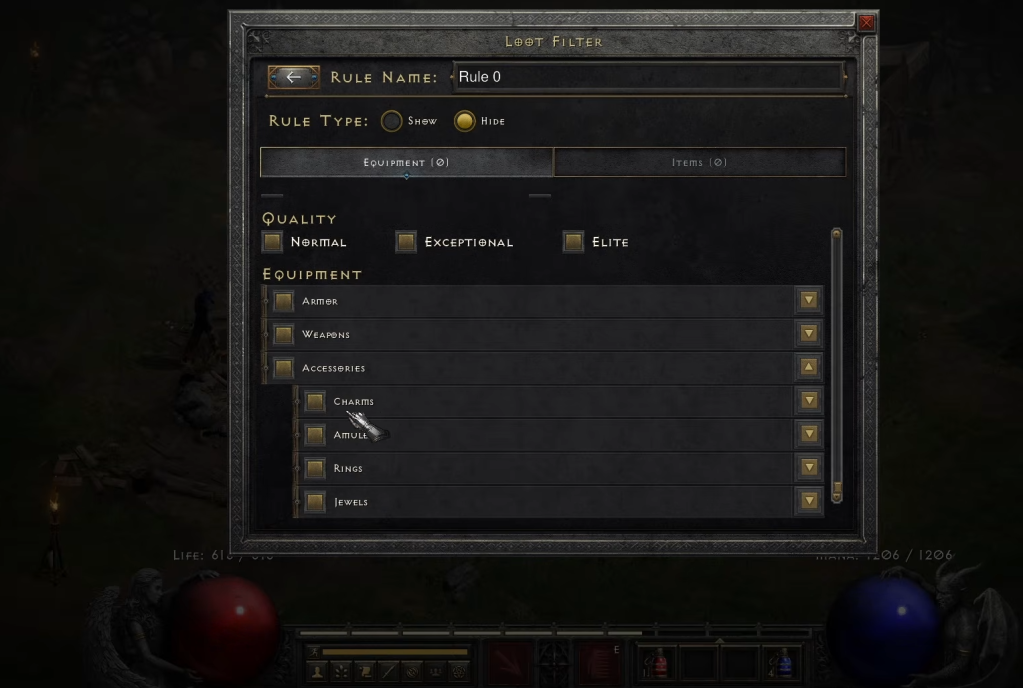 Image via Blizzard
 - Either click the + button to create a new profile, or use one that you've already made.
- Select a Rule type: Hide or Show.
- Choose the Rarity types under your chosen rule.
- Choose the Quality types.
- Add any specific equipment that you either want to be shown or hidden. The same also applies to any item.
- Close the Rule, and repeat the process if you want to.
How to import a Loot Filter in Diablo 2 Resurrected
The process of importing a Loot Filter is quite easy. Go to the Loot Filter option, and click the Import button. You must have copied a code; proceed to paste it, and the filter will be applicable to your profile. You can do the same with the Import from Clickboard button. Confirm, and the new filter will be active.You can also share your own Loot Filter from the same section. Once you've copied the code, you can then share it with your friend/social media if you want someone else to benefit.
The post How to use the Loot Filter in Diablo 2 Resurrected appeared first on Destructoid.
What's Your Reaction?








XINKER - Business and Income Tips
Explore XINKER, the ultimate platform for mastering business strategies, discovering passive income opportunities, and learning success principles. Join a community of thinkers dedicated to achieving financial freedom and entrepreneurial excellence.