



![[PRO Tips] Gold’s Bullish Revival: Seasonal Trends and Key Levels to Watch](https://xinker.org/uploads/images/202412/image_430x256_67724cc6ad0cd.webp)
![[PRO Tips] Gold Market Under Short-Term Pressure, Safe-Haven Demand and Central Bank Buying Support Long-Term Upside Potential](https://xinker.org/uploads/images/202412/image_430x256_676ffb4685287.webp)
![[PRO Tips] Analysis of 9 key points of differentiation strategy! Master differentiation to create a brand advantage that is unique in the world!](https://firebasestorage.googleapis.com/v0/b/xinker-tips.appspot.com/o/article_thumbnails%2Fscaled_differentiation%20strategy.png.png?alt=media&token=a1bfc3d2-e85a-4db7-8a6d-01c7274f8940)
![[PRO Tips] Will REITs regain growth momentum in 2024? 3 REITs ETFs you must know if you want to invest in real estate.](https://firebasestorage.googleapis.com/v0/b/xinker-tips.appspot.com/o/article_thumbnails%2Fscaled_REITs1.png.png?alt=media&token=8af4eb93-33ff-466f-8039-b6555fad52b4)
![[PRO Tips] Complete tutorial on how to make money in Adobe Stock!](https://firebasestorage.googleapis.com/v0/b/xinker-tips.appspot.com/o/article_thumbnails%2Fscaled_tut-adobe1.png.png?alt=media&token=0b2c8cf2-22bd-4142-883e-140ed1cbaf02)
![[Passive Income] Unlock the secret of passive income: 3 steps to apply for Google AdSense](https://xinker.org/uploads/images/202410/image_430x256_6717a4fb3052b.webp)
![[Passive Income] Earn over $200 a day with AI-generated articles!](https://firebasestorage.googleapis.com/v0/b/xinker-tips.appspot.com/o/article_thumbnails%2Fscaled_article1.png.png?alt=media&token=f61bf35b-8553-4719-826d-7360024adc70)
![[Passive Income] Earn over 20 USD per download with AI-generated images!](https://firebasestorage.googleapis.com/v0/b/xinker-tips.appspot.com/o/article_thumbnails%2Fscaled_adobe2.png.png?alt=media&token=3e20e76a-a907-45af-80aa-bf9b3600301f)
![[Passive Income] Earn 10 USD per new download by sharing CapCut!](https://firebasestorage.googleapis.com/v0/b/xinker-tips.appspot.com/o/article_thumbnails%2Fscaled_capcut2.png.png?alt=media&token=a04dec40-1fac-4857-86f2-19a8be02d38e)
![[Passive Income] Use your WiFi to create passive income in 5 minutes, and you can earn 4-6 U per day!](https://firebasestorage.googleapis.com/v0/b/xinker-tips.appspot.com/o/article_thumbnails%2Fscaled_Grassio.webp.png?alt=media&token=7659a95e-0e47-4f27-a17d-c942ac3cf7f4)


![[Business Talk] The Unique Theme of XINKER's Song: Beef Wellington and Business Mastery](https://xinker.org/uploads/images/202410/image_430x256_671afc155f47f.webp)
![[Business Talk] Chagee: Opening 3,500 stores in 6 years](https://xinker.org/uploads/images/202410/image_430x256_671afce80c5f9.webp)


How to use the Jam Track Player in Fortnite
Most missions you're given in Fortnite ask you to tackle specific tasks associated with various locations, items, and characters around the island. Sometimes, though, you're instead given ones that involve more general game features, as is the case with the use the Jam Track Player mission. This is one of the key Kickstart series quests featured in Chapter Seven, season two, but it's also a mission that might pop up in your dailies or other quest series every now and then. Because of this, it's a crucial one to learn, as it's quite easy to finish once you know what needs to be done, and super rewarding in XP. Here's how to use the Jam Track Player in Fortnite. Table of contentsHow do you use the Jam Track Player in Fortnite?How to stop Jam Track Player in FortniteHow do you use the Jam Track Player in Fortnite? Screenshot by Destructoid To complete the use the Jam Track Player Fortnite, you need to select and play one Jam Track, which can be done through the Emote menu. This process is a bit tricky to find the first time around, since it's somewhat hidden, so here's a full breakdown of how to make it happen. Wait until you're on the main island. All quests can only be tackled once you're on the official main island, not the starting one, so don't try to get it done until you're at a safe spot around the main area. Press and hold the emote button. It varies by platform, but you can check your settings if you don't know what you have this action bound to. By default, it's B on PC and D-Pad on console. Scroll or select the Jam Tracks page. Look at the options near the top of the screen. You start off on the Emote page, so scroll to reach or select the Jam Tracks page. Choose a Jam Track. Once you're on the Jam Track page, scroll through the songs listed there until you find one you want to play. All songs work for this quest, so pick whichever one you feel like. Release the emote button. While hovering over your desired song, release the emote button to make it start playing. You'll then hear the song as you traverse around the island. As soon as the song starts playing, you'll officially complete the use the Jam Track Player quest. How to stop Jam Track Player in Fortnite If you want to stop playing a song from the Jam Track Player, you can do so by pressing and holding the button listed next to the "Stop Jam Track" option in the bottom right corner. Screenshot and remix by Destructoid There's still plenty more to get done around the island. If you're not sure what to work on next, consider venturing to all NPC locations, finding all Chaos Cubes, deciding whether to join Team Foundation or Team Ice King, and finding the Ice King. The post How to use the Jam Track Player in Fortnite appeared first on Destructoid.
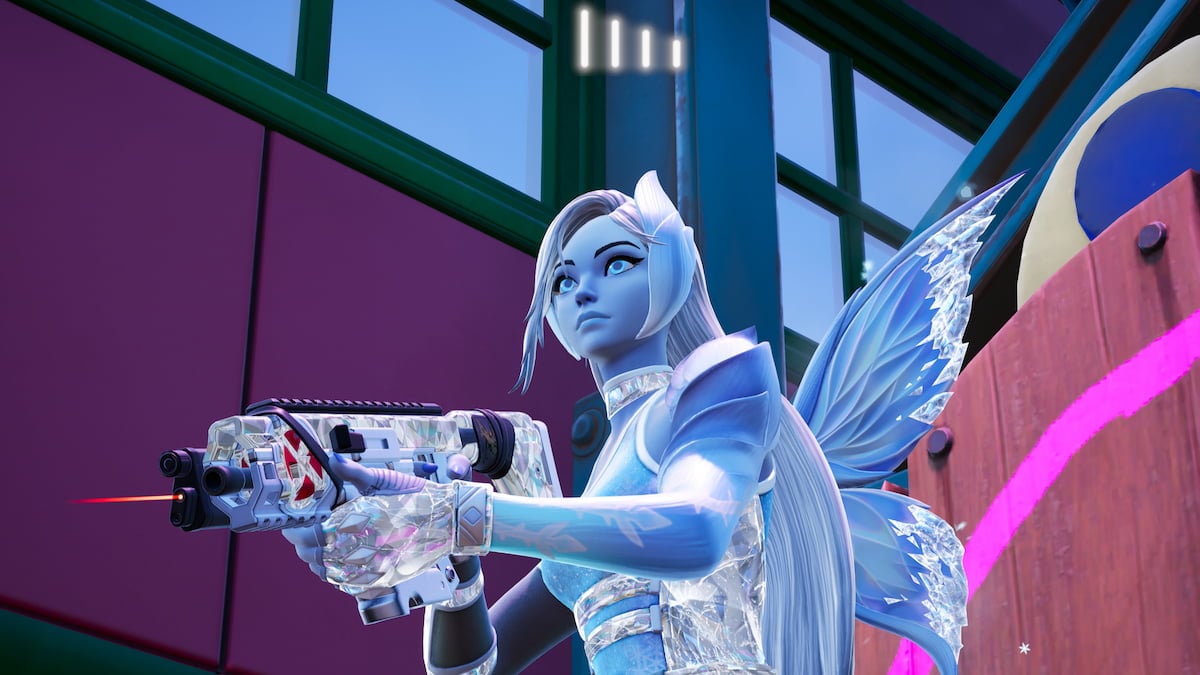
Most missions you're given in Fortnite ask you to tackle specific tasks associated with various locations, items, and characters around the island. Sometimes, though, you're instead given ones that involve more general game features, as is the case with the use the Jam Track Player mission.
This is one of the key Kickstart series quests featured in Chapter Seven, season two, but it's also a mission that might pop up in your dailies or other quest series every now and then. Because of this, it's a crucial one to learn, as it's quite easy to finish once you know what needs to be done, and super rewarding in XP. Here's how to use the Jam Track Player in Fortnite.
Table of contents
How do you use the Jam Track Player in Fortnite?
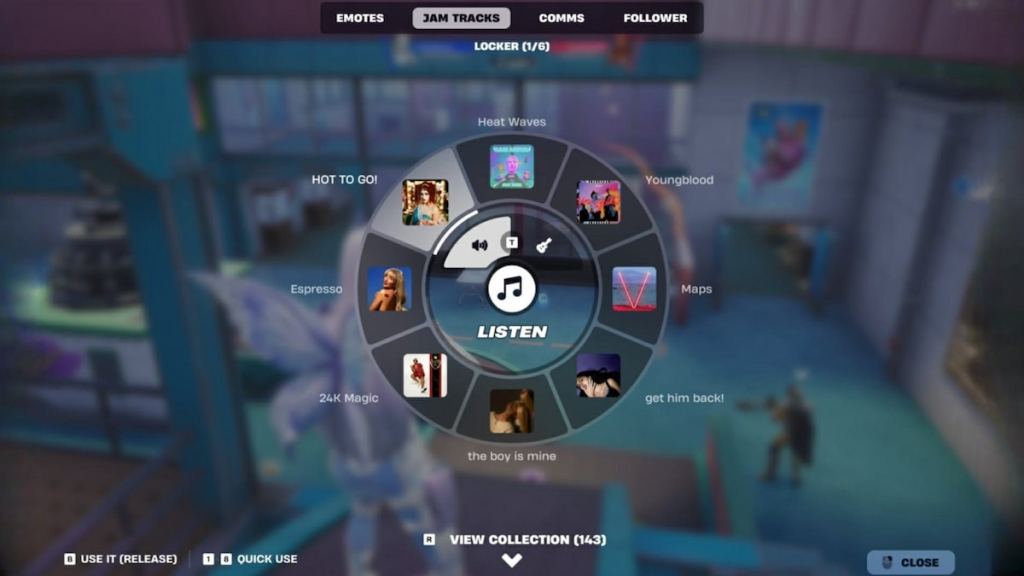 Screenshot by Destructoid To complete the use the Jam Track Player Fortnite, you need to select and play one Jam Track, which can be done through the Emote menu. This process is a bit tricky to find the first time around, since it's somewhat hidden, so here's a full breakdown of how to make it happen.
 - Wait until you're on the main island. All quests can only be tackled once you're on the official main island, not the starting one, so don't try to get it done until you're at a safe spot around the main area.
- Press and hold the emote button. It varies by platform, but you can check your settings if you don't know what you have this action bound to. By default, it's B on PC and D-Pad on console.
- Scroll or select the Jam Tracks page. Look at the options near the top of the screen. You start off on the Emote page, so scroll to reach or select the Jam Tracks page.
- Choose a Jam Track. Once you're on the Jam Track page, scroll through the songs listed there until you find one you want to play. All songs work for this quest, so pick whichever one you feel like.
- Release the emote button. While hovering over your desired song, release the emote button to make it start playing. You'll then hear the song as you traverse around the island.
How to stop Jam Track Player in Fortnite
If you want to stop playing a song from the Jam Track Player, you can do so by pressing and holding the button listed next to the "Stop Jam Track" option in the bottom right corner. 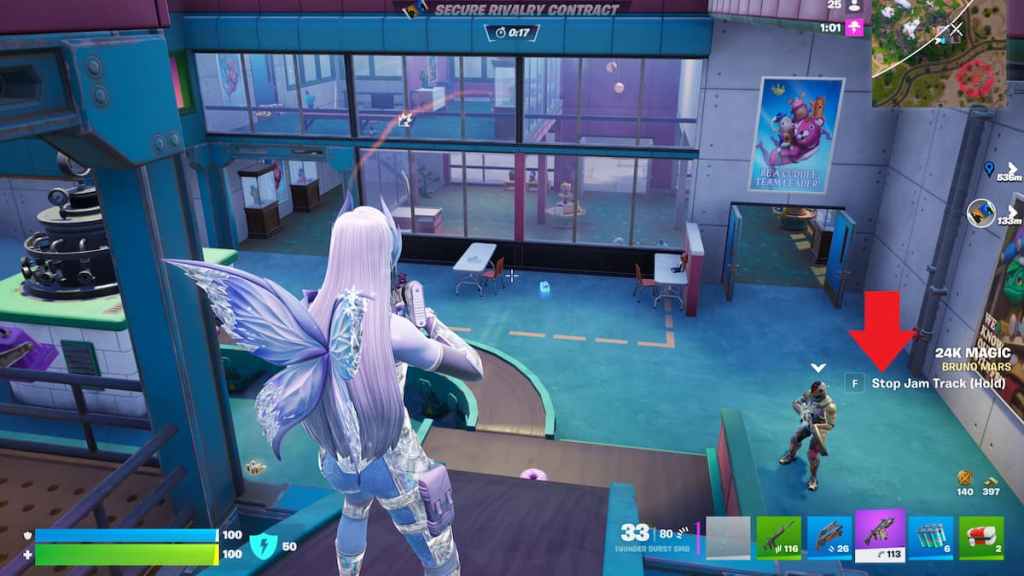 Screenshot and remix by Destructoid There's still plenty more to get done around the island. If you're not sure what to work on next, consider venturing to all NPC locations, finding all Chaos Cubes, deciding whether to join Team Foundation or Team Ice King, and finding the Ice King.
The post How to use the Jam Track Player in Fortnite appeared first on Destructoid.
What's Your Reaction?








XINKER - Business and Income Tips
Explore XINKER, the ultimate platform for mastering business strategies, discovering passive income opportunities, and learning success principles. Join a community of thinkers dedicated to achieving financial freedom and entrepreneurial excellence.