


![[PRO Tips] Gold’s Bullish Revival: Seasonal Trends and Key Levels to Watch](https://xinker.org/uploads/images/202412/image_430x256_67724cc6ad0cd.webp)
![[PRO Tips] Gold Market Under Short-Term Pressure, Safe-Haven Demand and Central Bank Buying Support Long-Term Upside Potential](https://xinker.org/uploads/images/202412/image_430x256_676ffb4685287.webp)
![[PRO Tips] Analysis of 9 key points of differentiation strategy! Master differentiation to create a brand advantage that is unique in the world!](https://firebasestorage.googleapis.com/v0/b/xinker-tips.appspot.com/o/article_thumbnails%2Fscaled_differentiation%20strategy.png.png?alt=media&token=a1bfc3d2-e85a-4db7-8a6d-01c7274f8940)
![[PRO Tips] Will REITs regain growth momentum in 2024? 3 REITs ETFs you must know if you want to invest in real estate.](https://firebasestorage.googleapis.com/v0/b/xinker-tips.appspot.com/o/article_thumbnails%2Fscaled_REITs1.png.png?alt=media&token=8af4eb93-33ff-466f-8039-b6555fad52b4)
![[PRO Tips] Complete tutorial on how to make money in Adobe Stock!](https://firebasestorage.googleapis.com/v0/b/xinker-tips.appspot.com/o/article_thumbnails%2Fscaled_tut-adobe1.png.png?alt=media&token=0b2c8cf2-22bd-4142-883e-140ed1cbaf02)
![[Passive Income] Unlock the secret of passive income: 3 steps to apply for Google AdSense](https://xinker.org/uploads/images/202410/image_430x256_6717a4fb3052b.webp)
![[Passive Income] Earn over $200 a day with AI-generated articles!](https://firebasestorage.googleapis.com/v0/b/xinker-tips.appspot.com/o/article_thumbnails%2Fscaled_article1.png.png?alt=media&token=f61bf35b-8553-4719-826d-7360024adc70)
![[Passive Income] Earn over 20 USD per download with AI-generated images!](https://firebasestorage.googleapis.com/v0/b/xinker-tips.appspot.com/o/article_thumbnails%2Fscaled_adobe2.png.png?alt=media&token=3e20e76a-a907-45af-80aa-bf9b3600301f)
![[Passive Income] Earn 10 USD per new download by sharing CapCut!](https://firebasestorage.googleapis.com/v0/b/xinker-tips.appspot.com/o/article_thumbnails%2Fscaled_capcut2.png.png?alt=media&token=a04dec40-1fac-4857-86f2-19a8be02d38e)
![[Passive Income] Use your WiFi to create passive income in 5 minutes, and you can earn 4-6 U per day!](https://firebasestorage.googleapis.com/v0/b/xinker-tips.appspot.com/o/article_thumbnails%2Fscaled_Grassio.webp.png?alt=media&token=7659a95e-0e47-4f27-a17d-c942ac3cf7f4)


![[Business Talk] The Unique Theme of XINKER's Song: Beef Wellington and Business Mastery](https://xinker.org/uploads/images/202410/image_430x256_671afc155f47f.webp)
![[Business Talk] Chagee: Opening 3,500 stores in 6 years](https://xinker.org/uploads/images/202410/image_430x256_671afce80c5f9.webp)


How to download Malware from West Gate in Marathon – Protect/Destroy 2 guide
The Protect/Destroy 2 contract in Marathon is a priority task for the MIDA faction, and it's one of the more challenging ones to complete. Split between three tasks, you have to complete them in a single run to get all the available rewards. Let's look at how to finish the contract without any problem.Table of contentsMarathon Protect/Destroy 2 contract walkthroughHow to download malware from terminal in West Gate gatehouseHow to submit a dropship request south of CanalHow to upload malware to the UESC dropshipMarathon Protect/Destroy 2 contract walkthrough The Protect/Destroy 2 contract can be broken down into the following three parts.Download malware from terminal in the West Gate gatehouseSubmit a dropship request south of CanalUpload malware to the UESC dropshipHow to download malware from terminal in West Gate gatehouse For the first task, head to the western part of the Dire Marsh map. Since the West Gate is a named location, it isn't too hard to find. I have marked the exact location of the terminal that you'll need to find at the POI. Screenshot and remix by Destructoid Located on the first floor, there are multiple entry points for the gatehouse area. There's a massive blue dome at this location, and the terminal is in the building to its left (refer to the image below). You'll find a ladder to its left; take it and climb up. Then, go right, and take the stairs on your left. 0Image via Bungie Avoid the lasers, and go two floors down. Once you're on the second floor, the quest marker will pop up, which makes things easier. Reach the terminal, interact with it, and download the malware.How to submit a dropship request south of Canal Screenshot and remix by Destructoid Next, head to the marked location south of Canal. This point is slightly far from West Gate, so be careful about enemies. I avoided Quarantine and cut through the Maintenance POI. If you reach the spot, you'll find a bunch of buildings in red (or pink) and white. Image via Bungie If you're at the marked spot, the quest marker will appear shortly. The terminal is located on the first floor of an isolated building (shown in the image above). Interact with the terminal to submit a dropship request.How to upload malware to the UESC dropship Once you've requested a dropship, you'll find a yellow-colored vehicle near you. To upload the malware, you'll need to get on its roof. This is a difficult task as you'll have to use nearby ledges and containers for support. Upload the malware upon reaching the roof, and you'll complete the Protect/Destroy 2 contract. The post How to download Malware from West Gate in Marathon – Protect/Destroy 2 guide appeared first on Destructoid.
The Protect/Destroy 2 contract in Marathon is a priority task for the MIDA faction, and it's one of the more challenging ones to complete.
Split between three tasks, you have to complete them in a single run to get all the available rewards. Let's look at how to finish the contract without any problem.
Table of contents
Marathon Protect/Destroy 2 contract walkthrough
The Protect/Destroy 2 contract can be broken down into the following three parts.- Download malware from terminal in the West Gate gatehouse
- Submit a dropship request south of Canal
- Upload malware to the UESC dropship
How to download malware from terminal in West Gate gatehouse
For the first task, head to the western part of the Dire Marsh map. Since the West Gate is a named location, it isn't too hard to find. I have marked the exact location of the terminal that you'll need to find at the POI.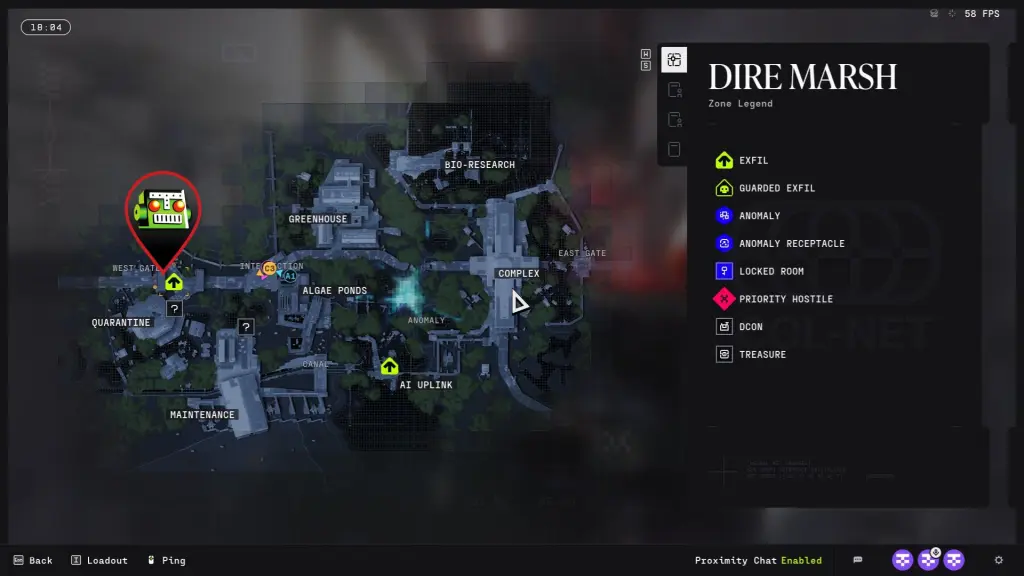 Screenshot and remix by Destructoid Located on the first floor, there are multiple entry points for the gatehouse area. There's a massive blue dome at this location, and the terminal is in the building to its left (refer to the image below). You'll find a ladder to its left; take it and climb up. Then, go right, and take the stairs on your left.
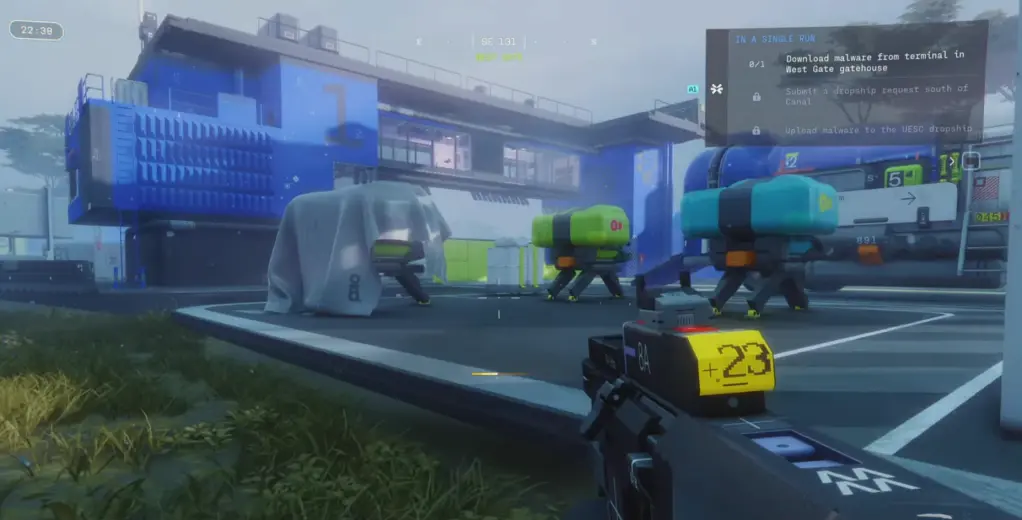 0Image via Bungie Avoid the lasers, and go two floors down. Once you're on the second floor, the quest marker will pop up, which makes things easier.
Reach the terminal, interact with it, and download the malware.
How to submit a dropship request south of Canal
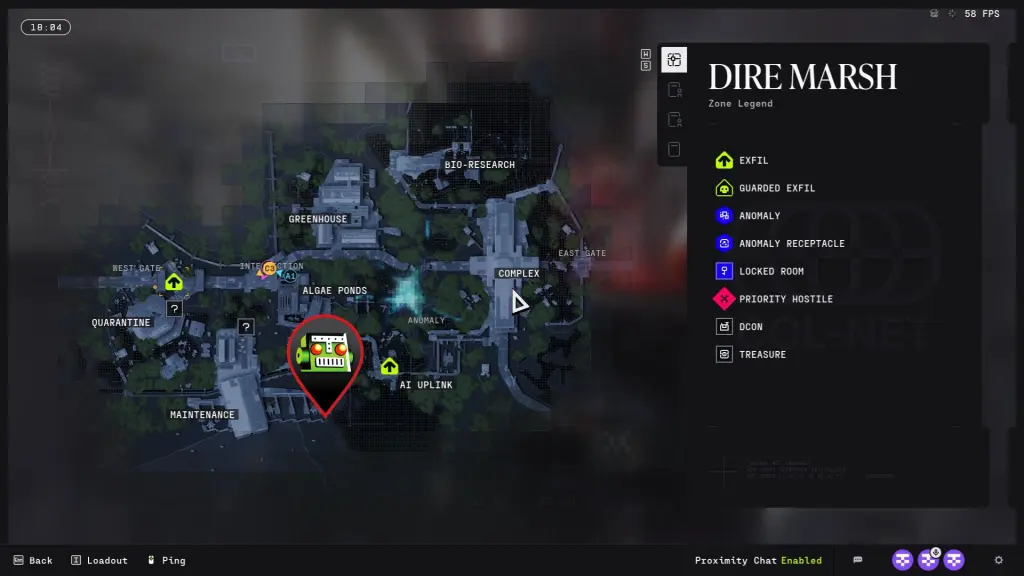 Screenshot and remix by Destructoid Next, head to the marked location south of Canal. This point is slightly far from West Gate, so be careful about enemies. I avoided Quarantine and cut through the Maintenance POI. If you reach the spot, you'll find a bunch of buildings in red (or pink) and white.
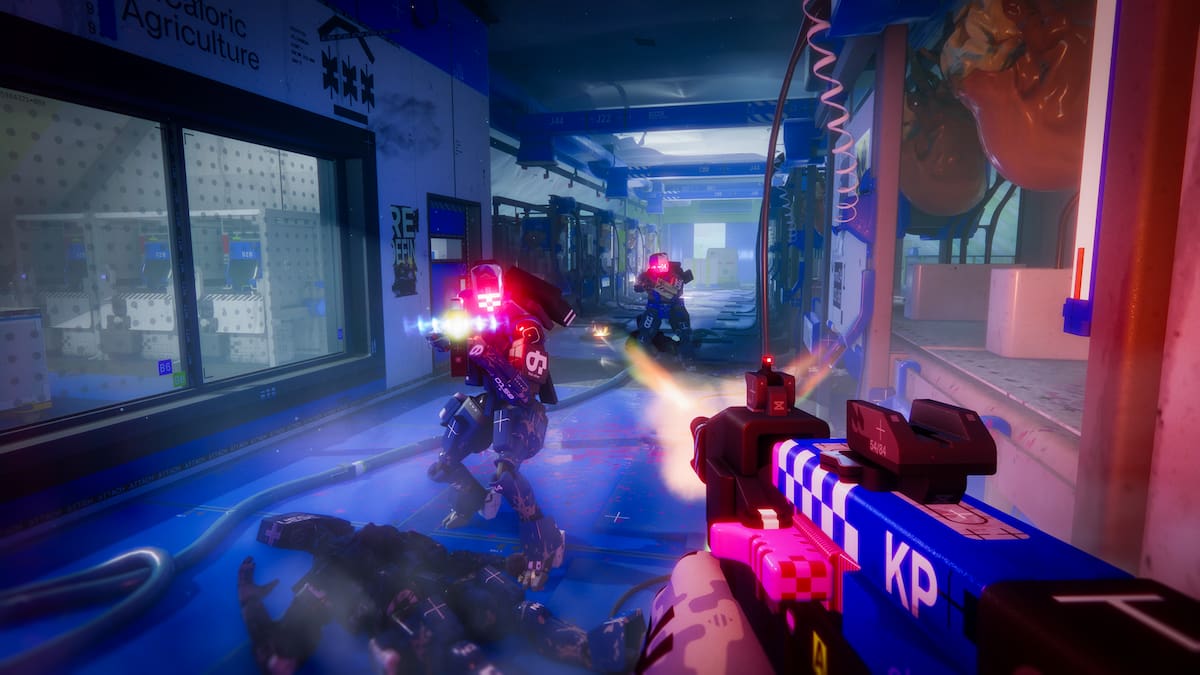
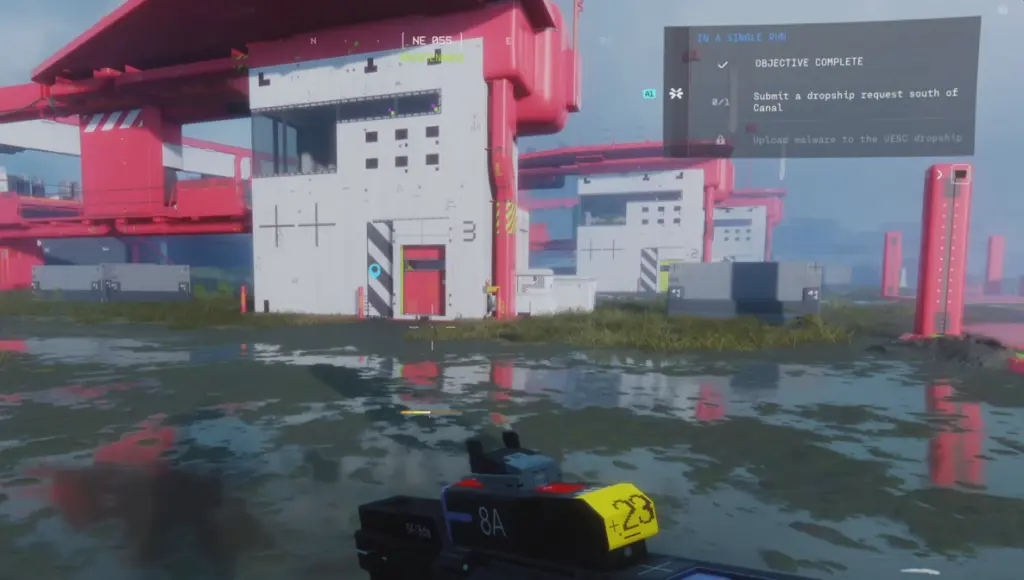 Image via Bungie If you're at the marked spot, the quest marker will appear shortly. The terminal is located on the first floor of an isolated building (shown in the image above). Interact with the terminal to submit a dropship request.
How to upload malware to the UESC dropship
Once you've requested a dropship, you'll find a yellow-colored vehicle near you. To upload the malware, you'll need to get on its roof. This is a difficult task as you'll have to use nearby ledges and containers for support.Upload the malware upon reaching the roof, and you'll complete the Protect/Destroy 2 contract.
The post How to download Malware from West Gate in Marathon – Protect/Destroy 2 guide appeared first on Destructoid.
What's Your Reaction?








XINKER - Business and Income Tips
Explore XINKER, the ultimate platform for mastering business strategies, discovering passive income opportunities, and learning success principles. Join a community of thinkers dedicated to achieving financial freedom and entrepreneurial excellence.