




![[PRO Tips] Gold’s Bullish Revival: Seasonal Trends and Key Levels to Watch](https://xinker.org/uploads/images/202412/image_430x256_67724cc6ad0cd.webp)
![[PRO Tips] Gold Market Under Short-Term Pressure, Safe-Haven Demand and Central Bank Buying Support Long-Term Upside Potential](https://xinker.org/uploads/images/202412/image_430x256_676ffb4685287.webp)
![[PRO Tips] Analysis of 9 key points of differentiation strategy! Master differentiation to create a brand advantage that is unique in the world!](https://firebasestorage.googleapis.com/v0/b/xinker-tips.appspot.com/o/article_thumbnails%2Fscaled_differentiation%20strategy.png.png?alt=media&token=a1bfc3d2-e85a-4db7-8a6d-01c7274f8940)
![[PRO Tips] Will REITs regain growth momentum in 2024? 3 REITs ETFs you must know if you want to invest in real estate.](https://firebasestorage.googleapis.com/v0/b/xinker-tips.appspot.com/o/article_thumbnails%2Fscaled_REITs1.png.png?alt=media&token=8af4eb93-33ff-466f-8039-b6555fad52b4)
![[PRO Tips] Complete tutorial on how to make money in Adobe Stock!](https://firebasestorage.googleapis.com/v0/b/xinker-tips.appspot.com/o/article_thumbnails%2Fscaled_tut-adobe1.png.png?alt=media&token=0b2c8cf2-22bd-4142-883e-140ed1cbaf02)
![[Passive Income] Unlock the secret of passive income: 3 steps to apply for Google AdSense](https://xinker.org/uploads/images/202410/image_430x256_6717a4fb3052b.webp)
![[Passive Income] Earn over $200 a day with AI-generated articles!](https://firebasestorage.googleapis.com/v0/b/xinker-tips.appspot.com/o/article_thumbnails%2Fscaled_article1.png.png?alt=media&token=f61bf35b-8553-4719-826d-7360024adc70)
![[Passive Income] Earn over 20 USD per download with AI-generated images!](https://firebasestorage.googleapis.com/v0/b/xinker-tips.appspot.com/o/article_thumbnails%2Fscaled_adobe2.png.png?alt=media&token=3e20e76a-a907-45af-80aa-bf9b3600301f)
![[Passive Income] Earn 10 USD per new download by sharing CapCut!](https://firebasestorage.googleapis.com/v0/b/xinker-tips.appspot.com/o/article_thumbnails%2Fscaled_capcut2.png.png?alt=media&token=a04dec40-1fac-4857-86f2-19a8be02d38e)
![[Passive Income] Use your WiFi to create passive income in 5 minutes, and you can earn 4-6 U per day!](https://firebasestorage.googleapis.com/v0/b/xinker-tips.appspot.com/o/article_thumbnails%2Fscaled_Grassio.webp.png?alt=media&token=7659a95e-0e47-4f27-a17d-c942ac3cf7f4)


![[Business Talk] The Unique Theme of XINKER's Song: Beef Wellington and Business Mastery](https://xinker.org/uploads/images/202410/image_430x256_671afc155f47f.webp)
![[Business Talk] Chagee: Opening 3,500 stores in 6 years](https://xinker.org/uploads/images/202410/image_430x256_671afce80c5f9.webp)


GameSir's latest software will teach you handy pro controller jargon you've been too scared to ask about, and you now won't need to reinstall it every time there's an update
GameSir has issued an update to its Connect software, which removes a big point of friction for people who regularly use the app to customize their PC controllers, but the update could also be really helpful if you've never been up to speed on your controller terminology. The GameSir Connect app is what you'll use to personalize the GameSir G7 Pro 8K PC model as well as a few of the other more recent GameSir products. Until now, we've been forced to uninstall each obsolete version of the application when a new one arrives, before finding the latest one on the Windows Store. As of now, those days are officially done. Now on version 1.14.4, the application will update the version you already have instead of forcing you to find an entirely new app.https://www.youtube-nocookie.com/embed/wOyH0a71Lvw This will definitely go some way to cutting out confusion, especially since, depending on what GameSir controller you have, there are different apps you need to use. The original GameSir G7 Pro for Xbox and PC uses the older GameSir Nexus app, for example. Either way, if you have a compatible controller, the latest version of Connect will allow for less foot-dragging in the Windows Store and more streamlined customization. I'd guess that most pro controller owners probably use their gamepad's controller software a total of once, on average. Beyond the initial setup when you unbox it, though, companion software can offer you loads of versatility and value for money for whichever gamepad you've opted for. GameSir's apps have always been great, but a streamlined updating system isn't the only improvement the brand has made to Connect. (Image credit: Future / Duncan Robertson) Perhaps most helpfully, a new information feature has been added that'll explain what some of the settings actually change. So if you've never been sure of your jargon controller terms, all you'll now have to do is hover a cursor over an information symbol next to each section header to get a brief description. So if you have trouble distinguishing between deadzones, polling rates, hair trigger mode, or more, you can now rest easy knowing that using an in-depth customization app like Connect isn't going to take you out of your depth. I'm sure for some, not knowing these terms is a reason they've avoided using companion apps to begin with. (Image credit: GameSir) With the latest firmware update for the G7 Pro 8K PC, you can also receive a latency improvement, which GameSir says will be narrowed down to less than 250 milliseconds. Furthermore, if you want a more granular way to modify the settings on your thumbstick deadzone curves, the new version of Connect will allow you to input coordinates of 100x100. Beyond the aforementioned GameSir controllers, the Connect app is also going to be the settings home for the GameSir Tarantula Pro, Cyclone 2, Super Nova, Tegenaria Lite, and Nova 2 Lite. Older controllers may still use the GameSir Nexus app. In the summary video about the software update on GameSir's YouTube channel, the upcoming GameSir Tarantula Pro 8K PC was also mentioned, which likely points to this controller using Connect when it hits the shelves. GameSir also makes some of the other best Xbox controllers, best Switch 2 controllers, and best mobile controllers. [/url]
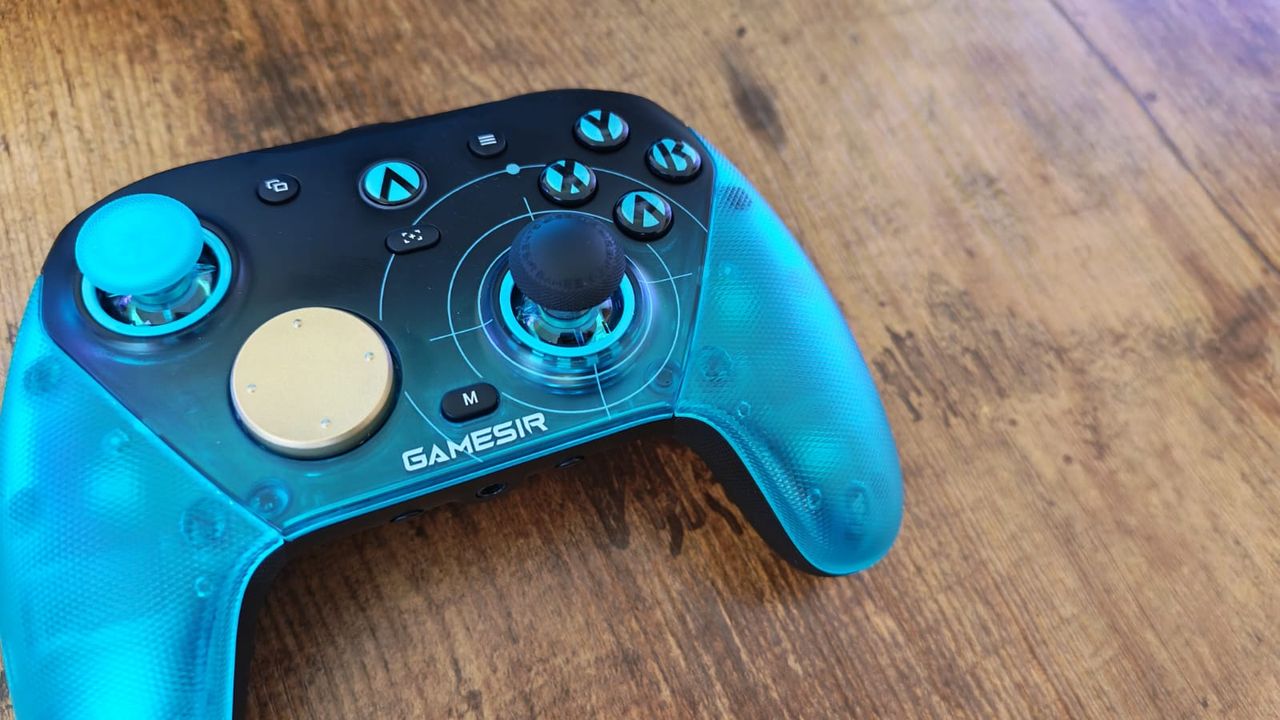 GameSir has issued an update to its Connect software, which removes a big point of friction for people who regularly use the app to customize their PC controllers, but the update could also be really helpful if you've never been up to speed on your controller terminology.
 The GameSir Connect app is what you'll use to personalize the GameSir G7 Pro 8K PC model as well as a few of the other more recent GameSir products. Until now, we've been forced to uninstall each obsolete version of the application when a new one arrives, before finding the latest one on the Windows Store.
As of now, those days are officially done. Now on version 1.14.4, the application will update the version you already have instead of forcing you to find an entirely new app.
https://www.youtube-nocookie.com/embed/wOyH0a71Lvw This will definitely go some way to cutting out confusion, especially since, depending on what GameSir controller you have, there are different apps you need to use. The original GameSir G7 Pro for Xbox and PC uses the older GameSir Nexus app, for example. Either way, if you have a compatible controller, the latest version of Connect will allow for less foot-dragging in the Windows Store and more streamlined customization.
I'd guess that most pro controller owners probably use their gamepad's controller software a total of once, on average. Beyond the initial setup when you unbox it, though, companion software can offer you loads of versatility and value for money for whichever gamepad you've opted for. GameSir's apps have always been great, but a streamlined updating system isn't the only improvement the brand has made to Connect.
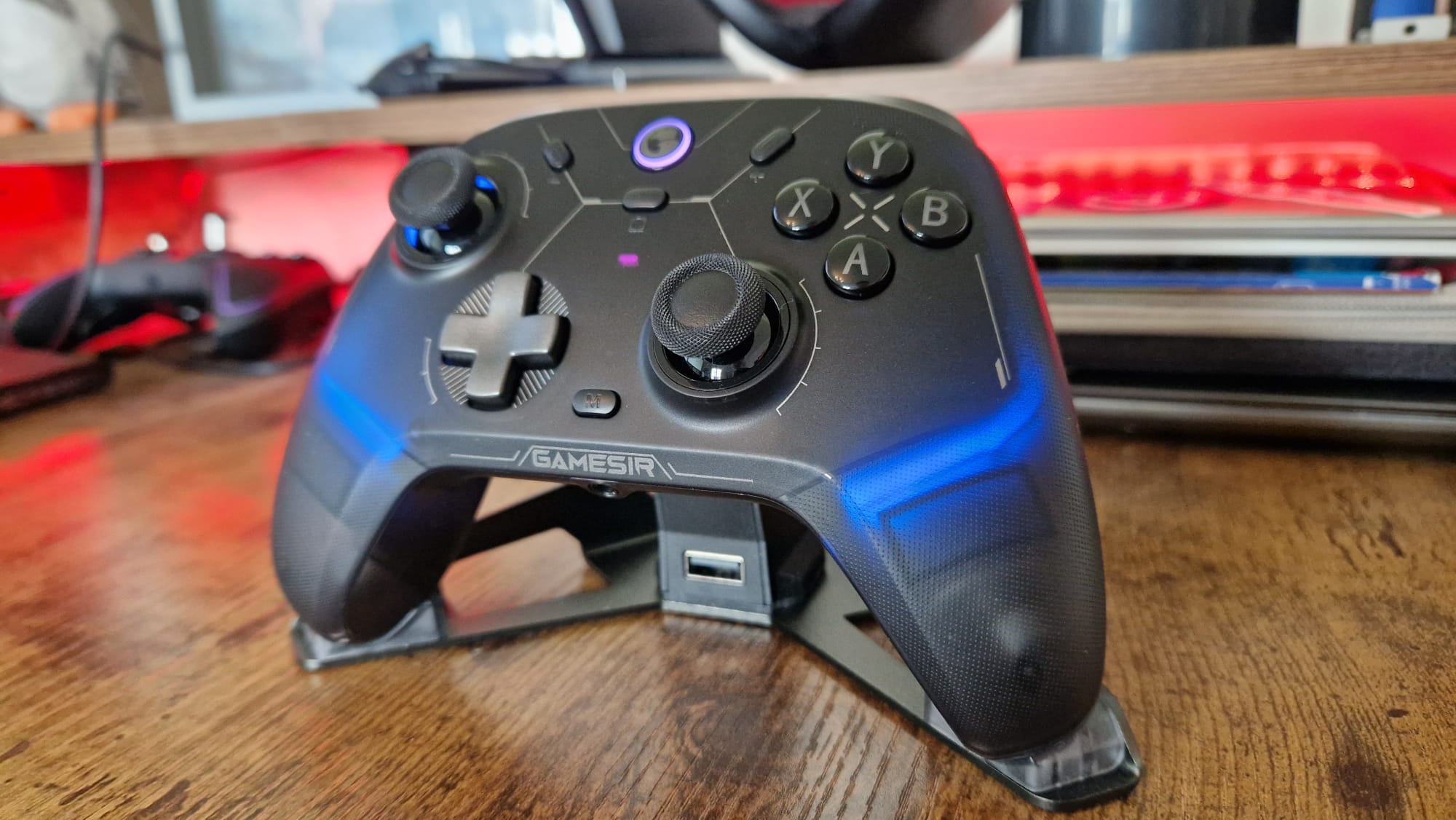
(Image credit: Future / Duncan Robertson) Perhaps most helpfully, a new information feature has been added that'll explain what some of the settings actually change. So if you've never been sure of your jargon controller terms, all you'll now have to do is hover a cursor over an information symbol next to each section header to get a brief description.
So if you have trouble distinguishing between deadzones, polling rates, hair trigger mode, or more, you can now rest easy knowing that using an in-depth customization app like Connect isn't going to take you out of your depth. I'm sure for some, not knowing these terms is a reason they've avoided using companion apps to begin with.

(Image credit: GameSir) With the latest firmware update for the G7 Pro 8K PC, you can also receive a latency improvement, which GameSir says will be narrowed down to less than 250 milliseconds. Furthermore, if you want a more granular way to modify the settings on your thumbstick deadzone curves, the new version of Connect will allow you to input coordinates of 100x100.
Beyond the aforementioned GameSir controllers, the Connect app is also going to be the settings home for the GameSir Tarantula Pro, Cyclone 2, Super Nova, Tegenaria Lite, and Nova 2 Lite. Older controllers may still use the GameSir Nexus app.
In the summary video about the software update on GameSir's YouTube channel, the upcoming GameSir Tarantula Pro 8K PC was also mentioned, which likely points to this controller using Connect when it hits the shelves.
GameSir also makes some of the other best Xbox controllers, best Switch 2 controllers, and best mobile controllers.
[/url]
What's Your Reaction?








XINKER - Business and Income Tips
Explore XINKER, the ultimate platform for mastering business strategies, discovering passive income opportunities, and learning success principles. Join a community of thinkers dedicated to achieving financial freedom and entrepreneurial excellence.


![[Business Talk] Chagee: Opening 3,500 stores in 6 years](https://xinker.org/uploads/images/202410/image_140x98_671afce94bf91.webp)