



![[PRO Tips] Gold’s Bullish Revival: Seasonal Trends and Key Levels to Watch](https://xinker.org/uploads/images/202412/image_430x256_67724cc6ad0cd.webp)
![[PRO Tips] Gold Market Under Short-Term Pressure, Safe-Haven Demand and Central Bank Buying Support Long-Term Upside Potential](https://xinker.org/uploads/images/202412/image_430x256_676ffb4685287.webp)
![[PRO Tips] Analysis of 9 key points of differentiation strategy! Master differentiation to create a brand advantage that is unique in the world!](https://firebasestorage.googleapis.com/v0/b/xinker-tips.appspot.com/o/article_thumbnails%2Fscaled_differentiation%20strategy.png.png?alt=media&token=a1bfc3d2-e85a-4db7-8a6d-01c7274f8940)
![[PRO Tips] Will REITs regain growth momentum in 2024? 3 REITs ETFs you must know if you want to invest in real estate.](https://firebasestorage.googleapis.com/v0/b/xinker-tips.appspot.com/o/article_thumbnails%2Fscaled_REITs1.png.png?alt=media&token=8af4eb93-33ff-466f-8039-b6555fad52b4)
![[PRO Tips] Complete tutorial on how to make money in Adobe Stock!](https://firebasestorage.googleapis.com/v0/b/xinker-tips.appspot.com/o/article_thumbnails%2Fscaled_tut-adobe1.png.png?alt=media&token=0b2c8cf2-22bd-4142-883e-140ed1cbaf02)
![[Passive Income] Unlock the secret of passive income: 3 steps to apply for Google AdSense](https://xinker.org/uploads/images/202410/image_430x256_6717a4fb3052b.webp)
![[Passive Income] Earn over $200 a day with AI-generated articles!](https://firebasestorage.googleapis.com/v0/b/xinker-tips.appspot.com/o/article_thumbnails%2Fscaled_article1.png.png?alt=media&token=f61bf35b-8553-4719-826d-7360024adc70)
![[Passive Income] Earn over 20 USD per download with AI-generated images!](https://firebasestorage.googleapis.com/v0/b/xinker-tips.appspot.com/o/article_thumbnails%2Fscaled_adobe2.png.png?alt=media&token=3e20e76a-a907-45af-80aa-bf9b3600301f)
![[Passive Income] Earn 10 USD per new download by sharing CapCut!](https://firebasestorage.googleapis.com/v0/b/xinker-tips.appspot.com/o/article_thumbnails%2Fscaled_capcut2.png.png?alt=media&token=a04dec40-1fac-4857-86f2-19a8be02d38e)
![[Passive Income] Use your WiFi to create passive income in 5 minutes, and you can earn 4-6 U per day!](https://firebasestorage.googleapis.com/v0/b/xinker-tips.appspot.com/o/article_thumbnails%2Fscaled_Grassio.webp.png?alt=media&token=7659a95e-0e47-4f27-a17d-c942ac3cf7f4)


![[Business Talk] The Unique Theme of XINKER's Song: Beef Wellington and Business Mastery](https://xinker.org/uploads/images/202410/image_430x256_671afc155f47f.webp)
![[Business Talk] Chagee: Opening 3,500 stores in 6 years](https://xinker.org/uploads/images/202410/image_430x256_671afce80c5f9.webp)


College Football 27 Advanced Access is now live
Welcome to the College Football 27 PC launch! Our team is actively monitoring player feedback and working on future updates. Below is a list of the stability, crash, and performance-related issues we are currently tracking and investigating for the PC version of the game, along with temporary workarounds where available.Crashes, Freezes, & Stalls Road to Glory Team Selection Crash Issue: The game may crash when attempting to enter the team selection screen in Road to Glory if you have the "High School Experience" setting turned off. Workaround: To bypass this crash, ensure the High School Experience option is turned On when starting your new Road to Glory career. DirectX and Graphics Device Errors Issue: Some players may encounter DirectX errors or device creation failures on startup. This is particularly common on PCs with hybrid graphics setups (laptops with both an integrated GPU and a dedicated graphics card) or hardware running below minimum specifications. Workaround: Manually force your computer to run the game on your high-performance dedicated graphics card. You can do this by going to Windows Graphics Settings, adding the game's executable, and selecting High Performance. Additionally, please ensure your graphics card drivers are updated to the newest available release. Anti-Cheat Security Stalls Issue: On systems running close to or below minimum specifications, severe system stalls (such as those lasting longer than 10 seconds) may cause the game's background security client to terminate the session, closing the game. Workaround: To prevent resource starvation, close heavy background processes, web browsers, and other applications before launching the game. Ensuring the game is installed on a fast SSD can also mitigate loading stalls. Memory Leaks from Extended Background Sessions Issue: Leaving the game running in a minimized, hidden, or background state for several consecutive hours can lead to excessive memory accumulation, eventually causing a graphics driver failure or a game crash. Workaround: Avoid leaving the game minimized or suspended for long periods. If you plan to be away from your PC for an extended duration, save your progress and close the application. Practice Mode Crash (Ultimate Team) Issue: Experiencing a network disconnection while actively participating in an Ultimate Team Practice session can occasionally trigger a game crash rather than returning you gracefully to the main menus. Career Load/Exit Loading Stalls Issue: Players may experience occasional long loading screen freezes (stalls exceeding 20 seconds) when loading into or exiting Career modes. Workaround: If the game appears to freeze during these transitions, please allow up to 30 seconds for the asset loading system to complete its tasks. If the screen does not progress after this point, a game restart is required. General Rendering & Shadow Failures Issue: We are investigating rare, hardware-specific graphics processor crashes linked to shadow rendering and pipeline state compilation during active gameplay. Network Disconnection Hang Issue: Severe online network disconnections can occasionally cause the game client to hang indefinitely while attempting to clean up background network queues. Graphics Pipeline Compilation Freeze Issue: Toggling menu screens rapidly can trigger a brief game lockup while the graphics engine dynamically compiles un-cached pipeline assets. Dynasty Mode Exit Hang Issue: Exiting Dynasty Mode back to the main menu can occasionally trigger a game hang due to background asset streaming conflicts. Road to Glory Simulation Moment Lock Issue: In Road to Glory, during simulations of moments where your custom player is not active on the field, the game may get stuck on simulation screens instead of skipping to the next playable play. EA Play Trial Entitlement Issue Issue: We’re aware that some players ran into an issue over the weekend when trying to access the EA Play trial on Steam. This issue has now been fixed, and you should be able to launch the trial as expected. If you ran into this before, please give it another try. Sorry for the disruption and thank you for your patience while we worked through it over the weekend. Deluxe Edition Availability Issue Issue: Users are having trouble with the game not being available despite owning the Deluxe Edition. Workaround: Players likely need to restart Steam (perform a full close and reopen).Multiplayer Connection Desynchronization "Play a Friend" Connection Desynchronization Issue: Players may experience an immediate desynchronization error and be returned to the main menu shortly after coming out of the loading screen in a "Play a Friend" match. This is often caused by mismatched local roster files disagreeing with server data. Pre-Play Adjustment Desynchronization Issue: In rare online situations, rapid pre-play adjustments, audible calls, or defensive shifts immediately before the snap can trigger input mismatches between players, leading to
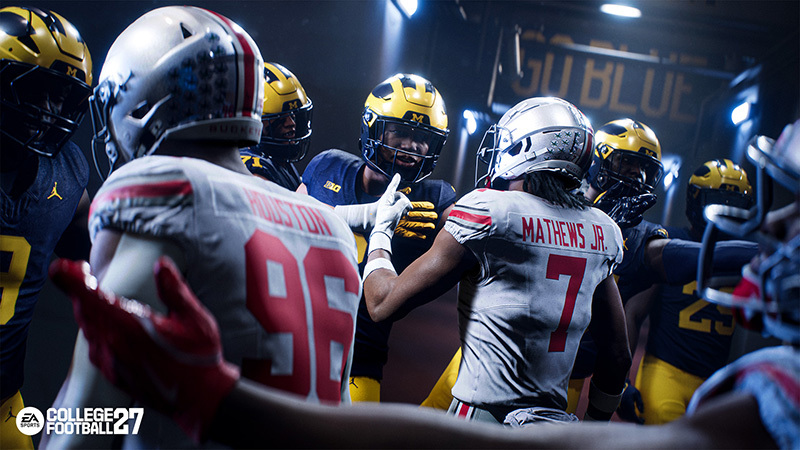
Welcome to the College Football 27 PC launch! Our team is actively monitoring player feedback and working on future updates. Below is a list of the stability, crash, and performance-related issues we are currently tracking and investigating for the PC version of the game, along with temporary workarounds where available.
Stay in the conversation by following us on Facebook, Twitter, Instagram, YouTube, and EA Forums.
Crashes, Freezes, & Stalls
- Road to Glory Team Selection Crash
- Issue: The game may crash when attempting to enter the team selection screen in Road to Glory if you have the "High School Experience" setting turned off.
- Workaround: To bypass this crash, ensure the High School Experience option is turned On when starting your new Road to Glory career.
- Issue: The game may crash when attempting to enter the team selection screen in Road to Glory if you have the "High School Experience" setting turned off.
- DirectX and Graphics Device Errors
- Issue: Some players may encounter DirectX errors or device creation failures on startup. This is particularly common on PCs with hybrid graphics setups (laptops with both an integrated GPU and a dedicated graphics card) or hardware running below minimum specifications.
- Workaround: Manually force your computer to run the game on your high-performance dedicated graphics card. You can do this by going to Windows Graphics Settings, adding the game's executable, and selecting High Performance. Additionally, please ensure your graphics card drivers are updated to the newest available release.
- Issue: Some players may encounter DirectX errors or device creation failures on startup. This is particularly common on PCs with hybrid graphics setups (laptops with both an integrated GPU and a dedicated graphics card) or hardware running below minimum specifications.
- Anti-Cheat Security Stalls
- Issue: On systems running close to or below minimum specifications, severe system stalls (such as those lasting longer than 10 seconds) may cause the game's background security client to terminate the session, closing the game.
- Workaround: To prevent resource starvation, close heavy background processes, web browsers, and other applications before launching the game. Ensuring the game is installed on a fast SSD can also mitigate loading stalls.
- Issue: On systems running close to or below minimum specifications, severe system stalls (such as those lasting longer than 10 seconds) may cause the game's background security client to terminate the session, closing the game.
- Memory Leaks from Extended Background Sessions
- Issue: Leaving the game running in a minimized, hidden, or background state for several consecutive hours can lead to excessive memory accumulation, eventually causing a graphics driver failure or a game crash.
- Workaround: Avoid leaving the game minimized or suspended for long periods. If you plan to be away from your PC for an extended duration, save your progress and close the application.
- Issue: Leaving the game running in a minimized, hidden, or background state for several consecutive hours can lead to excessive memory accumulation, eventually causing a graphics driver failure or a game crash.
- Practice Mode Crash (Ultimate Team)
- Issue: Experiencing a network disconnection while actively participating in an Ultimate Team Practice session can occasionally trigger a game crash rather than returning you gracefully to the main menus.
- Career Load/Exit Loading Stalls
- Issue: Players may experience occasional long loading screen freezes (stalls exceeding 20 seconds) when loading into or exiting Career modes.
- Workaround: If the game appears to freeze during these transitions, please allow up to 30 seconds for the asset loading system to complete its tasks. If the screen does not progress after this point, a game restart is required.
- Issue: Players may experience occasional long loading screen freezes (stalls exceeding 20 seconds) when loading into or exiting Career modes.
- General Rendering & Shadow Failures
- Issue: We are investigating rare, hardware-specific graphics processor crashes linked to shadow rendering and pipeline state compilation during active gameplay.
- Network Disconnection Hang
- Issue: Severe online network disconnections can occasionally cause the game client to hang indefinitely while attempting to clean up background network queues.
- Graphics Pipeline Compilation Freeze
- Issue: Toggling menu screens rapidly can trigger a brief game lockup while the graphics engine dynamically compiles un-cached pipeline assets.
- Dynasty Mode Exit Hang
- Issue: Exiting Dynasty Mode back to the main menu can occasionally trigger a game hang due to background asset streaming conflicts.
- Road to Glory Simulation Moment Lock
- Issue: In Road to Glory, during simulations of moments where your custom player is not active on the field, the game may get stuck on simulation screens instead of skipping to the next playable play.
- EA Play Trial Entitlement Issue
- Issue: We’re aware that some players ran into an issue over the weekend when trying to access the EA Play trial on Steam. This issue has now been fixed, and you should be able to launch the trial as expected. If you ran into this before, please give it another try. Sorry for the disruption and thank you for your patience while we worked through it over the weekend.
- Deluxe Edition Availability Issue
- Issue: Users are having trouble with the game not being available despite owning the Deluxe Edition.
- Workaround: Players likely need to restart Steam (perform a full close and reopen).
- Issue: Users are having trouble with the game not being available despite owning the Deluxe Edition.
Multiplayer Connection Desynchronization
- "Play a Friend" Connection Desynchronization
- Issue: Players may experience an immediate desynchronization error and be returned to the main menu shortly after coming out of the loading screen in a "Play a Friend" match. This is often caused by mismatched local roster files disagreeing with server data.
- Pre-Play Adjustment Desynchronization
- Issue: In rare online situations, rapid pre-play adjustments, audible calls, or defensive shifts immediately before the snap can trigger input mismatches between players, leading to a match desync.
Performance & Rendering Hitching
- Window Mode Transition Sluggishness & Multi-Monitor Hitching
- Issue: Toggling between Windowed, Full Screen, and Borderless settings in the Graphics menu can cause brief screen freezes, input delays, and high CPU usage. Additionally, using a mouse and keyboard in Fullscreen mode on multi-monitor setups may cause performance hitching when moving the cursor across screens.
- Workaround: For players using multiple monitors or who frequently switch between active apps, running the game in Borderless Windowed mode instead of Fullscreen will prevent transitional freezes and keep performance stable.
- Issue: Toggling between Windowed, Full Screen, and Borderless settings in the Graphics menu can cause brief screen freezes, input delays, and high CPU usage. Additionally, using a mouse and keyboard in Fullscreen mode on multi-monitor setups may cause performance hitching when moving the cursor across screens.
- Strand Hair Render Thread Hitching
- Issue: During character load-in or customization screens, simultaneous generation of multiple high-detail Strand Hair objects can briefly lock up the render thread, causing a noticeable loading movie freeze or skip.
- Edit Player Ratings Hover Lag
- Issue: In the "Manage Players" Edit Player screen, hovering your mouse cursor over the vertical list of player ratings options can trigger significant menu lag and frame rate drops.
- Workaround: Use a controller or your keyboard's arrow keys to scroll through player ratings smoothly.
- Issue: In the "Manage Players" Edit Player screen, hovering your mouse cursor over the vertical list of player ratings options can trigger significant menu lag and frame rate drops.
- Manage Practice Player Stats Hover Freeze
- Issue: Moving your mouse cursor over player stats rows in the Dynasty "Manage Weekly Practice" screen can lock up the menu, preventing further navigation of practice reps.
Stay in the conversation by following us on Facebook, Twitter, Instagram, YouTube, and EA Forums.
What's Your Reaction?








XINKER - Business and Income Tips
Explore XINKER, the ultimate platform for mastering business strategies, discovering passive income opportunities, and learning success principles. Join a community of thinkers dedicated to achieving financial freedom and entrepreneurial excellence.
![[Business Talk] Chagee: Opening 3,500 stores in 6 years](https://xinker.org/uploads/images/202410/image_140x98_671afce94bf91.webp)






