![[Video] 1.0.11 Patch Preview Video Now Available](https://clan.akamai.steamstatic.com/images/46066795/1f2e205a6e891fa5da0973471fc5679f79c786eb.png?#)

![S12 New Characters' Adventures: [Chapter 2]](https://clan.fastly.steamstatic.com/images/34875433/706104bc353dc51f8b318f4153751a024f6eb7e7.png?#)

![[PRO Tips] Gold’s Bullish Revival: Seasonal Trends and Key Levels to Watch](https://xinker.org/uploads/images/202412/image_430x256_67724cc6ad0cd.webp)
![[PRO Tips] Gold Market Under Short-Term Pressure, Safe-Haven Demand and Central Bank Buying Support Long-Term Upside Potential](https://xinker.org/uploads/images/202412/image_430x256_676ffb4685287.webp)
![[PRO Tips] Analysis of 9 key points of differentiation strategy! Master differentiation to create a brand advantage that is unique in the world!](https://firebasestorage.googleapis.com/v0/b/xinker-tips.appspot.com/o/article_thumbnails%2Fscaled_differentiation%20strategy.png.png?alt=media&token=a1bfc3d2-e85a-4db7-8a6d-01c7274f8940)
![[PRO Tips] Will REITs regain growth momentum in 2024? 3 REITs ETFs you must know if you want to invest in real estate.](https://firebasestorage.googleapis.com/v0/b/xinker-tips.appspot.com/o/article_thumbnails%2Fscaled_REITs1.png.png?alt=media&token=8af4eb93-33ff-466f-8039-b6555fad52b4)
![[PRO Tips] Complete tutorial on how to make money in Adobe Stock!](https://firebasestorage.googleapis.com/v0/b/xinker-tips.appspot.com/o/article_thumbnails%2Fscaled_tut-adobe1.png.png?alt=media&token=0b2c8cf2-22bd-4142-883e-140ed1cbaf02)
![[Passive Income] Unlock the secret of passive income: 3 steps to apply for Google AdSense](https://xinker.org/uploads/images/202410/image_430x256_6717a4fb3052b.webp)
![[Passive Income] Earn over $200 a day with AI-generated articles!](https://firebasestorage.googleapis.com/v0/b/xinker-tips.appspot.com/o/article_thumbnails%2Fscaled_article1.png.png?alt=media&token=f61bf35b-8553-4719-826d-7360024adc70)
![[Passive Income] Earn over 20 USD per download with AI-generated images!](https://firebasestorage.googleapis.com/v0/b/xinker-tips.appspot.com/o/article_thumbnails%2Fscaled_adobe2.png.png?alt=media&token=3e20e76a-a907-45af-80aa-bf9b3600301f)
![[Passive Income] Earn 10 USD per new download by sharing CapCut!](https://firebasestorage.googleapis.com/v0/b/xinker-tips.appspot.com/o/article_thumbnails%2Fscaled_capcut2.png.png?alt=media&token=a04dec40-1fac-4857-86f2-19a8be02d38e)
![[Passive Income] Use your WiFi to create passive income in 5 minutes, and you can earn 4-6 U per day!](https://firebasestorage.googleapis.com/v0/b/xinker-tips.appspot.com/o/article_thumbnails%2Fscaled_Grassio.webp.png?alt=media&token=7659a95e-0e47-4f27-a17d-c942ac3cf7f4)


![[Business Talk] The Unique Theme of XINKER's Song: Beef Wellington and Business Mastery](https://xinker.org/uploads/images/202410/image_430x256_671afc155f47f.webp)
![[Business Talk] Chagee: Opening 3,500 stores in 6 years](https://xinker.org/uploads/images/202410/image_430x256_671afce80c5f9.webp)


v9.2.0 Update Notice
Greetings from Com2uS!Summoners War will be holding maintenance to proceed with the v9.2.0 update.Please note that you won't be able to play the game during the maintenance, and you'll be moved to the title screen when the update begins. We advise you to come back to the village before the update starts to avoid any inconveniences.* The time of the EXP Booster that's in use during the maintenance will be extended by the time consumed for the maintenance. Please see below for more info on the update schedule.================================\[Update Schedule per Server]12:00 AM - 01:00 AM PDT (all servers)\[Update Details]Server maintenance for the v9.2.0 update\[Maintenance Reward]- All Servers: 12-Year Special Scroll x5, Crystal +100, Energy +300 - Distribution Period: After v9.2.0 update on Apr. 29 - May 1, 7:59 AM PDT================================* We'll put up another notice if there's any change to the update schedule. * Even if the maintenance ends early, you won't be able to enter the World Arena, Arena Interserver Battle, and World Guild Battle during 12:00 AM - 01:00 AM PDT due to the version update and server maintenance process. Other content can be played normally.========================v9.2.0 Update Details ========================Greetings from Com2uS!Summoners War v9.2.0 has been updated. Please check below for details!* The actual update will be applied through an auto update during the maintenance. (Android/iOS)* Details can be checked through the maintenance notice.=====================================v9.2.0 Update Details =====================================▶ New Feature \[Deck Preset]- \[Deck Preset] allows you to save your Monster decks with specific Rune/Artifact settings for each content.Since the same Runes and Artifacts can be used across different Presets simultaneously,you can manage your attack and defense decks more strategically depending on the content.\[Read Developer's Note]- A new building, the \[Deck Building], has been added where you can manage various Presets at a glance.: \[Deck Building] can be used after installing it via \[Shop > Normal > Building].: In the \[Deck Building], you can check and manage Attack and Defense Deck Presets for each content on a single screen.* When changing an Attack Deck Preset, the changes will not be immediately reflected if you are currently preparing for battle or if a battle is in progress. The changes will apply only after you assign the Preset on the battle preparation screen.- How to Register a Preset\[Attack Deck]Step 1) Move to the deck settings screen via the \[Edit Deck] button on the battle preparation screen or through the \[Deck Building]. Then, press \[Manage] to select the Monsters to be placed in the attack deck.Step 2) Once the Monster placement is complete, you can configure the Runes/Artifacts for each Monster through \[Runes/Artifacts].* For Relics, the Relic information currently engraved on the Monster will be reflected in the Preset.Step 3) Once the settings are complete, press the \[① Save] button to save the Preset.There is no additional Mana Stone cost for saving or using Presets.Additionally, a toggle \[②] is provided to choose whether to save only Monster info or to include their Rune/Artifact info as well.If you wish to save Rune/Artifact info together, please ensure this feature is activated before use.Saved Attack Deck Presets can be loaded and used immediately from the battle preparation screen thereafter.\[Defense Deck]* Available in Arena, Arena Interserver Battle, Siege Battle, and World Guild Battle where defense placement is required.Step 1) Move to the Defense Deck Settings screen via the defense placement menu of each content or through the \[Deck Building].Step 2) Place Monsters as you would for an Attack Deck, then configure the Runes/Artifacts for each Monster via \[Runes/Artifacts].* Please note that, as before, the same Runes/Artifacts cannot be shared among Siege Battle defense decks (up to 10).Step 3) Once the settings are complete, press \[Complete] to save.There is no additional Mana Stone cost for saving or using Presets.Features such as the Test feature previously provided in the defense placement screen remain available.※ Please note partial changes from the Developer's Note.: The number of Siege Battle Attack Deck Presets has been increased from \[15 → 25].Defense deck quantities have been added to the table next to attack deck quantities where applicable.- Changes following the \[Deck Preset] Update: The Temporary Engrave feature has been removed.The feature used to load Monsters from the Normal Monster Sealed Shrine and use them with temporary engravings has been replaced by the Deck Preset feature.: Following the removal of Siege Battle Rune separation, the Siege Battle tab within \[Rune Management > Manage Engrave] has been removed.: The UI button for selecting a Friend's Monster on the battle preparation screen has been moved to the Monster selection screen.▶ \[Reli
Greetings from Com2uS!
Summoners War will be holding maintenance to proceed with the v9.2.0 update.
Please note that you won't be able to play the game during the maintenance, and you'll be moved to the title screen when the update begins.
We advise you to come back to the village before the update starts to avoid any inconveniences.
* The time of the EXP Booster that's in use during the maintenance will be extended by the time consumed for the maintenance.
Please see below for more info on the update schedule.
================================
\[Update Schedule per Server]
12:00 AM - 01:00 AM PDT (all servers)
\[Update Details]
Server maintenance for the v9.2.0 update
\[Maintenance Reward]
- All Servers: 12-Year Special Scroll x5, Crystal +100, Energy +300
- Distribution Period: After v9.2.0 update on Apr. 29 - May 1, 7:59 AM PDT
================================
* We'll put up another notice if there's any change to the update schedule.
* Even if the maintenance ends early, you won't be able to enter the World Arena, Arena Interserver Battle, and World Guild Battle during 12:00 AM - 01:00 AM PDT due to the version update and server maintenance process. Other content can be played normally.
========================
v9.2.0 Update Details
========================
Greetings from Com2uS!
Summoners War v9.2.0 has been updated.
Please check below for details!
* The actual update will be applied through an auto update during the maintenance. (Android/iOS)
* Details can be checked through the maintenance notice.
=====================================
v9.2.0 Update Details
=====================================
▶ New Feature \[Deck Preset]
- \[Deck Preset] allows you to save your Monster decks with specific Rune/Artifact settings for each content.
Since the same Runes and Artifacts can be used across different Presets simultaneously,
you can manage your attack and defense decks more strategically depending on the content.
- A new building, the \[Deck Building], has been added where you can manage various Presets at a glance.
: \[Deck Building] can be used after installing it via \[Shop > Normal > Building].
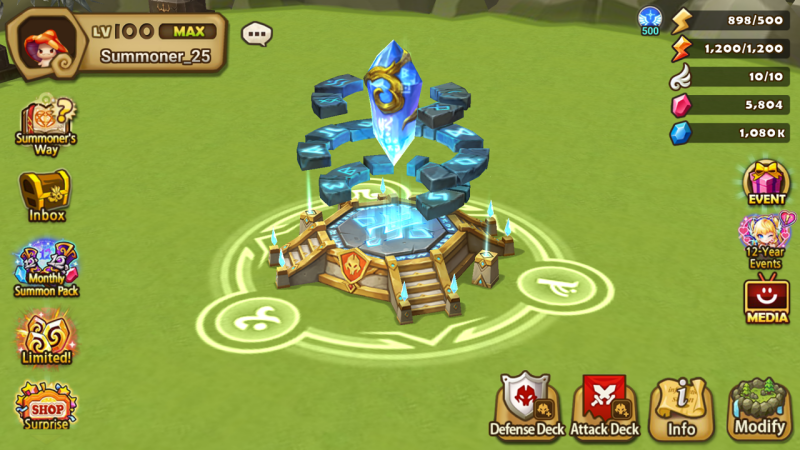
: In the \[Deck Building], you can check and manage Attack and Defense Deck Presets for each content on a single screen.
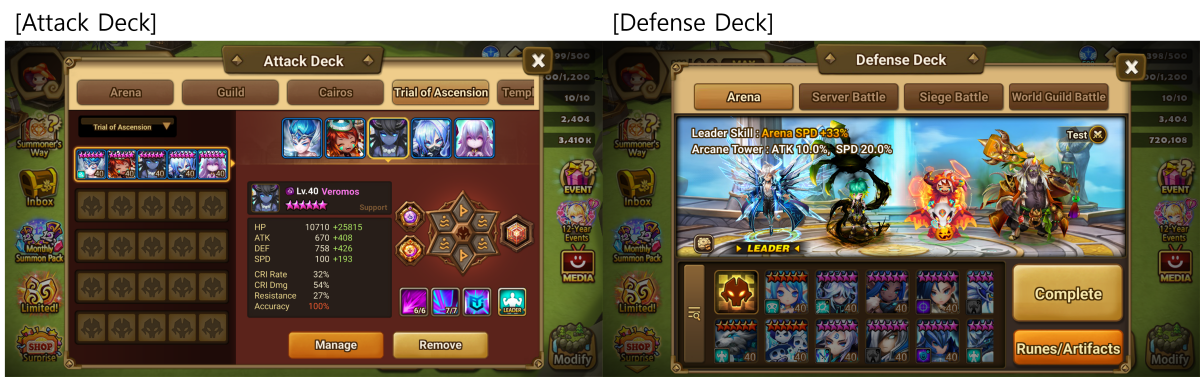
* When changing an Attack Deck Preset, the changes will not be immediately reflected if you are currently preparing for battle or if a battle is in progress. The changes will apply only after you assign the Preset on the battle preparation screen.
- How to Register a Preset
\[Attack Deck]
Step 1) Move to the deck settings screen via the \[Edit Deck] button on the battle preparation screen or through the \[Deck Building]. Then, press \[Manage] to select the Monsters to be placed in the attack deck.
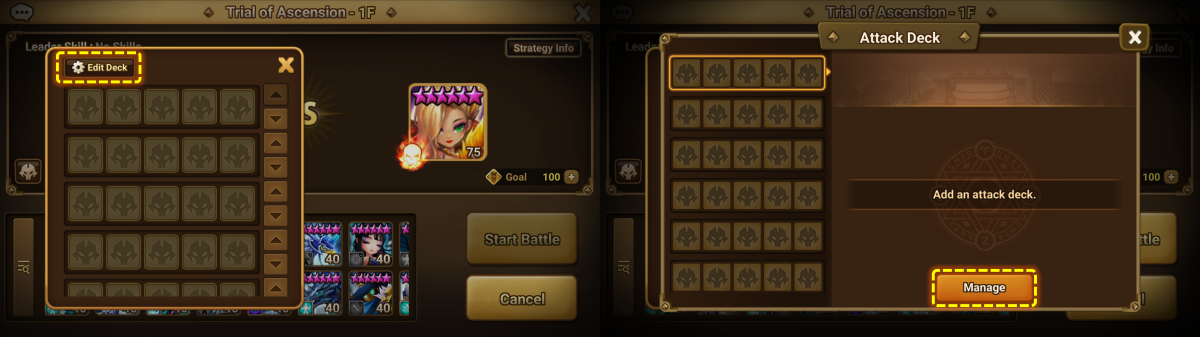
Step 2) Once the Monster placement is complete, you can configure the Runes/Artifacts for each Monster through \[Runes/Artifacts].
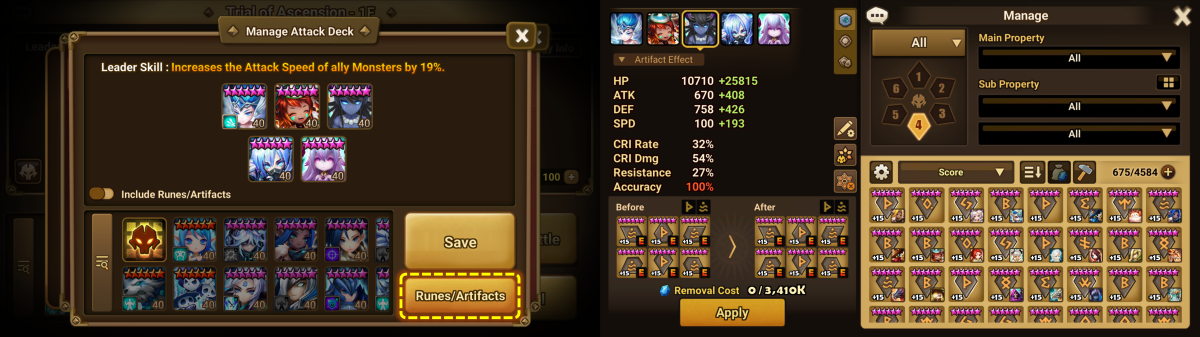
* For Relics, the Relic information currently engraved on the Monster will be reflected in the Preset.
Step 3) Once the settings are complete, press the \[① Save] button to save the Preset.
There is no additional Mana Stone cost for saving or using Presets.
Additionally, a toggle \[②] is provided to choose whether to save only Monster info or to include their Rune/Artifact info as well.
If you wish to save Rune/Artifact info together, please ensure this feature is activated before use.
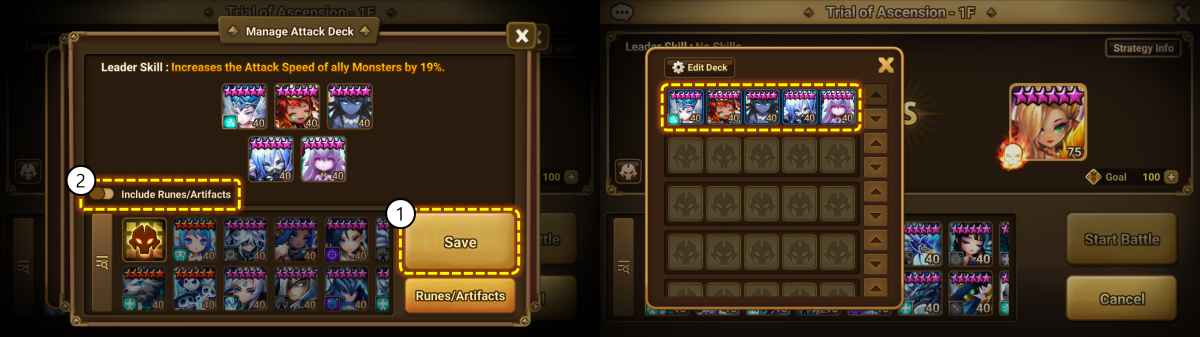
Saved Attack Deck Presets can be loaded and used immediately from the battle preparation screen thereafter.
\[Defense Deck]
* Available in Arena, Arena Interserver Battle, Siege Battle, and World Guild Battle where defense placement is required.
Step 1) Move to the Defense Deck Settings screen via the defense placement menu of each content or through the \[Deck Building].
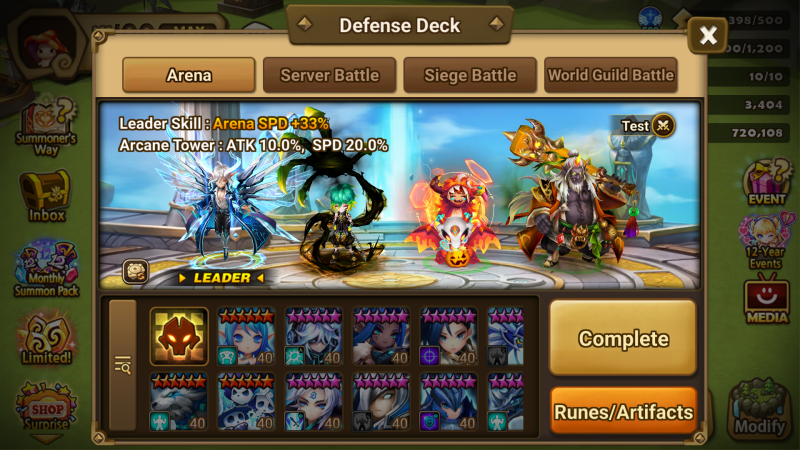
Step 2) Place Monsters as you would for an Attack Deck, then configure the Runes/Artifacts for each Monster via \[Runes/Artifacts].
* Please note that, as before, the same Runes/Artifacts cannot be shared among Siege Battle defense decks (up to 10).
Step 3) Once the settings are complete, press \[Complete] to save.
There is no additional Mana Stone cost for saving or using Presets.
Features such as the Test feature previously provided in the defense placement screen remain available.
※ Please note partial changes from the Developer's Note.
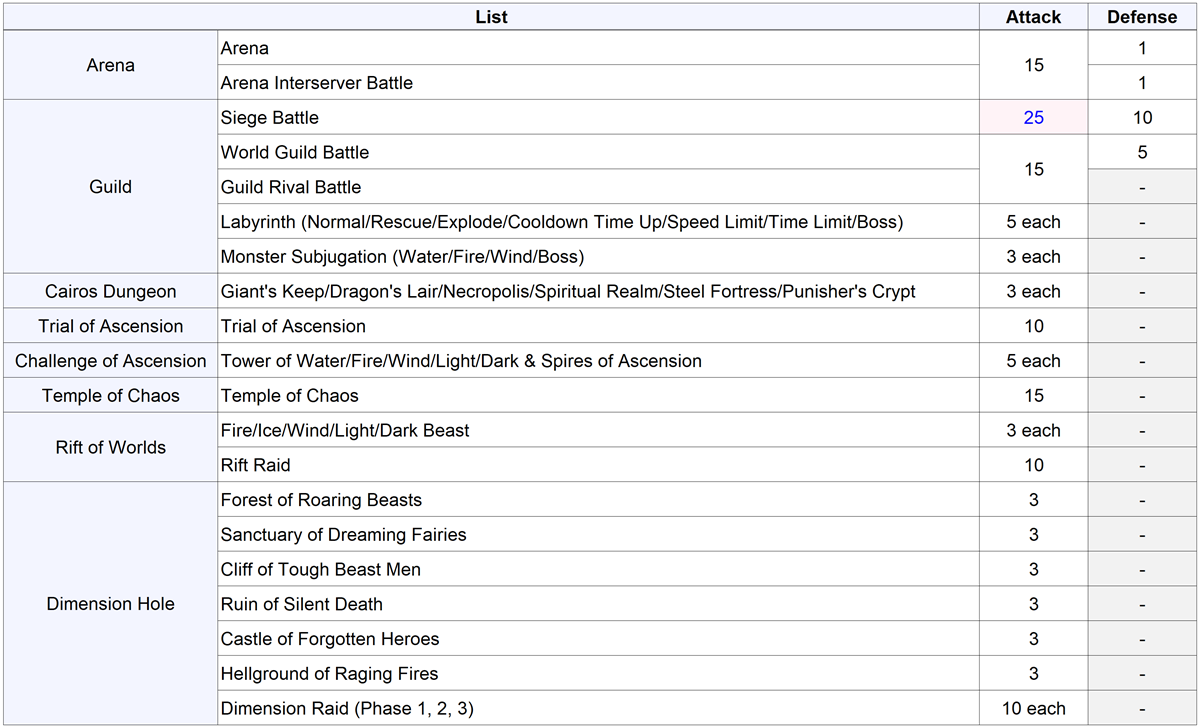
: The number of Siege Battle Attack Deck Presets has been increased from \[15 → 25].
Defense deck quantities have been added to the table next to attack deck quantities where applicable.
- Changes following the \[Deck Preset] Update
: The Temporary Engrave feature has been removed.
The feature used to load Monsters from the Normal Monster Sealed Shrine and use them with temporary engravings has been replaced by the Deck Preset feature.
: Following the removal of Siege Battle Rune separation, the Siege Battle tab within \[Rune Management > Manage Engrave] has been removed.
: The UI button for selecting a Friend's Monster on the battle preparation screen has been moved to the Monster selection screen.
▶ \[Relic] Improvements
- \[Relic] and \[Relic Power-up Stone] products will now only appear in the Shop after satisfying the Relic tutorial requirements.
(Affected: \[Shop > Exchange] Arena, Guild, Ancient Crystal / \[Shop > Normal] Crystal Shop)
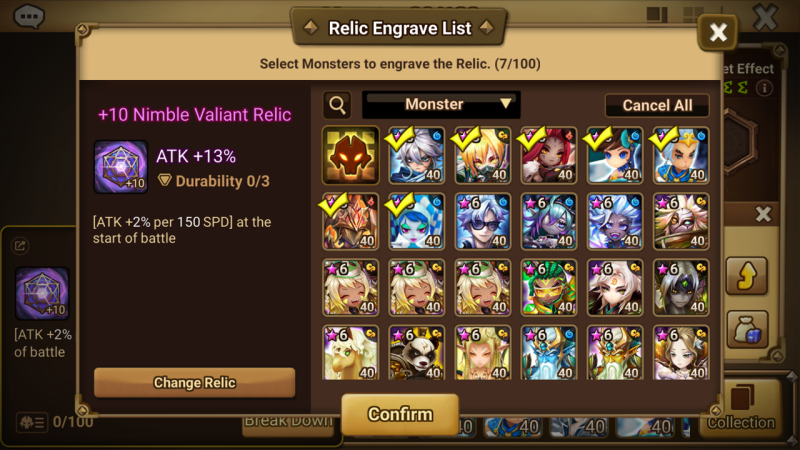
- The Relic Engrave List UI has been revamped, and a \[Change Relic] feature has been added, allowing you to swap a Relic in use by Monsters for another one in bulk.
- Fixed an issue where Relic equipment info was not updated in real-time under certain conditions.
▶ Other Improvements and Changes
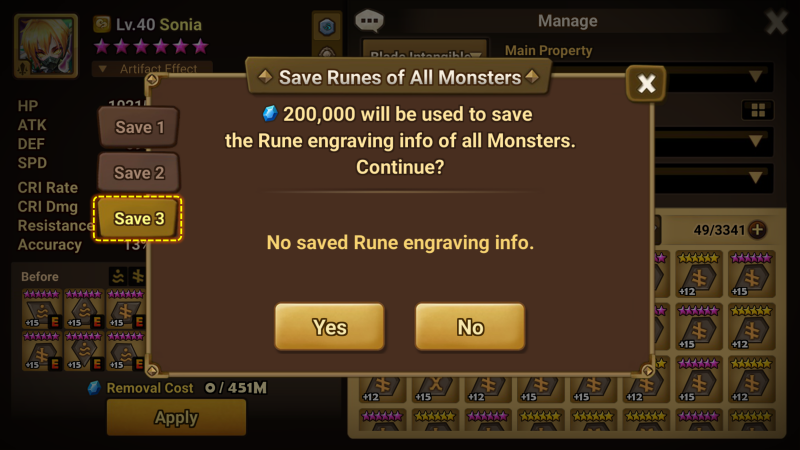
- \[World Arena] A tab for saving Runes and Artifacts of all Monsters will be added.
: Tab #3 will be added, allowing you to save and load Runes/Artifacts from three selections.
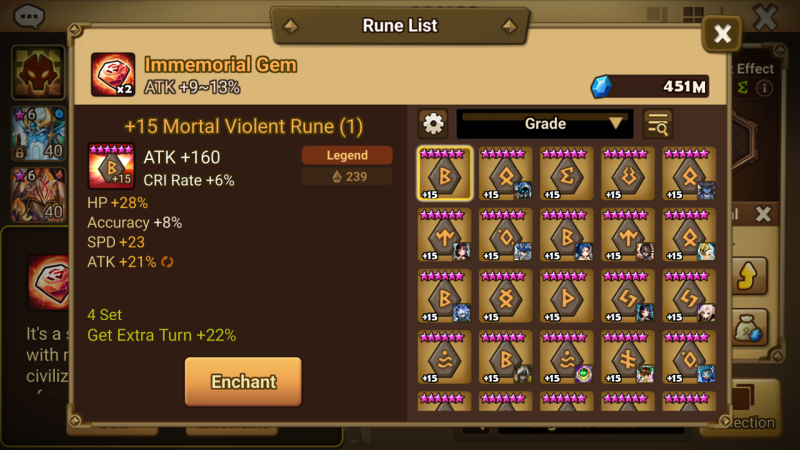
- The Rune/Artifact list UI displayed when pressing \[Gem/Grindstone > Enchant] or \[Conversion Stone > Convert] has been improved.
You can now check the details of the selected Rune/Artifact on one screen without additional actions.
- If a Monster is obtained in its awakened state, its unawakened version will now be reflected as collected.
- \[Shop > Recommended > Special] The monthly purchase limit for Monthly Summon Pack will change from 3 to 5 starting May 1 (server time).
- \[Shop > Exchange] The order of tabs at the top has been changed.
: (As-is) Trial of Ascension / Arena / World Arena / League / Guild / Ancient Coin / Ancient Crystal
: (To-be) Arena / World Arena / League / Guild / Ancient Crystal / Ancient Coin / Trial of Ascension
▶ \[Shop > Recommended] 12th Anniversary Special! Limited-Time Surprise Shop
- Surprise Shop Period: After the v9.2.0 update on Apr. 29 - May 24, 11:59 PM (server time)
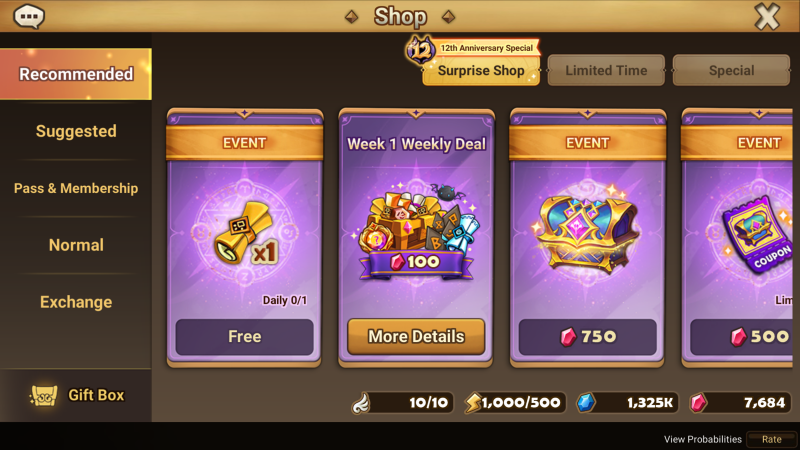
- The Surprise Shop offers the following items.
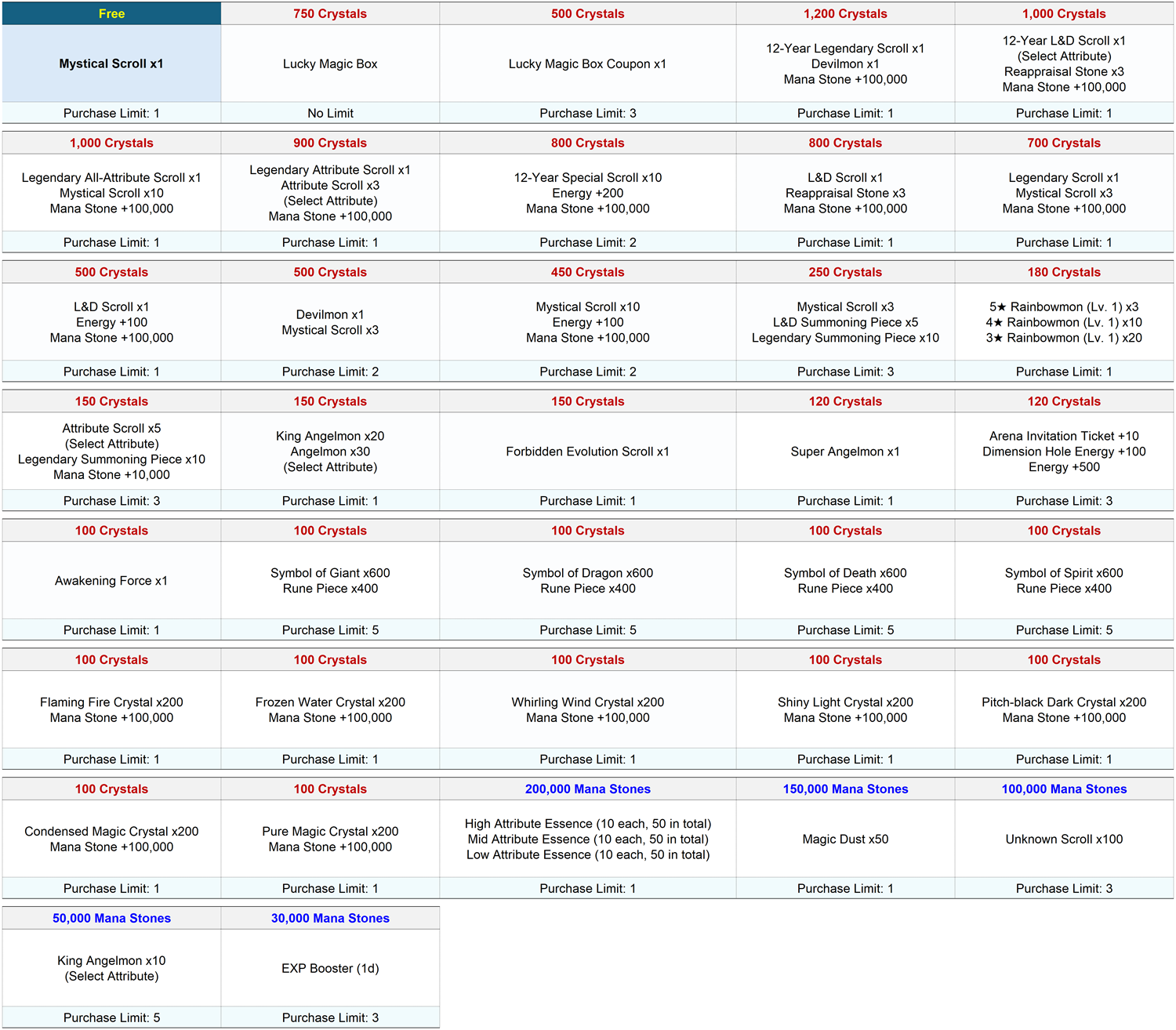
* The daily free Mystical Scroll gift refreshes every day at 12:00 AM (server time).
* Lucky Magic Box Coupons can be used until May 24, 11:59 PM (server time).
\[Weekly Special Products] will be available for four weeks, offering different items each week.
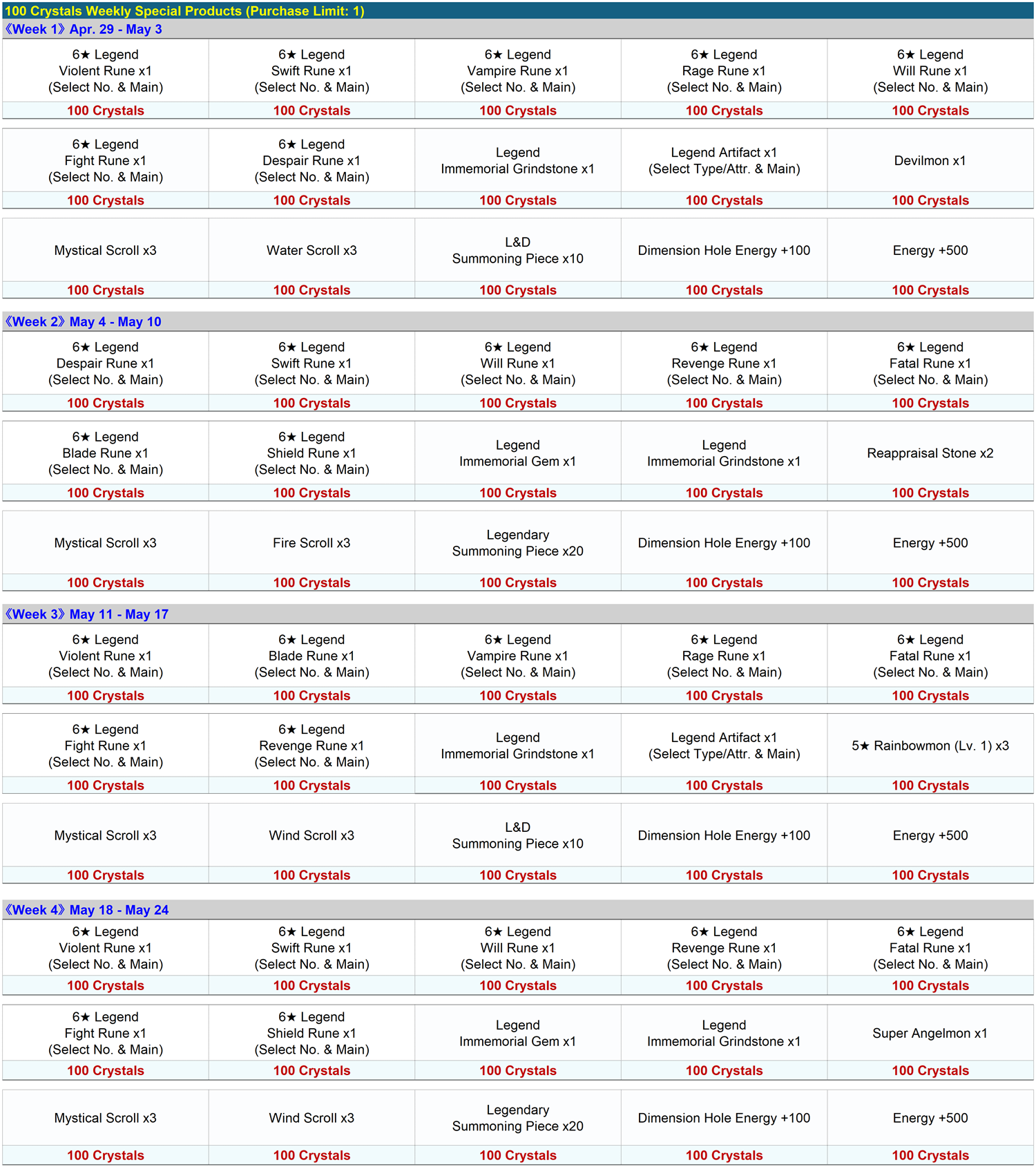
* For 6★ Legend Runes, you can select the Rune number and main property when claiming them from your Inbox.
* For Legend Artifacts, you can select the Attribute/Type and main property when claiming them from your Inbox.
* Weekly Special Products refresh every Monday at 12:00 AM.
* Week 1 products will be available from the v9.2.0 update patch on Apr. 29 until May 3, 11:59 PM (server time).
▶ \[Settings] Switch Account Feature
- A feature to save account login info on your device and quickly switch between accounts has been added.
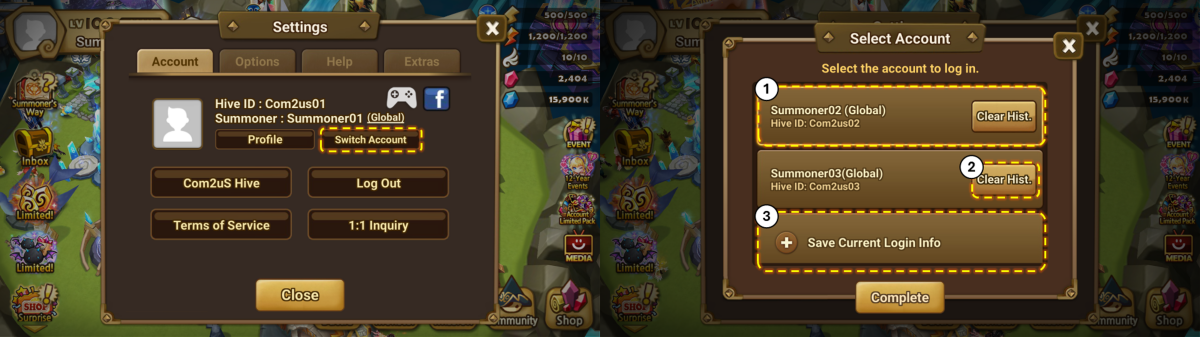
① Login info currently saved on the device. You can switch accounts quickly between the saved info.
② Clear History: You can delete the login info saved on the current device. Account info is maintained.
③ You can save the login info of the account currently logged in on the device.
* Please note that all stored account info will be reset if the app is deleted/reinstalled or the device is changed.
* For Google Play Games, this feature is currently under preparation.
▶ \[World Arena] Challenge Battle New Season
- Period: May 1, 12:00 AM PDT - Jun. 30, 7:59 AM PDT
* The new season will open across all servers after a rest period from Apr. 30, 8:00 AM until 11:59 PM PDT.
(* Rankings and records will reset during the rest period.)
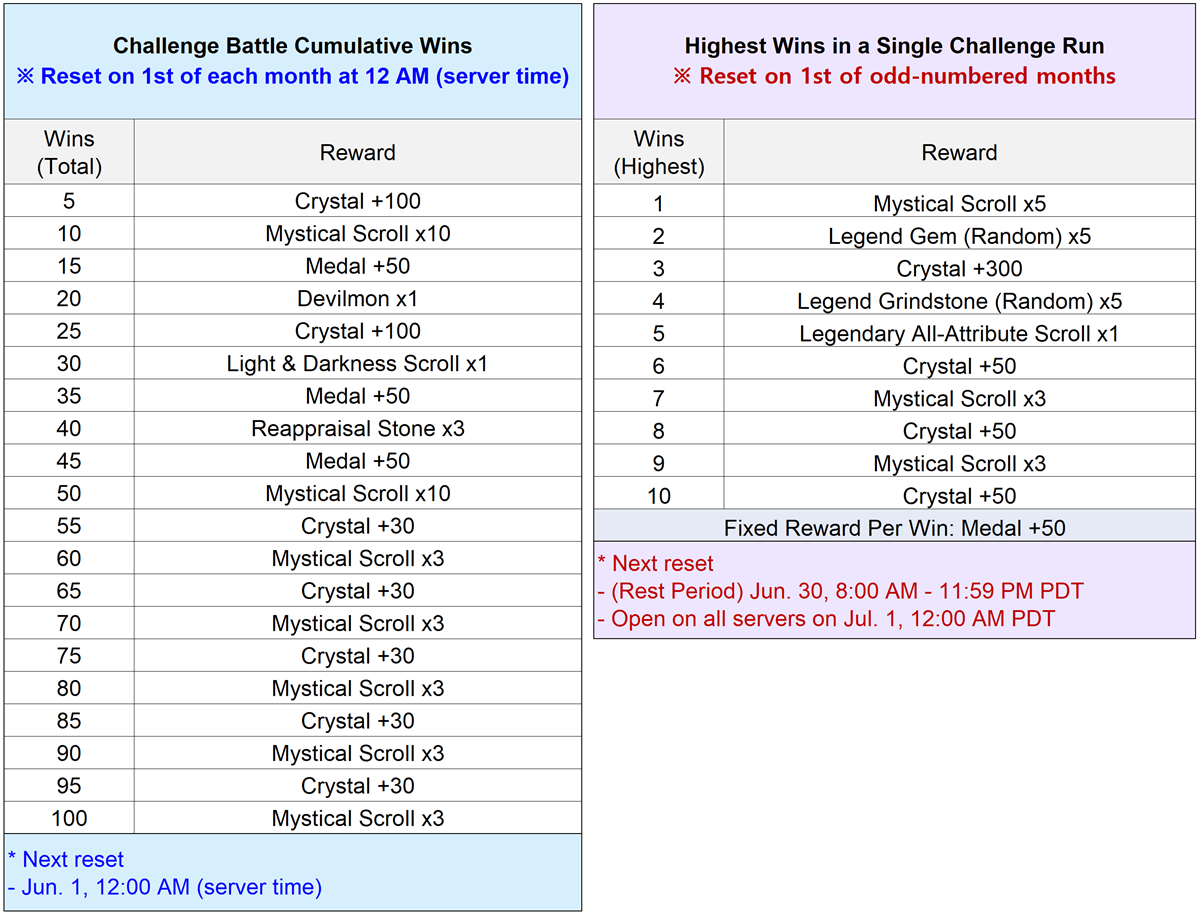
- Challenge Battle rewards will be reset as follows.
- The following Challenge Battle Monsters will be available for the new season.
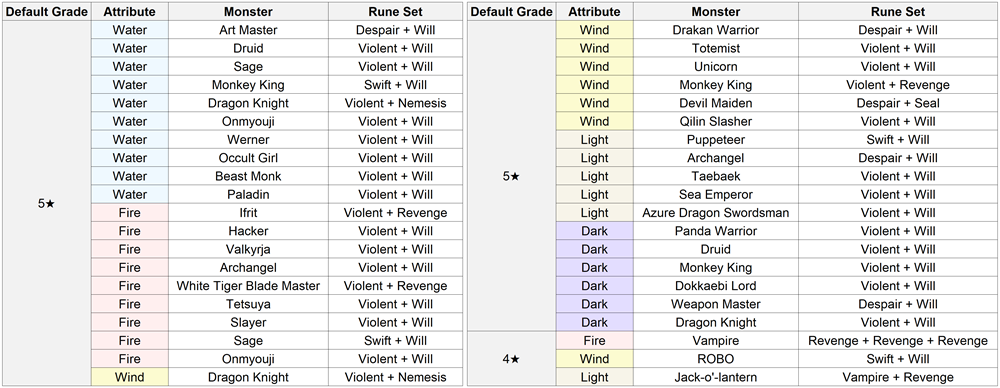
* Challenge Monsters above can be used until Jun. 30, 7:59 AM PDT, and will be replaced with a new set when the new season begins on Jul. 1, 12:00 AM PDT.
* Monster info of the same Challenge Monster from the previous season has been updated as follows.
- Rune Stat Change
: Wind Monkey King's HP decreased by 6,070, Critical Damage increased by 50%
▶ \[Temple of Chaos] May Boss
- Temple of Chaos is a monthly dungeon open for one week each month, from 12:00 AM on the first Sunday until 12:00 AM on the following Sunday (server time).
: Battle Period: May 3, 12:00 AM - May 10, 12:00 AM (server time)
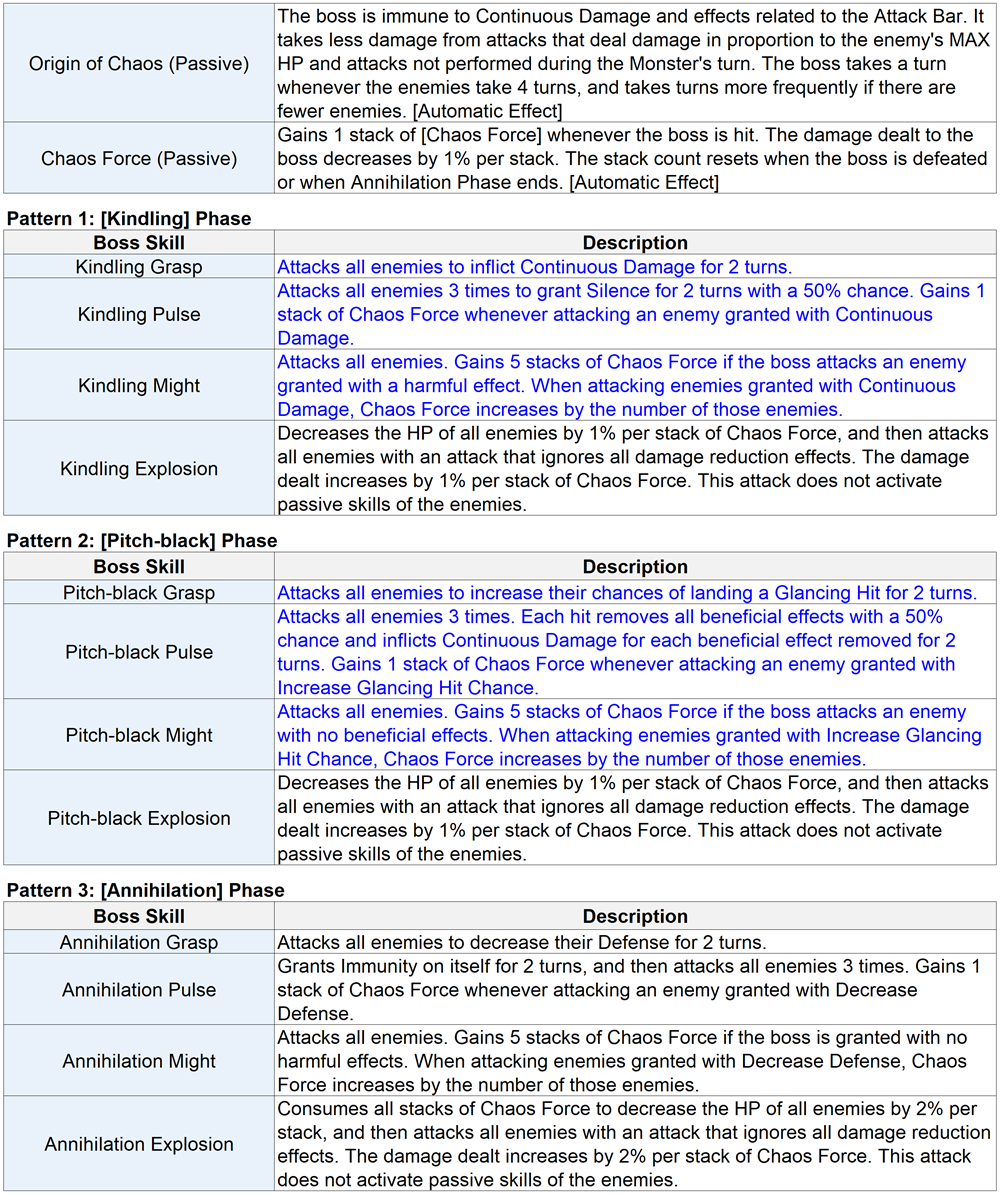
- The May boss will be a Dark Attribute, and its skills are as follows.
▶ \[Android] Minimum Supported Version Changed to 6.0 or Higher.
▶ Game Errors Fixed
- Fixed an issue where Fire/Wind/Light Beetle Guardians were incorrectly searched under \[Recover self HP] in \[Search Monster > Other Effects].
- Fixed an issue in the Artifact list pop-up (displayed when pressing \[Convert] for Conversion Stones) where Artifacts possessing the selected Conversion Stone's property were not displayed.
- \[Labyrinth > Info > Reward] Fixed an issue where rewards were not displayed correctly when selecting reward chests by rank.
- Fixed an issue where markings configured for certain Monsters before the v9.1.8 update could not be removed.
Affected Monsters: Japan Server - Fire Imp Champion, Fire Golem, Water Werewolf / Other Servers - Fire Yeti, Dark Salamander, Water Viking
- Fixed some typos.
▶ Skill descriptions of some Monsters have been modified.

What's Your Reaction?










![[Business Talk] Chagee: Opening 3,500 stores in 6 years](https://xinker.org/uploads/images/202410/image_140x98_671afce94bf91.webp)






