


![[PRO Tips] Gold’s Bullish Revival: Seasonal Trends and Key Levels to Watch](https://xinker.org/uploads/images/202412/image_430x256_67724cc6ad0cd.webp)
![[PRO Tips] Gold Market Under Short-Term Pressure, Safe-Haven Demand and Central Bank Buying Support Long-Term Upside Potential](https://xinker.org/uploads/images/202412/image_430x256_676ffb4685287.webp)
![[PRO Tips] Analysis of 9 key points of differentiation strategy! Master differentiation to create a brand advantage that is unique in the world!](https://firebasestorage.googleapis.com/v0/b/xinker-tips.appspot.com/o/article_thumbnails%2Fscaled_differentiation%20strategy.png.png?alt=media&token=a1bfc3d2-e85a-4db7-8a6d-01c7274f8940)
![[PRO Tips] Will REITs regain growth momentum in 2024? 3 REITs ETFs you must know if you want to invest in real estate.](https://firebasestorage.googleapis.com/v0/b/xinker-tips.appspot.com/o/article_thumbnails%2Fscaled_REITs1.png.png?alt=media&token=8af4eb93-33ff-466f-8039-b6555fad52b4)
![[PRO Tips] Complete tutorial on how to make money in Adobe Stock!](https://firebasestorage.googleapis.com/v0/b/xinker-tips.appspot.com/o/article_thumbnails%2Fscaled_tut-adobe1.png.png?alt=media&token=0b2c8cf2-22bd-4142-883e-140ed1cbaf02)
![[Passive Income] Unlock the secret of passive income: 3 steps to apply for Google AdSense](https://xinker.org/uploads/images/202410/image_430x256_6717a4fb3052b.webp)
![[Passive Income] Earn over $200 a day with AI-generated articles!](https://firebasestorage.googleapis.com/v0/b/xinker-tips.appspot.com/o/article_thumbnails%2Fscaled_article1.png.png?alt=media&token=f61bf35b-8553-4719-826d-7360024adc70)
![[Passive Income] Earn over 20 USD per download with AI-generated images!](https://firebasestorage.googleapis.com/v0/b/xinker-tips.appspot.com/o/article_thumbnails%2Fscaled_adobe2.png.png?alt=media&token=3e20e76a-a907-45af-80aa-bf9b3600301f)
![[Passive Income] Earn 10 USD per new download by sharing CapCut!](https://firebasestorage.googleapis.com/v0/b/xinker-tips.appspot.com/o/article_thumbnails%2Fscaled_capcut2.png.png?alt=media&token=a04dec40-1fac-4857-86f2-19a8be02d38e)
![[Passive Income] Use your WiFi to create passive income in 5 minutes, and you can earn 4-6 U per day!](https://firebasestorage.googleapis.com/v0/b/xinker-tips.appspot.com/o/article_thumbnails%2Fscaled_Grassio.webp.png?alt=media&token=7659a95e-0e47-4f27-a17d-c942ac3cf7f4)


![[Business Talk] The Unique Theme of XINKER's Song: Beef Wellington and Business Mastery](https://xinker.org/uploads/images/202410/image_430x256_671afc155f47f.webp)
![[Business Talk] Chagee: Opening 3,500 stores in 6 years](https://xinker.org/uploads/images/202410/image_430x256_671afce80c5f9.webp)


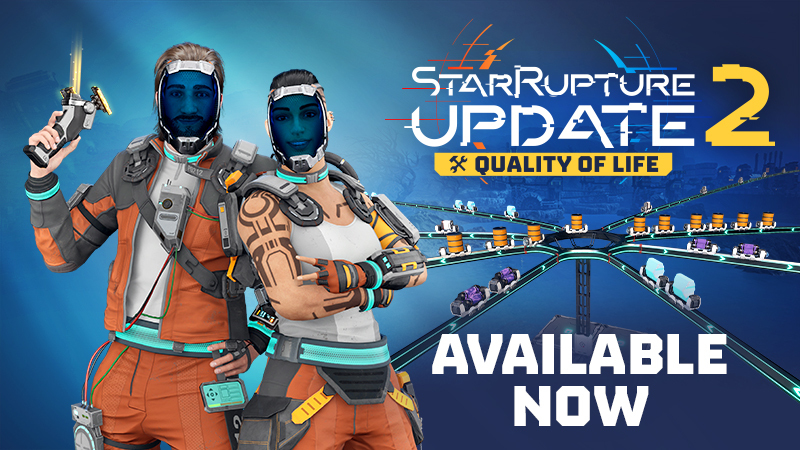
Update 2: Quality of Life - now available! [what's new + patch notes]
Hello everyone!We’re excited to release to you our second Update to StarRupture’s Early Access, named “Quality of Life”. In this update, we have focused on crucial improvements to one of the core gameplay features - factory building. Besides fixing hundreds of bugs, this major update introduces numerous quality-of-life features based on your feedback. So we’d like to thank you all for your comments and messages, and for helping us make StarRupture the best it can be during its road to 1.0 release.Below, we’re presenting you with a summary of new features introduced in Update 2: Quality of Life, followed by an expanded explanation of each one of them, and we’ll top it off with the vast list of patch notes included in the Update.Full list of new features & improvements introduced in Update 2: Building Features Copying Buildings along with their settings Building settings copy-paste function Multi-deconstruct feature Deconstructing Buildings without Foundations Pillar Support height adjustment "Add Pillars" functionality in Building Mode Ability to snap Platforms to the sides of Pillars Drone Roundabout overhaul Game-balance improvements New and balanced production recipes Base Core upgrade cost rebalance UI Features Production per minute OCL’s package sendout rate Search bar in Buildings & Storages Teleporter & Base Core custom names on the Map Autosave heads-up Abandoned Bases Completion Tracker Infected Bases Completion Tracker Corporation level requirements display New interaction options with items "Continue" button in the main menu UI/UX Improvements Alphabetical Item order in Storages Custom building name & task icon visibility New game cursor Reworked Infolog New accessibility options (on/off): Headbob, Camera shake, Sprint FOV changeBuilding FeaturesCopying Buildings with their settingsThe building copy feature has been improved, as you can now copy a building alongside its settings by pressing the Z button. If you want to copy just the building without its settings, use the new Ctrl+Z shortcut.Building settings copy-paste functionA simple keyboard shortcut of Ctrl+C & Ctrl+V will help you quickly copy and paste a selected building setup, such as a production recipe or corporation order. The copy & paste action works either by looking at the building or when interacting with its interface.Multi-deconstruct featureThe Building Tool now allows you to quickly mark multiple constructions and deconstruct them all at once. Constructions that use the stability of the buildings you’d like to deconstruct will now be highlighted in red to help you see the result of your deconstruction.Deconstructing Buildings without FoundationsAnother new feature will allow you to toggle the ability to deconstruct buildings excluding their foundations. This may prove handy when you don’t want to delete the floor level of your current construction.Pillar Support height adjustmentPillars will now automatically adjust their height when you try to place them under already existing Platforms. You can also manually adjust the Pillar's height when placing it on the ground by simply scrolling your mouse wheel.We’ve also added new keybinds and other changes in preparation for new building features and even more improvements in the future."Add Pillars" functionality in Building ModePlacing new buildings on various height levels will now be a breeze thanks to the “Add Pillars” ability. Enabling it will automatically add Pillars under the building you want to build, and in the same way as with regular Pillars, you will be able to control the Pillars’ height by scrolling your mouse wheel.You can also turn off the pillars when placing a building if this better suits your construction.Ability to snap Platforms to the sides of PillarsPlatforms can now also be built on the sides of Pillar Supports. This neat feature opens brand-new possibilities for creative building and making your factory even more spectacular.Drone Roundabout overhaulThe Drone Roundabout, in addition to receiving a fresh look, will no longer slow down your Drones, as it will transport them equally fast as the fastest rail connected to your Roundabout.Game-balanceNew and balanced production recipesWith improved v.1 recipes, new v.2 & alternative recipes, the production of some of the late-game items has been rebalanced. Regular recipes for v.1 buildings have been rebalanced to require fewer buildings, making it easier to produce later-game items in larger quantities. The recipes for the v.2 buildings have been rebalanced, simplified, and divided into two categories: Upgraded v.2 recipes, which require the same ingredients as the v.1 recipes but in bigger numbers, and produce more items at the same time; Alternative v.2 recipes, which have slightly different ingredients than the v.1 or upgraded v.2 recipes, and produce even more items at the same time.Check out the gallery below to see all the new & balanced recipes:[carousel][/carousel]Base Core upgrade cost rebalanceThe
![Update 2: Quality of Life - now available! [what's new + patch notes]](https://clan.fastly.steamstatic.com/images/44238153/1457ec7f4441c44f5ebc4faee082c614dad91969.jpg?#)
Hello everyone!
We’re excited to release to you our second Update to StarRupture’s Early Access, named “Quality of Life”. In this update, we have focused on crucial improvements to one of the core gameplay features - factory building.
Besides fixing hundreds of bugs, this major update introduces numerous quality-of-life features based on your feedback. So we’d like to thank you all for your comments and messages, and for helping us make StarRupture the best it can be during its road to 1.0 release.

Below, we’re presenting you with a summary of new features introduced in Update 2: Quality of Life, followed by an expanded explanation of each one of them, and we’ll top it off with the vast list of patch notes included in the Update.
Full list of new features & improvements introduced in Update 2:
- Building Features
- Copying Buildings along with their settings
- Building settings copy-paste function
- Multi-deconstruct feature
- Deconstructing Buildings without Foundations
- Pillar Support height adjustment
- "Add Pillars" functionality in Building Mode
- Ability to snap Platforms to the sides of Pillars
- Drone Roundabout overhaul
- Copying Buildings along with their settings
- Game-balance improvements
- New and balanced production recipes
- Base Core upgrade cost rebalance
- New and balanced production recipes
- UI Features
- Production per minute
- OCL’s package sendout rate
- Search bar in Buildings & Storages
- Teleporter & Base Core custom names on the Map
- Autosave heads-up
- Abandoned Bases Completion Tracker
- Infected Bases Completion Tracker
- Corporation level requirements display
- New interaction options with items
- "Continue" button in the main menu
- Production per minute
- UI/UX Improvements
- Alphabetical Item order in Storages
- Custom building name & task icon visibility
- New game cursor
- Reworked Infolog
- New accessibility options (on/off): Headbob, Camera shake, Sprint FOV change
- Alphabetical Item order in Storages


Building Features
Copying Buildings with their settings
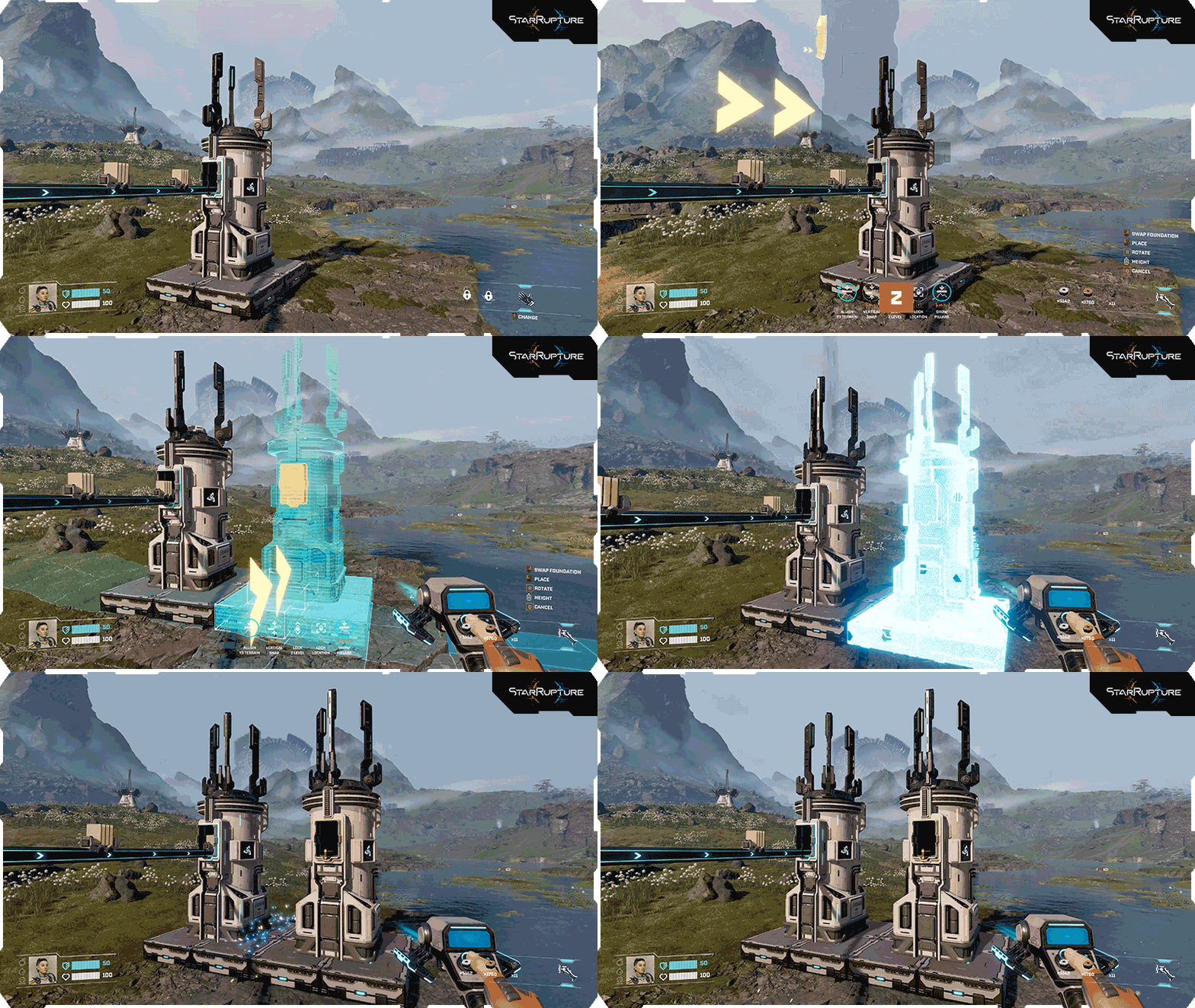
The building copy feature has been improved, as you can now copy a building alongside its settings by pressing the Z button. If you want to copy just the building without its settings, use the new Ctrl+Z shortcut.
Building settings copy-paste function
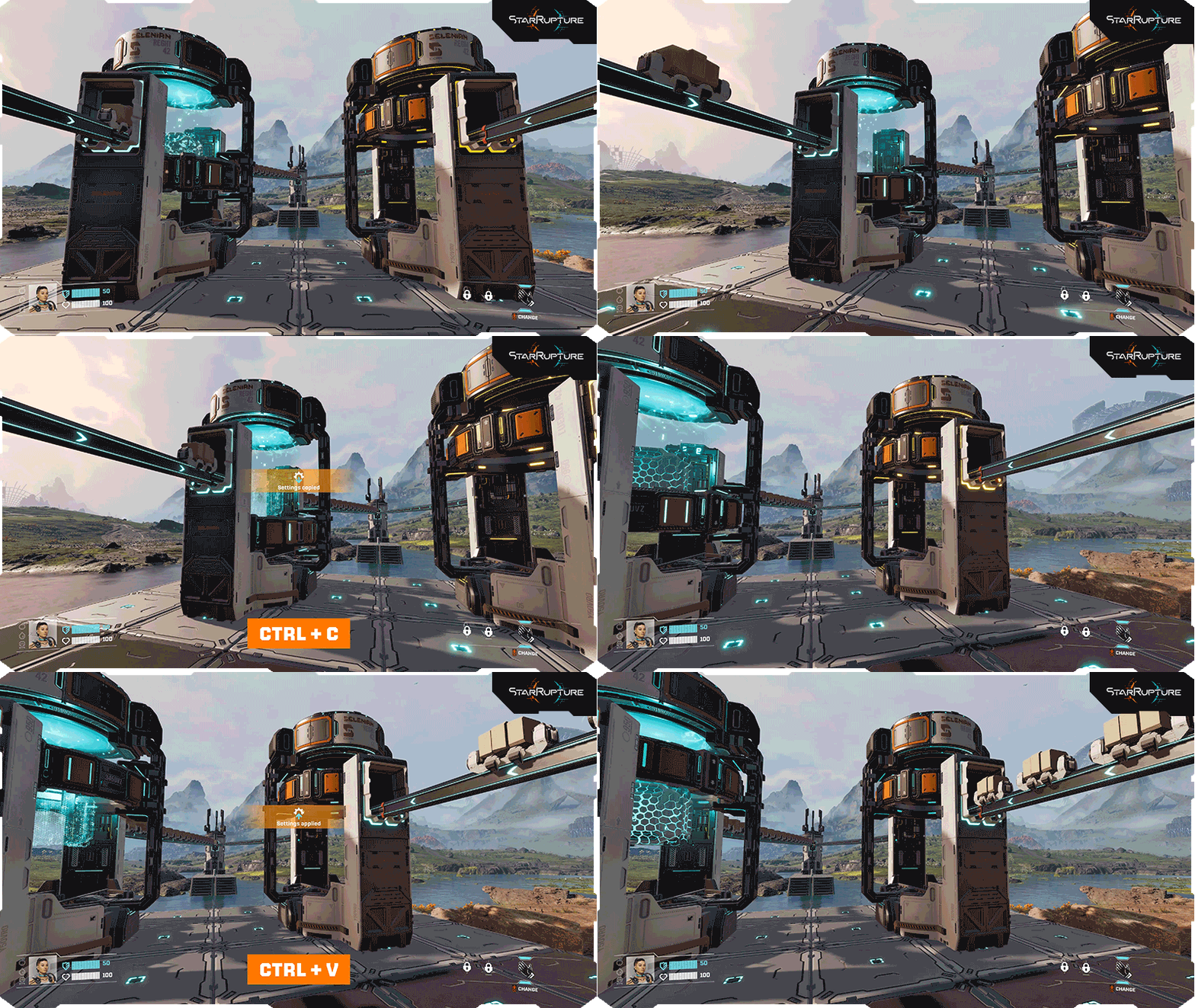
A simple keyboard shortcut of Ctrl+C & Ctrl+V will help you quickly copy and paste a selected building setup, such as a production recipe or corporation order. The copy & paste action works either by looking at the building or when interacting with its interface.
Multi-deconstruct feature
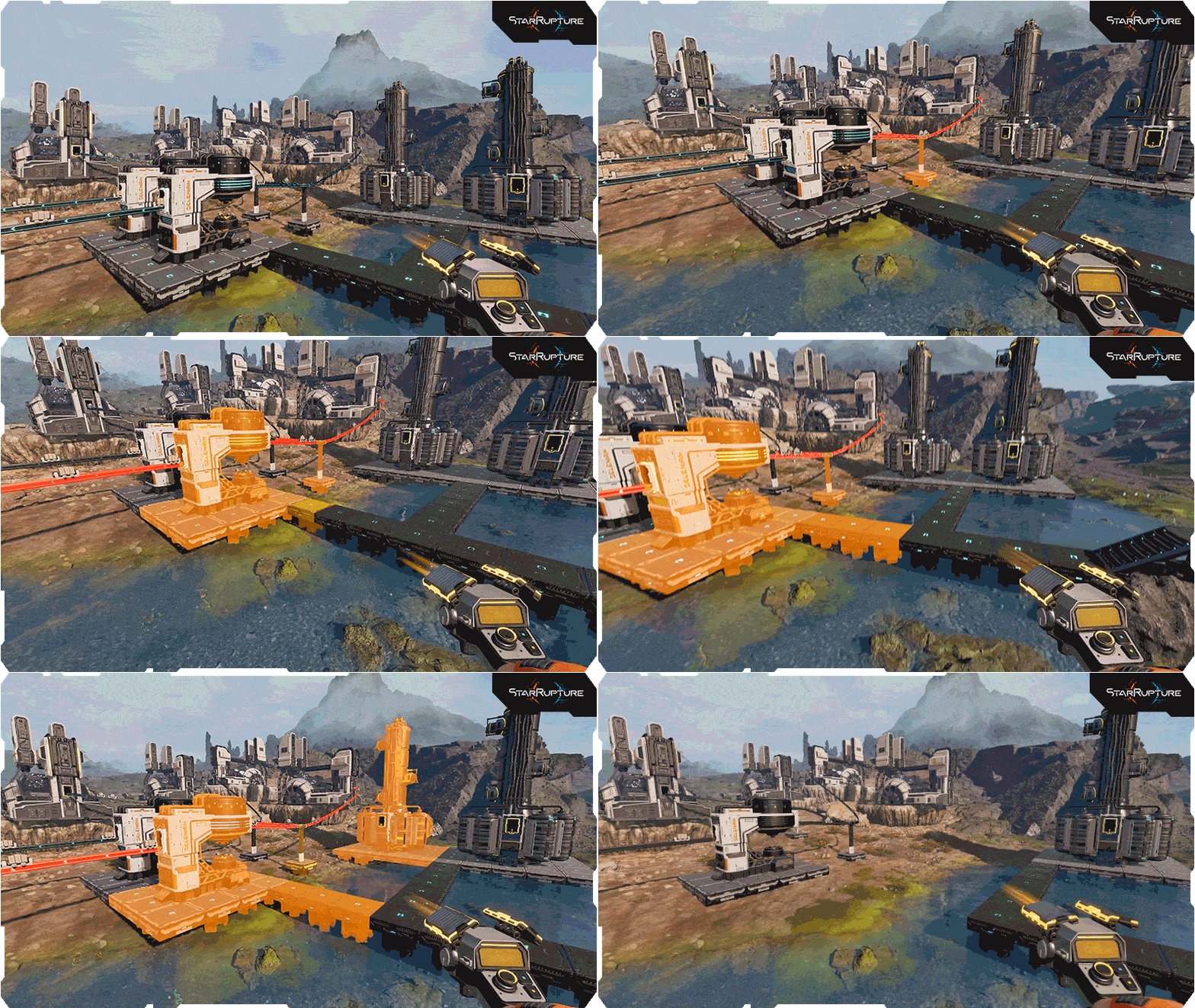
The Building Tool now allows you to quickly mark multiple constructions and deconstruct them all at once. Constructions that use the stability of the buildings you’d like to deconstruct will now be highlighted in red to help you see the result of your deconstruction.
Deconstructing Buildings without Foundations
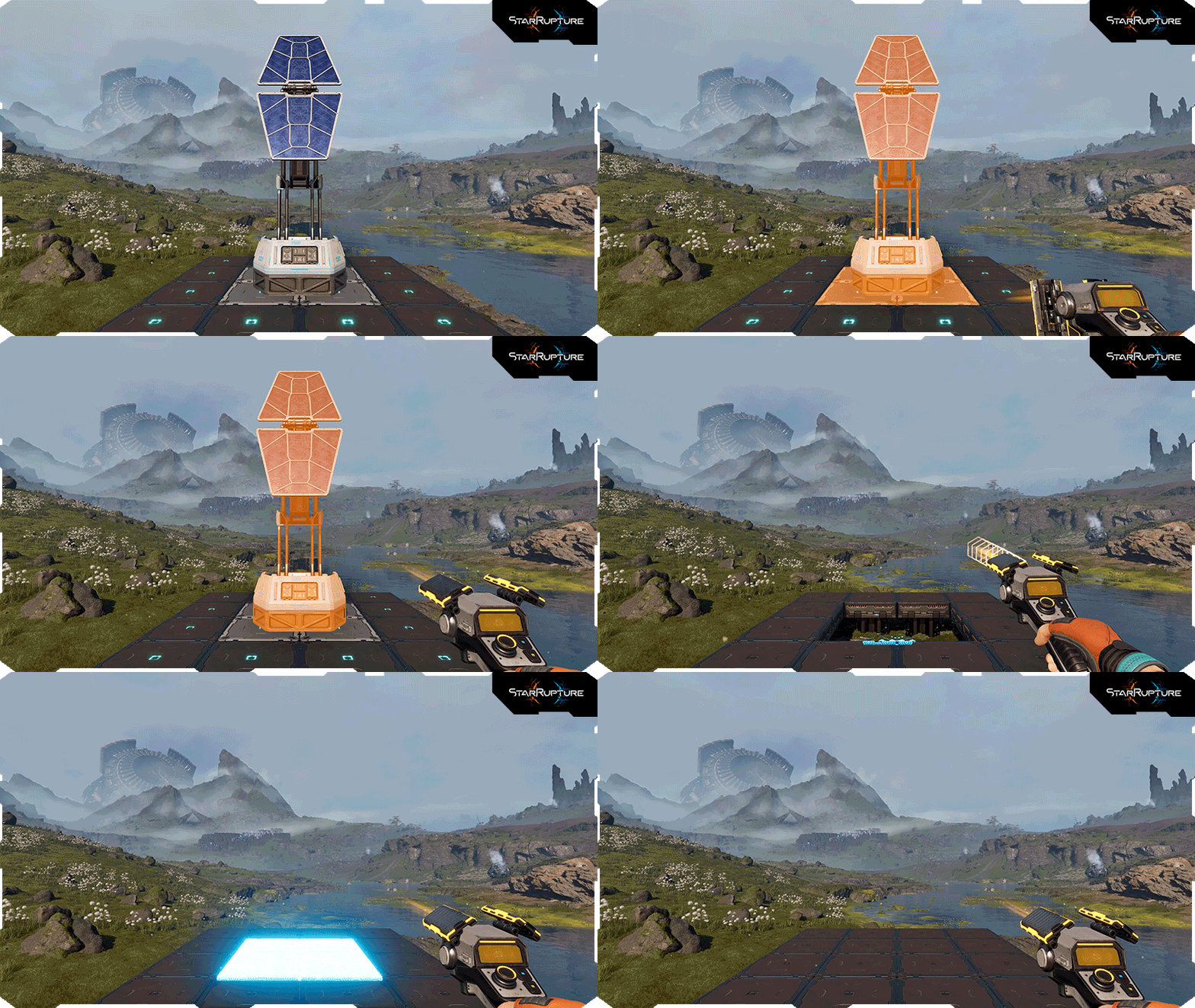
Another new feature will allow you to toggle the ability to deconstruct buildings excluding their foundations. This may prove handy when you don’t want to delete the floor level of your current construction.
Pillar Support height adjustment
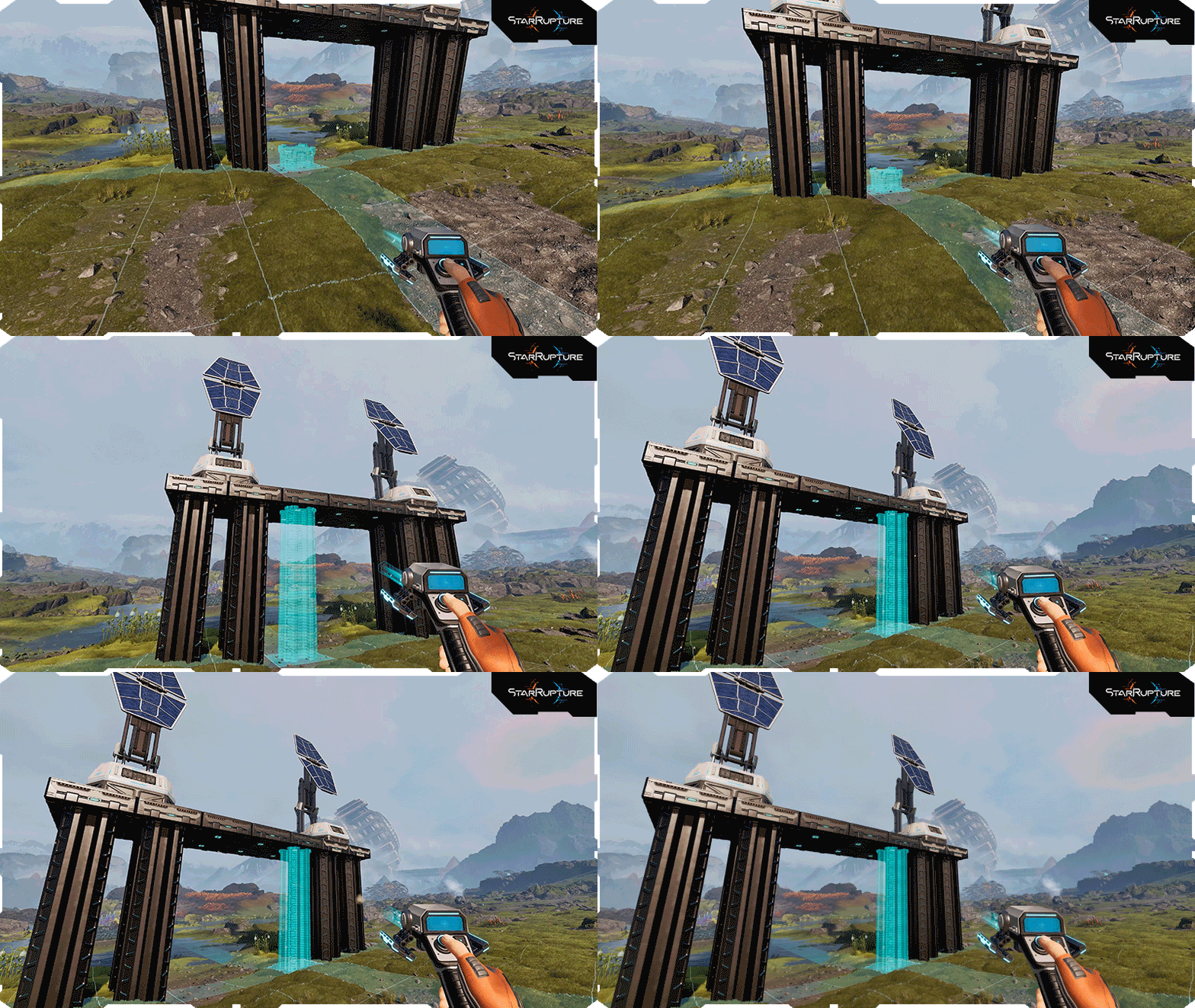
Pillars will now automatically adjust their height when you try to place them under already existing Platforms.
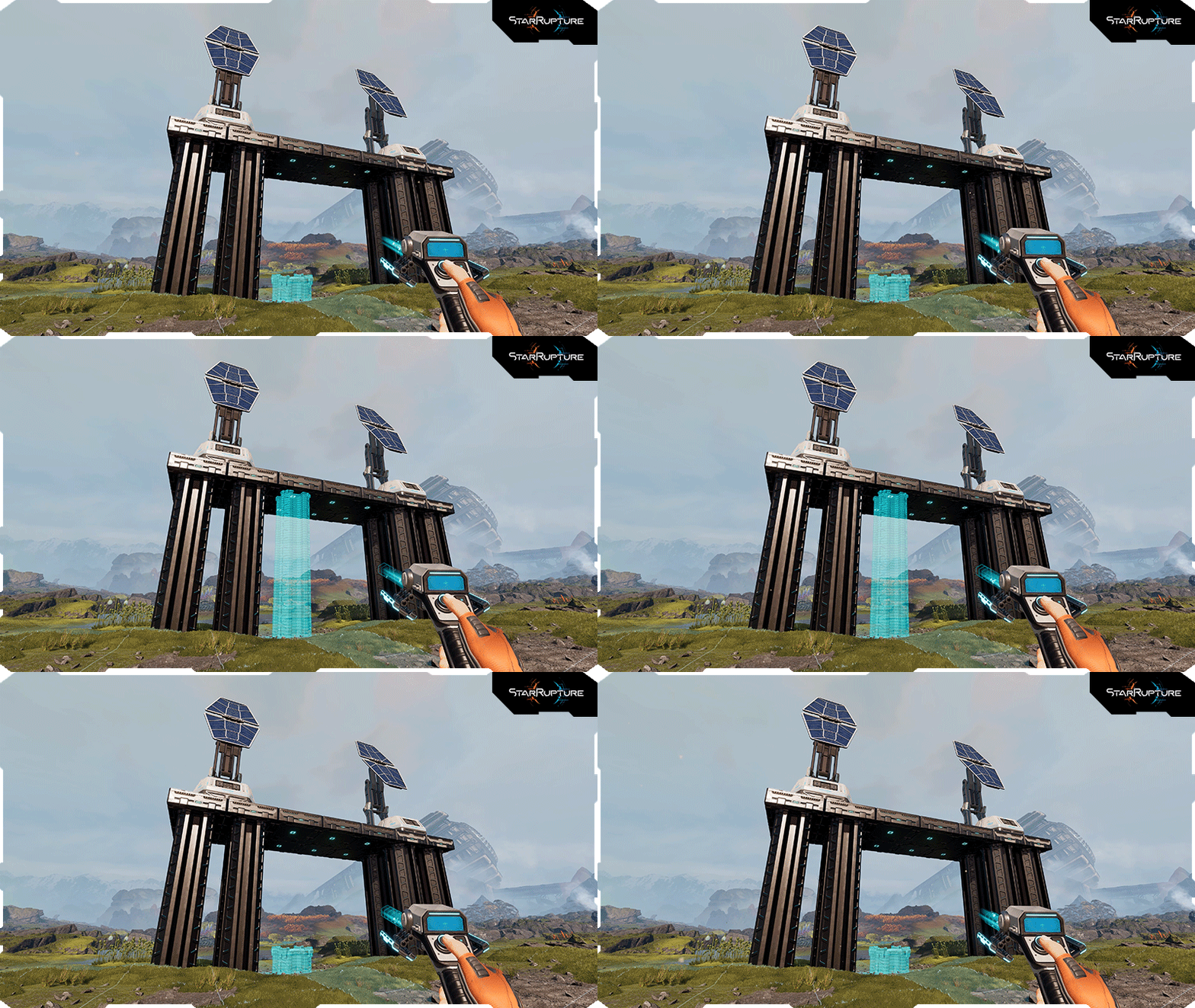
You can also manually adjust the Pillar's height when placing it on the ground by simply scrolling your mouse wheel.

We’ve also added new keybinds and other changes in preparation for new building features and even more improvements in the future.
"Add Pillars" functionality in Building Mode
Placing new buildings on various height levels will now be a breeze thanks to the “Add Pillars” ability. 
Enabling it will automatically add Pillars under the building you want to build, and in the same way as with regular Pillars, you will be able to control the Pillars’ height by scrolling your mouse wheel.
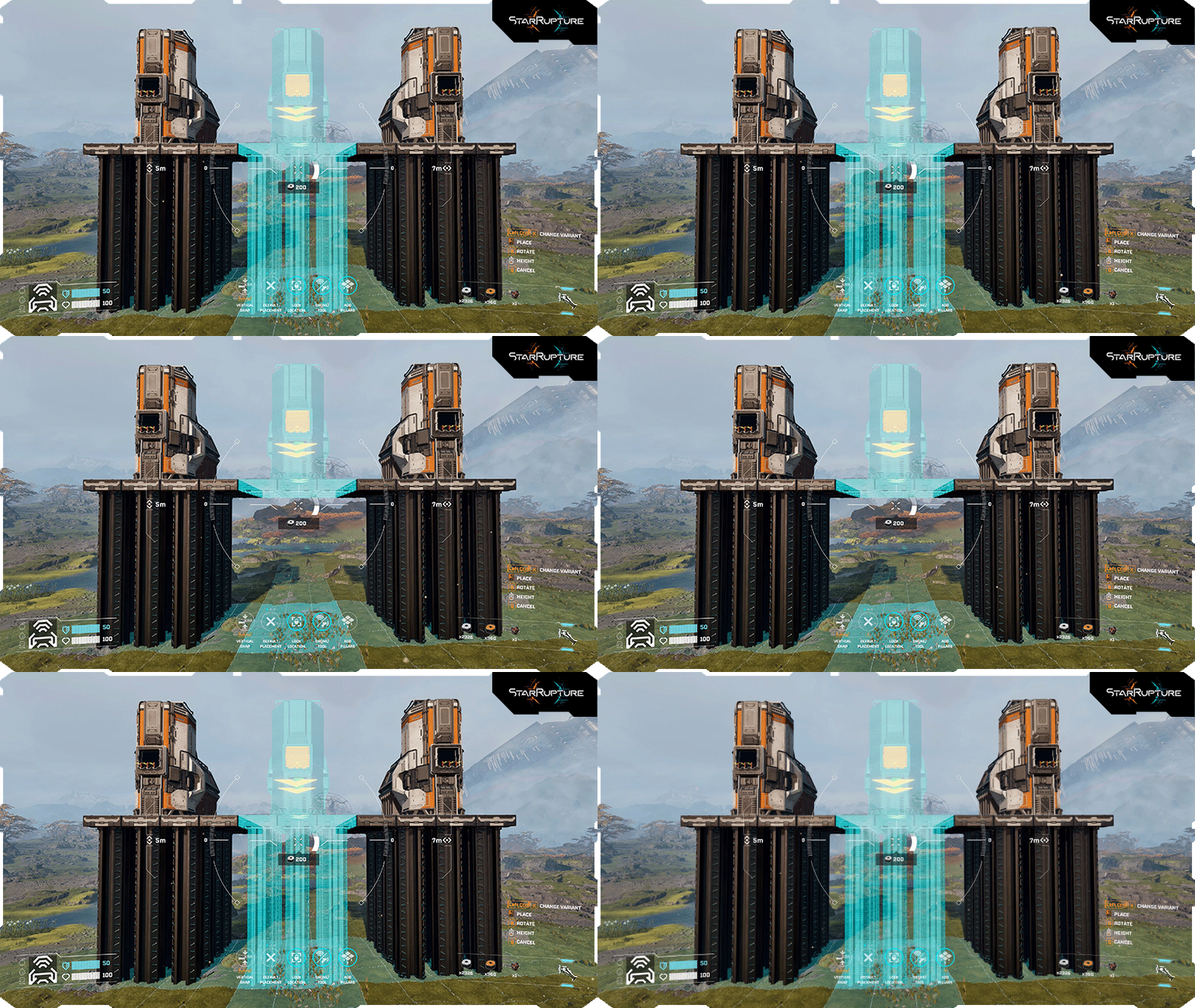
You can also turn off the pillars when placing a building if this better suits your construction.
Ability to snap Platforms to the sides of Pillars
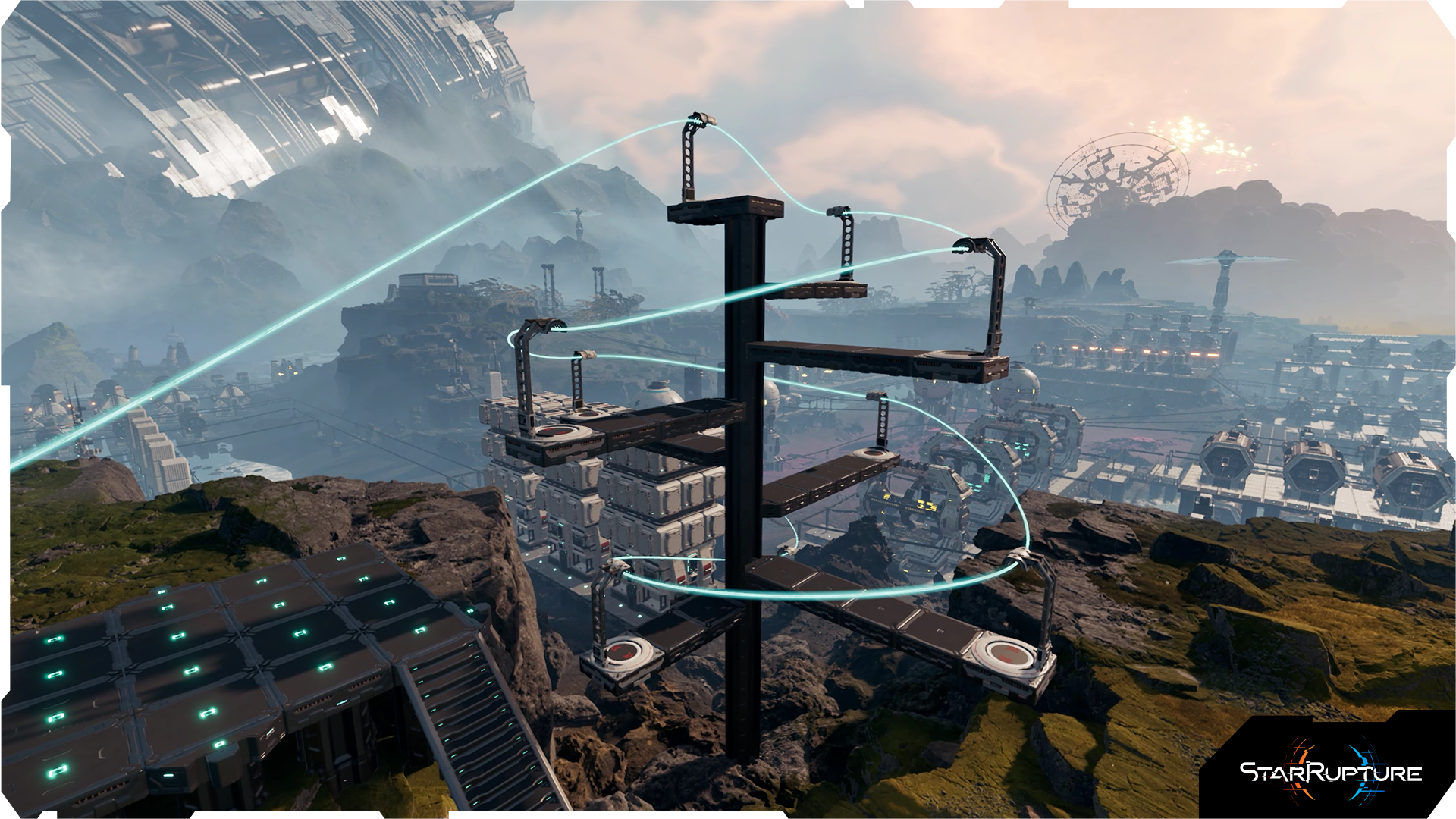
Platforms can now also be built on the sides of Pillar Supports. This neat feature opens brand-new possibilities for creative building and making your factory even more spectacular.
Drone Roundabout overhaul
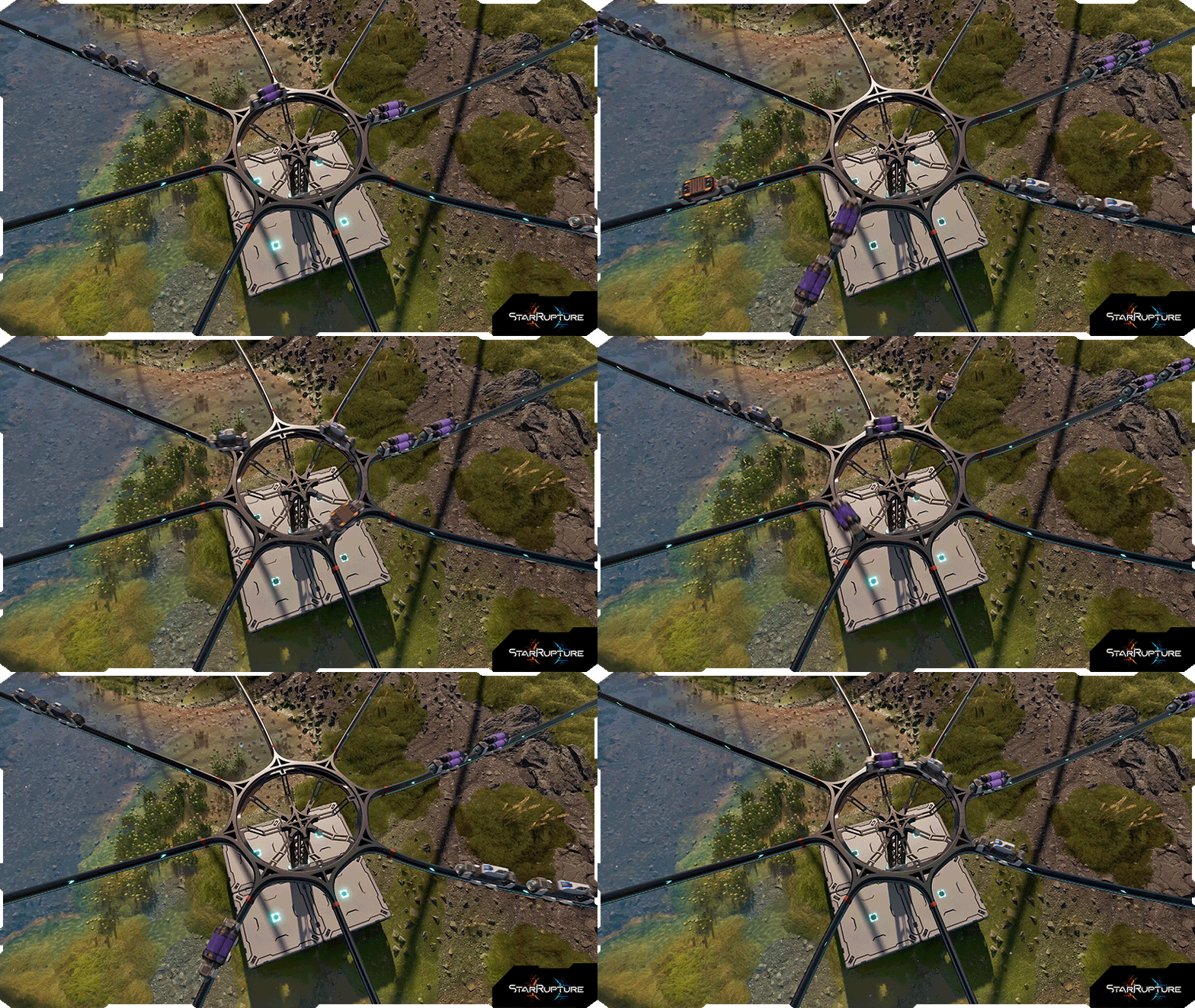
The Drone Roundabout, in addition to receiving a fresh look, will no longer slow down your Drones, as it will transport them equally fast as the fastest rail connected to your Roundabout.
Game-balance
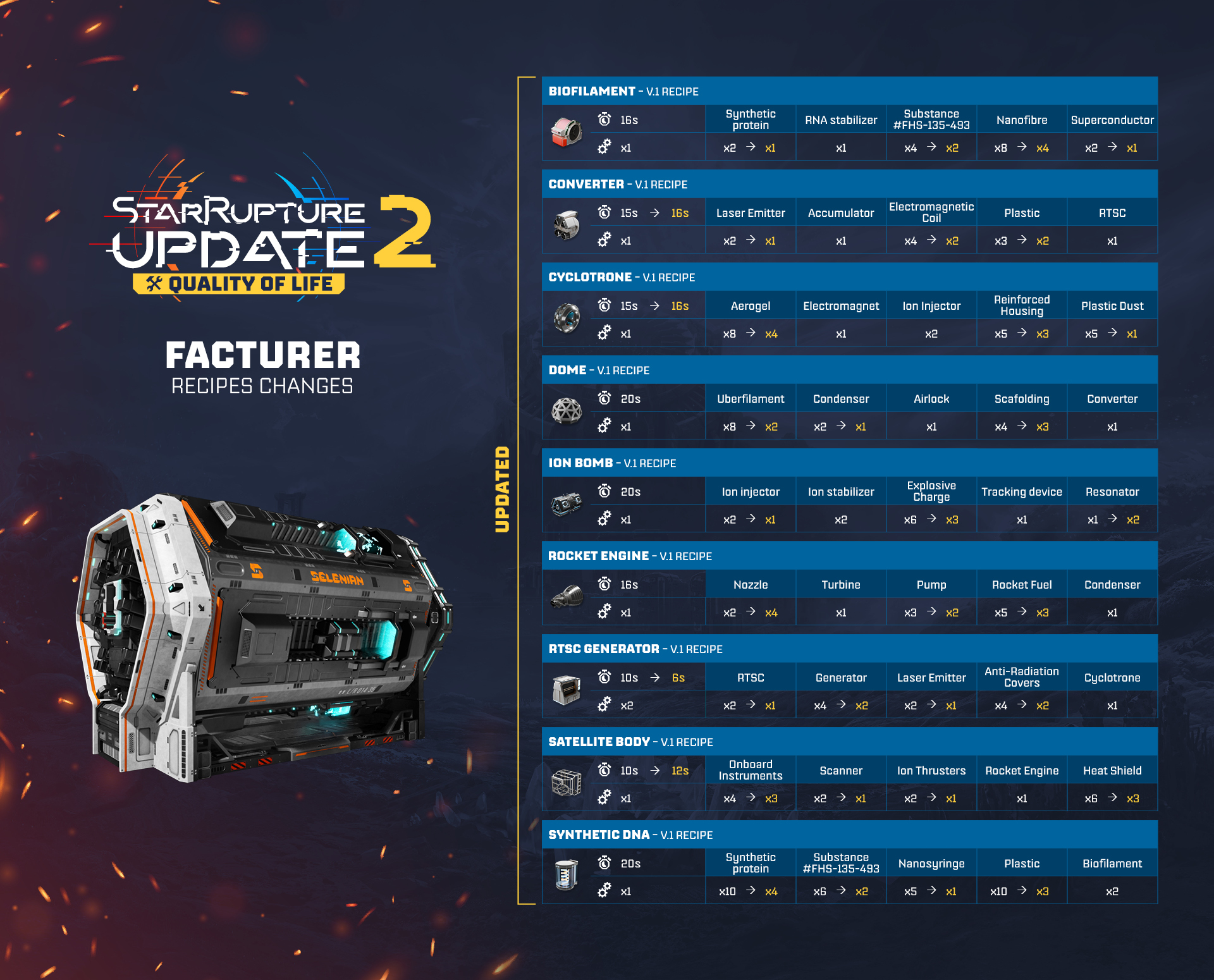
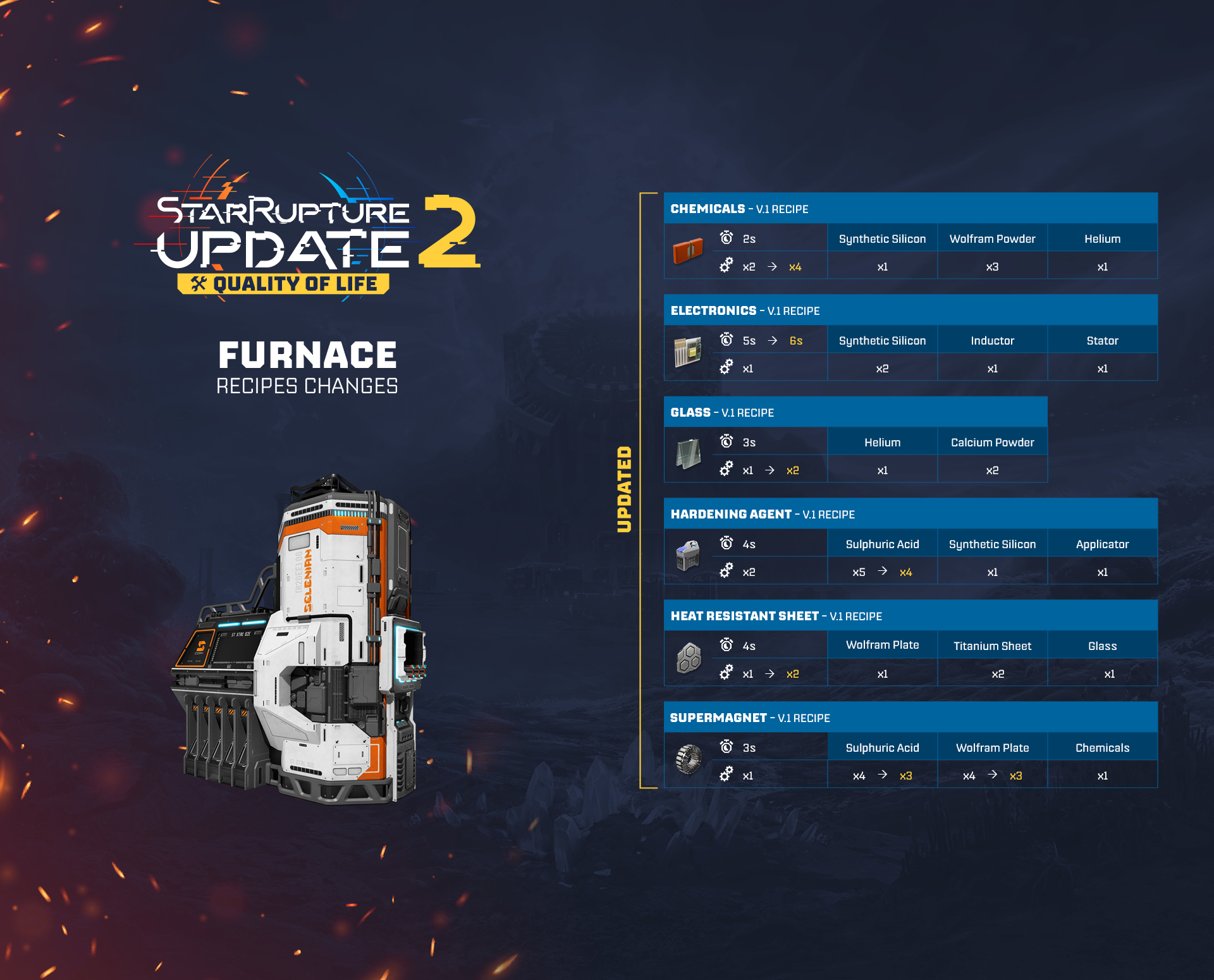
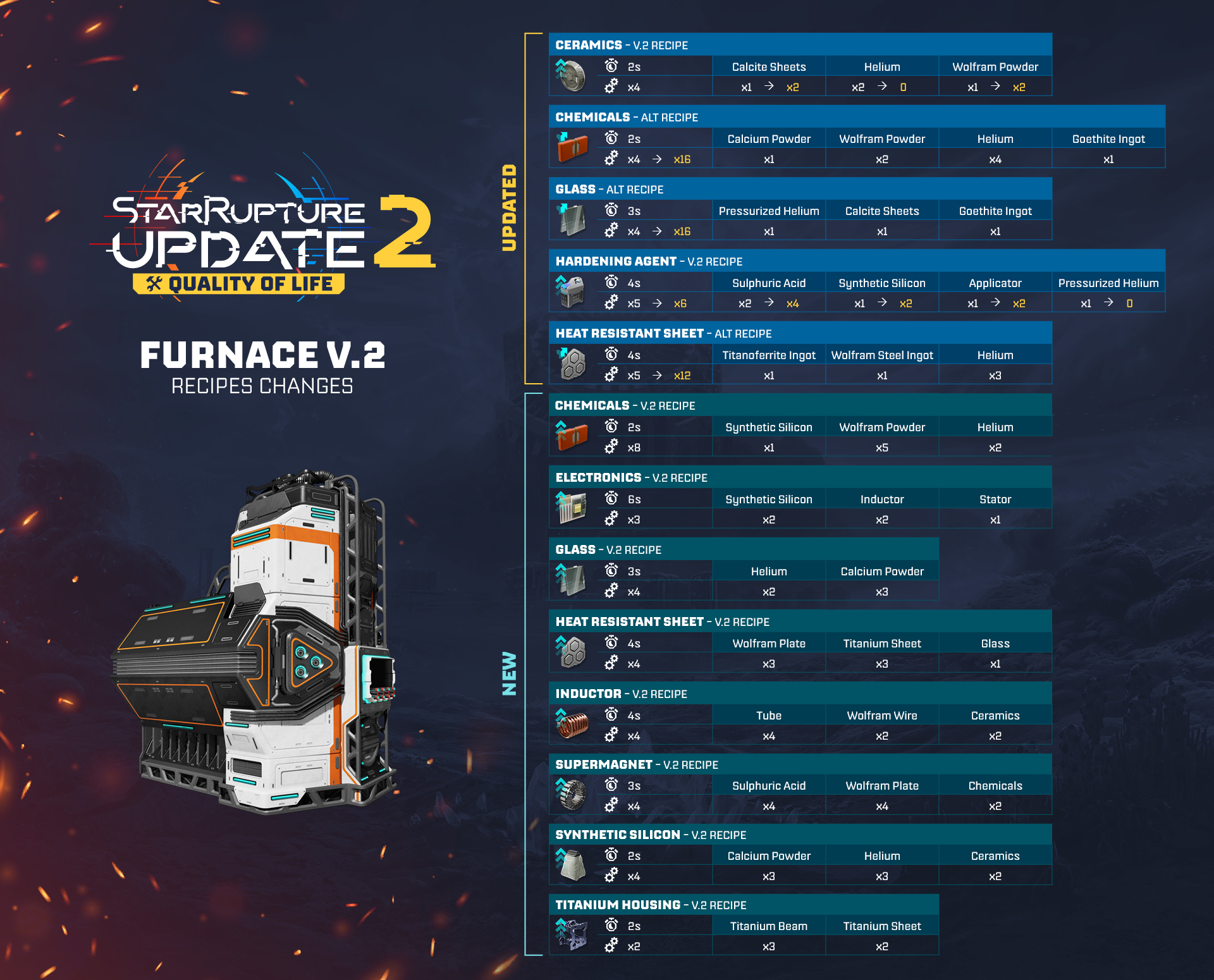
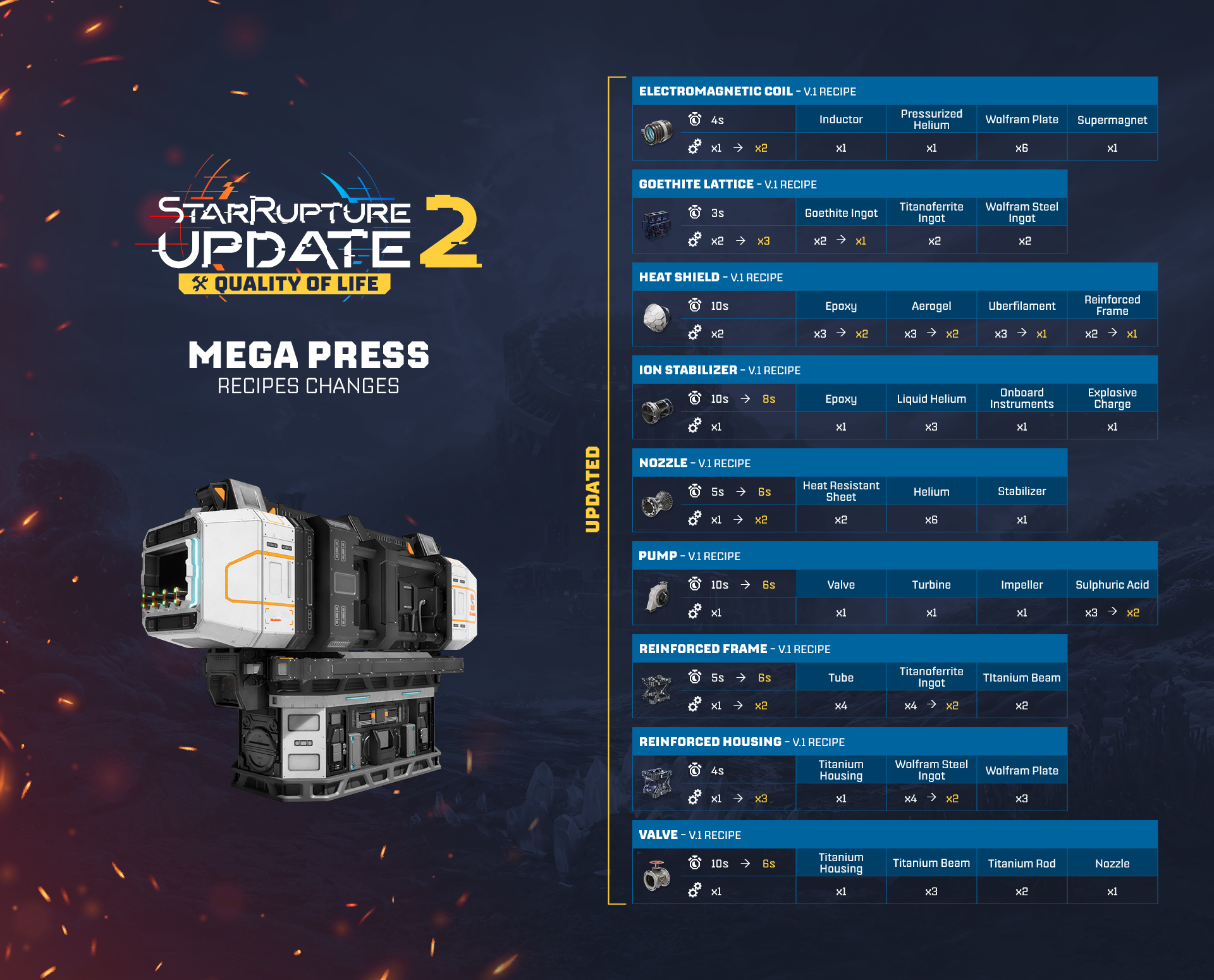
New and balanced production recipes
With improved v.1 recipes, new v.2 & alternative recipes, the production of some of the late-game items has been rebalanced.
- Regular recipes for v.1 buildings have been rebalanced to require fewer buildings, making it easier to produce later-game items in larger quantities.
- The recipes for the v.2 buildings have been rebalanced, simplified, and divided into two categories:
- Upgraded v.2 recipes, which require the same ingredients as the v.1 recipes but in bigger numbers, and produce more items at the same time;
- Alternative v.2 recipes, which have slightly different ingredients than the v.1 or upgraded v.2 recipes, and produce even more items at the same time.
- Upgraded v.2 recipes, which require the same ingredients as the v.1 recipes but in bigger numbers, and produce more items at the same time;
[carousel]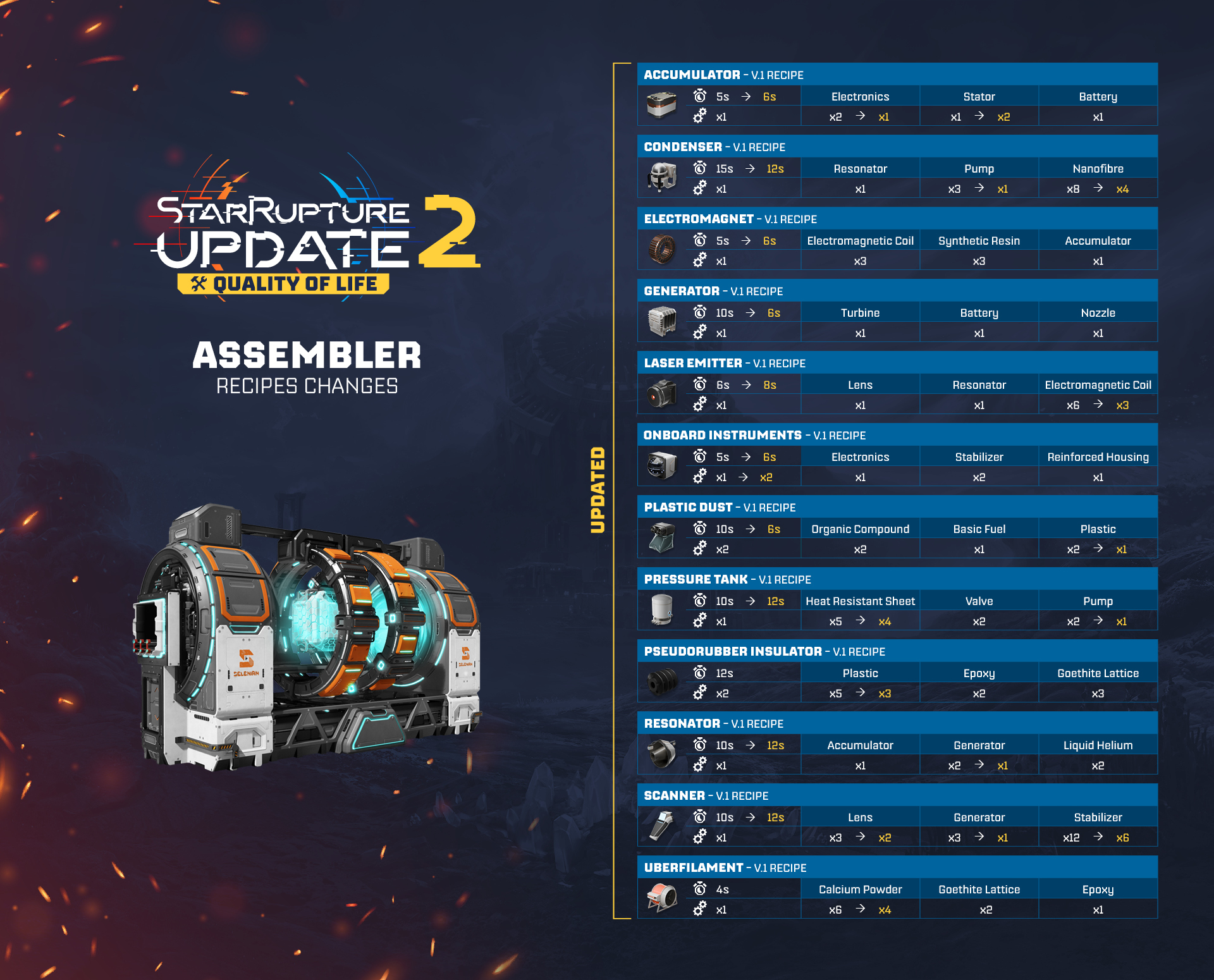
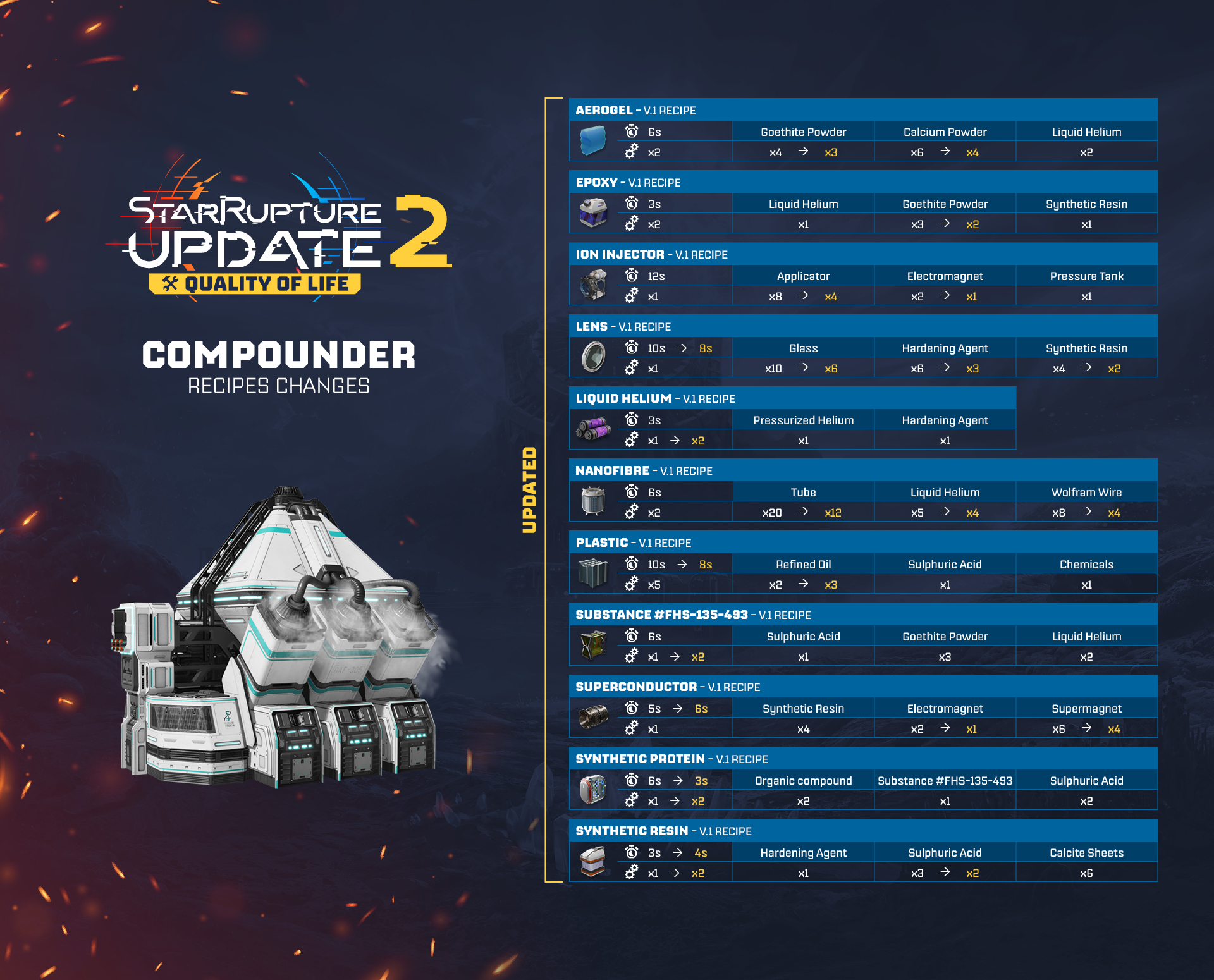
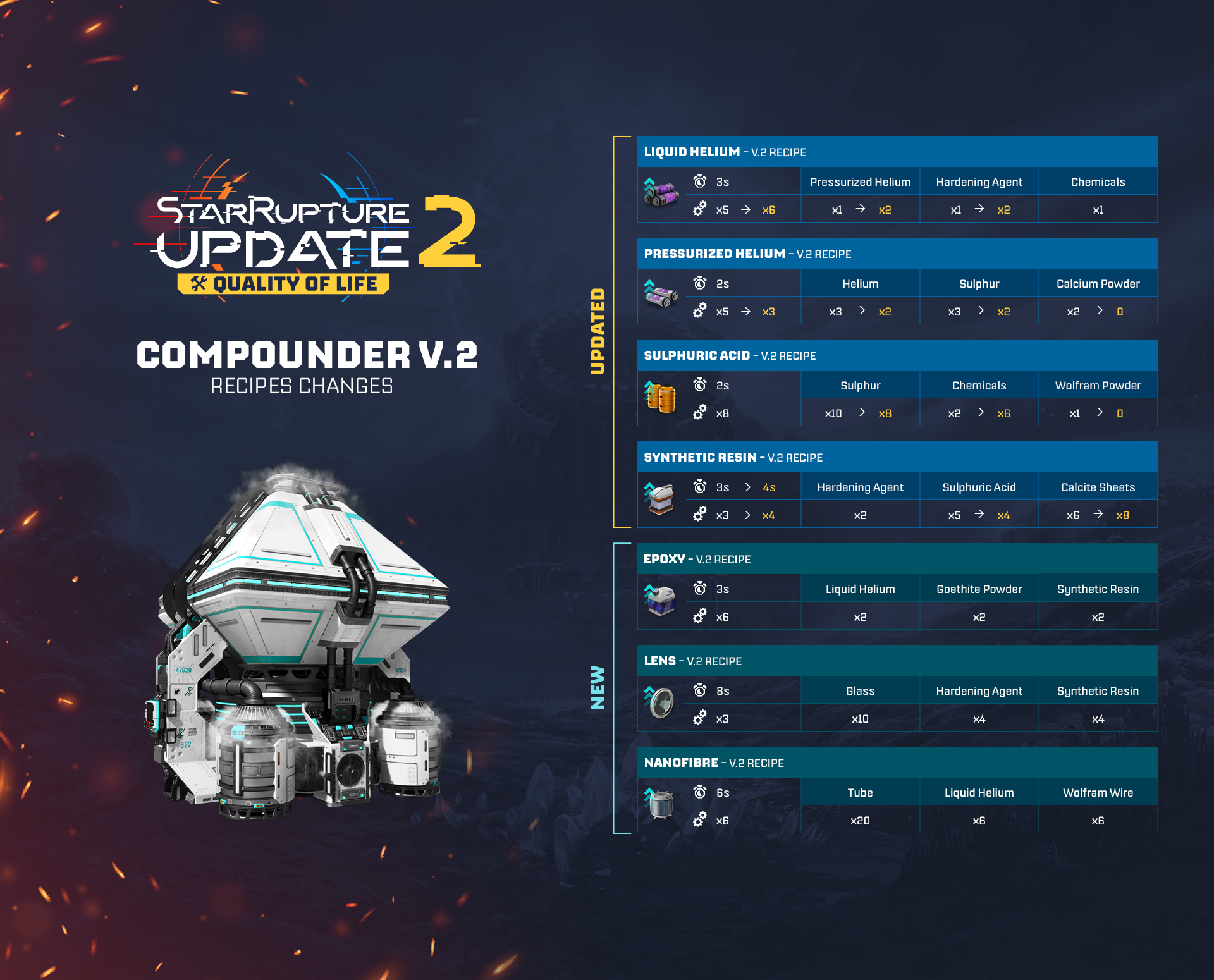
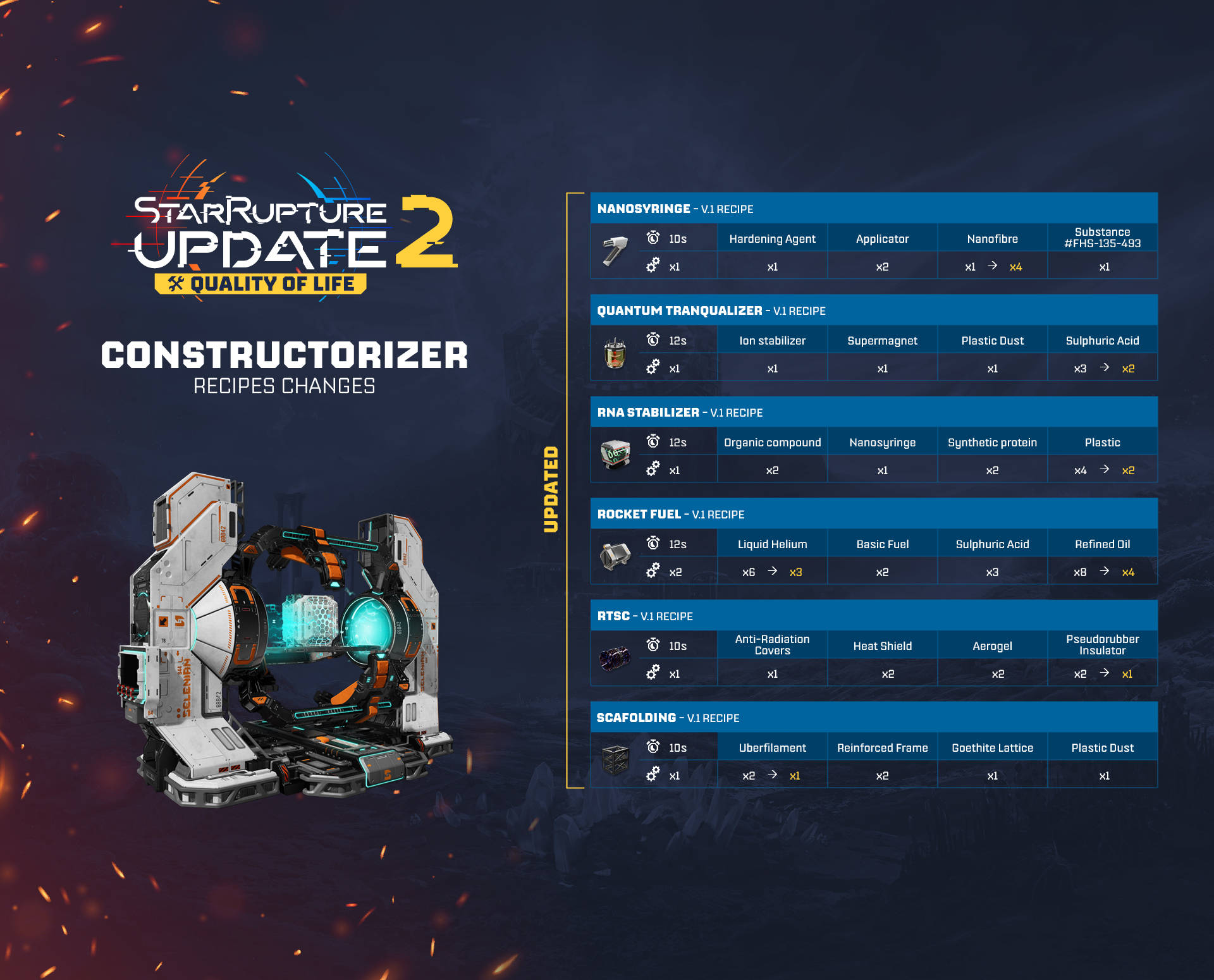
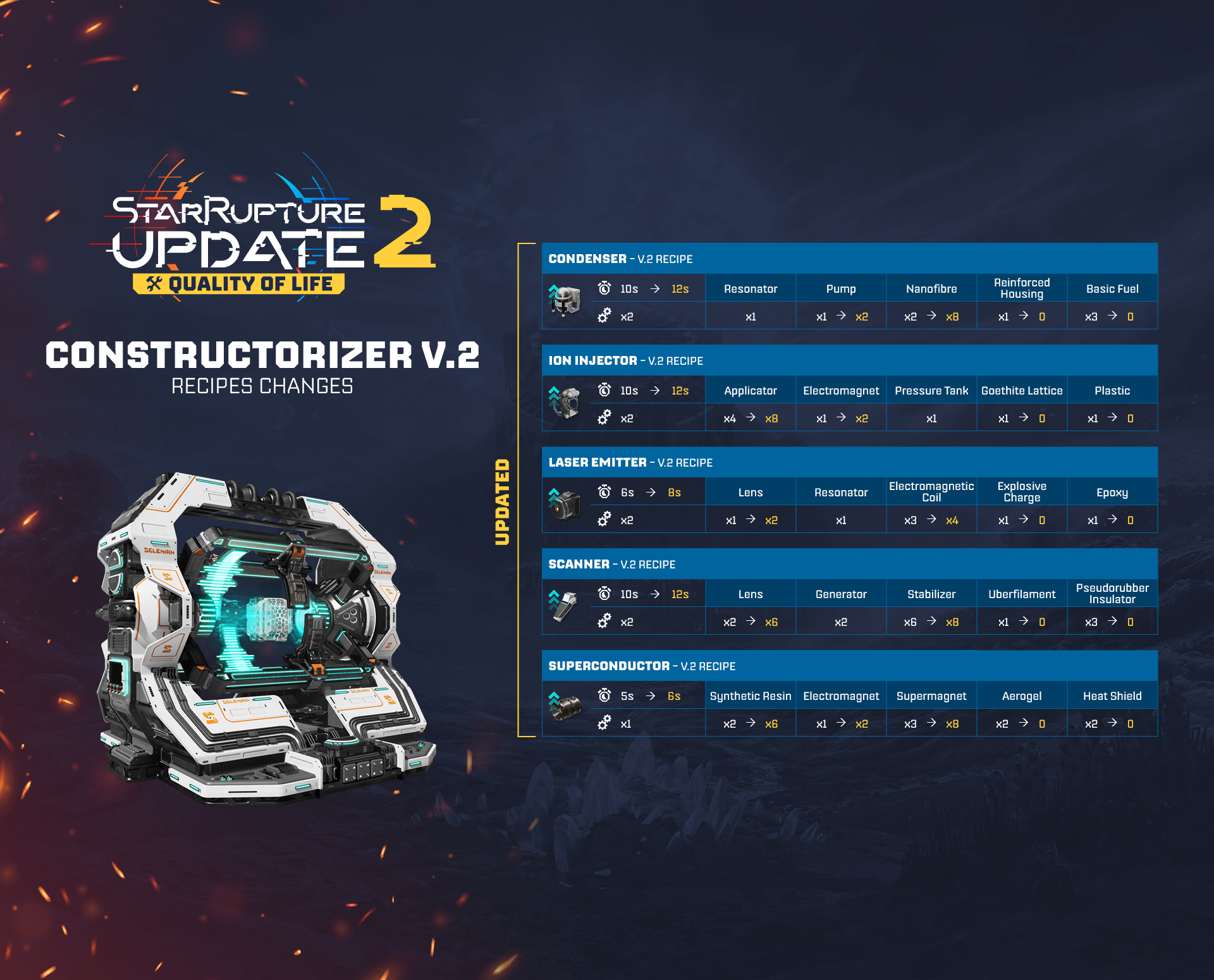
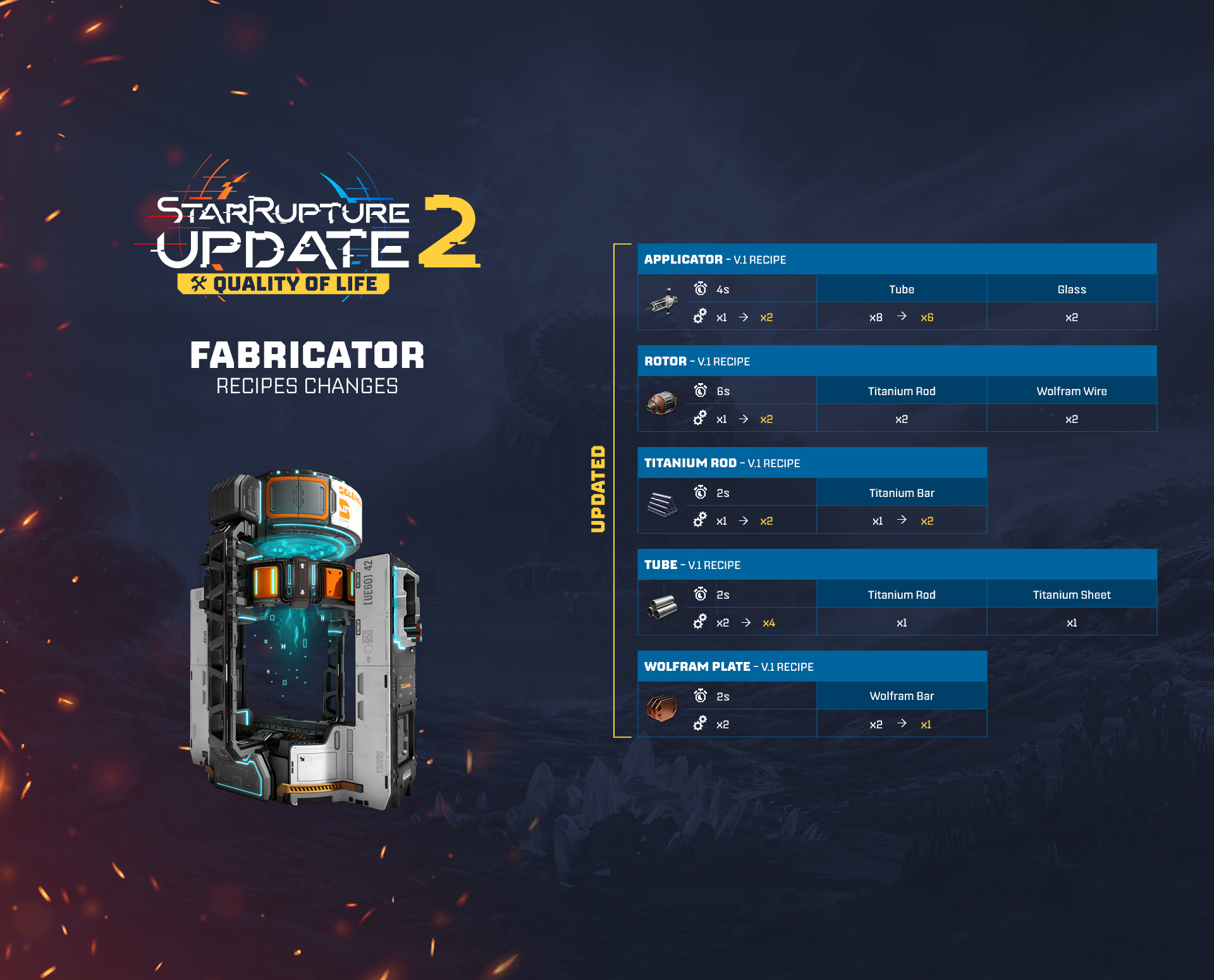
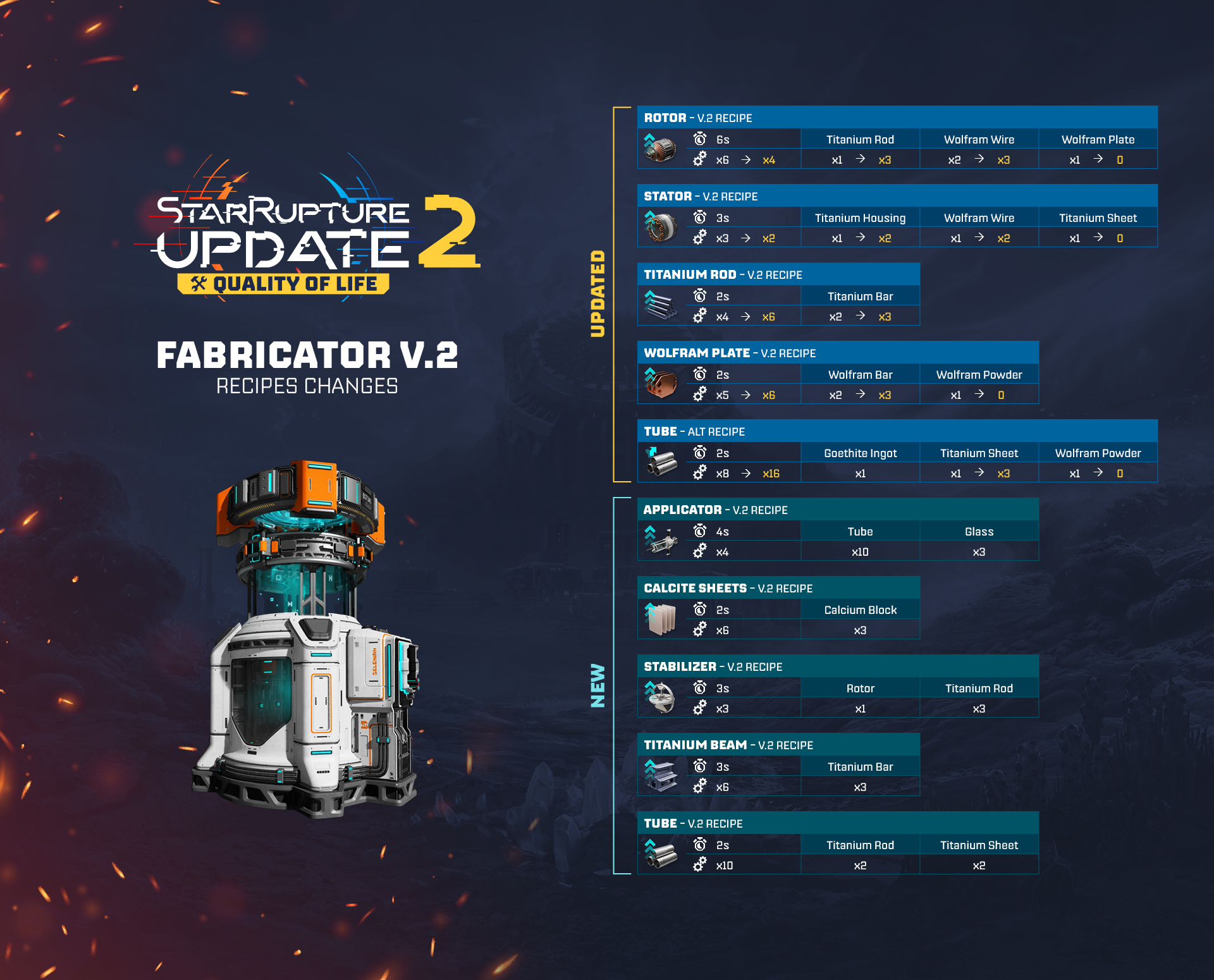
 [/carousel]
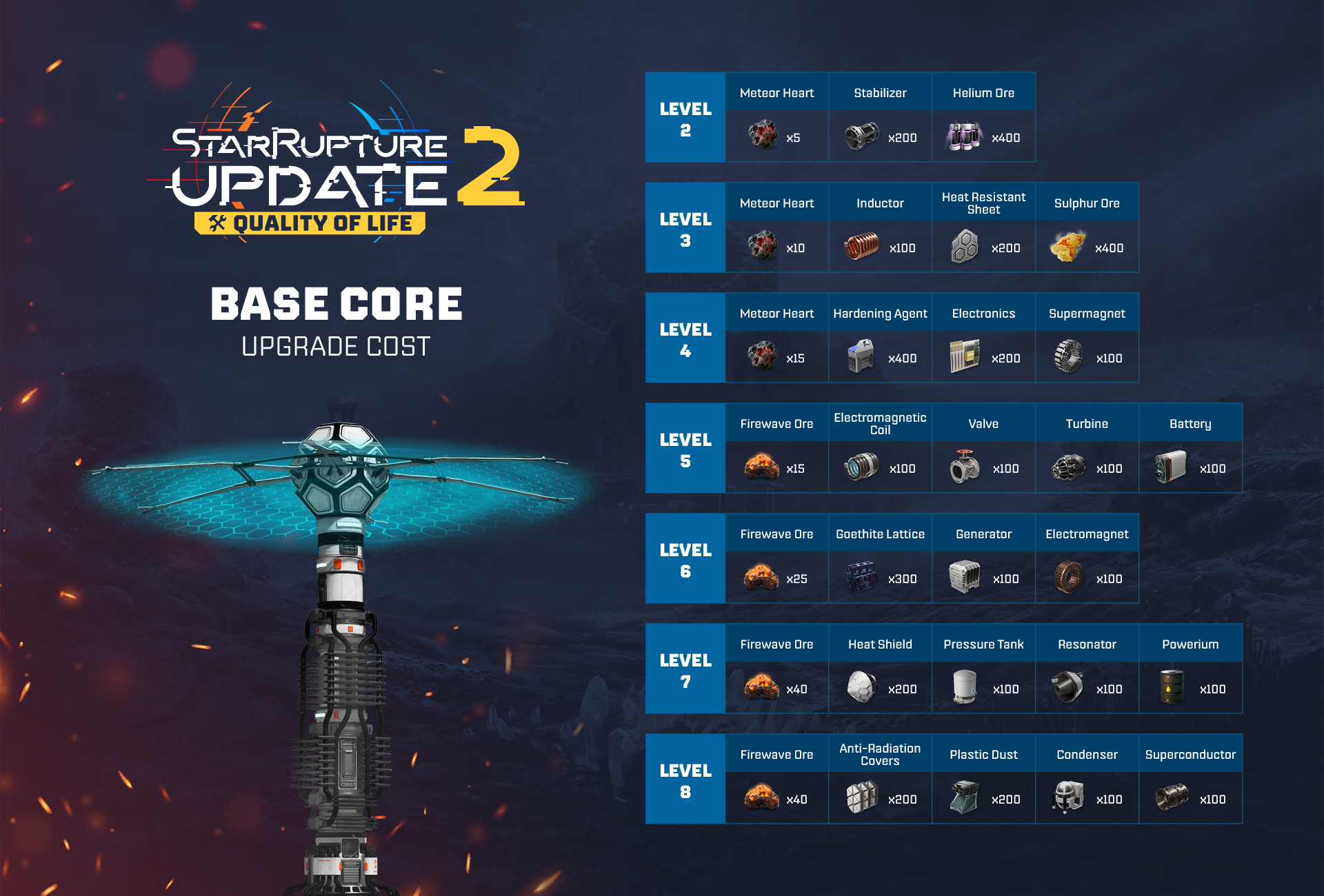
Base Core upgrade cost rebalance
The upgrade costs for the Base Core have been rebalanced - we’ve decreased the number of required Meteorite Heart and Ignitium (to reduce the time spent on collecting them), and reduced the quantities of other necessary resources (to make it easier to deliver them to the Base Core). Additionally, the requirements for upgrading your Base Cores should now better match the progress in the Corporation Levels.Check out the graphic below to see the new Base Core upgrade costs:
UI Features
Production per minute
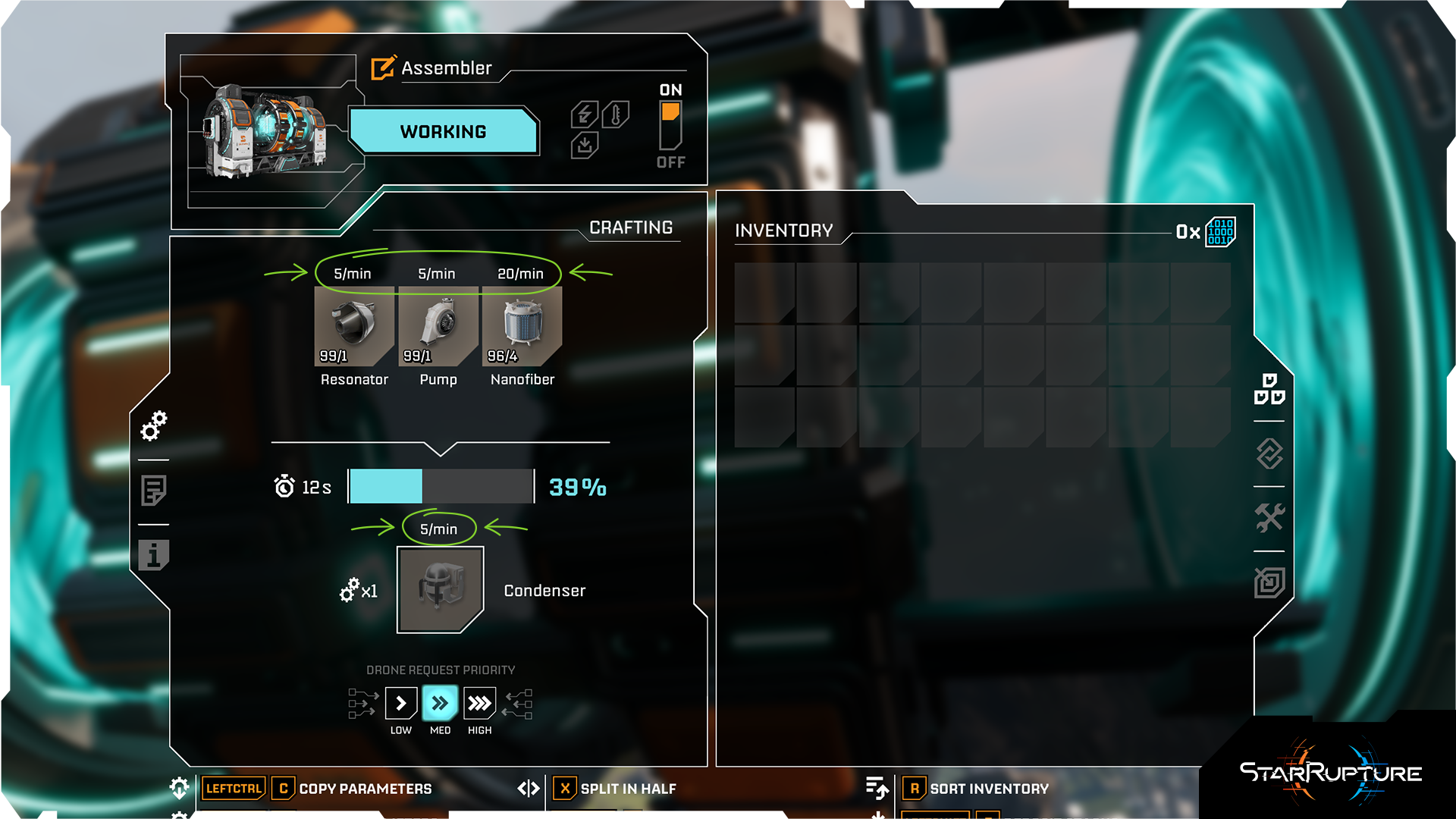
Crafting UI has been refreshed. The new UI shows more info about the input and output items, including the number of items being crafted per minute.
Search bar in Buildings & Storages
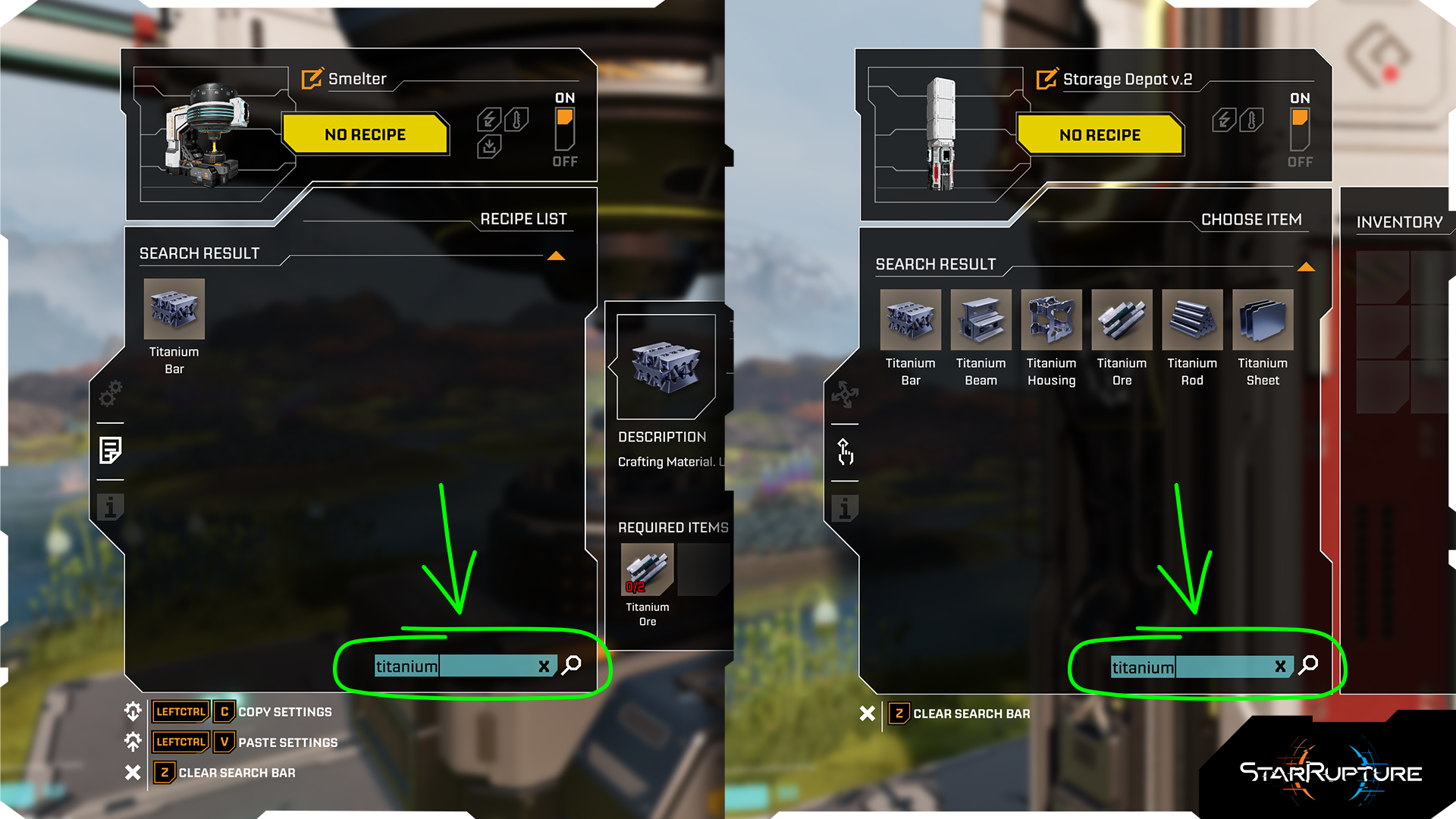
Sharp minds think fast, and so does the search bar we’ve added to Buildings & Storages, which speeds up the process of finding a particular item you want to locate.
Teleporter & Base Core custom names on the Map
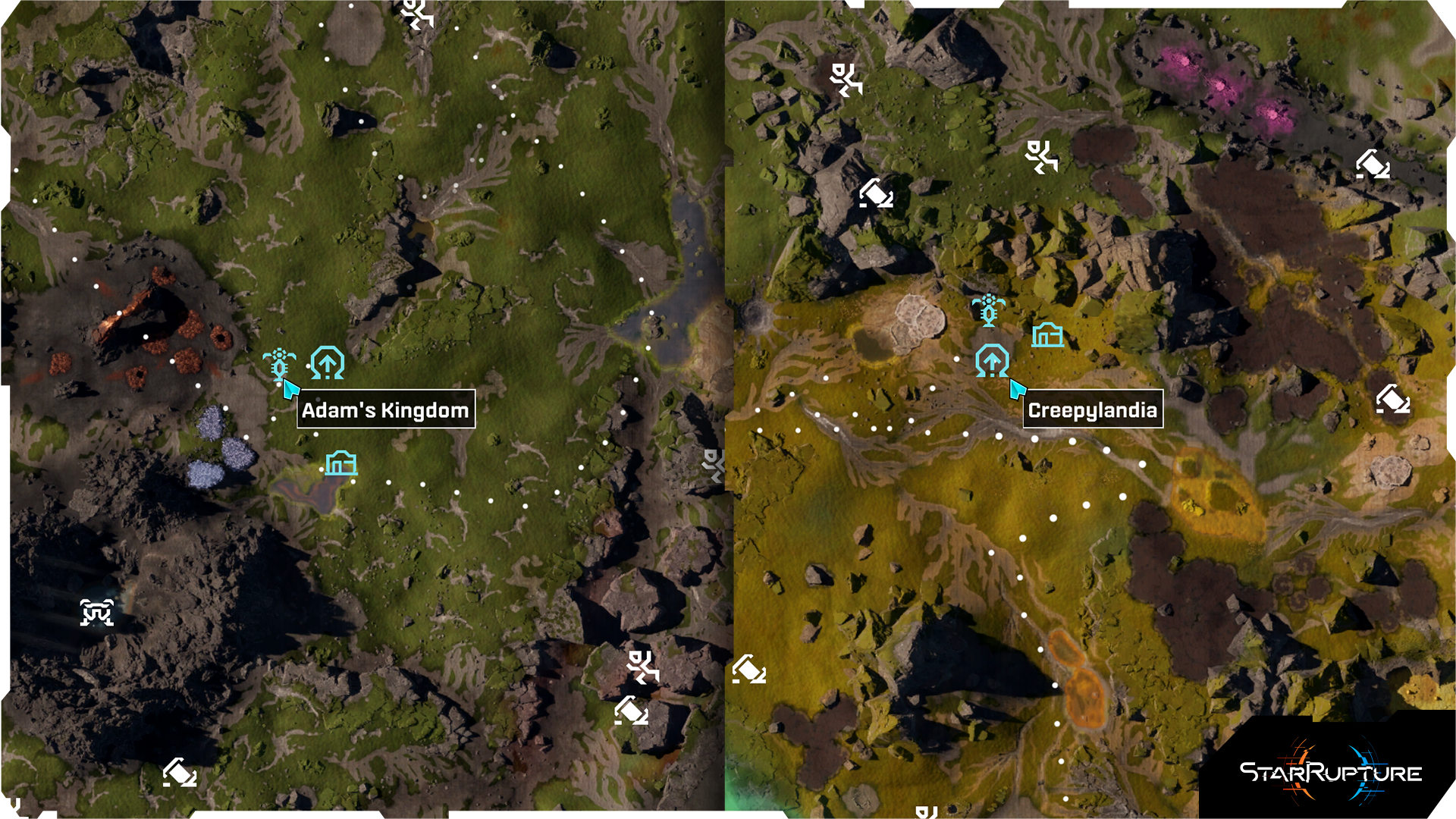
Custom names for your Teleporters & Base Cores will now be visible on the map, so that it will be much simpler to remind yourself about what has been placed where.
Autosave heads-up
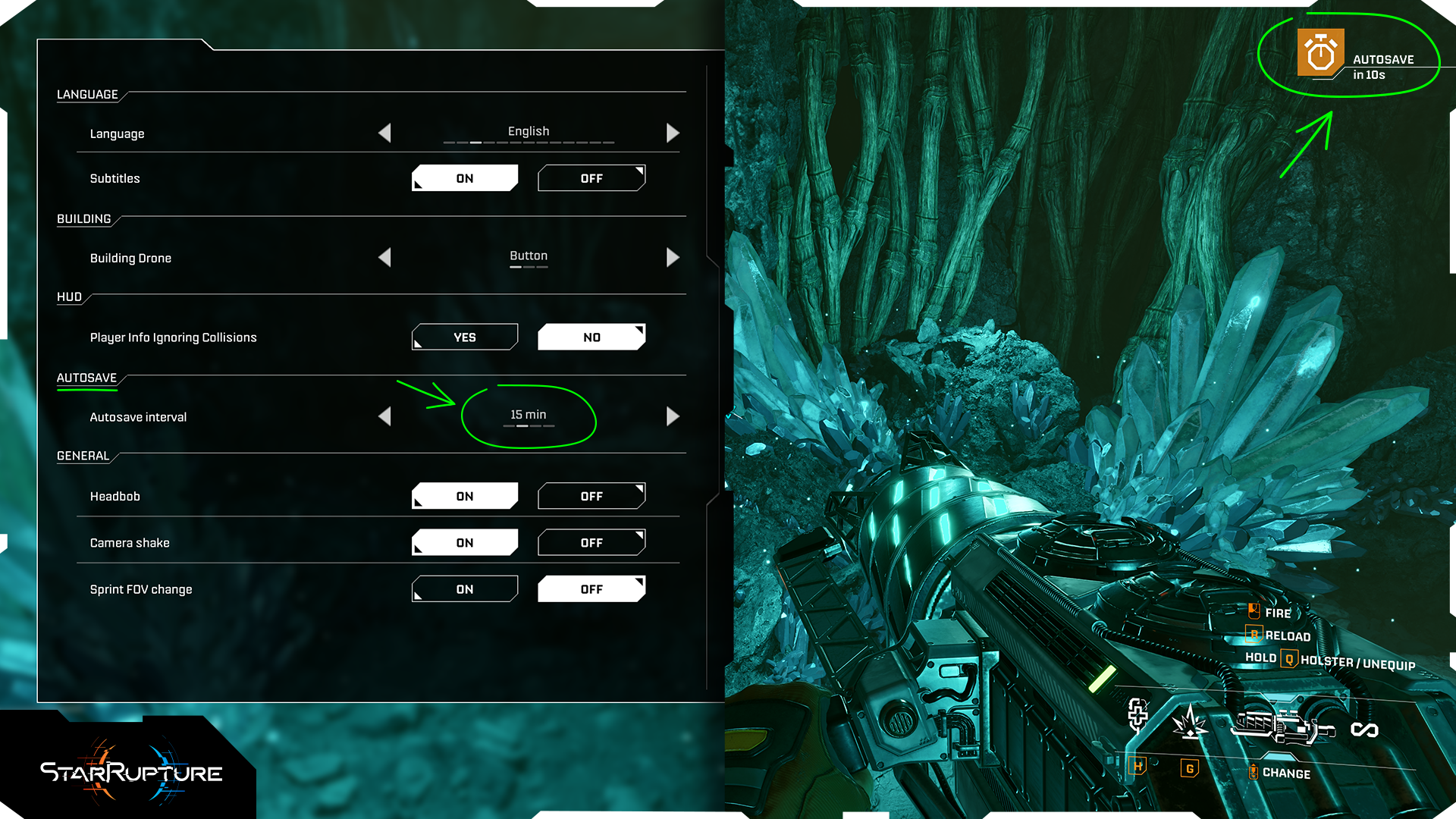
A handy little countdown heads-up will be displayed to inform you about the upcoming autosave. Remember, you can always change the frequency of autosave - or turn it off completely - in the game options.
Abandoned Bases Completion Tracker
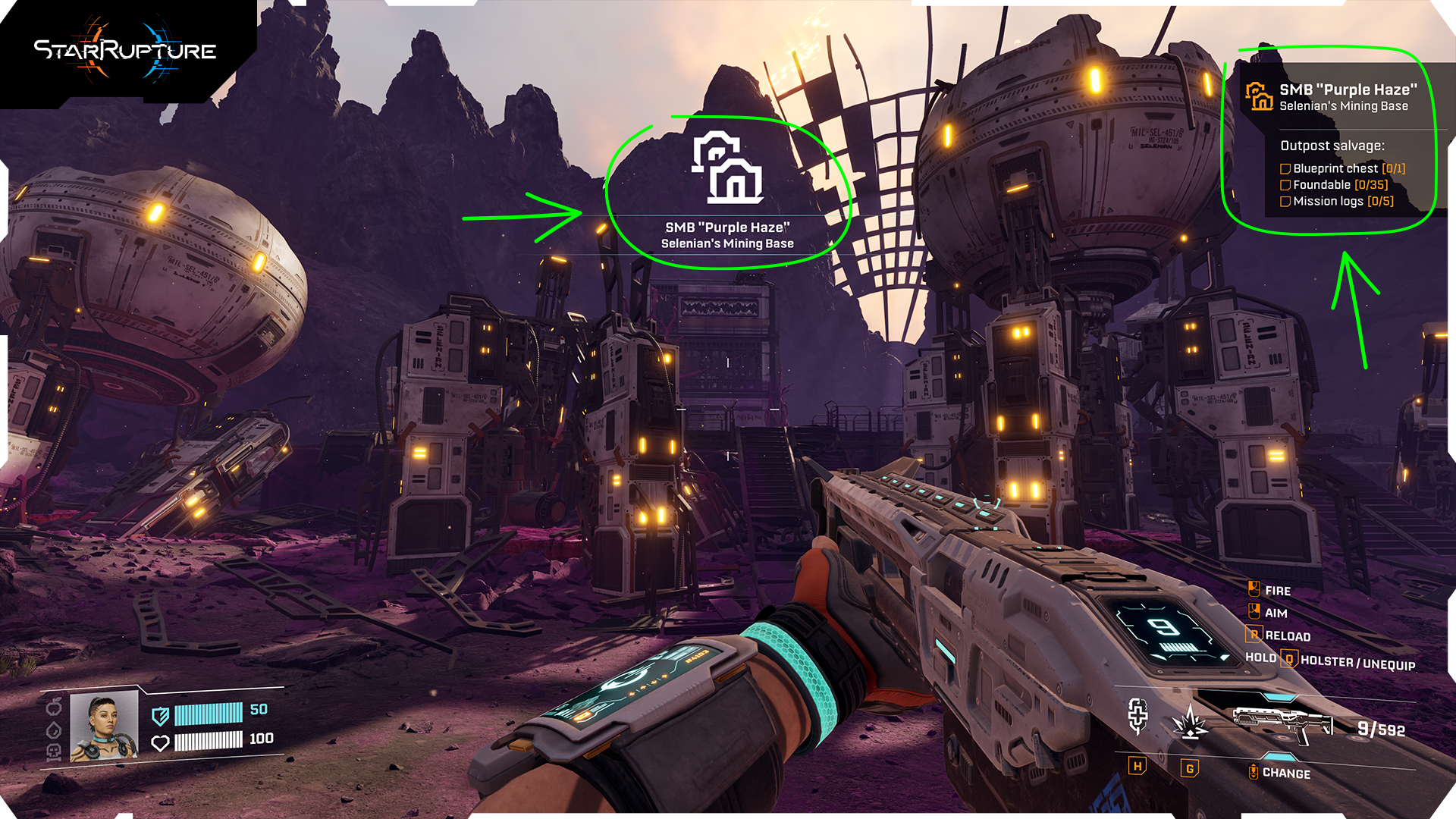
Abandoned Bases now have a new UI that allows you to track your progress both while exploring them and when looking at them on your map.
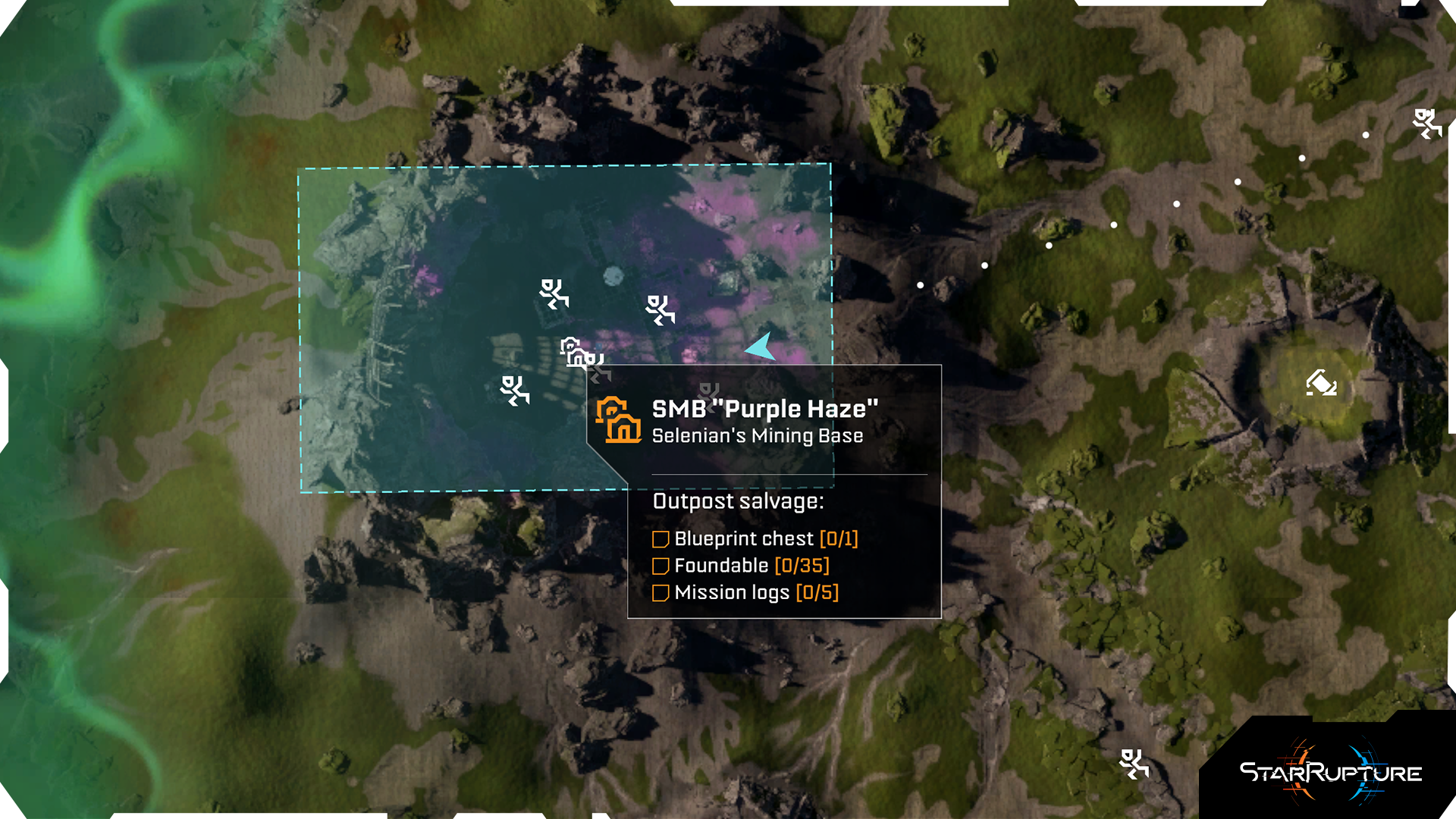
This will help you to know if a particular location could be worth getting back to for some additional, not previously collected goods.
Infected Bases Completion Tracker
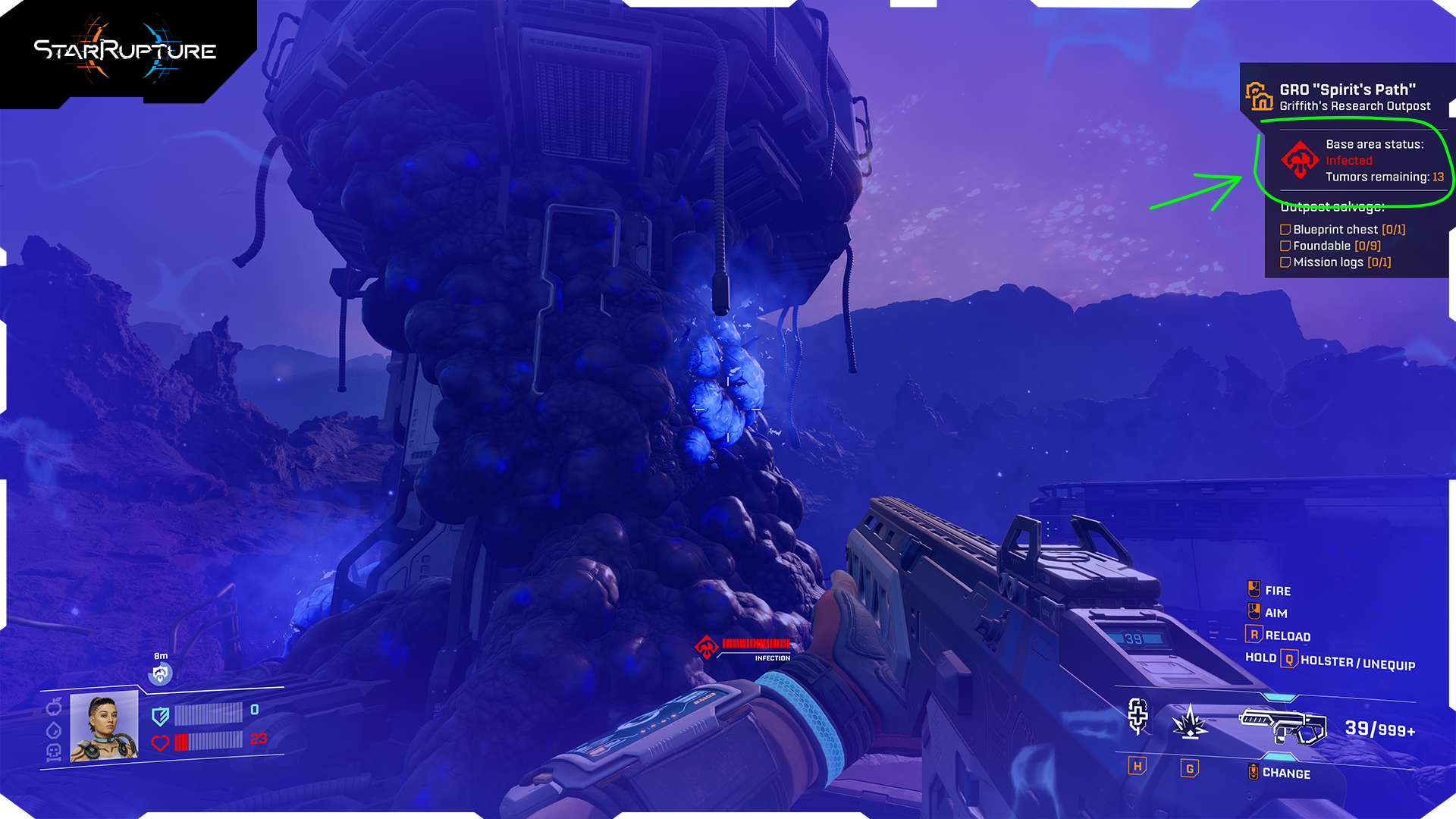
Infected Bases now also show info about the number of Infection Tumors left to be destroyed. The same feature applies to your own infected Base Cores. Additionally, finding the Infection Tumors will be slightly easier now, thanks to improved VFX visibility.
Corporation level requirements display
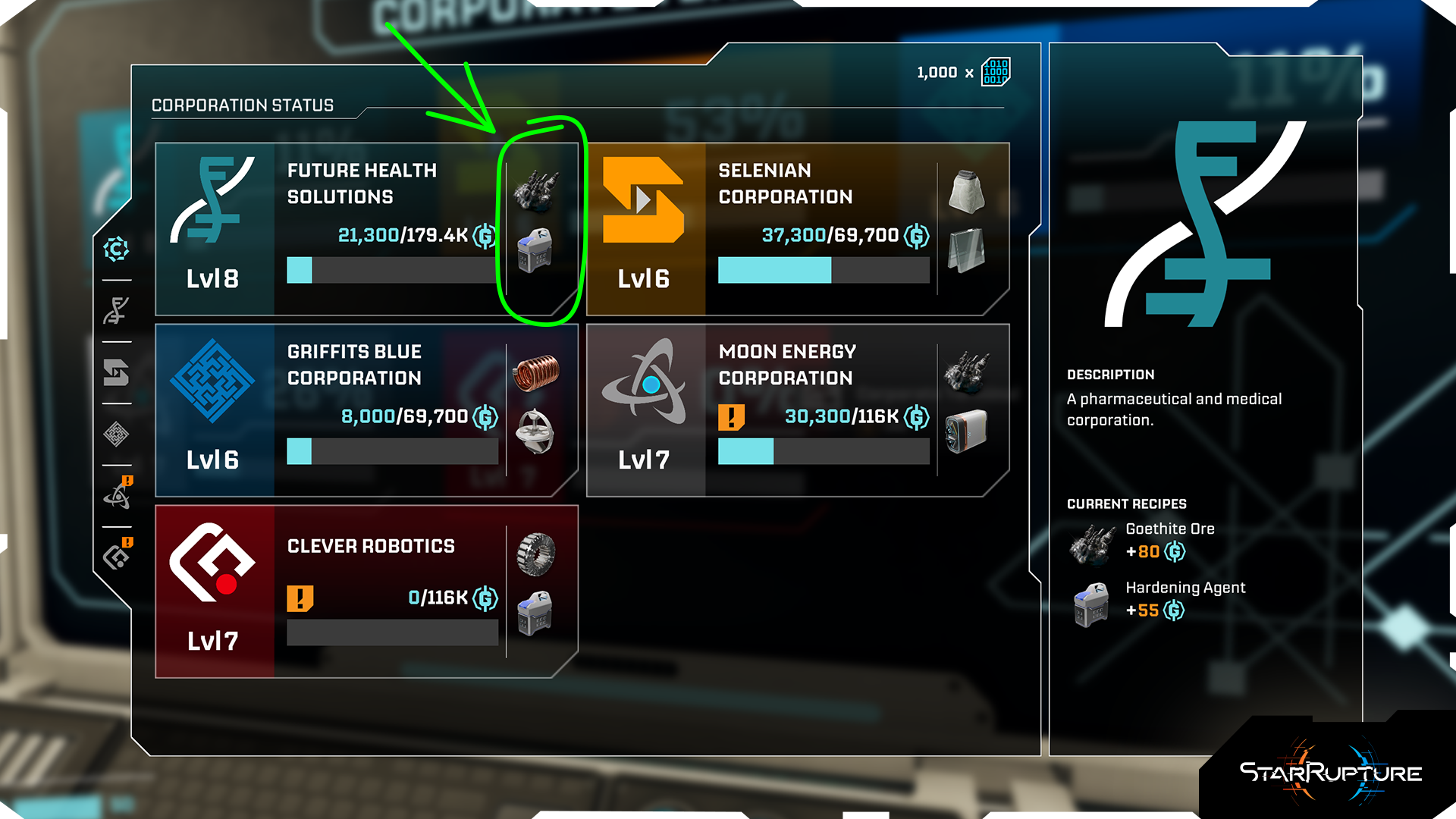

Planning your factories should now be easier, as both the OCL and the Corporation Terminal will show you exactly what items are required when, and whether you have already unlocked the recipes for those items.
New interaction options with items
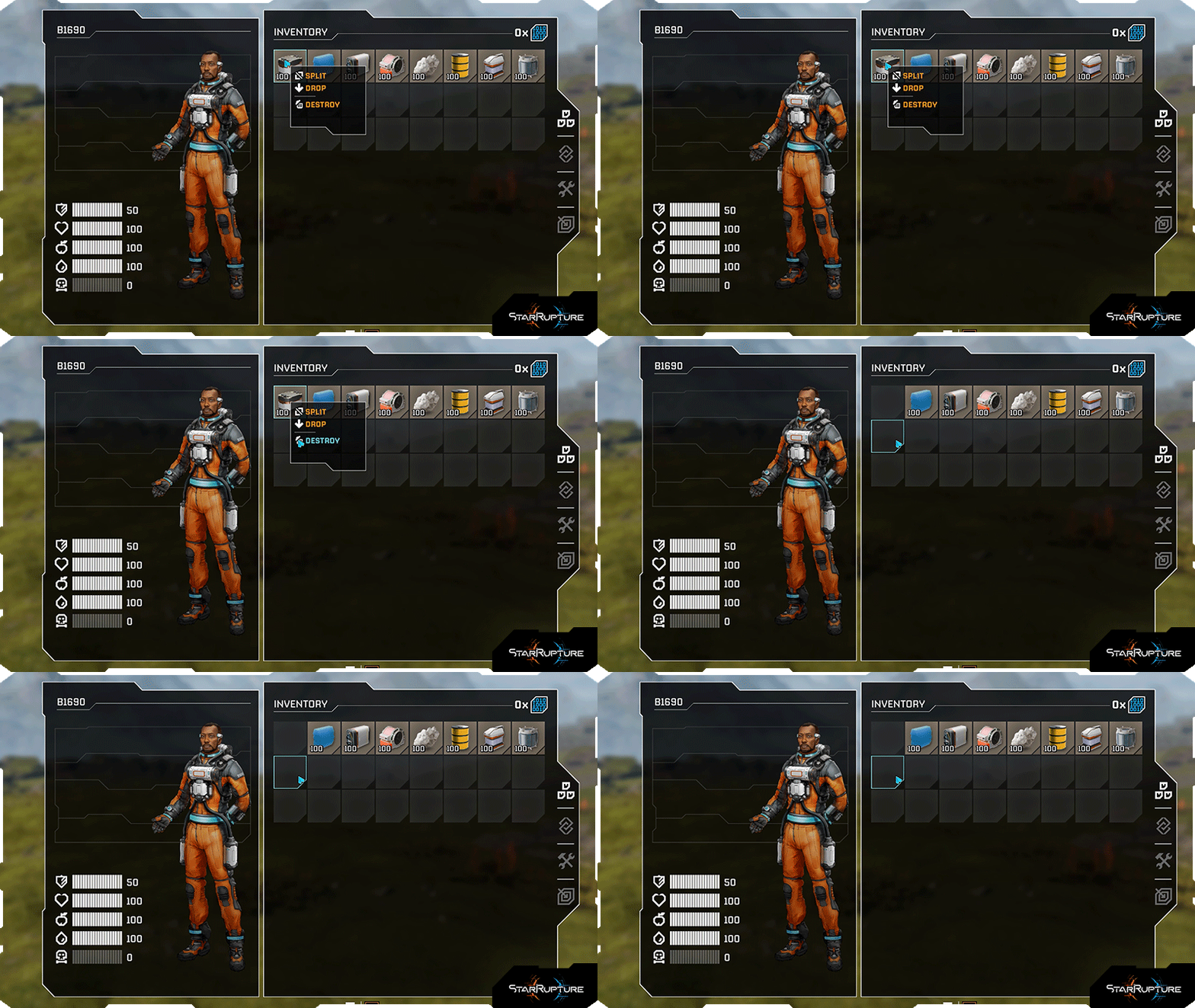
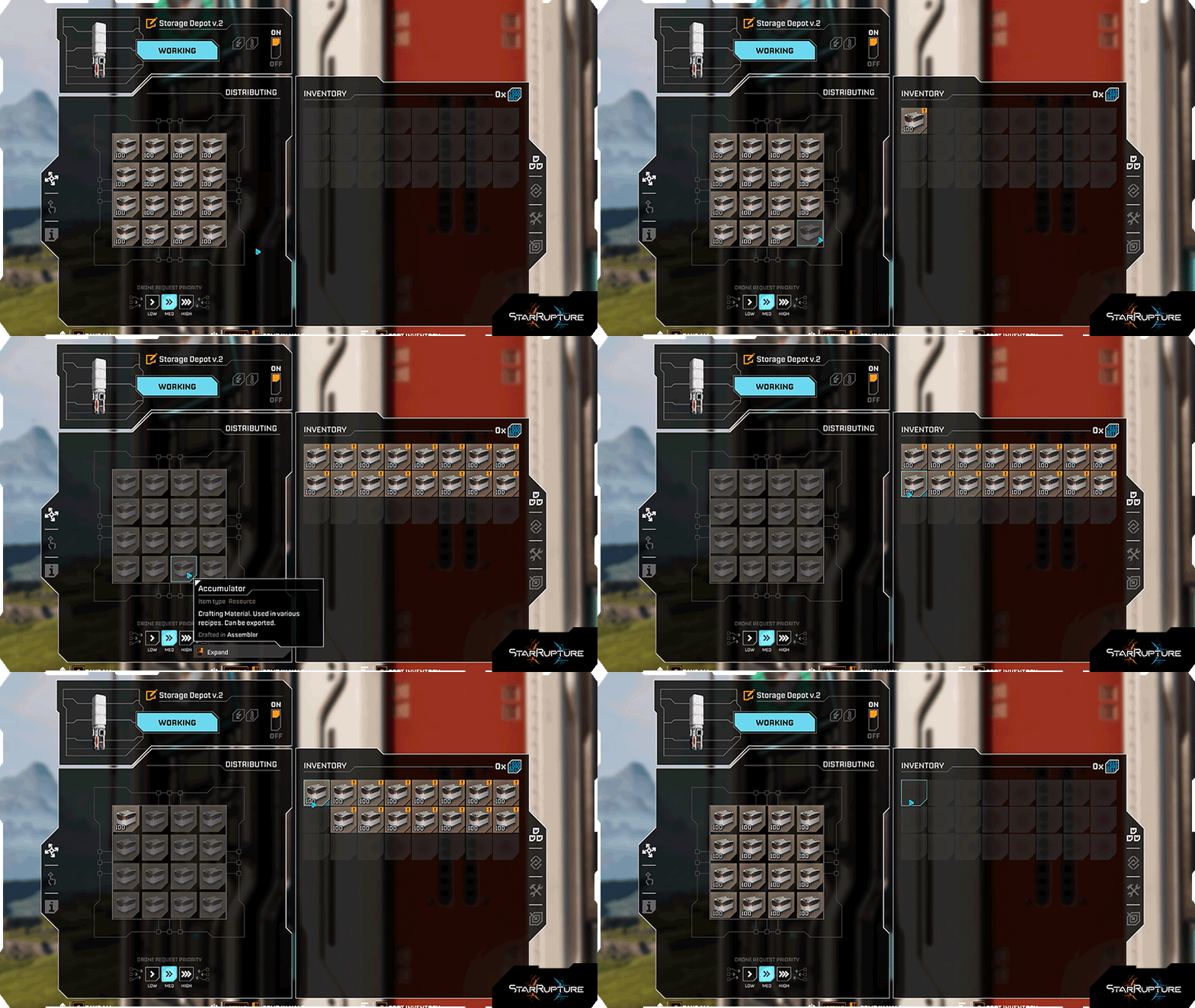
New interaction options have been added to various interaction screens. You can now:
- destroy an item’s stack,
- transfer a single or all stacks of an item from your inventory to a building,
- take a single or all stacks of an item from a building to your inventory.
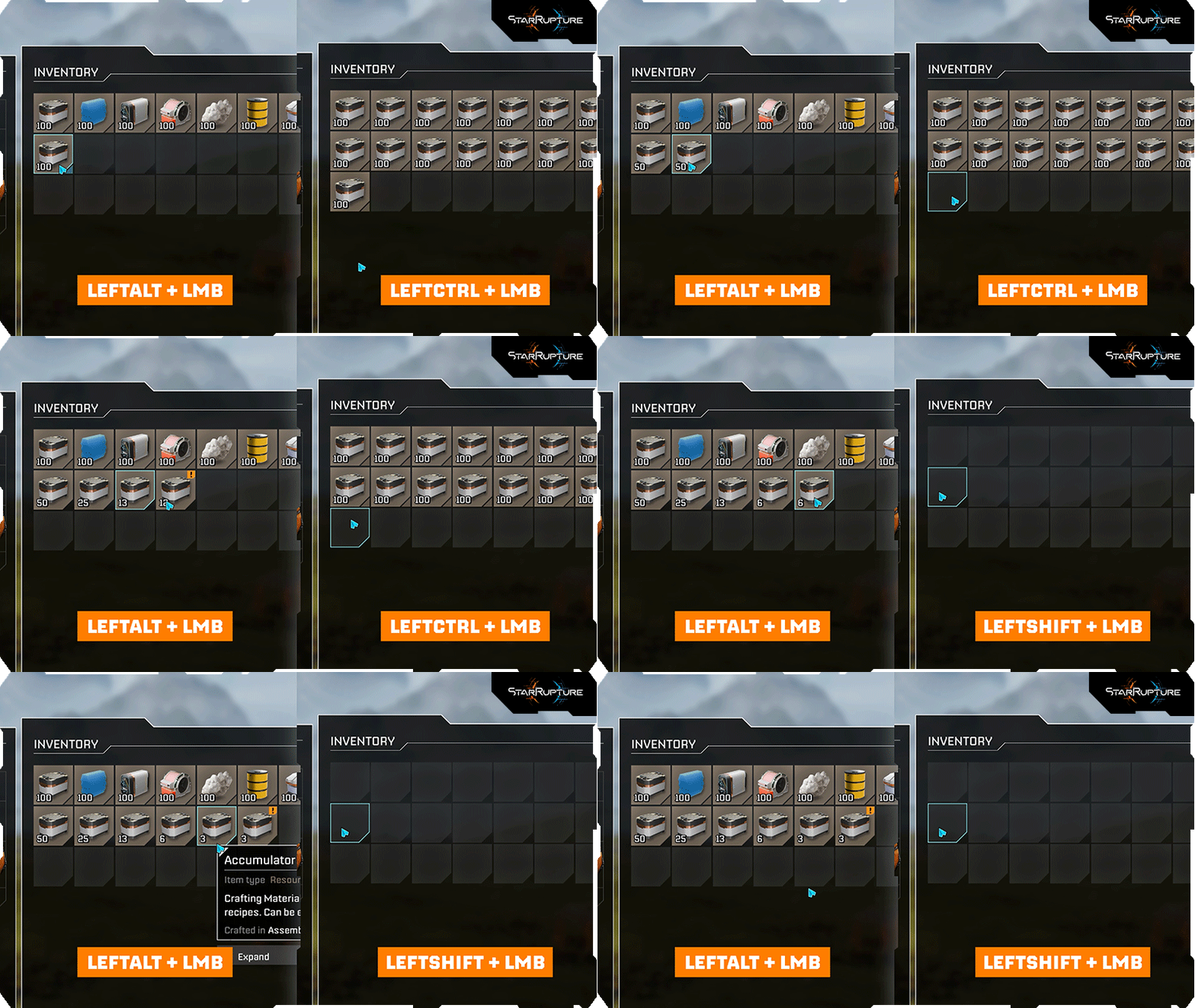
We’ve also added new keybinds, which will speed up particular actions, including:
- splitting an item stack in half
- and dropping a single or all stacks of an item.
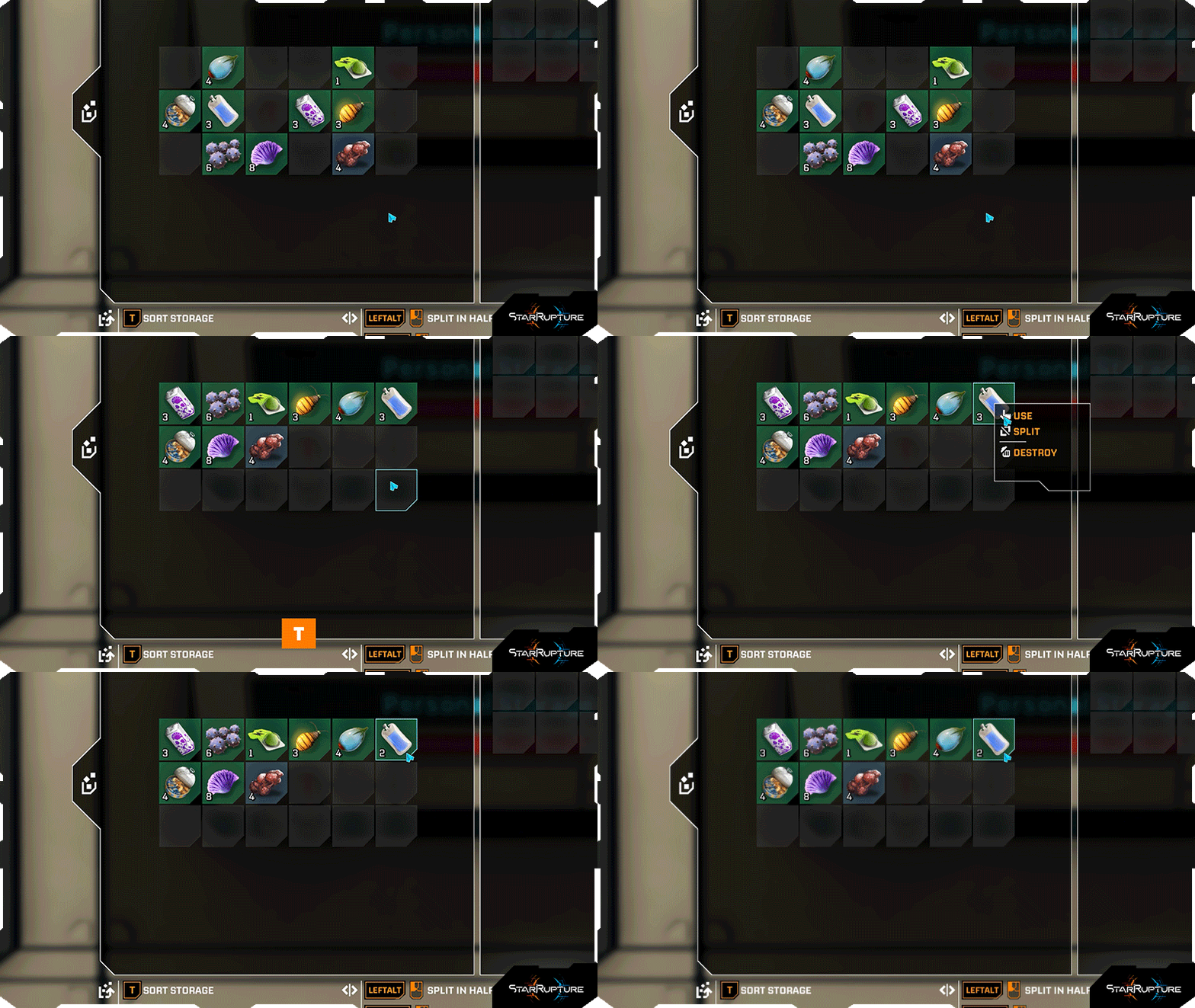 Storages have also received these improvements, as well as the sorting option and the ability to eat your consumables directly from Storage.
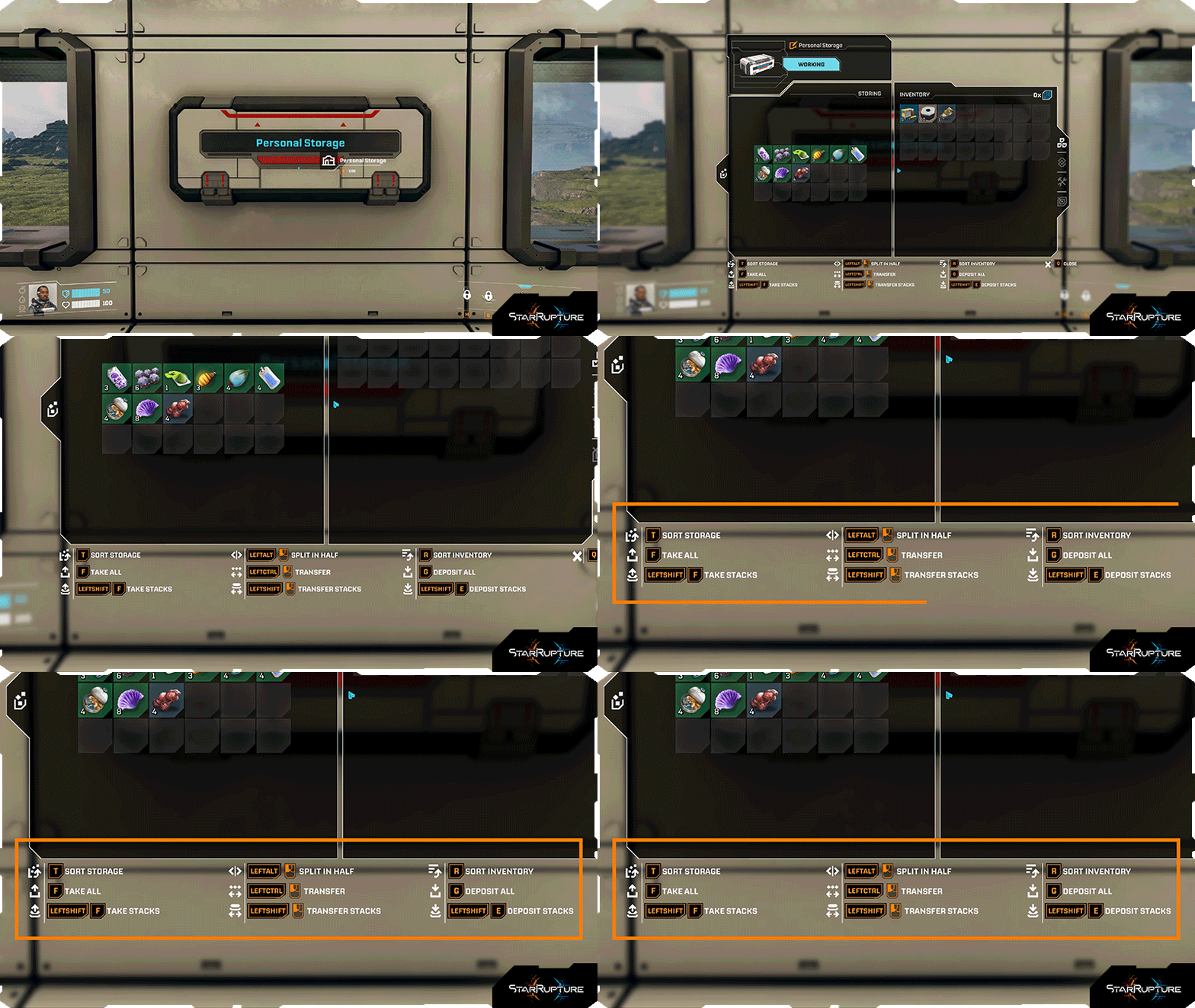 Don't worry about needing to remember those things, as every available action is described in the new interactive UI below the interaction menus.
"Continue" button in the main menu
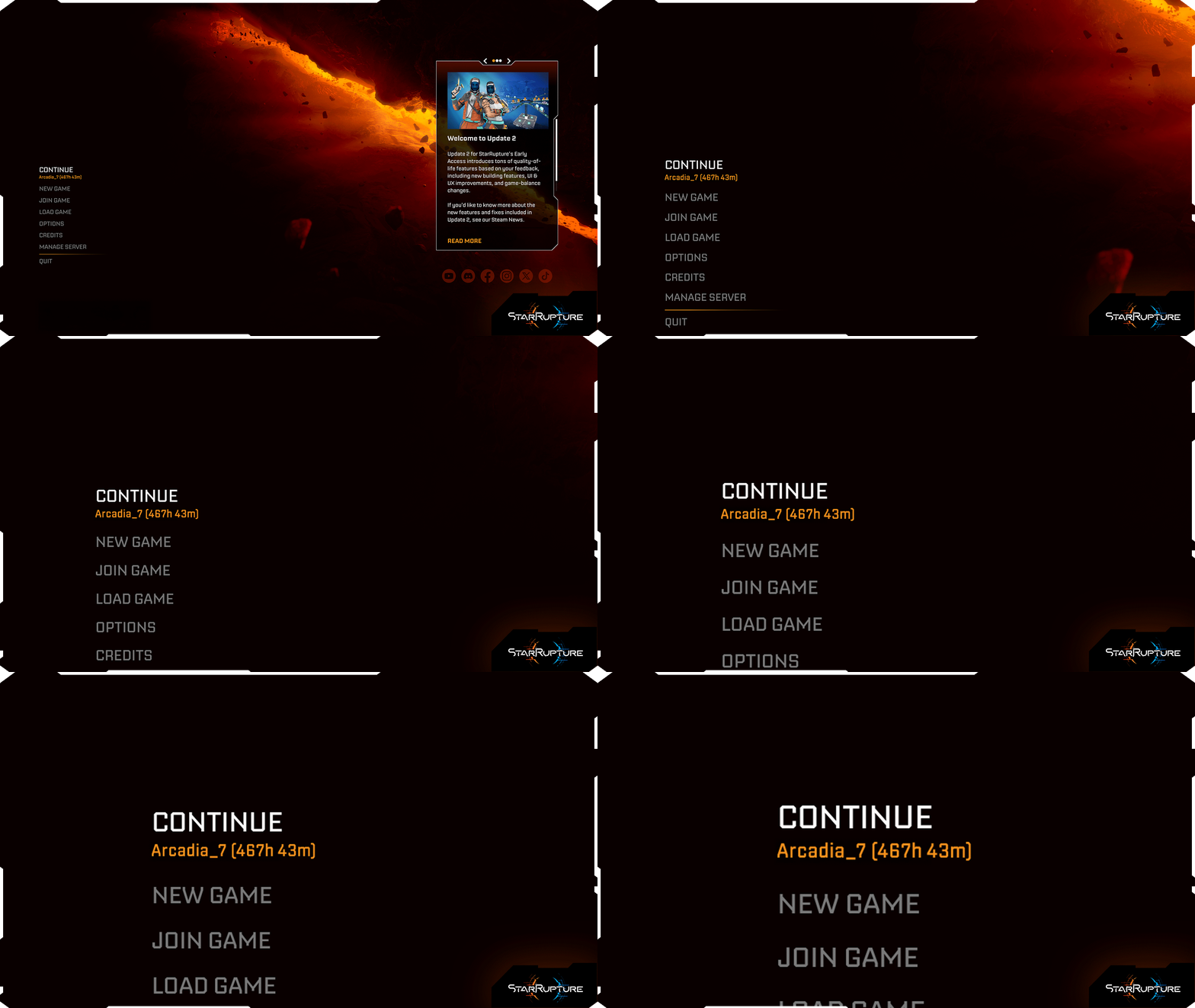 The brand new “continue” button in the main menu will resume your latest game save and allow you to get back to action faster.
UI & UX Improvements
Alphabetical Item order in Storages
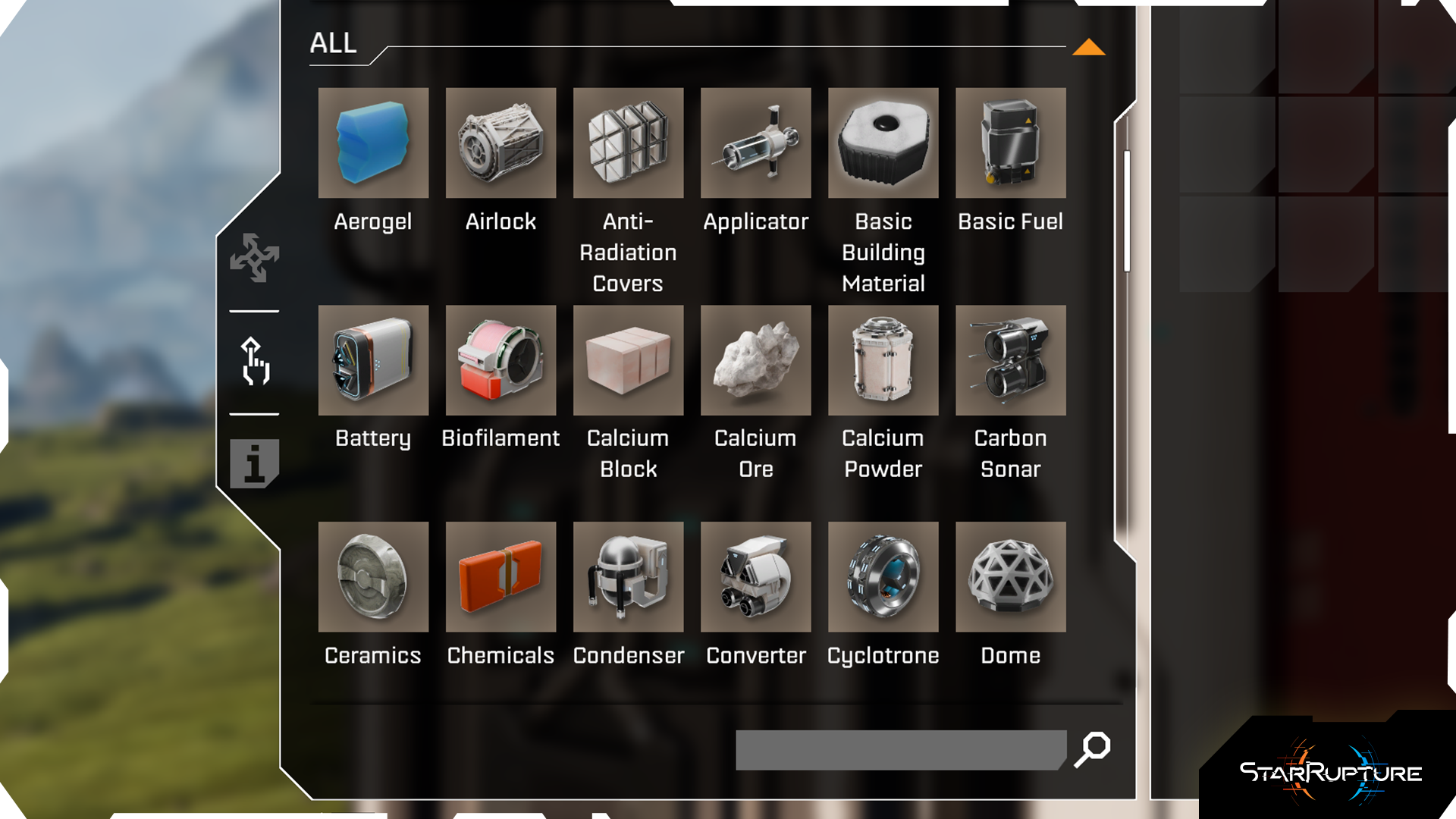 Items will now be sorted alphabetically on the selection list inside Storages - finally peace, finally order.
Custom building name & task icon visibility
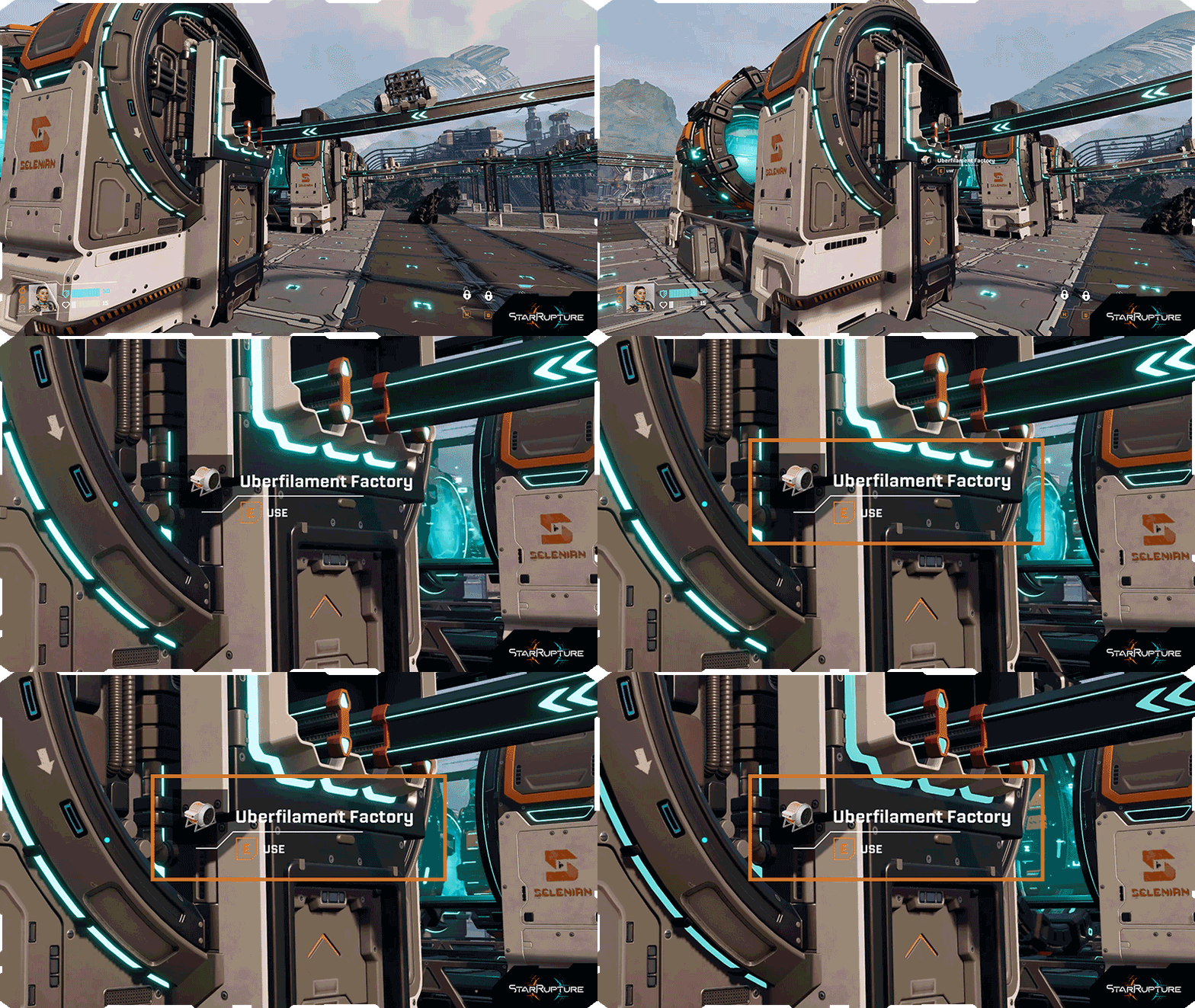 For a quicker lookup of a particular building, you can now point at a building nearby, and you’ll see its custom name & current active task icon.
 New game cursor
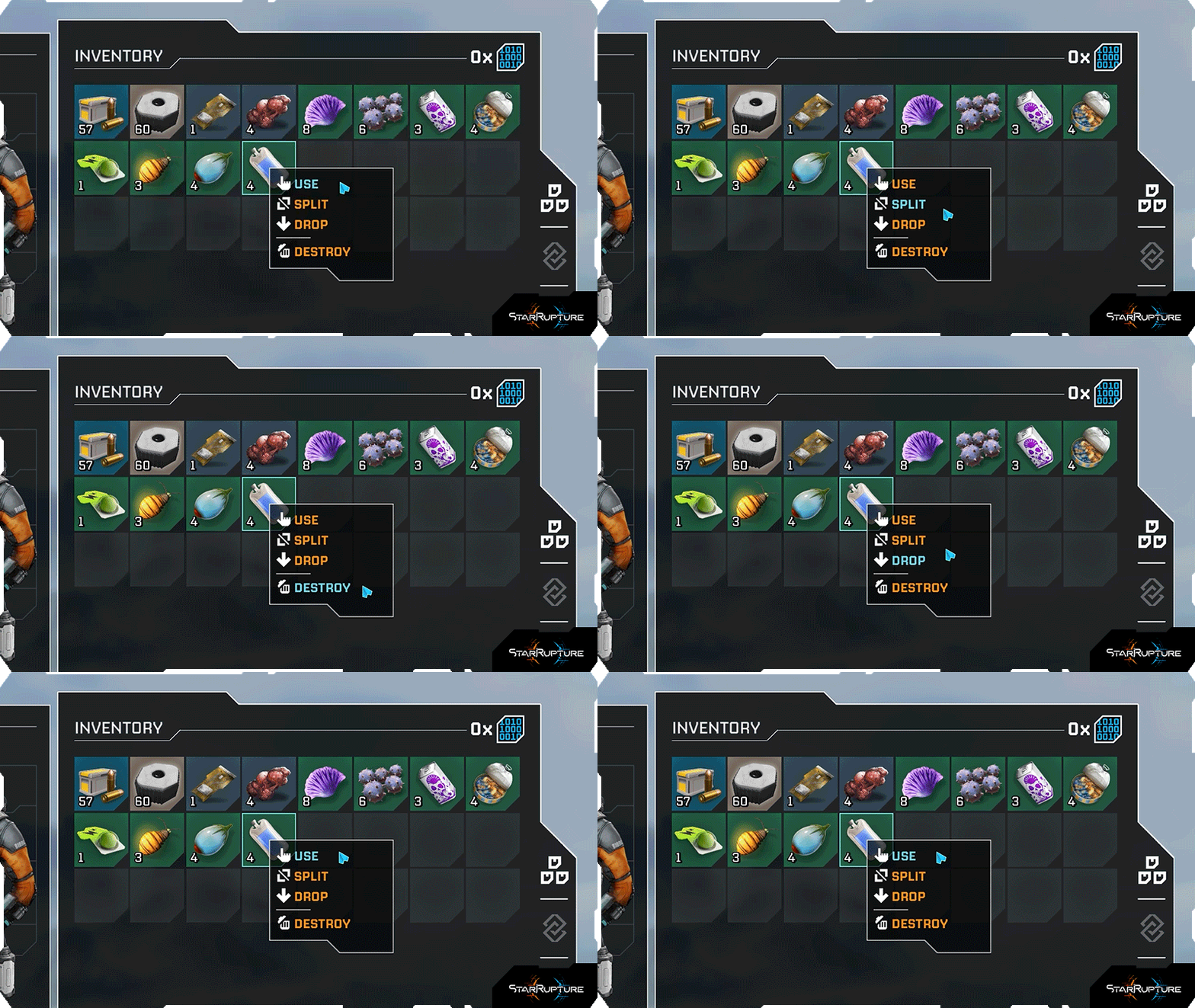 A brand new cursor has been added to the game for better scalability across different screen resolutions and better interactions with UI elements.
Reworked Infolog
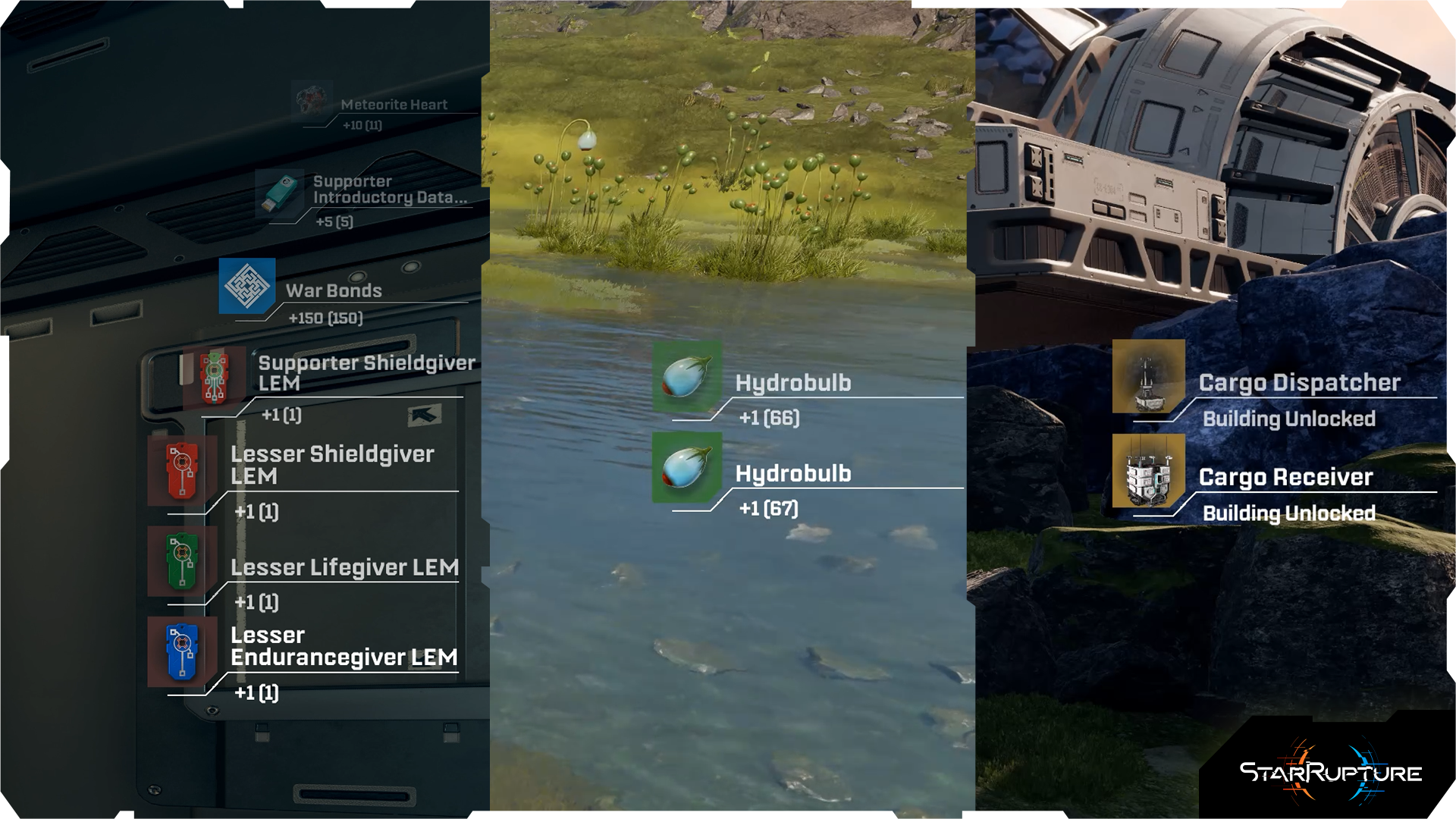 The game’s infolog has also been improved. Thanks to added activity type names & improved text wrapping, the infolog will now be much more useful in tracking your actions, collected items, finished tasks, unlocked levels, or skills.
New accessibility options
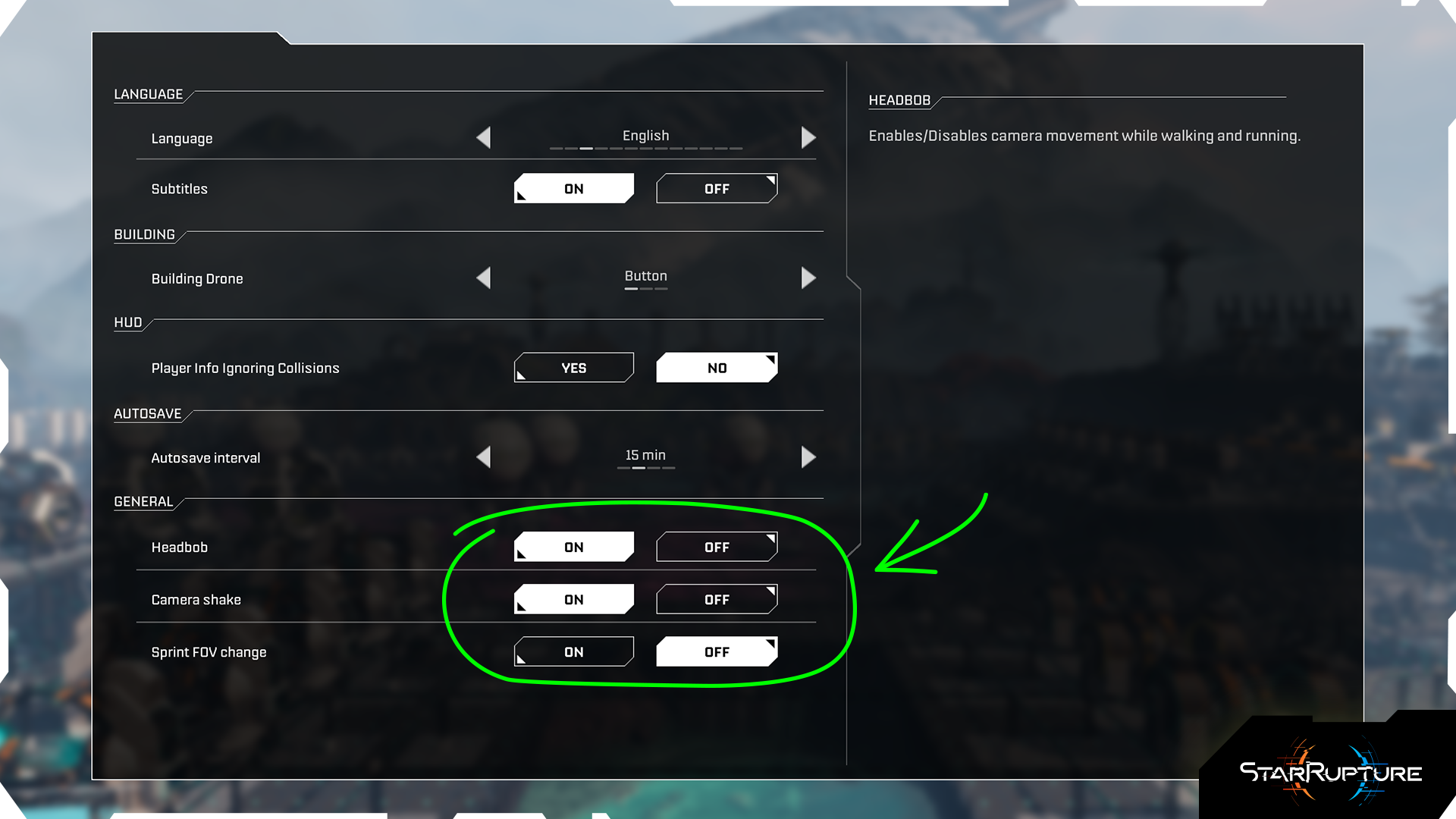 New accessibility options have been added to the game’s menu. You can now enable or disable Headbob, Camera shake, and Sprint FOV change.
The update also contains hundreds of fixes and improvements based on the feedback you’ve provided us via our official support page, the Steam forum, and our official communities.
See the full patch notes for Update 2: Quality of Life below.
Crashes & Performance issues
- Secured the game's code that may have caused a crash when building multiple platforms
- Secured the game's code that may have caused a freeze during Fire Wave for the Hosts and a stopped animation for the Clients
- Addressed a performance drop that occurred when a player was using deconstruct on a large save file
- Secured the game's code to prevent a potential crash when deconstructing a Base Core while the infected Base Core UI widget remains displayed
- Secured the code that might have caused crashes while deconstructing Viewports
- Fixed a performance drop that would occur upon granting items from the Supporter Pack
- Secured code that might have caused crashes when players reloaded their save file in the Forgotten Engine's Generator Room
- Secured code that might have caused crashes for Clients upon joining their Host in Forgotten Engine
- Improved game performance at the beginning of a Fire Wave
- Secured the game's code that may have caused a crash when collecting loot containers while listening to Audiologs
- Addressed a crash that would occur after the player changed the session type from online to offline after being invited
- Improved game's optimization while the player is holding out ghosts of buildings
- Improved stability of the game when the player is continuously placing buildings from the Personal Drone in quick succession
- Secured the game's code that may have caused a crash when placing a Base Core at the maximum distance from the Personal Building Drone
- Secured the game's code from a crash that might occur in co-op when both the Host and Client upgraded the Rail
- Secured the game's code to prevent crashes in co-op, where one player claims the last reward in the Corpo Terminal while the other player has that corporation tab open in the Development Station
- Secured the game's code to prevent crashes while opening buildings' UI
- Secured the game's code to prevent crashes while one of the co-op clients died
- Secured the game's code to prevent crashes while managing the factory and its buildings
- Secured code changes that may have caused crashes while launching the Personal Building Drone
Multiplayer issues
- Fixed an issue where Viewports didn't merge correctly for the client players in co-op sessions
- Fixed an issue where multiple dialogues would overlap after losing an Antenna fight in co-op
- Fixed an issue where an audiolog wouldn't be played for the client in the co-op session if another dialogue was already playing
- Addressed an issue where Viewports would not merge properly if the client built them far away from the Host
- Fixed a bug that would cause loot containers to not disappear upon pickup for the client
- Addressed an issue where the client of the session would not see Points of Interest on the map previously discovered by the Host
- Fixed an issue where the infolog about gaining a new level would not be displayed to the client
- Fixed an issue where a trigger is displayed for the client to have already activated the Control Room in Forgotten Engine
- Fixed an issue that caused Antenna markers to disappear from the map in co-op sessions
- Fixed a lack of the directional damage indicator for the client in the co-op sessions
- Fixed an issue where clients couldn't pick up loot containers from the world
- Fixed an issue in co-op where Interior Buildings could be placed simultaneously in the same spot
- Fixed an issue where the items dropped into an existing dropbox may cause them to vanish in co-op sessions
- Fixed an issue where Quartz Ore would not spawn for the Client if the Host was far away
- Addressed a co-op replication issue where enemies moving across multiplatforms would appear to jitter or stutter for client players if the host's framerate dropped
- Fixed an issue where ammo slots were grayed out if the client inserted the ammo to Defense Tower or Turret
- Fixed an issue in Forgotten Engine where the client could not see the animation for the Forgotten Engine's Cannon after reloading the session
- Fixed an issue where clients could not use ADS if the Shotgun was the first equipped weapon
- Addressed an issue where clients would unexpectedly receive the "Bigger Inventory" infolog pop-up upon joining a reloaded session
- Addressed an issue in co-op where a rejoining player would not be protected from the Fire Wave inside the Habitat
- Addressed an issue in co-op where players were unable to view the description of a character in the Regeneration Chamber if that character was already occupied by someone else in the session
- Addressed an issue where the client of the session could change the host's character if they were both using the Regeneration Chamber at the same time
- Fixed an issue in co-op where clients could build a Drone Rail from a socket that was already occupied or currently being built by the host
- Fixed an issue in co-op where the map area remained covered for players who joined a game after an Antenna had already been activated
- Fixed an issue where the client would lose stamina while running on powered Supported Platforms far away from the Host
- Fixed an issue where the client spawns in the host's model while joining the co-op session for the first time
- Fixed an issue where Swarmers may die with a visible delay for the client in co-op sessions
- GAL dialogues should now trigger for all players in co-op sessions upon a new discovery
- Autosave interval settings should now be properly greyed out and ineffective on Listen Servers
- Fixed an issue where some of the dialogues were not playing for the client in co-op sessions
- Fixed an issue where the client of the co-op session would not see the walls of the Habitat
- Fixed an issue where one of the co-op clients has two characters assigned in the Regeneration Chamber
- Fixed an issue where the ghost of Supported Platforms may not appear correctly for the co-op clients
- Fixed an issue where the autosave timer would not be visible for co-op clients
Dedicated Servers
- Fixed a crash on Dedicated Servers that might have occurred while deconstructing a merged Viewport
- Fixed Goliath charge animations on Dedicated Servers
- Autosave interval settings changed by the client on Dedicated Servers should now be properly applied
- Secured the game's code to prevent crashes while quickly sending consecutive chat messages on Dedicated Servers
- Secured the game's code to prevent crashes while loading progression-heavy save files on Dedicated Servers
Building
- Fixed an issue where the Ladder would not attach to all segments of the Habitat
- Fixed an issue where placing multiple platforms would cause them to ignore collisions and other buildings
- Addressed an issue where the player could place multiplatforms over Cave entrances
- Deconstructing stacked Habitats should now properly clean up all interior components, preventing leftover machines
- Fixed an issue where multi-level regular Habitats connected by horizontal bridges would sometimes remain floating mid-air after deconstructing lower-level structures
- Fixed a performance drop that would occur when a player connected Rails to machines
- Fixed an issue that caused the Railing to not snap onto Shallow Stairs in some circumstances
- Fixed an issue where the Extendable Walkway could not be snapped to the Large Habitat's roof
- Fixed an issue where some of the Platforms could be placed despite not having any stability
- Fixed an issue where Supported Platforms could be built in a restricted area
- Fixed an issue where the Extendable Walkway would attach incorrectly if it was built immediately upon snapping to another structure
- Fixed an issue where the player could place multiple Supported Platforms in one spot
- Fixed an issue where Solar Panels could not be built due to the "Starlight Obscured" message, despite meeting the requirements
- Fixed an issue where a Rail's ghost could collide with another Rail on the same Junction
- Addressed an issue where Smelter's cylinders could occasionally persist as "ghost" objects in the world after deconstruction
- Fixed an issue where players could not sample any Junctions if the height of the pole was altered
- Fixed an issue where buildings could be placed on top of the Bloodfern
- Improved the Zipline snapping mechanic to the Zipline Pole
- Fixed an issue where Habitat Modules would be left behind upon the deconstruction of the Habitat
- Fixed an issue where Interior Buildings could be snapped onto other buildings than Habitat
- Fixed an issue where an upper stacked Habitat floated mid-air after the deconstruction of the lower one
- Fixed an issue that prevented the Platform from being snapped to a Zipline Pole
- Fixed an issue where Pillar Support and Supported Platforms could be built above ground
- Base Multiplatforms should now properly replace existing platform layouts when placed directly on top of them
- Fixed an issue where the Platform may not properly snap to the Supported Platform
- Fixed an issue where Excavators, Drills, and Extractors could have been placed outside of the ore area
Enemies/Combat
- Fixed an issue where Goliath's charge would apply inconsistent damage to the player
- Addressed an issue where Exploder’s explosion would not correctly apply damage to the player
- Tweaked the behavior of Vermin during Antenna attacks, so they would not exclusively target the player
- Fixed an issue where Vermin would fall and attack the player from below the floor
- Fixed an issue that might have caused the Goliath to clip into buildings while chasing after the player
- Fixed issues with Goliath's behavior that might have caused a lack of infection on Defense Towers
- Fixed the damage range for Swarmers
- Addressed an issue where Spitters' projectile range was too big during the Base Attack
- Addressed an issue where the Vermin would disappear before switching to ragdoll for the client
- Fixed a damage calculation issue where enemies could occasionally receive an unintended damage multiplier
- Addressed an issue where Slasher's jump attacks would still deal damage, even if the enemy was defeated before the attack landed
- Fixed an issue where a single Grenade explosion could have killed Goliath
- Improved Goliath's pathfinding in multiple places on the map
- Improved the behavior of Skylisk's spawners
- Fixed an issue where Slashers could be launched into the air while performing an attack
- Fixed an issue that could cause Vermin swarms to teleport towards the player
- Fixed an issue where Slashers may move backwards while switching aggro between players
- Fixed an issue where enemies might have immediately respawned after a kill if a player saved and loaded the session
- Fixed issues with the Vermin's incorrect color of blood splash
- Improved Vermin's VFXs while they are attacking the player
- Bodies of dead Spitters should no longer disappear too abruptly
Forgotten Engine & Abandoned Bases
- Fixed an issue where some of the loot containers were missing in Abandoned Bases
- Fixed an issue where some enemies could fall through the floor in the Forgotten Engine sequence
- Fixed an issue where some of the loot containers in the Abandoned Bases were placed underground
- Improved the visibility of the rubble piles in Abandoned Bases
Environment
- Fixed an issue that might have caused Vermin to fall through the closed Cave entrances
- Fixed Quartz Ores not properly spawning inside multiple Caves
- Addressed a bug across multiple caves that allowed players to build smaller structures inside restricted zone borders under specific terrain and height conditions
- Addressed an issue where entrance cave vines would disappear and prematurely close the cave entrance following a regrowth phase
- Fixed an issue where a player could open a cave by throwing a grenade at it
- Fixed environment textures in certain areas
- Fixed various holes in the game's world map that the player could fall into
- Fixed an issue where Vulpir's corpse would be displayed with moss despite being killed during the Ashfall Phase
UI
- Fixed an issue where the names of the items would be cut off on the HUD's infolog
- Survival stat markers should now show the correct state of depletion
- Changed some of the Buildings' UI icons for improved clarity
- Introduced a change to the map so that the filtering options are more visible
- Fixed an issue where the red screen effect would suddenly appear during Goliath's attack, despite the player not taking any damage
- Fixed an issue where the Abandoned Base icon would be incorrectly displayed on the map upon session reload
- Fixed an issue where the infection level bar would not be visible after a reload of the game
- Fixed an issue where Cave markers would not be displayed on the map after rejoining a co-op session
- Fixed an issue where the background audio setting would not work after rebooting the game
- Fixed an issue where Audio Output Device settings would display inconsistent options
- Ammo count on HUD now indicates 999+ if there's more ammunition available in Players' Inventory
- Fixed a HUD issue where the tooltips about running on powered platforms would be displayed after each reload of the session
- Fixed an issue for Personal Storages, where the items would not stack in the same way as they do in the Inventory
- Fixed an issue where LEMs could be removed from the equipped slots through the player's Inventory
- Fixed an issue where changing the autosave interval setting in the pause menu wasn't applied to the game
- Fixed an issue where the tooltip for the item in Recipe Station would be displayed upon hovering the "Insert" button
- Various other UI fixes
Gameplay
- Fixed an issue where the player may have been able to add resources to the Base Core update twice
- Base Core's integrity can no longer reach 0% before Base Attack is lost
- Fixed an issue that caused Vermin's loot to drop inside the Platforms
- Fixed an issue where an inactive Infection Tumor looked visually active upon reloading of the session
- Fixed an issue where Storage buildings would still request items despite being turned off
- Fixed an issue in the Tutorial, where an objective of providing enough power could be achieved under incorrect circumstances
- Fixed Greater Infiltrator LEM granting a different uncover map area percentage than stated in its description
- Fixed Lesser Shieldfixer, Shieldfixer, and Greater Shieldfixer LEMs, granting different bonuses than stated in their descriptions
- Fixed an issue where energy-powered Walkways used the player's stamina
- Fixed an issue where saving and loading a session after destroying an active Infection Tumor would cause the infection around a lost Base Core to stop functioning
- Fixed an issue where weapon ADS would remain active without input if the player sampled a building while holding the aim button
- Addressed an issue where Plants, Coralion & Vulpir Eggs would remain visually present in the world after being gathered
- Fixed various issues regarding gatherable plants
- Fixed an issue where Glowcaps wouldn't regrow in proximity to the player
- Fixed an issue where Stamina wasn't drained while running on unpowered Supported Platforms
- Items from inventory should no longer be transferable to loot chests
- Fixed an issue where looting containers didn't count towards Large Personal Storage progression in the Development Station
- Fixed an issue that caused the Infection Cloud during the Base Attack to not vanish despite removing it from buildings
- Fixed an issue where some flora would not get burned during the Fire Wave
- Fixed an issue where the entire base deconstruction may have granted double materials
- Fixed an issue where one of the infected Base Cores would not display Infection Tumor if another Base Core close by was cleared
Other
- Adjusted the sliding animation for co-op players to look more natural
- Fixed an issue where the hit reaction SFX was always playing at maximum volume
- Fixed an issue where heat VFX may not have been properly applied to all buildings after reloading the game
- Fixed an issue where some dialogue volume was affected by Sound Effects and Dialogue Volume settings
- Fixed an issue that caused the building tool to be detached from the character's model when the Personal Building Drone started automatically in deconstruct mode
- Fixed Harvester's reversed speed indicator animation
- Improved the fix for an issue that caused the gravel from Meteorites to appear on buildings
- Fixed an issue where saving and loading a session during a Base Attack might have caused an automatic win for the player
- Fixed an issue where doors to the Cooling Station in Forgotten Engine would display incorrect animation
- Fixed an issue where some Infection Clouds did not disappear in Abandoned Bases after clearing them out
- Fixed an issue where the Infection Cloud around the Base Core was not visible if the base attack was lost during the Ashfall Phase
- Fixed an issue where clients would hear an alarm in the completed Forgotten Engine after reloading the session
- Addressed an issue where there was no combat music during the growback phase
- Fixed an issue where motion blur would cause flickering on the materials transported by drones
- Fixed an issue where some dialogues were not affected by the audio settings
- Fixed an issue where combat music would loop endlessly despite not being in combat anymore
- Added missing package materialization sound to Facturer
- Fixed an issue where multiple SFX were not assigned to any audio settings sliders
- Fixed an issue where stretched textures could briefly obscure the screen during movement
- Fixed an issue where the player's model hands may be misaligned from the gun when viewed from a distance
- Fixed issues with Vermin shadows, which appear at a distance
- Fixed an issue where the Harvester's beam may look distorted on some PC configurations
- Fixed some of the models in Abandoned Bases
- Fixed an issue where Pillar Support would be visible through Platforms from afar
- Various Localization adjustments
- Fixed an issue where the Forgotten Engine activation sound may have played twice.
Have fun while building, rebuilding, and expanding your factories in the new update!
If you’d like to provide us with feedback, check troubleshooting guides, or report a bug, please visit our Support Page.
Until the next one,
Creepy Jar Team
https://store.steampowered.com/app/4167250/StarRupture__Supporter_Pack/

What's Your Reaction?








XINKER - Business and Income Tips
Explore XINKER, the ultimate platform for mastering business strategies, discovering passive income opportunities, and learning success principles. Join a community of thinkers dedicated to achieving financial freedom and entrepreneurial excellence.


![[Business Talk] Chagee: Opening 3,500 stores in 6 years](https://xinker.org/uploads/images/202410/image_140x98_671afce94bf91.webp)