


![[PRO Tips] Gold’s Bullish Revival: Seasonal Trends and Key Levels to Watch](https://xinker.org/uploads/images/202412/image_430x256_67724cc6ad0cd.webp)
![[PRO Tips] Gold Market Under Short-Term Pressure, Safe-Haven Demand and Central Bank Buying Support Long-Term Upside Potential](https://xinker.org/uploads/images/202412/image_430x256_676ffb4685287.webp)
![[PRO Tips] Analysis of 9 key points of differentiation strategy! Master differentiation to create a brand advantage that is unique in the world!](https://firebasestorage.googleapis.com/v0/b/xinker-tips.appspot.com/o/article_thumbnails%2Fscaled_differentiation%20strategy.png.png?alt=media&token=a1bfc3d2-e85a-4db7-8a6d-01c7274f8940)
![[PRO Tips] Will REITs regain growth momentum in 2024? 3 REITs ETFs you must know if you want to invest in real estate.](https://firebasestorage.googleapis.com/v0/b/xinker-tips.appspot.com/o/article_thumbnails%2Fscaled_REITs1.png.png?alt=media&token=8af4eb93-33ff-466f-8039-b6555fad52b4)
![[PRO Tips] Complete tutorial on how to make money in Adobe Stock!](https://firebasestorage.googleapis.com/v0/b/xinker-tips.appspot.com/o/article_thumbnails%2Fscaled_tut-adobe1.png.png?alt=media&token=0b2c8cf2-22bd-4142-883e-140ed1cbaf02)
![[Passive Income] Unlock the secret of passive income: 3 steps to apply for Google AdSense](https://xinker.org/uploads/images/202410/image_430x256_6717a4fb3052b.webp)
![[Passive Income] Earn over $200 a day with AI-generated articles!](https://firebasestorage.googleapis.com/v0/b/xinker-tips.appspot.com/o/article_thumbnails%2Fscaled_article1.png.png?alt=media&token=f61bf35b-8553-4719-826d-7360024adc70)
![[Passive Income] Earn over 20 USD per download with AI-generated images!](https://firebasestorage.googleapis.com/v0/b/xinker-tips.appspot.com/o/article_thumbnails%2Fscaled_adobe2.png.png?alt=media&token=3e20e76a-a907-45af-80aa-bf9b3600301f)
![[Passive Income] Earn 10 USD per new download by sharing CapCut!](https://firebasestorage.googleapis.com/v0/b/xinker-tips.appspot.com/o/article_thumbnails%2Fscaled_capcut2.png.png?alt=media&token=a04dec40-1fac-4857-86f2-19a8be02d38e)
![[Passive Income] Use your WiFi to create passive income in 5 minutes, and you can earn 4-6 U per day!](https://firebasestorage.googleapis.com/v0/b/xinker-tips.appspot.com/o/article_thumbnails%2Fscaled_Grassio.webp.png?alt=media&token=7659a95e-0e47-4f27-a17d-c942ac3cf7f4)


![[Business Talk] The Unique Theme of XINKER's Song: Beef Wellington and Business Mastery](https://xinker.org/uploads/images/202410/image_430x256_671afc155f47f.webp)
![[Business Talk] Chagee: Opening 3,500 stores in 6 years](https://xinker.org/uploads/images/202410/image_430x256_671afce80c5f9.webp)


Loadouts Feature Now Live!
Warlords, we've all been there: you're taking your time adjusting your gear in the queue, when suddenly a match is found. Before you know it, you're forced into battle wearing a mix of Light and Heavy Armour.To improve this, the latest update introduces the Loadouts feature, allowing Warlords to switch equipment with one click during the preparation phase.How it Works:The Loadouts feature lets you save your Weapon, Armour, and Runes together as a complete preset.Next time you want to use it, simply apply it directly from your "Loadouts".Outside battles: Press P to enter the character menu and click the in the top right corner of the equipment interface.During battle preparation: Click "Loadouts" in the bottom right corner to switch to your saved equipment.Full Configuration Loadout —— Save your combined Weapon, Armour, and Runes to prepare for battle quickly and switch playstyles with one click.Leadership —— If you switch to a Loadout with lower Leadership and can no longer support your deployed Units, the system will automatically remove units from the end of your roster until the Leadership requirements are met.Available slots: Every Warlord starts with two Loadout slots. Active Premium Accounts will receive one additional slot.This new Loadouts system is our latest Quality of Life update, designed to streamline your gaming experience.If you have any further suggestions, please feel free to share your feedback with us!

Warlords, we've all been there: you're taking your time adjusting your gear in the queue, when suddenly a match is found. Before you know it, you're forced into battle wearing a mix of Light and Heavy Armour.
To improve this, the latest update introduces the Loadouts feature, allowing Warlords to switch equipment with one click during the preparation phase.
The Loadouts feature lets you save your Weapon, Armour, and Runes together as a complete preset.
Next time you want to use it, simply apply it directly from your "Loadouts".
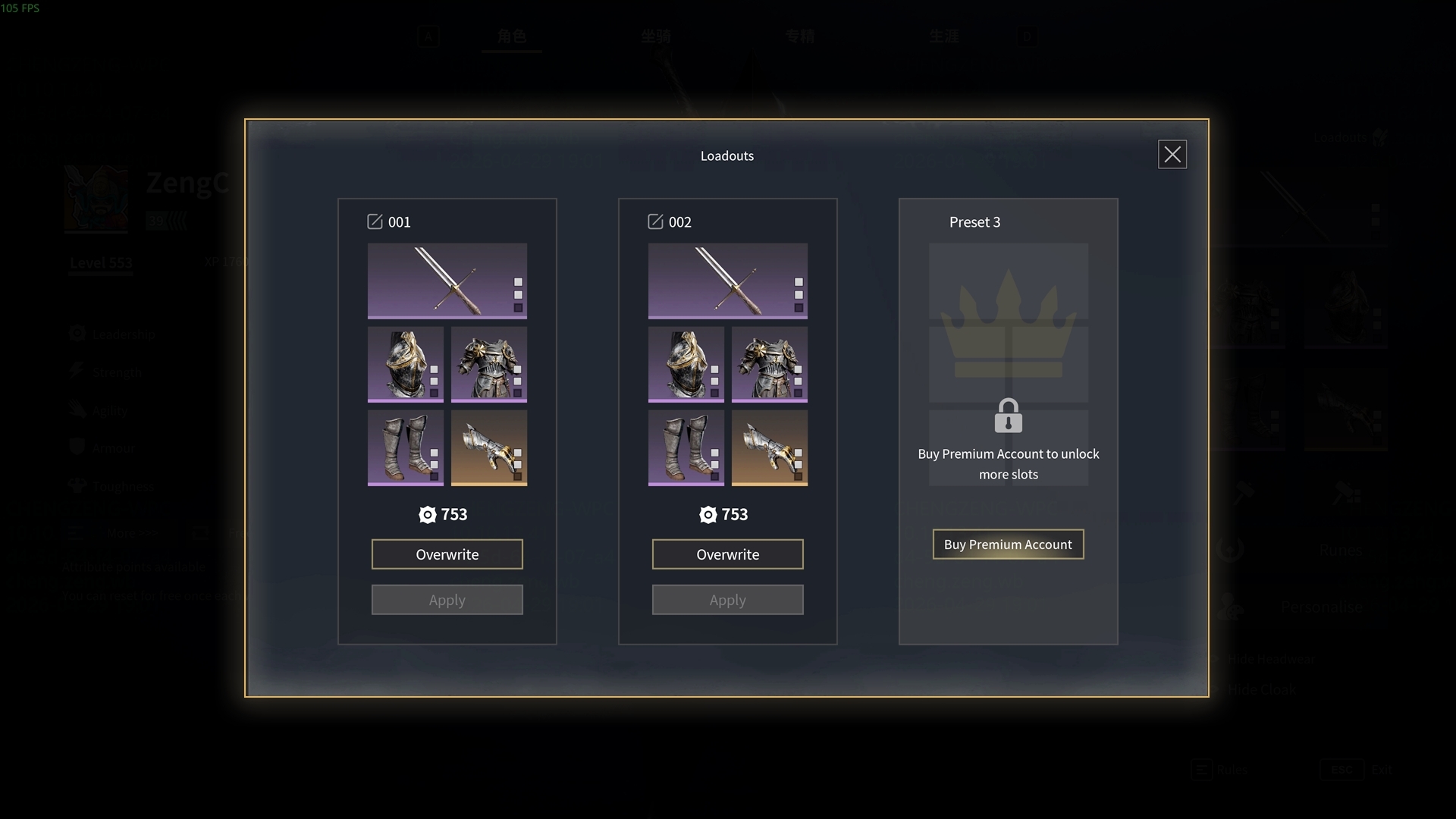
Outside battles: Press P to enter the character menu and click the in the top right corner of the equipment interface.
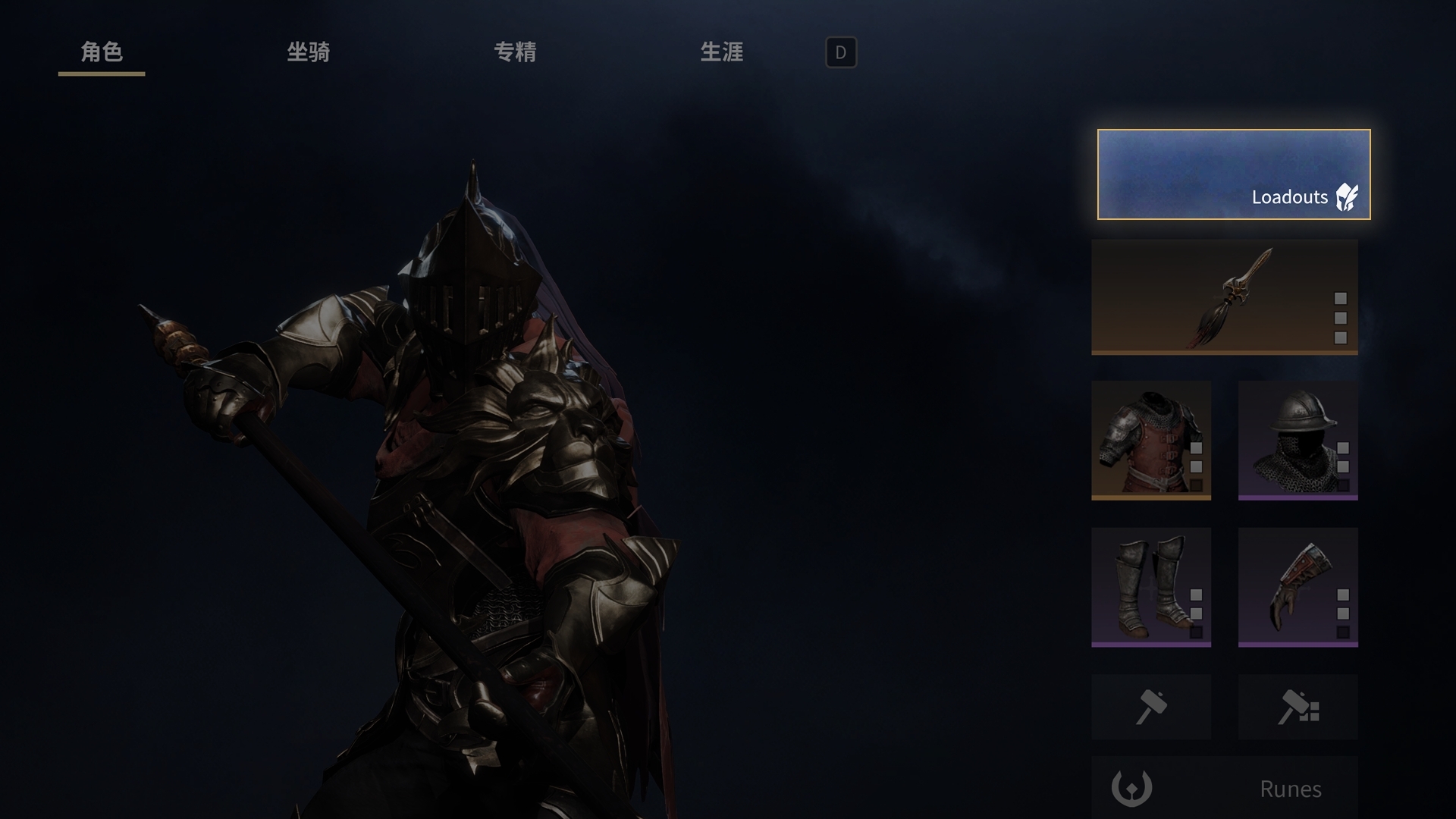
During battle preparation: Click "Loadouts" in the bottom right corner to switch to your saved equipment.
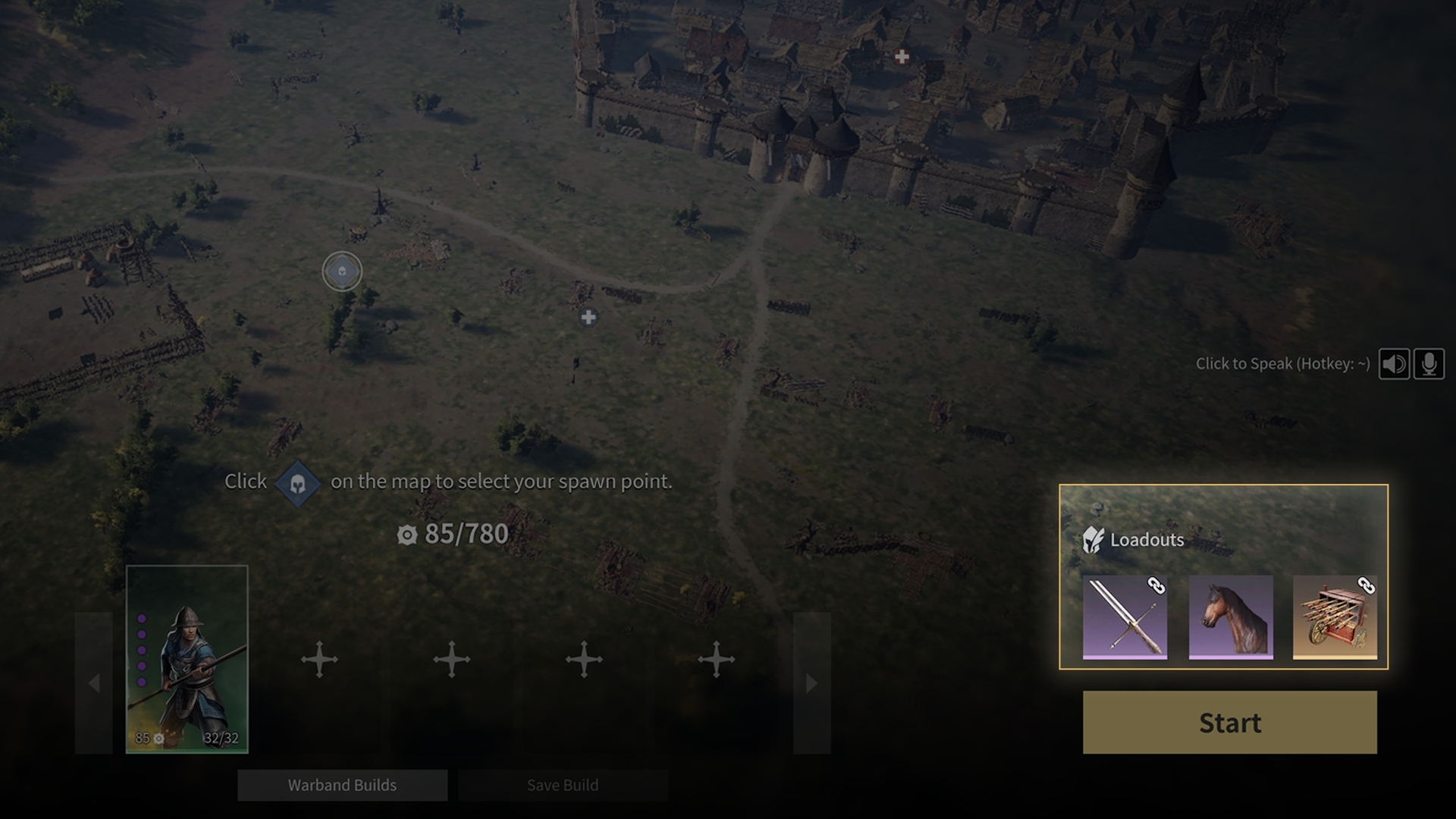
Full Configuration Loadout —— Save your combined Weapon, Armour, and Runes to prepare for battle quickly and switch playstyles with one click.
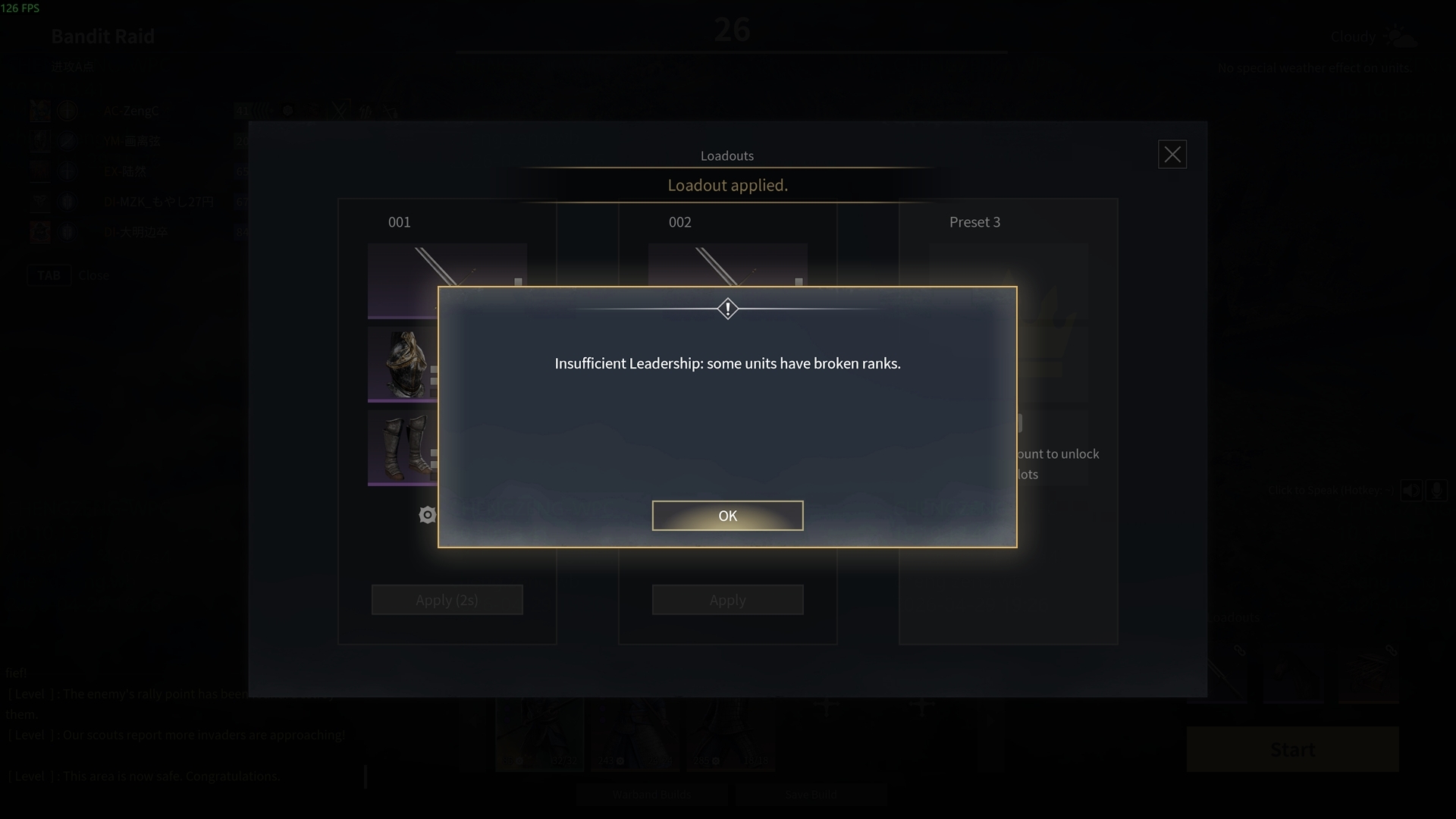
Leadership —— If you switch to a Loadout with lower Leadership and can no longer support your deployed Units, the system will automatically remove units from the end of your roster until the Leadership requirements are met.
Available slots: Every Warlord starts with two Loadout slots. Active Premium Accounts will receive one additional slot.
This new Loadouts system is our latest Quality of Life update, designed to streamline your gaming experience.
If you have any further suggestions, please feel free to share your feedback with us!
What's Your Reaction?











![[Business Talk] Chagee: Opening 3,500 stores in 6 years](https://xinker.org/uploads/images/202410/image_140x98_671afce94bf91.webp)






