




![[PRO Tips] Gold’s Bullish Revival: Seasonal Trends and Key Levels to Watch](https://xinker.org/uploads/images/202412/image_430x256_67724cc6ad0cd.webp)
![[PRO Tips] Gold Market Under Short-Term Pressure, Safe-Haven Demand and Central Bank Buying Support Long-Term Upside Potential](https://xinker.org/uploads/images/202412/image_430x256_676ffb4685287.webp)
![[PRO Tips] Analysis of 9 key points of differentiation strategy! Master differentiation to create a brand advantage that is unique in the world!](https://firebasestorage.googleapis.com/v0/b/xinker-tips.appspot.com/o/article_thumbnails%2Fscaled_differentiation%20strategy.png.png?alt=media&token=a1bfc3d2-e85a-4db7-8a6d-01c7274f8940)
![[PRO Tips] Will REITs regain growth momentum in 2024? 3 REITs ETFs you must know if you want to invest in real estate.](https://firebasestorage.googleapis.com/v0/b/xinker-tips.appspot.com/o/article_thumbnails%2Fscaled_REITs1.png.png?alt=media&token=8af4eb93-33ff-466f-8039-b6555fad52b4)
![[PRO Tips] Complete tutorial on how to make money in Adobe Stock!](https://firebasestorage.googleapis.com/v0/b/xinker-tips.appspot.com/o/article_thumbnails%2Fscaled_tut-adobe1.png.png?alt=media&token=0b2c8cf2-22bd-4142-883e-140ed1cbaf02)
![[Passive Income] Unlock the secret of passive income: 3 steps to apply for Google AdSense](https://xinker.org/uploads/images/202410/image_430x256_6717a4fb3052b.webp)
![[Passive Income] Earn over $200 a day with AI-generated articles!](https://firebasestorage.googleapis.com/v0/b/xinker-tips.appspot.com/o/article_thumbnails%2Fscaled_article1.png.png?alt=media&token=f61bf35b-8553-4719-826d-7360024adc70)
![[Passive Income] Earn over 20 USD per download with AI-generated images!](https://firebasestorage.googleapis.com/v0/b/xinker-tips.appspot.com/o/article_thumbnails%2Fscaled_adobe2.png.png?alt=media&token=3e20e76a-a907-45af-80aa-bf9b3600301f)
![[Passive Income] Earn 10 USD per new download by sharing CapCut!](https://firebasestorage.googleapis.com/v0/b/xinker-tips.appspot.com/o/article_thumbnails%2Fscaled_capcut2.png.png?alt=media&token=a04dec40-1fac-4857-86f2-19a8be02d38e)
![[Passive Income] Use your WiFi to create passive income in 5 minutes, and you can earn 4-6 U per day!](https://firebasestorage.googleapis.com/v0/b/xinker-tips.appspot.com/o/article_thumbnails%2Fscaled_Grassio.webp.png?alt=media&token=7659a95e-0e47-4f27-a17d-c942ac3cf7f4)


![[Business Talk] The Unique Theme of XINKER's Song: Beef Wellington and Business Mastery](https://xinker.org/uploads/images/202410/image_430x256_671afc155f47f.webp)
![[Business Talk] Chagee: Opening 3,500 stores in 6 years](https://xinker.org/uploads/images/202410/image_430x256_671afce80c5f9.webp)


How to battle your friends in Pokémon Champions
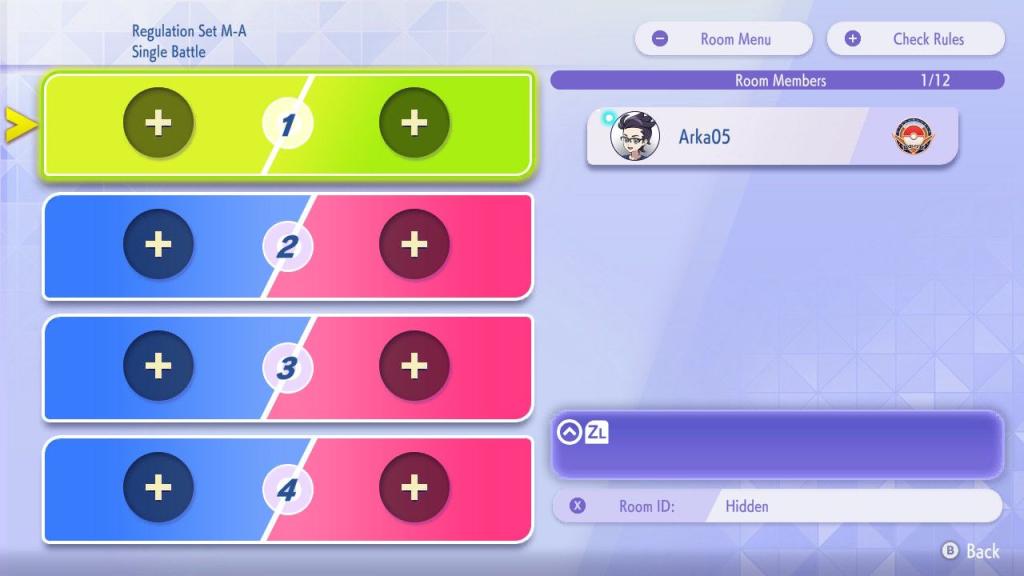
Pokémon Champions is now out on Nintendo Switch devices, and you finally battle your friends to find out who is the best. While friendly battles certainly have some limitations in the current build, the game still covers the basics pretty well. Let's first look at how to set up a friendly battle with your buddy.Table of contentsHow to add friends in Pokémon ChampionsHow to battle your friend in Pokémon ChampionsDoes Pokémon Champions have local PvPHow to add friends in Pokémon Champions To battle with your friend, you'll first need to add them to the game. To do so, open the sub-menu from the home screen. Then, you'll need to view your user ID by pressing the X button on your Switch console. Copy the ID and send it to your friend. Alternatively, you can enter the ID of your buddy. Screenshot by Destructoid Once you enter the code, you'll be able to send a friend request. You can then battle the other person with your chosen team.How to battle your friend in Pokémon Champions When it comes to friendly battles, you'll need to create a room in Private Battles. Once done, you can set the rules of battles and finalize the room creation. Once you're in the lobby, press the X button, and you'll find the room ID. Screenshot by Destructoid Send the room ID to your friends, who can join by entering the code. Once you're all in the same lobby, you can then start to create matches that will take place between all of you. All matches will follow the lobby rules, so make sure to share them with your buddies to avoid any unwanted tensions. You can also battle with other players in the same fashion, even if they're not your friends in the game. Screenshot by Destructoid Does Pokémon Champions have local PvP There's absolutely no way to play offline PvP games in Pokémon Champions with your friends. Pokémon Champions also requires a persistent internet connection at all times, and the only option for friendlies is via the private room routes. While there's casual play, I haven't managed to find a way to make a pre-made team in duos with your friend to take on other players. That could change in the future with updates from TPC. For the time being, the only option in duos is to matchmake with strangers. The post How to battle your friends in Pokémon Champions appeared first on Destructoid.

Pokémon Champions is now out on Nintendo Switch devices, and you finally battle your friends to find out who is the best. While friendly battles certainly have some limitations in the current build, the game still covers the basics pretty well.
Let's first look at how to set up a friendly battle with your buddy.
Table of contents
- How to add friends in Pokémon Champions
- How to battle your friend in Pokémon Champions
- Does Pokémon Champions have local PvP
How to add friends in Pokémon Champions
To battle with your friend, you'll first need to add them to the game. To do so, open the sub-menu from the home screen. Then, you'll need to view your user ID by pressing the X button on your Switch console. Copy the ID and send it to your friend. Alternatively, you can enter the ID of your buddy.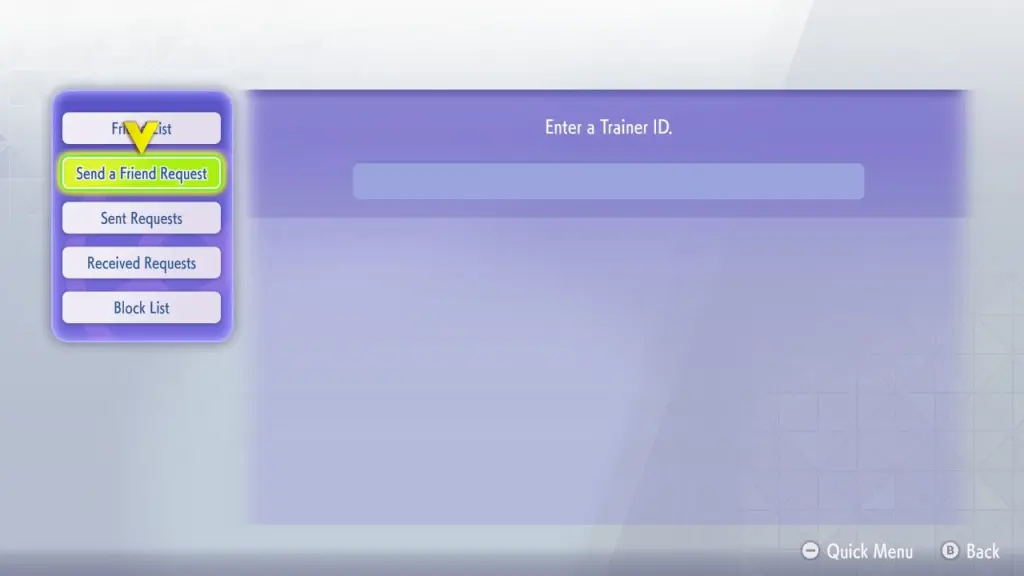 Screenshot by Destructoid Once you enter the code, you'll be able to send a friend request. You can then battle the other person with your chosen team.
How to battle your friend in Pokémon Champions
When it comes to friendly battles, you'll need to create a room in Private Battles. Once done, you can set the rules of battles and finalize the room creation. Once you're in the lobby, press the X button, and you'll find the room ID.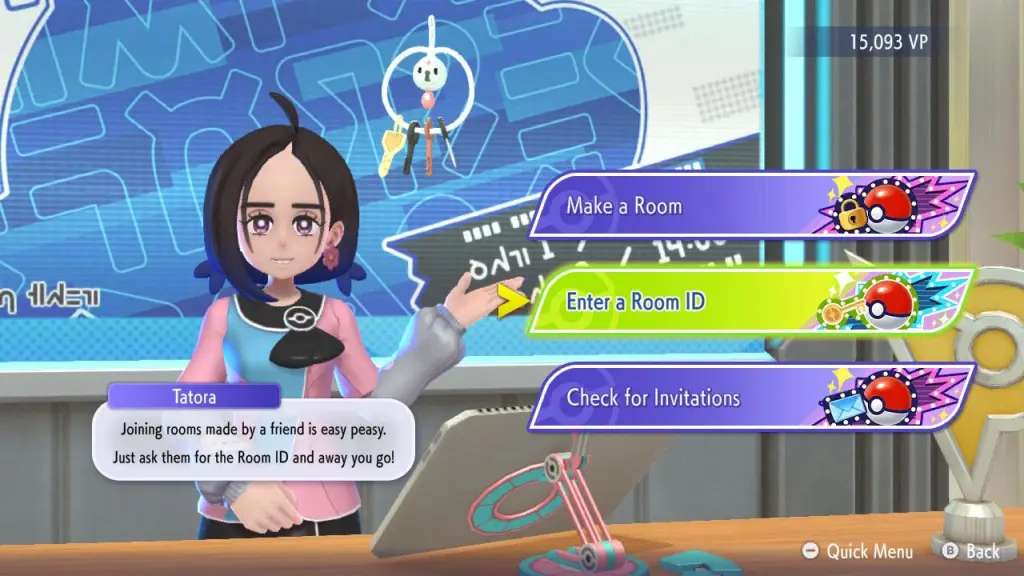 Screenshot by Destructoid Send the room ID to your friends, who can join by entering the code. Once you're all in the same lobby, you can then start to create matches that will take place between all of you. All matches will follow the lobby rules, so make sure to share them with your buddies to avoid any unwanted tensions.
You can also battle with other players in the same fashion, even if they're not your friends in the game.
 Screenshot by Destructoid
 Does Pokémon Champions have local PvP
There's absolutely no way to play offline PvP games in Pokémon Champions with your friends. Pokémon Champions also requires a persistent internet connection at all times, and the only option for friendlies is via the private room routes.While there's casual play, I haven't managed to find a way to make a pre-made team in duos with your friend to take on other players. That could change in the future with updates from TPC. For the time being, the only option in duos is to matchmake with strangers.
The post How to battle your friends in Pokémon Champions appeared first on Destructoid.
What's Your Reaction?








XINKER - Business and Income Tips
Explore XINKER, the ultimate platform for mastering business strategies, discovering passive income opportunities, and learning success principles. Join a community of thinkers dedicated to achieving financial freedom and entrepreneurial excellence.