






![[PRO Tips] Gold’s Bullish Revival: Seasonal Trends and Key Levels to Watch](https://xinker.org/uploads/images/202412/image_430x256_67724cc6ad0cd.webp)
![[PRO Tips] Gold Market Under Short-Term Pressure, Safe-Haven Demand and Central Bank Buying Support Long-Term Upside Potential](https://xinker.org/uploads/images/202412/image_430x256_676ffb4685287.webp)
![[PRO Tips] Analysis of 9 key points of differentiation strategy! Master differentiation to create a brand advantage that is unique in the world!](https://firebasestorage.googleapis.com/v0/b/xinker-tips.appspot.com/o/article_thumbnails%2Fscaled_differentiation%20strategy.png.png?alt=media&token=a1bfc3d2-e85a-4db7-8a6d-01c7274f8940)
![[PRO Tips] Will REITs regain growth momentum in 2024? 3 REITs ETFs you must know if you want to invest in real estate.](https://firebasestorage.googleapis.com/v0/b/xinker-tips.appspot.com/o/article_thumbnails%2Fscaled_REITs1.png.png?alt=media&token=8af4eb93-33ff-466f-8039-b6555fad52b4)
![[PRO Tips] Complete tutorial on how to make money in Adobe Stock!](https://firebasestorage.googleapis.com/v0/b/xinker-tips.appspot.com/o/article_thumbnails%2Fscaled_tut-adobe1.png.png?alt=media&token=0b2c8cf2-22bd-4142-883e-140ed1cbaf02)
![[Passive Income] Unlock the secret of passive income: 3 steps to apply for Google AdSense](https://xinker.org/uploads/images/202410/image_430x256_6717a4fb3052b.webp)
![[Passive Income] Earn over $200 a day with AI-generated articles!](https://firebasestorage.googleapis.com/v0/b/xinker-tips.appspot.com/o/article_thumbnails%2Fscaled_article1.png.png?alt=media&token=f61bf35b-8553-4719-826d-7360024adc70)
![[Passive Income] Earn over 20 USD per download with AI-generated images!](https://firebasestorage.googleapis.com/v0/b/xinker-tips.appspot.com/o/article_thumbnails%2Fscaled_adobe2.png.png?alt=media&token=3e20e76a-a907-45af-80aa-bf9b3600301f)
![[Passive Income] Earn 10 USD per new download by sharing CapCut!](https://firebasestorage.googleapis.com/v0/b/xinker-tips.appspot.com/o/article_thumbnails%2Fscaled_capcut2.png.png?alt=media&token=a04dec40-1fac-4857-86f2-19a8be02d38e)
![[Passive Income] Use your WiFi to create passive income in 5 minutes, and you can earn 4-6 U per day!](https://firebasestorage.googleapis.com/v0/b/xinker-tips.appspot.com/o/article_thumbnails%2Fscaled_Grassio.webp.png?alt=media&token=7659a95e-0e47-4f27-a17d-c942ac3cf7f4)


![[Business Talk] The Unique Theme of XINKER's Song: Beef Wellington and Business Mastery](https://xinker.org/uploads/images/202410/image_430x256_671afc155f47f.webp)
![[Business Talk] Chagee: Opening 3,500 stores in 6 years](https://xinker.org/uploads/images/202410/image_430x256_671afce80c5f9.webp)


Don't want to buy a Stream Deck? Corsair's new mouse can pull up a virtual control center with one button
Corsair acquired Elgato eight years ago, but it's chosen the past 12 months to throw the brand's Stream Deck technology on everything that leaves its factory. Some of the brand's best gaming mice feature plugin-friendly 12-button side panels, keyboards with a full deck built in, and as many 'virtual' Stream Deck buttons as I have fingers. The brand even dropped an entire touchscreen on its Command Series MC7, for some reason. The Corsair Nightsword v2 Wireless might be the first to actually make me think twice about having to reach over to hit some physical buttons, though. Released today at a slightly-higher-than-mid-range $129.99 / £119.99 (Corsair), the Nighsword v2 includes a side button dedicated to pulling up your virtual Deck. That means all the benefits of Corsair's bountiful plugin ecosystem without having to shell out on the hardware it was designed for (or having to move your mouse hand away from the action to make a change). Corsair Nightsword v2 Wireless Corsair's latest gaming mouse features a 33,00 DPI sensor, 8,000Hz polling, both 2.4GHz and Bluetooth wireless connectivity, and a battery life extending up to 170 hours in its most power-economical state. That could be a more impactful addition than some may realize. I wasn't quite as enamoured when I first heard of the feature. Surely you could assign a virtual Stream Deck launcher to a dedicated button on whatever gaming mouse you're running, it's just a program after all. Corsair's not just giving its software away, though. What is virtual Stream Deck? Virtual Stream Deck is a software that essentially throws a suite of controls onto your screen rather than sitting in a physical hardware device on your desk. You still get access to all the plugins available in the ecosystem, but you'll need to use your mouse to navigate the controls. Turns out, without the Nightsword in hand, you need to connect a physical Stream Deck to your PC once a month to keep virtual privileges. That puts that $129.99 price tag into perspective a little. The cheapest Stream Deck, the Neo, starts life at $99.99 (currently on sale for $85.99 at Amazon). If you're after more than eight buttons, you're looking at $149.95 (Amazon) for a Stream Deck Mk. 2. If you've already got a perfectly fine gaming mouse, the Nightsword's Stream Deck capabilities might not be turning your head on their own. That Neo model is cheaper than the Nightsword, after all. However, if you're a multi-control power user, I'll just say this. I'm writing this article with two Stream Decks in place on my desk, and I have to say having to take my hand off my mouse or keyboard when pressing a button does wear thin a little. It's one of the things that drew me to the Corsair Galleon 100 SD's Deck integration, even closing that distance a little helps. The value of being able to keep your hands on your main controls while navigating an extra layer of functionality will entirely depend on how much cash you're willing to drop. Compared to the larger Stream Deck Mk. 2, and even fancier stream controllers in the range, though, the Nightsword could be pulling its weight in the value arena. You're getting a far more flexible panel of controls after all, without those hardware limitations, and lest we forget this is actually a gaming mouse in itself. It's a must-consider for anyone looking to upgrade their rodent and has been eyeing up the extra controls of a Stream Deck. The mouse itself comes with a very capable 33K Marksman S optical sensor, the same used in the brand's excellent Sabre Pro V2 Ultralight, with a 750 IPS tracking speed and 50g acceleration. This isn't as competitive a model as the Sabre, though, with an 89g weight that puts it more in the casual camp. Eight extra onboard buttons are fully programmable in Stream Deck's software as well. See all gaming mice at Amazon I'm also rounding up the best wireless gaming mouse models on the market, or take a look at the best gaming keyboards and best streaming kit for more upgrades. [/url]
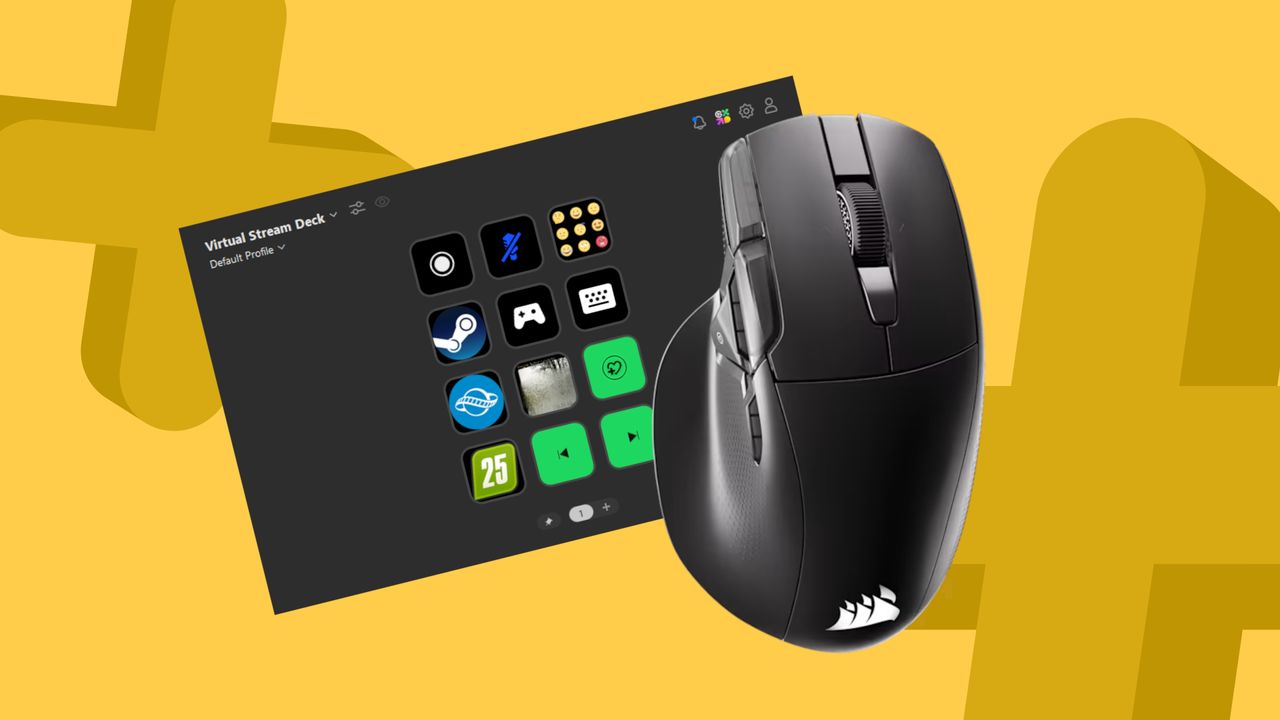 Corsair acquired Elgato eight years ago, but it's chosen the past 12 months to throw the brand's Stream Deck technology on everything that leaves its factory. Some of the brand's best gaming mice feature plugin-friendly 12-button side panels, keyboards with a full deck built in, and as many 'virtual' Stream Deck buttons as I have fingers. The brand even dropped an entire touchscreen on its Command Series MC7, for some reason.
The Corsair Nightsword v2 Wireless might be the first to actually make me think twice about having to reach over to hit some physical buttons, though. Released today at a slightly-higher-than-mid-range $129.99 / £119.99 (Corsair), the Nighsword v2 includes a side button dedicated to pulling up your virtual Deck.
That means all the benefits of Corsair's bountiful plugin ecosystem without having to shell out on the hardware it was designed for (or having to move your mouse hand away from the action to make a change).
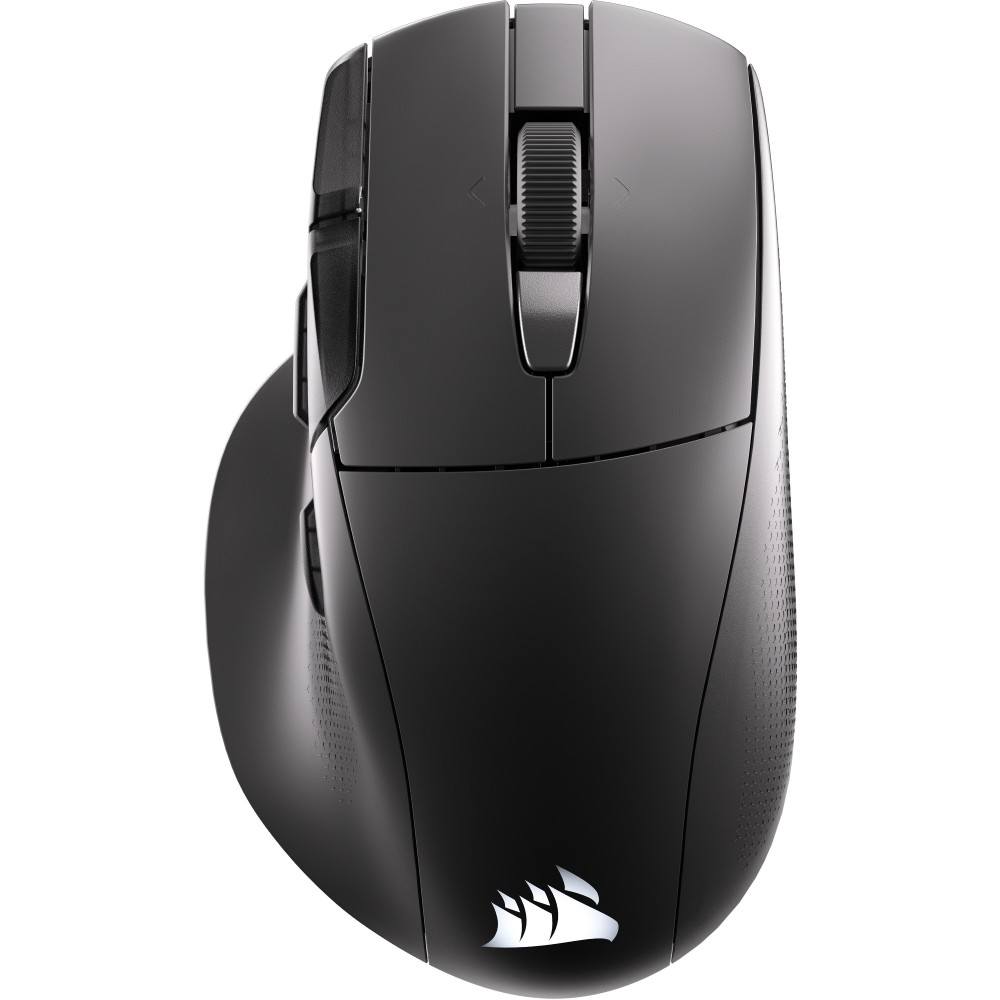 Corsair Nightsword v2 Wireless Corsair's latest gaming mouse features a 33,00 DPI sensor, 8,000Hz polling, both 2.4GHz and Bluetooth wireless connectivity, and a battery life extending up to 170 hours in its most power-economical state.
 That could be a more impactful addition than some may realize. I wasn't quite as enamoured when I first heard of the feature. Surely you could assign a virtual Stream Deck launcher to a dedicated button on whatever gaming mouse you're running, it's just a program after all. Corsair's not just giving its software away, though.
What is virtual Stream Deck? Virtual Stream Deck is a software that essentially throws a suite of controls onto your screen rather than sitting in a physical hardware device on your desk. You still get access to all the plugins available in the ecosystem, but you'll need to use your mouse to navigate the controls.
Turns out, without the Nightsword in hand, you need to connect a physical Stream Deck to your PC once a month to keep virtual privileges. That puts that $129.99 price tag into perspective a little.
The cheapest Stream Deck, the Neo, starts life at $99.99 (currently on sale for $85.99 at Amazon). If you're after more than eight buttons, you're looking at $149.95 (Amazon) for a Stream Deck Mk. 2. If you've already got a perfectly fine gaming mouse, the Nightsword's Stream Deck capabilities might not be turning your head on their own. That Neo model is cheaper than the Nightsword, after all.
However, if you're a multi-control power user, I'll just say this. I'm writing this article with two Stream Decks in place on my desk, and I have to say having to take my hand off my mouse or keyboard when pressing a button does wear thin a little. It's one of the things that drew me to the Corsair Galleon 100 SD's Deck integration, even closing that distance a little helps. The value of being able to keep your hands on your main controls while navigating an extra layer of functionality will entirely depend on how much cash you're willing to drop.
Compared to the larger Stream Deck Mk. 2, and even fancier stream controllers in the range, though, the Nightsword could be pulling its weight in the value arena. You're getting a far more flexible panel of controls after all, without those hardware limitations, and lest we forget this is actually a gaming mouse in itself.
It's a must-consider for anyone looking to upgrade their rodent and has been eyeing up the extra controls of a Stream Deck.
The mouse itself comes with a very capable 33K Marksman S optical sensor, the same used in the brand's excellent Sabre Pro V2 Ultralight, with a 750 IPS tracking speed and 50g acceleration. This isn't as competitive a model as the Sabre, though, with an 89g weight that puts it more in the casual camp. Eight extra onboard buttons are fully programmable in Stream Deck's software as well.
- See all gaming mice at Amazon
[/url]
What's Your Reaction?








XINKER - Business and Income Tips
Explore XINKER, the ultimate platform for mastering business strategies, discovering passive income opportunities, and learning success principles. Join a community of thinkers dedicated to achieving financial freedom and entrepreneurial excellence.



![[Business Talk] Chagee: Opening 3,500 stores in 6 years](https://xinker.org/uploads/images/202410/image_140x98_671afce94bf91.webp)