


![[PRO Tips] Gold’s Bullish Revival: Seasonal Trends and Key Levels to Watch](https://xinker.org/uploads/images/202412/image_430x256_67724cc6ad0cd.webp)
![[PRO Tips] Gold Market Under Short-Term Pressure, Safe-Haven Demand and Central Bank Buying Support Long-Term Upside Potential](https://xinker.org/uploads/images/202412/image_430x256_676ffb4685287.webp)
![[PRO Tips] Analysis of 9 key points of differentiation strategy! Master differentiation to create a brand advantage that is unique in the world!](https://firebasestorage.googleapis.com/v0/b/xinker-tips.appspot.com/o/article_thumbnails%2Fscaled_differentiation%20strategy.png.png?alt=media&token=a1bfc3d2-e85a-4db7-8a6d-01c7274f8940)
![[PRO Tips] Will REITs regain growth momentum in 2024? 3 REITs ETFs you must know if you want to invest in real estate.](https://firebasestorage.googleapis.com/v0/b/xinker-tips.appspot.com/o/article_thumbnails%2Fscaled_REITs1.png.png?alt=media&token=8af4eb93-33ff-466f-8039-b6555fad52b4)
![[PRO Tips] Complete tutorial on how to make money in Adobe Stock!](https://firebasestorage.googleapis.com/v0/b/xinker-tips.appspot.com/o/article_thumbnails%2Fscaled_tut-adobe1.png.png?alt=media&token=0b2c8cf2-22bd-4142-883e-140ed1cbaf02)
![[Passive Income] Unlock the secret of passive income: 3 steps to apply for Google AdSense](https://xinker.org/uploads/images/202410/image_430x256_6717a4fb3052b.webp)
![[Passive Income] Earn over $200 a day with AI-generated articles!](https://firebasestorage.googleapis.com/v0/b/xinker-tips.appspot.com/o/article_thumbnails%2Fscaled_article1.png.png?alt=media&token=f61bf35b-8553-4719-826d-7360024adc70)
![[Passive Income] Earn over 20 USD per download with AI-generated images!](https://firebasestorage.googleapis.com/v0/b/xinker-tips.appspot.com/o/article_thumbnails%2Fscaled_adobe2.png.png?alt=media&token=3e20e76a-a907-45af-80aa-bf9b3600301f)
![[Passive Income] Earn 10 USD per new download by sharing CapCut!](https://firebasestorage.googleapis.com/v0/b/xinker-tips.appspot.com/o/article_thumbnails%2Fscaled_capcut2.png.png?alt=media&token=a04dec40-1fac-4857-86f2-19a8be02d38e)
![[Passive Income] Use your WiFi to create passive income in 5 minutes, and you can earn 4-6 U per day!](https://firebasestorage.googleapis.com/v0/b/xinker-tips.appspot.com/o/article_thumbnails%2Fscaled_Grassio.webp.png?alt=media&token=7659a95e-0e47-4f27-a17d-c942ac3cf7f4)


![[Business Talk] The Unique Theme of XINKER's Song: Beef Wellington and Business Mastery](https://xinker.org/uploads/images/202410/image_430x256_671afc155f47f.webp)
![[Business Talk] Chagee: Opening 3,500 stores in 6 years](https://xinker.org/uploads/images/202410/image_430x256_671afce80c5f9.webp)


PC, CONSOLE, MAC PERFORMANCE SPECS
Find Crimson Desert’s PC, console, and Mac performance specifications below. Before playing the game, please make sure your hardware meets or exceeds the minimum requirements.PC- The performance figures shown are based on internal testing results. Performance may vary depending on your PC’s hardware and software configuration, as well as changes made to individual graphics settings.- The latest DirectX 12 is required. Console* Requires compatible display (120/240 Hz) and HDMI 2.1 cable ** Requires VRR compatible display and HDMI 2.1 cable Rog Xbox Ally X | S- The performance figures shown are based on internal testing results. Performance may vary depending on hardware and software configuration, as well as changes made to individual graphics settings.- Measurements were taken with the power connected and Turbo Mode enabled. Mac * “For this Mac” is a preset which will assign the settings and resolution that provide optimal visual quality and performance on your Mac. Specific settings may vary depending on how powerful your hardware is. - The performance figures shown are based on internal testing results. Performance may vary depending on your Mac hardware and software configuration, as well as changes made to individual graphics settings. - We recommend using macOS 26 “Tahoe” or a later version for optimal performance and stability.

Find Crimson Desert’s PC, console, and Mac performance specifications below. Before playing the game, please make sure your hardware meets or exceeds the minimum requirements.
PC
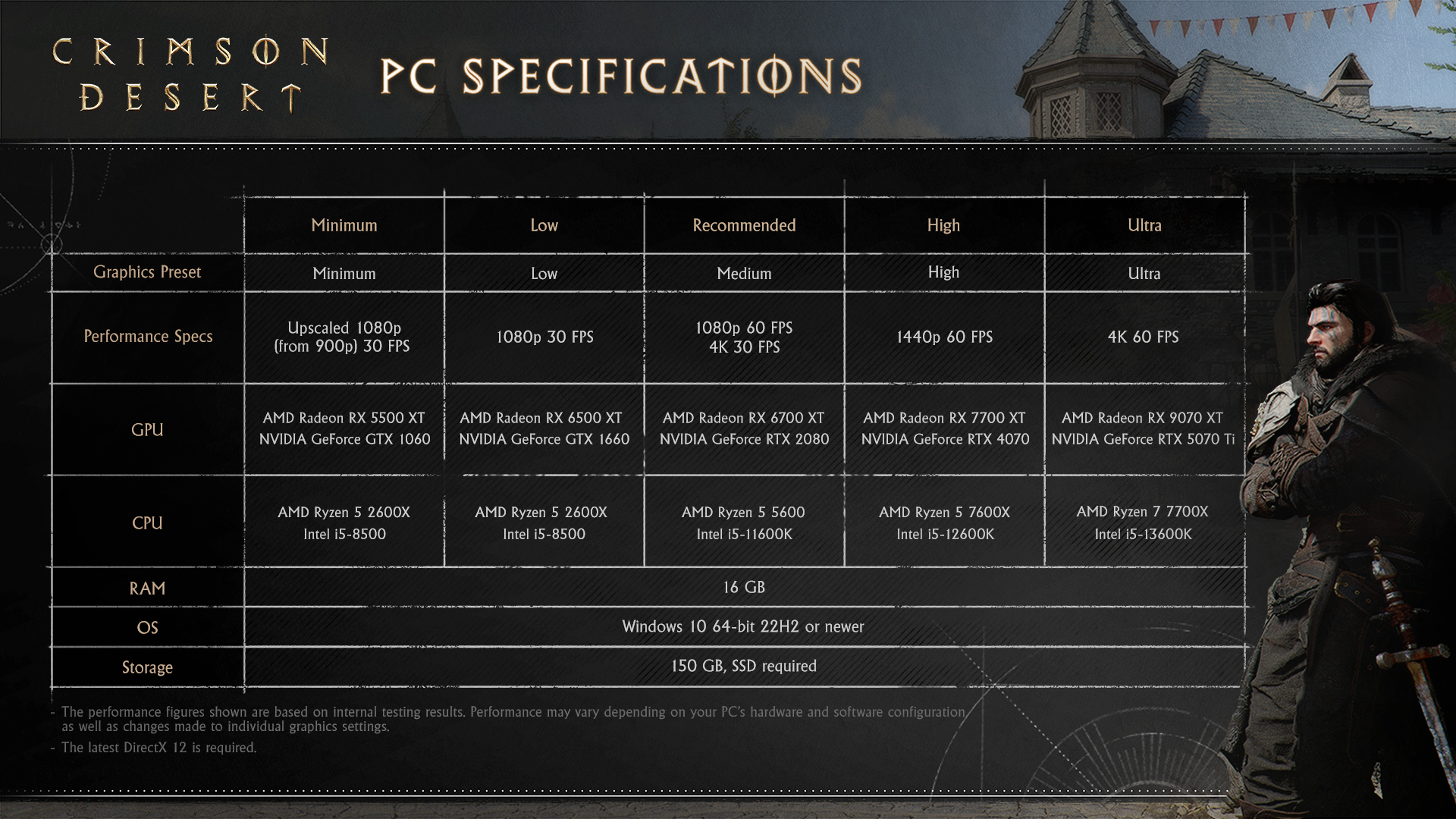 - The performance figures shown are based on internal testing results. Performance may vary depending on your PC’s hardware and software configuration, as well as changes made to individual graphics settings.
- The latest DirectX 12 is required.
Console
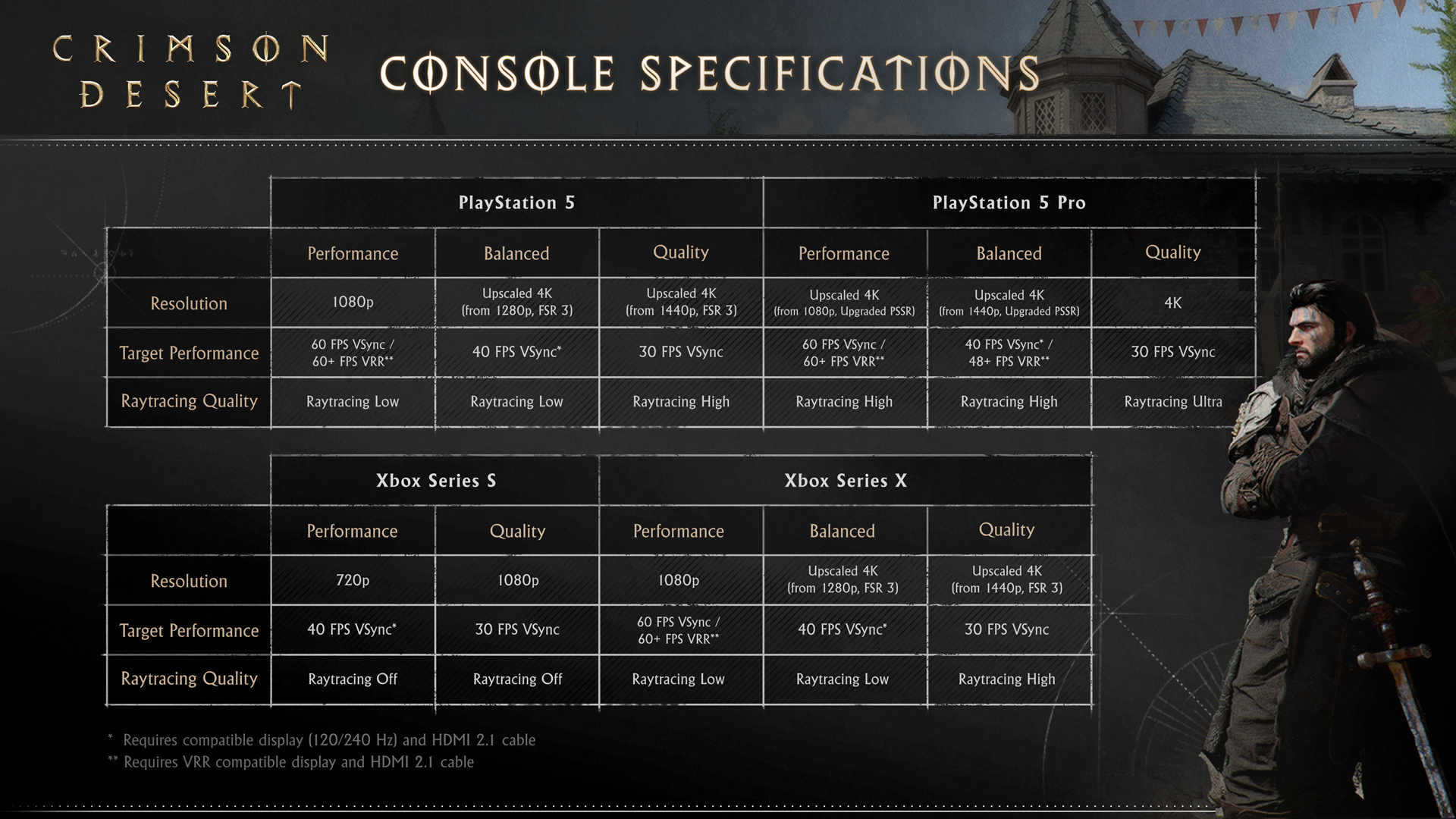 * Requires compatible display (120/240 Hz) and HDMI 2.1 cable
** Requires VRR compatible display and HDMI 2.1 cable
Rog Xbox Ally X | S
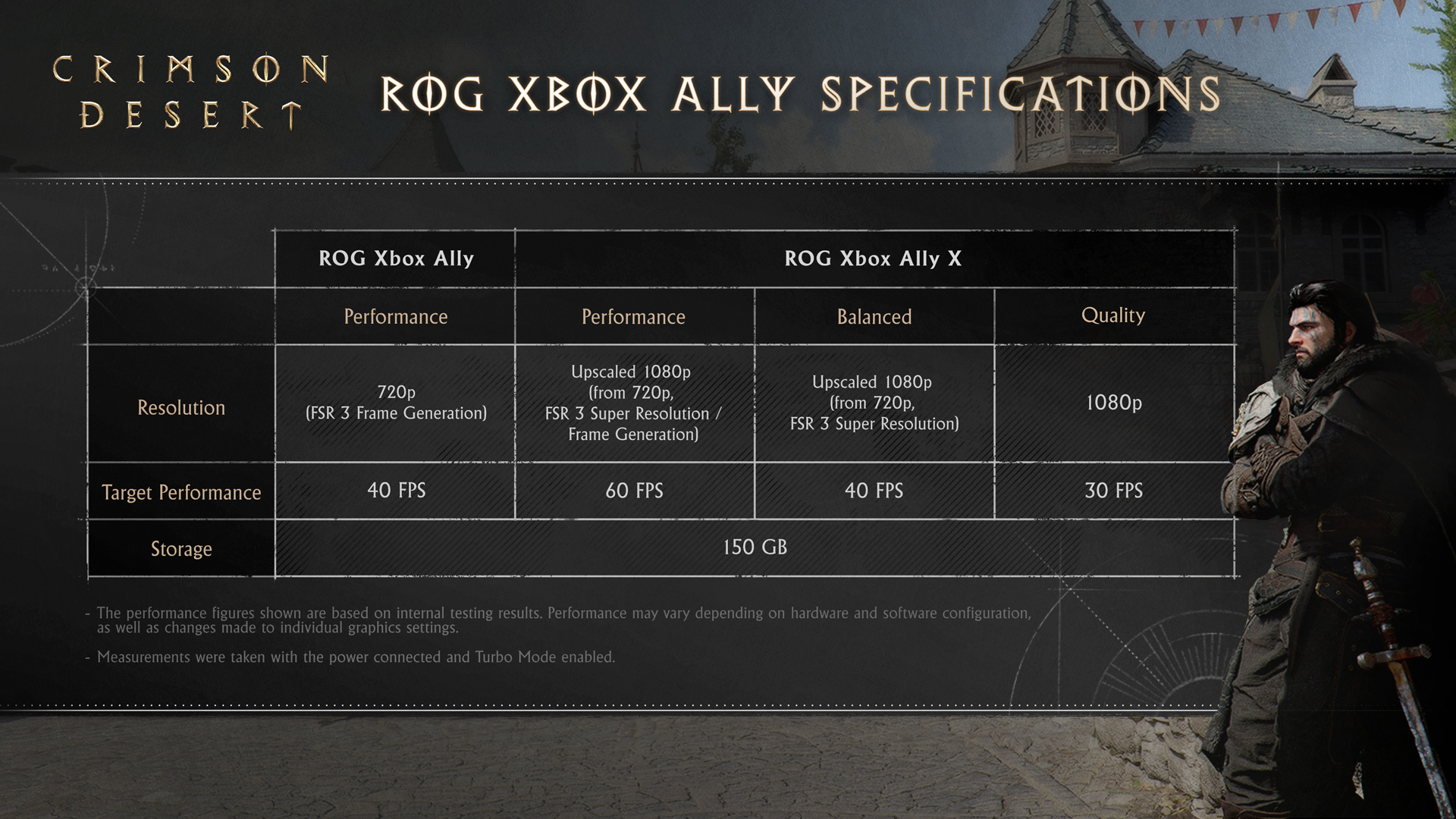 - The performance figures shown are based on internal testing results. Performance may vary depending on hardware and software configuration, as well as changes made to individual graphics settings.
- Measurements were taken with the power connected and Turbo Mode enabled.
Mac
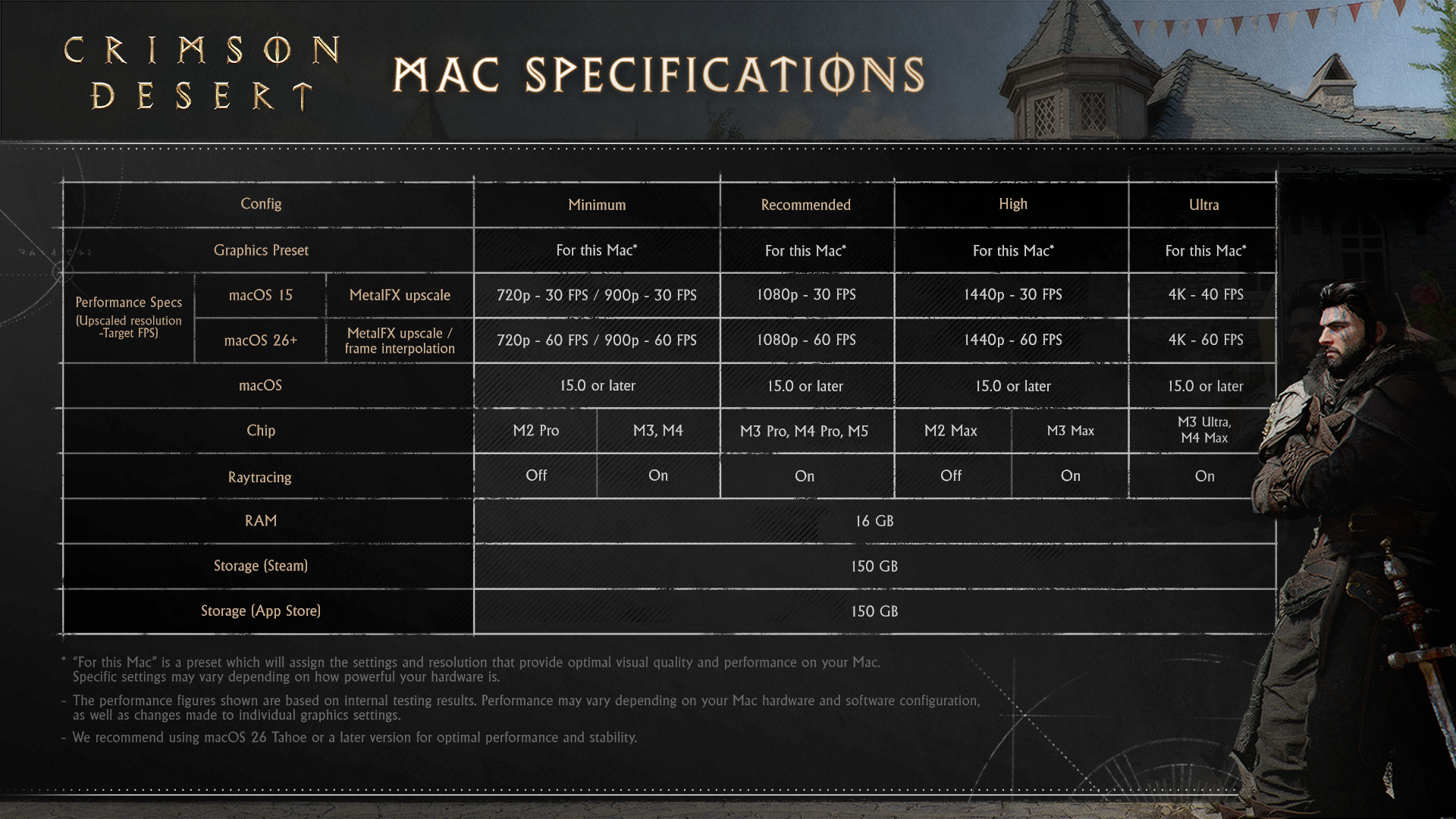
* “For this Mac” is a preset which will assign the settings and resolution that provide optimal visual quality and performance on your Mac. Specific settings may vary depending on how powerful your hardware is.
- The performance figures shown are based on internal testing results. Performance may vary depending on your Mac hardware and software configuration, as well as changes made to individual graphics settings.
- We recommend using macOS 26 “Tahoe” or a later version for optimal performance and stability.
What's Your Reaction?