




Item Reset & Market Trading Policy Change Update (Ver 1.00.07)
Hello,This is the development team.First and foremost, we want to make it clear that the current situation is the fault of our development team for failing to follow Steam's technical guidelines. We will take care not to appear as though we are shifting blame when writing future announcements.We sincerely and humbly apologize to everyone — including the Steam staff and all of our players.On June 2, 2026, because normal gameplay had become impossible, an Item Reset & Market Trading Policy Change Update was carried out.The main update details are as follows.■ Update Details1. Cube functions restored — Synthesis, Alchemy, Crafting, Decoration, Engraving, Inscription, and Offering can be used again.2. The Trade Ship menu can now be used starting from Cube Level 10.3. Certain items have been deleted.- All "Equipment" corresponding to levels 25, 35, 45, 55, 60, 70, 75, 85, and 90- All "Type B Equipment" of Uncommon grade or higher (If you already had the above equipment in your inventory, you can continue to use it as is. However, Synthesis and trading are not possible.)4. Level adjustments for regular Boxes and Stage Boss Boxes in some regions| Region Level | Obtainable Box || Lv. 25–29 | Lv. 20 Box || Lv. 35–39 | Lv. 30 Box || Lv. 45–49 | Lv. 40 Box || Lv. 55–64 | Lv. 50 Box || Lv. 70–79 | Lv. 65 Box || Lv. 85–90 | Lv. 80 Box |5. Equipment of Rare grade or lower (Common, Uncommon, Rare) — can no longer be traded on the Market.*Material items can still be traded on the Market as before, even if they are of these grades.6. Synthesis (sub-level range changes)| Before | After || Lv. 1–10 | Lv. 1–10 || Lv. 10–20 | Lv. 10–20 || Lv. 15–30 | Lv. 15–30 || Lv. 20–40 | Lv. 20–40 || Lv. 30–50 | Lv. 30–50 || Lv. 40–60 | Lv. 40–65 || Lv. 50–70 | Lv. 50–65 || Lv. 60–80 | Lv. 65–80 || Lv. 70–90 | Removed |*Result drop rates have been adjusted to match the new recipes.7. Crafting (sub-level range changes)| Before | After || Lv. 1–10 | Lv. 1–10 || Lv. 10–20 | Lv. 10–20 || Lv. 20–30 | Lv. 20–30 || Lv. 30–40 | Lv. 30–40 || Lv. 40–50 | Lv. 40–50 || Lv. 50–60 | Lv. 50–65 || Lv. 60–70 | Lv. 65–80 || Lv. 70–80 | Lv. 80 || Lv. 80–90 | Removed |8. Added a Steam Inventory recovery function- This must be used at least 1 hour after the update.- When your Steam Inventory is not working properly, you can use this function to recover it.■ Precautions1. The following items may be lost during the update.- Among the items being deleted this time, any placed in the Trade Ship, Inventory, or Market- Boxes obtained at the region levels below may be lost (*Before the update goes live, please be sure to open all of your Boxes and claim the items in advance.)\[Lv. 25–29 | Lv. 35–39 | Lv. 45–49 | Lv. 55–64 | Lv. 70–79 | Lv. 85–90]2. For about 2 hours after the update, some features may experience issues due to the large-scale re-application of server data.- Boxes may not open.- Untradable items (such as Type B equipment) may appear from Boxes.- Cube and Trade Ship use may be disrupted due to server data synchronization.3. For about 3 to 6 hours after the update, the Market will be unavailable.- During this time, Market logic cleanup will be carried out.- We will let you know via a separate announcement once Market trading resumes.■ Other1. A bug has been reported in some environments where a black image appears behind the game. As time is short, we are sharing a temporary workaround you can use for now. This bug will be fixed in the next update.> Solution: Steam > Library > TBH : Task Bar Hero > Right-click > Installed Files > Browse... > TaskBarHero.exe > Right-click > Properties > Compatibility > Check "Disable fullscreen optimizations"If any problems arise after this update, we will respond to them immediately.We will do our very best in our development.Thank you.Sincerely,The Development Team
Hello,
This is the
First and foremost, we want to make it clear that the current situation is the fault of our development team for failing to follow Steam's technical guidelines. We will take care not to appear as though we are shifting blame when writing future announcements.
We sincerely and humbly apologize to everyone — including the Steam staff and all of our players.
On June 2, 2026, because normal gameplay had become impossible, an Item Reset & Market Trading Policy Change Update was carried out.
The main update details are as follows.
1. Cube functions restored — Synthesis, Alchemy, Crafting, Decoration, Engraving, Inscription, and Offering can be used again.
2. The Trade Ship menu can now be used starting from Cube Level 10.
3. Certain items have been deleted.
- All "Equipment" corresponding to levels 25, 35, 45, 55, 60, 70, 75, 85, and 90
- All "Type B Equipment" of Uncommon grade or higher
(If you already had the above equipment in your inventory, you can continue to use it as is. However, Synthesis and trading are not possible.)
4. Level adjustments for regular Boxes and Stage Boss Boxes in some regions
| Region Level | Obtainable Box |
| Lv. 25–29 | Lv. 20 Box |
| Lv. 35–39 | Lv. 30 Box |
| Lv. 45–49 | Lv. 40 Box |
| Lv. 55–64 | Lv. 50 Box |
| Lv. 70–79 | Lv. 65 Box |
| Lv. 85–90 | Lv. 80 Box |
5. Equipment of Rare grade or lower (Common, Uncommon, Rare) — can no longer be traded on the Market.
*Material items can still be traded on the Market as before, even if they are of these grades.
6. Synthesis (sub-level range changes)
| Before | After |
| Lv. 1–10 | Lv. 1–10 |
| Lv. 10–20 | Lv. 10–20 |
| Lv. 15–30 | Lv. 15–30 |
| Lv. 20–40 | Lv. 20–40 |
| Lv. 30–50 | Lv. 30–50 |
| Lv. 40–60 | Lv. 40–65 |
| Lv. 50–70 | Lv. 50–65 |
| Lv. 60–80 | Lv. 65–80 |
| Lv. 70–90 | Removed |
*Result drop rates have been adjusted to match the new recipes.
7. Crafting (sub-level range changes)
| Before | After |
| Lv. 1–10 | Lv. 1–10 |
| Lv. 10–20 | Lv. 10–20 |
| Lv. 20–30 | Lv. 20–30 |
| Lv. 30–40 | Lv. 30–40 |
| Lv. 40–50 | Lv. 40–50 |
| Lv. 50–60 | Lv. 50–65 |
| Lv. 60–70 | Lv. 65–80 |
| Lv. 70–80 | Lv. 80 |
| Lv. 80–90 | Removed |
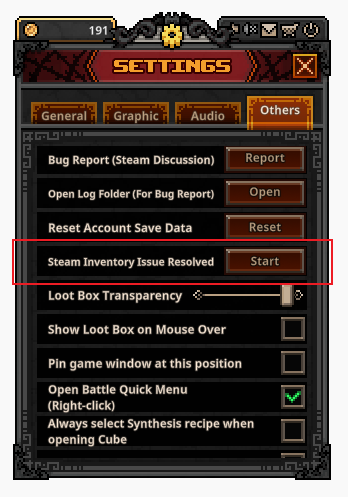
8. Added a Steam Inventory recovery function
- This must be used at least 1 hour after the update.
- When your Steam Inventory is not working properly, you can use this function to recover it.
1. The following items may be lost during the update.
- Among the items being deleted this time, any placed in the Trade Ship, Inventory, or Market
- Boxes obtained at the region levels below may be lost (*Before the update goes live, please be sure to open all of your Boxes and claim the items in advance.)
\[Lv. 25–29 | Lv. 35–39 | Lv. 45–49 | Lv. 55–64 | Lv. 70–79 | Lv. 85–90]
2. For about 2 hours after the update, some features may experience issues due to the large-scale re-application of server data.
- Boxes may not open.
- Untradable items (such as Type B equipment) may appear from Boxes.
- Cube and Trade Ship use may be disrupted due to server data synchronization.
3. For about 3 to 6 hours after the update, the Market will be unavailable.
- During this time, Market logic cleanup will be carried out.
- We will let you know via a separate announcement once Market trading resumes.
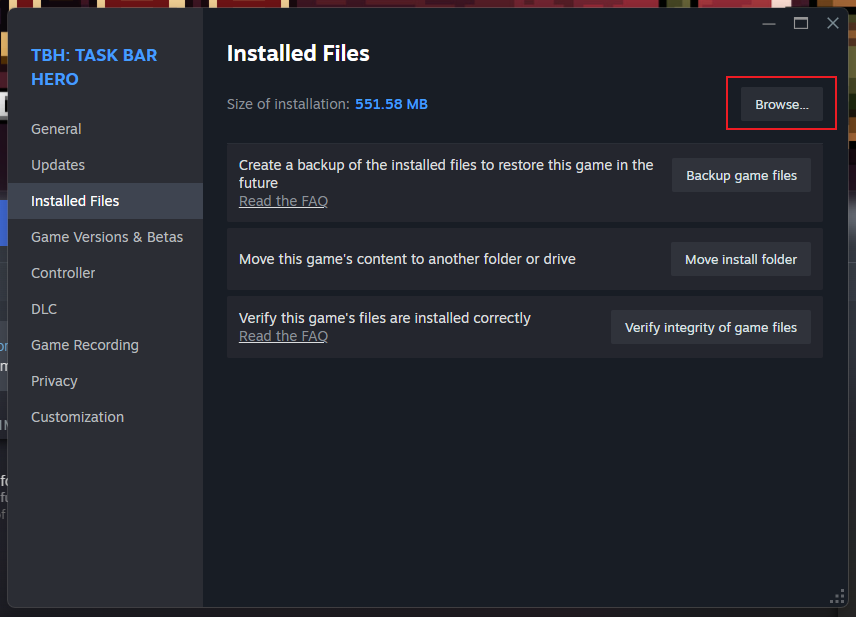
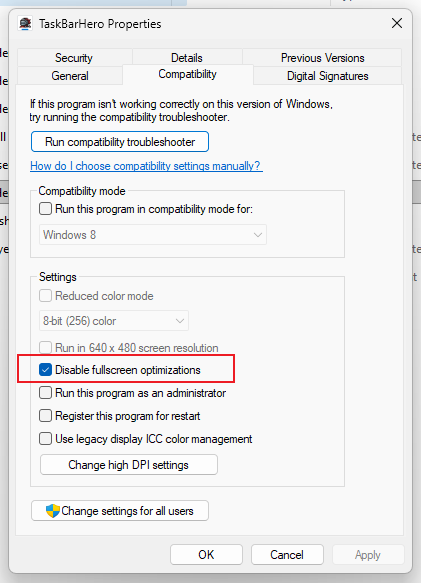
1. A bug has been reported in some environments where a black image appears behind the game. As time is short, we are sharing a temporary workaround you can use for now. This bug will be fixed in the next update.
> Solution: Steam > Library > TBH : Task Bar Hero > Right-click > Installed Files > Browse... > TaskBarHero.exe > Right-click > Properties > Compatibility > Check "Disable fullscreen optimizations"
If any problems arise after this update, we will respond to them immediately.
We will do our very best in our development.
Thank you.
Sincerely,
The
你覺得這篇文章如何?