




[Info] New Feature: Deck Preset
Greetings from the Summoners War Dev Team!How are you all enjoying the 12th Anniversary Festival? Today, we have prepared an additional Developer's Note to provide more specific details regarding the Deck Preset feature mentioned in our previous note. Although we have introduced the feature, we understand that some may still find the system a bit complex. Therefore, we would like to explain it in more detail using the Siege Battle Attack Deck Preset as an example. Please follow along as we explain how to utilize Presets in Siege Battle Attack Decks with the images we have prepared.Siege Battle Deck Preset■ Registering the First Siege Battle Attack Deck PresetJust as you would with the existing Load Deck feature, you can load a saved Preset deck from the battle preparation screen.You can also move to the attack deck settings screen via the \[Edit Deck] button.Step 1. Enter the Preset menu from the battle preparation screen.Since no decks have been registered yet, the pop-up is empty. From here, press the \[Add] button to move to the next step.Step 2. Select Monsters to place in the Preset.When you press the \[Add] button, the following screen will be displayed. For our first attack deck, we'll set \[Galleon, Poseidon, and Tiana].Once you have placed all the Monsters you want for your attack deck, you must set the Runes and Artifacts they will use.Press the \[Runes/Artifacts] button to move to the screen where you can configure the Runes and Artifacts for each Monster.Step 3. Configure Runes/Artifacts for the placed Monsters.A screen similar to the existing Rune/Artifact management screen will appear. Press a Monster's thumbnail to freely change and save their Runes and Artifacts.For this example, let's assume we have configured the Runes for Tiana as below.\[Saved Deck 1: Tiana]After setting the Runes and Artifacts, saving your changes will finish the Preset registration.Since various attack decks are utilized in Siege Battle, let's create a second Preset using the same method.■ Registering the Second Siege Battle Attack Deck PresetStep 1. Enter the Preset menu from the battle preparation screen.You can see the first Preset we just created. Let's set up the second Preset in a similar way.Step 2. Configure the second Attack Deck.For the second attack deck, we'll save \[Gin, Teon, and Lushen].Let's set up the Runes for \[Teon].As mentioned in the previous Developer's Note, Presets save Rune/Artifact info separately. This means you can assign the same Runes or Artifacts to Monsters stored in different Preset decks.Therefore, Runes No. 1, 3, and 5 previously engraved on Tiana can be engraved on \[Teon] as well.\[Saved Deck 2: Teon]Now, the second Preset is fully configured.By saving various attack decks as Presets in this manner, you can engrave the same Runes and Artifacts on multiple Monsters simultaneously for use in Siege Battle.This eliminates the hassle of repeatedly equipping and unequipping the same Runes/Artifacts. Beyond that, you'll be able to manage your attack deck Runes and Artifacts with ease, even without the Siege Battle Rune separation feature.(Defense decks will also follow a similar flow.)Finally, we have organized some points you might be curious about in a Q&A format.=================================Q. Once Presets are updated and Siege Battle Rune separation is removed, do I have to set up all my attack and defense decks from scratch?A. Along with the update, the existing Monster and Rune/Artifact settings for your Siege Battle attack and defense decks will be automatically registered as Siege Battle attack and defense deck Presets, respectively.Q. After Siege Battle Rune separation is removed, what happens to the Siege Battle Rune/Artifact settings for Monsters not registered in an attack or defense deck?A. Following the removal of the Siege Battle Rune separation feature, the Rune/Artifact engraving info for all Monsters will revert to their default settings. If you wish to save the Siege Battle Rune/Artifact info for Monsters not currently in an attack or defense deck, we recommend using the \[Siege Battle > Monster > Rune Manage > Settings > Save Runes/Artifacts of all Monsters] feature to save them before the update.Q. You mentioned that Presets allow engraving the same Runes or Artifacts on multiple Monsters in different decks. Can I engrave the same Runes or Artifacts on different Monsters within the same deck?A. No, you cannot engrave the same Runes or Artifacts on different Monsters within the same deck. It is best to think of it as Runes and Artifacts being available for use on a per-Preset basis.Q. Is there a cost for saving or using Presets?A. There is no Mana Stone cost for saving or using Presets. Just as there were no swap costs in the existing Siege Battle Rune/Artifact separation feature, you can save and use attack/defense deck Presets without any Mana Stone consumption. This applies to Presets across all content, not just Siege Battle.==============================
![[Info] New Feature: Deck Preset](https://clan.akamai.steamstatic.com/images/44752586/e8337329dc6ae1b74d639aed40d23ba82e75365c.jpg?#)
Greetings from the Summoners War Dev Team!
How are you all enjoying the 12th Anniversary Festival?
Today, we have prepared an additional Developer's Note to provide more specific details regarding the Deck Preset feature mentioned in our previous note.
Although we have introduced the feature, we understand that some may still find the system a bit complex.
Therefore, we would like to explain it in more detail using the Siege Battle Attack Deck Preset as an example. Please follow along as we explain how to utilize Presets in Siege Battle Attack Decks with the images we have prepared.
■ Registering the First Siege Battle Attack Deck Preset
Just as you would with the existing Load Deck feature, you can load a saved Preset deck from the battle preparation screen.
You can also move to the attack deck settings screen via the \[Edit Deck] button.
Step 1. Enter the Preset menu from the battle preparation screen.
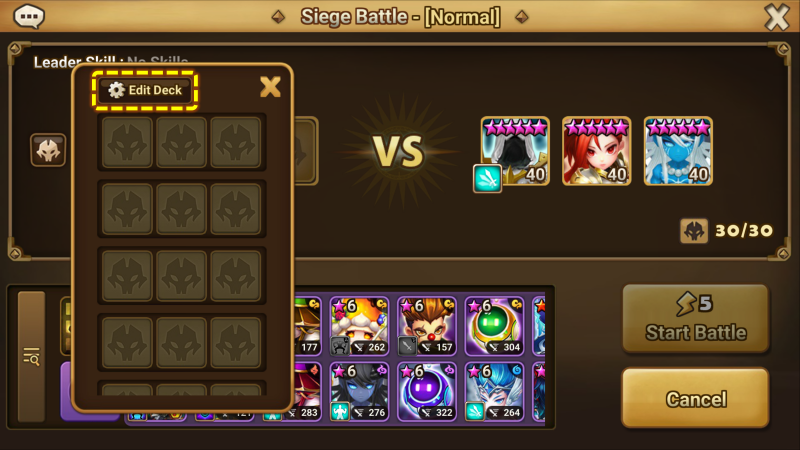
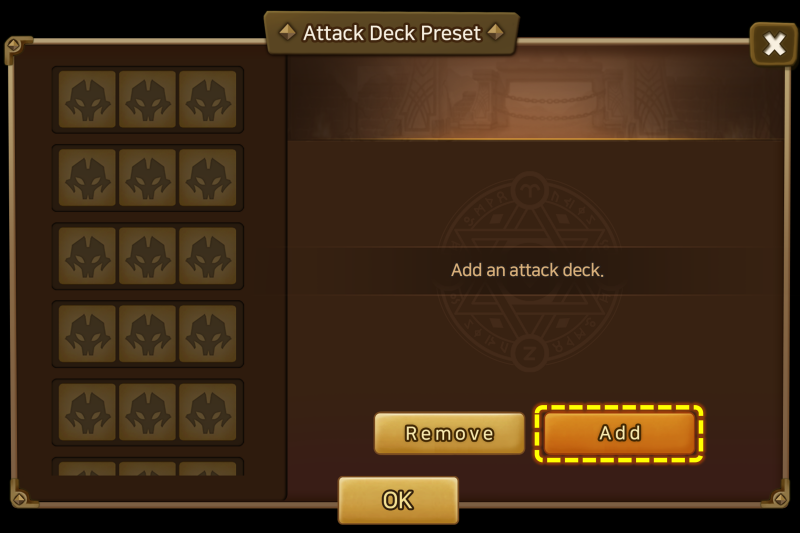
Since no decks have been registered yet, the pop-up is empty. From here, press the \[Add] button to move to the next step.
Step 2. Select Monsters to place in the Preset.
When you press the \[Add] button, the following screen will be displayed. For our first attack deck, we'll set \[Galleon, Poseidon, and Tiana].
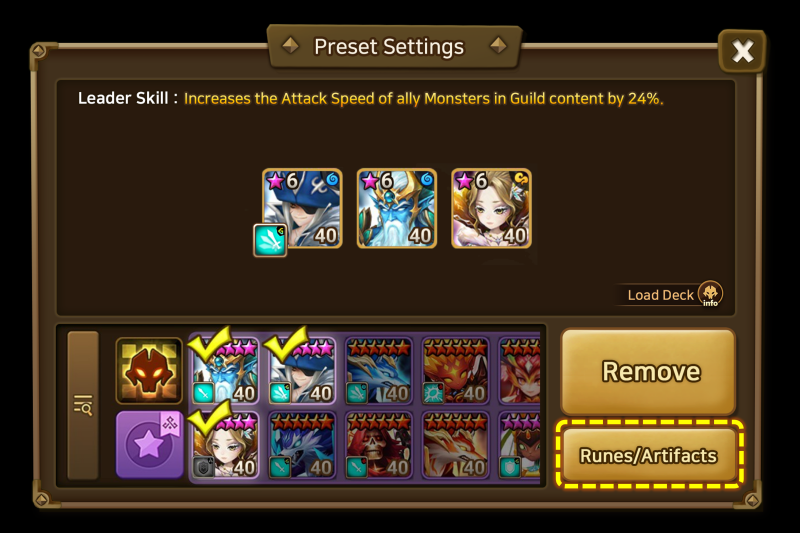
Once you have placed all the Monsters you want for your attack deck, you must set the Runes and Artifacts they will use.
Press the \[Runes/Artifacts] button to move to the screen where you can configure the Runes and Artifacts for each Monster.
Step 3. Configure Runes/Artifacts for the placed Monsters.
_1776676113.png)
A screen similar to the existing Rune/Artifact management screen will appear.
Press a Monster's thumbnail to freely change and save their Runes and Artifacts.
For this example, let's assume we have configured the Runes for Tiana as below.
\[Saved Deck 1: Tiana]
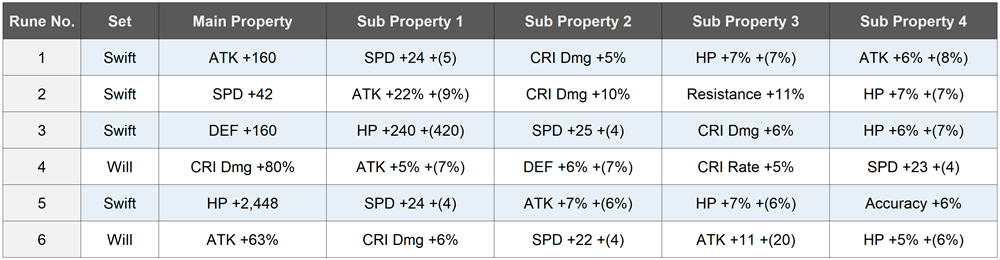
After setting the Runes and Artifacts, saving your changes will finish the Preset registration.
Since various attack decks are utilized in Siege Battle, let's create a second Preset using the same method.
■ Registering the Second Siege Battle Attack Deck Preset
Step 1. Enter the Preset menu from the battle preparation screen.
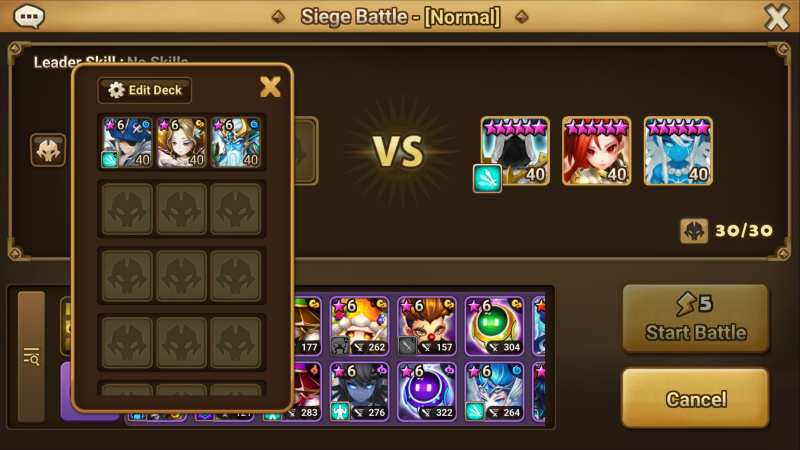
You can see the first Preset we just created. Let's set up the second Preset in a similar way.
Step 2. Configure the second Attack Deck.
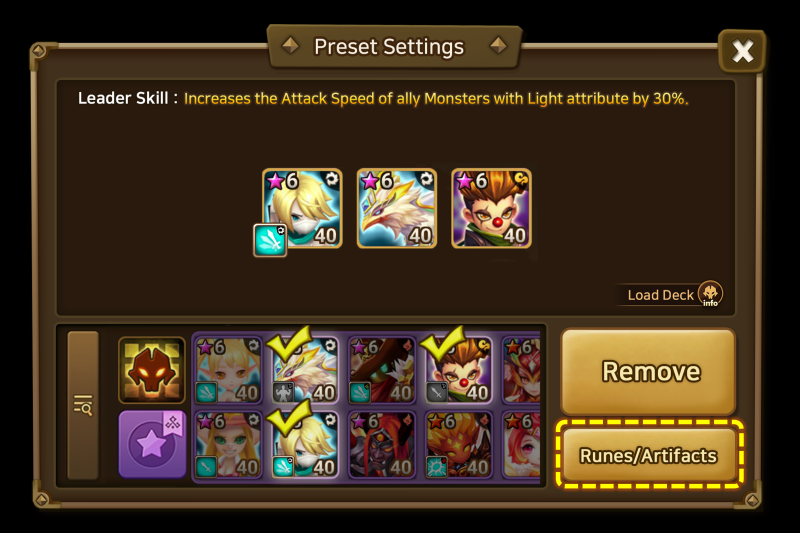
For the second attack deck, we'll save \[Gin, Teon, and Lushen].
Let's set up the Runes for \[Teon].
As mentioned in the previous Developer's Note, Presets save Rune/Artifact info separately. This means you can assign the same Runes or Artifacts to Monsters stored in different Preset decks.
Therefore, Runes No. 1, 3, and 5 previously engraved on Tiana can be engraved on \[Teon] as well.
_1776676126.png)
\[Saved Deck 2: Teon]
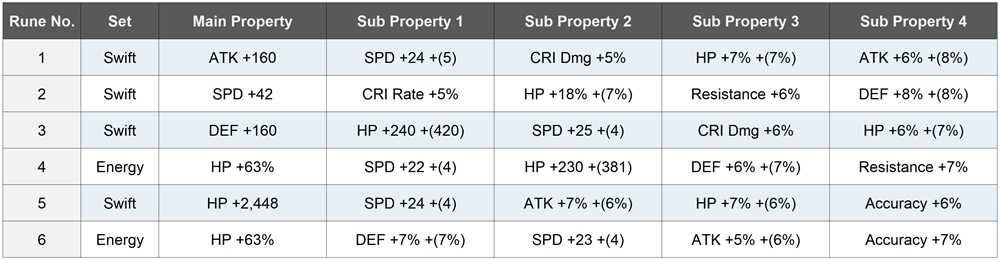
Now, the second Preset is fully configured.
By saving various attack decks as Presets in this manner, you can engrave the same Runes and Artifacts on multiple Monsters simultaneously for use in Siege Battle.
This eliminates the hassle of repeatedly equipping and unequipping the same Runes/Artifacts. Beyond that, you'll be able to manage your attack deck Runes and Artifacts with ease, even without the Siege Battle Rune separation feature.
(Defense decks will also follow a similar flow.)
Finally, we have organized some points you might be curious about in a Q&A format.
=================================
Q. Once Presets are updated and Siege Battle Rune separation is removed, do I have to set up all my attack and defense decks from scratch?
A. Along with the update, the existing Monster and Rune/Artifact settings for your Siege Battle attack and defense decks will be automatically registered as Siege Battle attack and defense deck Presets, respectively.
Q. After Siege Battle Rune separation is removed, what happens to the Siege Battle Rune/Artifact settings for Monsters not registered in an attack or defense deck?
A. Following the removal of the Siege Battle Rune separation feature, the Rune/Artifact engraving info for all Monsters will revert to their default settings. If you wish to save the Siege Battle Rune/Artifact info for Monsters not currently in an attack or defense deck, we recommend using the \[Siege Battle > Monster > Rune Manage > Settings > Save Runes/Artifacts of all Monsters] feature to save them before the update.
Q. You mentioned that Presets allow engraving the same Runes or Artifacts on multiple Monsters in different decks. Can I engrave the same Runes or Artifacts on different Monsters within the same deck?
A. No, you cannot engrave the same Runes or Artifacts on different Monsters within the same deck. It is best to think of it as Runes and Artifacts being available for use on a per-Preset basis.
Q. Is there a cost for saving or using Presets?
A. There is no Mana Stone cost for saving or using Presets. Just as there were no swap costs in the existing Siege Battle Rune/Artifact separation feature, you can save and use attack/defense deck Presets without any Mana Stone consumption. This applies to Presets across all content, not just Siege Battle.
=================================
This concludes our introduction to Deck Presets.
We hope this update significantly enhances the convenience of utilizing Runes and Artifacts, allowing you to enjoy each piece of content more strategically.
(The details shared in this Developer's Note are intended to provide a preview and help your understanding.
Since development and testing are still ongoing, there may be some differences in the actual update. We ask for your kind understanding.)
We will continue to listen to your valuable feedback and do our best to make Summoners War even more enjoyable.
Thank you once again to all the Summoners who always support Summoners War.
We will be back with more exciting news in the next Developer's Note.
你覺得這篇文章如何?