




Borderlands 4 PC Performance Status Update
We've been listening to the community since launch and have seen the comments about optimization and performance. We take this seriously, and want to take a moment and talk about the strides and advancements we’ve made.A lot of our optimization work for PC players has centered on providing meaningful improvements in frame rate without noticeable sacrifices to the game, including visual fidelity, that are fundamental to the artistic intent of Gearbox’s developers. Our primary objective is to strike the balance between making sure players can notice the frame rate improvements we’re making without disrupting their experience. Over the past several months, these optimizations have improved average FPS by approximately 20% across the board, including on our minimum and recommended specifications. But this is just the start. We've also greatly improved stability, reducing the amount of crashes affecting players. We know we have work left to do, and we're continuing to optimize for the future. So let's talk about some of the ways we've improved PC Performance on Borderlands 4 since launch. https://www.youtube.com/watch?v=l656gL0nv0cPerformance and stability improvementsLet's take a look at how performance at launch compares to our upcoming March 26 patch for Mad Ellie and the Vault of the Damned:(Warning: this is about to get highly technical, but the key takeaway is the ~20% gain in average frame rates across different PC specs.)The roughly 20% increase in average FPS comes from combined efforts focusing on GPU, CPU, and general efficiency, with the Optimization Team identifying specific refinements to improve performance without being too noticeable in terms of visual fidelity.In addition to improving average FPS, we reduced stutters, improving the 1% and 0.1% lows in frame rate. These are the bottom 1% and 0.1% of frames generated during our benchmark test and are indicators of frame stability. The closer these numbers are to the average FPS, the smoother and more responsive the game will feel, reducing stutters and hitches. Hitching is among the top challenges impacting performance, as a stuttering frame rate can really take you out of the action. We reduced hitching by refining our PSO (Pipeline State Objects) process to avoid overloading the game system with too many effects. Shader PSOs exist to make rendering faster by having the graphics drivers generate a final optimal shader for a specific GPU in specific conditions. However, the tradeoff is that those drivers need time to generate the shaders when encountering them for the first time, leading to hitches. Developers usually solve this by pre-building shaders before entering a level or letting the system build them in the background; we do both. Borderlands 4 is known for having billions of guns, each one dynamically spawned with dedicated materials for each part. It's a great recipe for fun, but a challenging task for the team's rendering programmers. Since launch, we improved the way Borderlands 4 enables your graphics drivers early detection of new material on special effects and weapons, therefore ensuring these drivers are ready.Another big area of optimization is our HLOD (Hierarchical Level of Detail) that renders areas of the map that are farther off in the distance. We reworked how the low-detail mesh looks in a way that's hopefully imperceptible, so you don't notice any change when traversing the seamless world of Kairos without any loading screens.Lastly, we greatly improved stability since launch, reducing how often players encounter crashes. And since December alone, we’ve nearly halved the crash rate, from 0.63% of all sessions to 0.38% (and 17% of players experiencing a crash down to 9.35%).Optimized visuals, lighting, and UIWhen it comes to visual effects, we found ways to reduce your GPU's workload by trimming polygon counts for certain effects like thruster exhausts, Action Skill particle effects, and Airship drop world events, just to name a few examples. Likewise, we lessened strain on CPUs by refining things like Cryo damage effects, collision physics, and cloth simulation. There may be times on Kairos when you're seeing all of these effects and more at once, so the GPU and CPU optimizations go a long way!We also made headway in lighting across Kairos, using the Virtual Shadow Maps technology of Unreal 5 to improve performance. Borderlands 4 introduced dynamic time-of-day lighting across day and night cycles, meaning that every frame has to account for the sun's position. That leads to a ton of per-frame calculations, which we're now able to cache using Virtual Shadow Maps to reduce the load on your GPU. We also did some fine-tuning with better lighting shaders and skylight environment map updates.Lastly (for today's discussion at least), we made backend code improvements to greatly improve UI efficiency. You shouldn't notice a difference when perusing your ECHO Menus or delighting in the damage numbers hovering above wounded enemie

We've been listening to the community since launch and have seen the comments about optimization and performance. We take this seriously, and want to take a moment and talk about the strides and advancements we’ve made.
A lot of our optimization work for PC players has centered on providing meaningful improvements in frame rate without noticeable sacrifices to the game, including visual fidelity, that are fundamental to the artistic intent of Gearbox’s developers. Our primary objective is to strike the balance between making sure players can notice the frame rate improvements we’re making without disrupting their experience.
Over the past several months, these optimizations have improved average FPS by approximately 20% across the board, including on our minimum and recommended specifications.
But this is just the start. We've also greatly improved stability, reducing the amount of crashes affecting players.
We know we have work left to do, and we're continuing to optimize for the future. So let's talk about some of the ways we've improved PC Performance on Borderlands 4 since launch.
https://www.youtube.com/watch?v=l656gL0nv0c
Let's take a look at how performance at launch compares to our upcoming March 26 patch for Mad Ellie and the Vault of the Damned:
(Warning: this is about to get highly technical, but the key takeaway is the ~20% gain in average frame rates across different PC specs.)
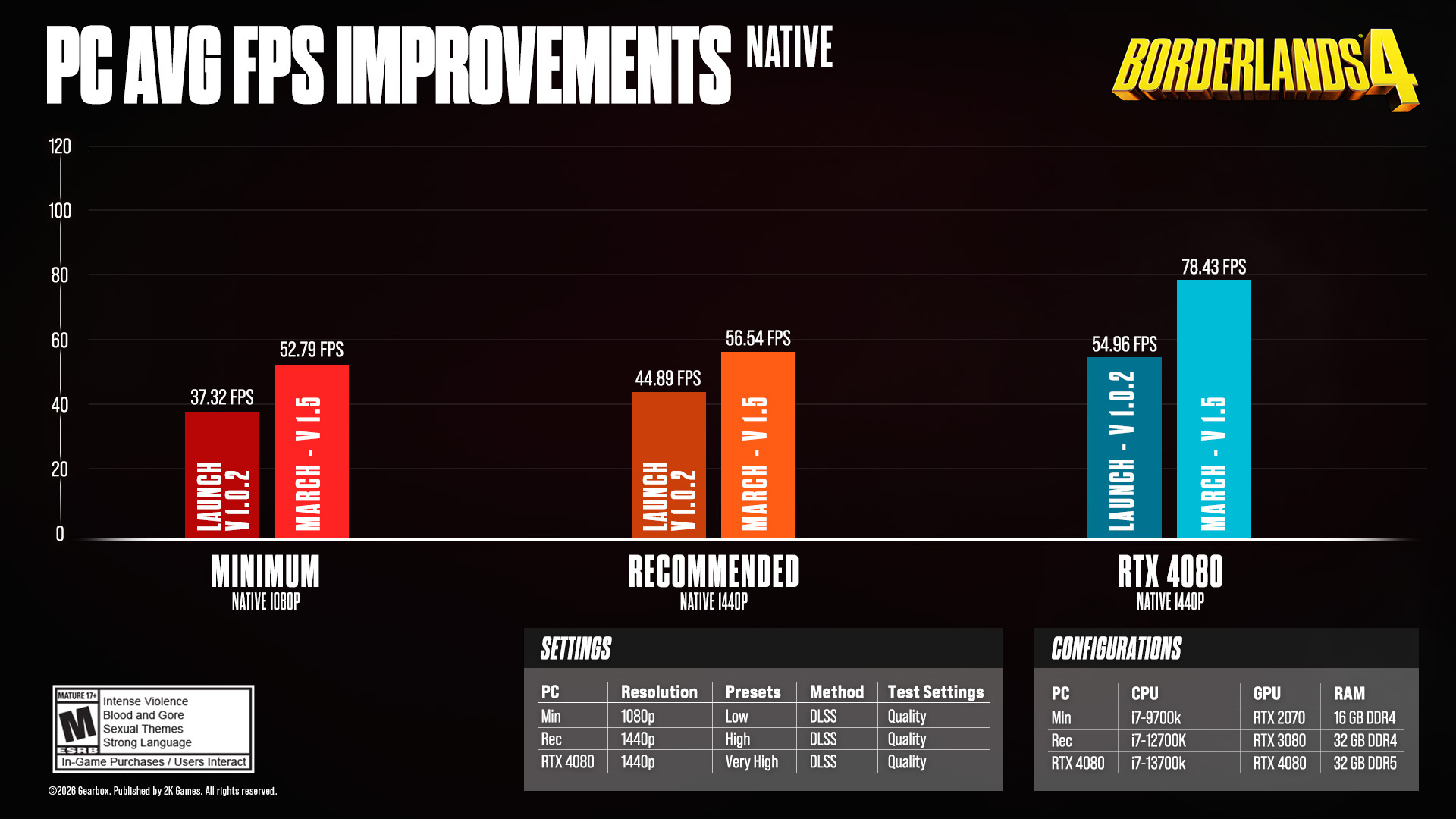
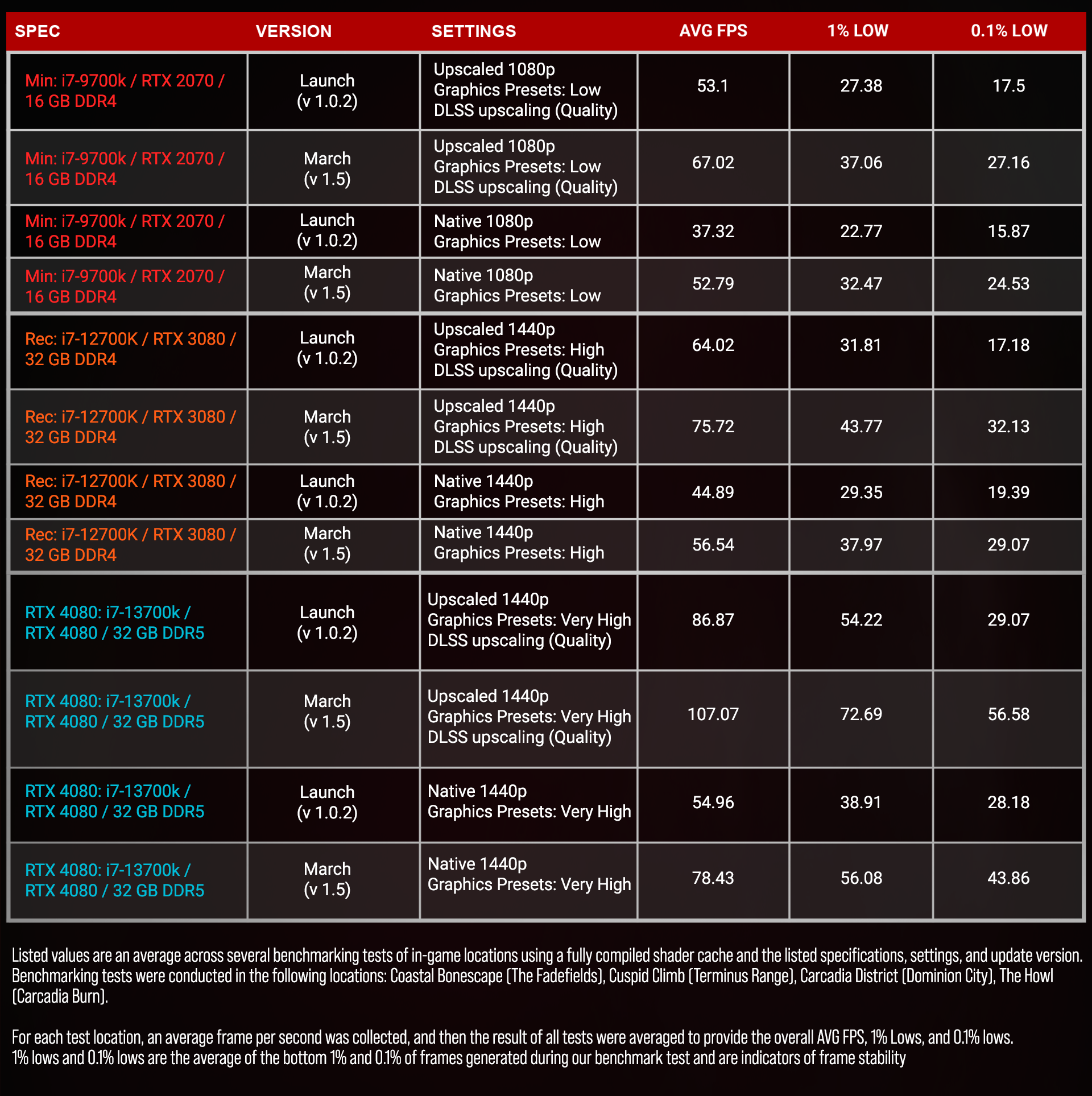
The roughly 20% increase in average FPS comes from combined efforts focusing on GPU, CPU, and general efficiency, with the Optimization Team identifying specific refinements to improve performance without being too noticeable in terms of visual fidelity.
In addition to improving average FPS, we reduced stutters, improving the 1% and 0.1% lows in frame rate. These are the bottom 1% and 0.1% of frames generated during our benchmark test and are indicators of frame stability. The closer these numbers are to the average FPS, the smoother and more responsive the game will feel, reducing stutters and hitches.
Hitching is among the top challenges impacting performance, as a stuttering frame rate can really take you out of the action. We reduced hitching by refining our PSO (Pipeline State Objects) process to avoid overloading the game system with too many effects.
Shader PSOs exist to make rendering faster by having the graphics drivers generate a final optimal shader for a specific GPU in specific conditions. However, the tradeoff is that those drivers need time to generate the shaders when encountering them for the first time, leading to hitches. Developers usually solve this by pre-building shaders before entering a level or letting the system build them in the background; we do both.
Borderlands 4 is known for having billions of guns, each one dynamically spawned with dedicated materials for each part. It's a great recipe for fun, but a challenging task for the team's rendering programmers. Since launch, we improved the way Borderlands 4 enables your graphics drivers early detection of new material on special effects and weapons, therefore ensuring these drivers are ready.
Another big area of optimization is our HLOD (Hierarchical Level of Detail) that renders areas of the map that are farther off in the distance. We reworked how the low-detail mesh looks in a way that's hopefully imperceptible, so you don't notice any change when traversing the seamless world of Kairos without any loading screens.
Lastly, we greatly improved stability since launch, reducing how often players encounter crashes. And since December alone, we’ve nearly halved the crash rate, from 0.63% of all sessions to 0.38% (and 17% of players experiencing a crash down to 9.35%).
When it comes to visual effects, we found ways to reduce your GPU's workload by trimming polygon counts for certain effects like thruster exhausts, Action Skill particle effects, and Airship drop world events, just to name a few examples.
Likewise, we lessened strain on CPUs by refining things like Cryo damage effects, collision physics, and cloth simulation. There may be times on Kairos when you're seeing all of these effects and more at once, so the GPU and CPU optimizations go a long way!
We also made headway in lighting across Kairos, using the Virtual Shadow Maps technology of Unreal 5 to improve performance. Borderlands 4 introduced dynamic time-of-day lighting across day and night cycles, meaning that every frame has to account for the sun's position. That leads to a ton of per-frame calculations, which we're now able to cache using Virtual Shadow Maps to reduce the load on your GPU. We also did some fine-tuning with better lighting shaders and skylight environment map updates.
Lastly (for today's discussion at least), we made backend code improvements to greatly improve UI efficiency. You shouldn't notice a difference when perusing your ECHO Menus or delighting in the damage numbers hovering above wounded enemies, but rest assured that they're working better than ever when it comes to performance.
We're proud of the work the team's done to improve Borderlands 4's PC performance since launch, and we also recognize we have more to do. We’re in it for the long haul!
We are doing all of this without removing the ability that players have had, and will continue to have, to self-tune their experiences to fit their playstyle preferences using the in-game graphics options and graphics card-based drivers and tools.
Thanks again for your support and patience, and an extra special thanks to everyone who submitted feedback. Every ticket sent to 2K Support helps us identify, track, and diagnose problems so we can make more refinements; please don't hesitate to reach out if you're encountering any issues.
As always, we'll continue listening to every piece of feedback and finding more ways to improve your experience. We're honored to have you with us on Kairos, Vault Hunter.
你覺得這篇文章如何?